

When you’re considering the leap from Windows or macOS to Linux, the sheer number of distributions available can feel overwhelming. Among the hundreds of options, Linux Mint has consistently held its position as the go-to recommendation for newcomers. But as we move through 2026, with Ubuntu, Zorin OS, Pop!_OS, and numerous other beginner-friendly distributions evolving rapidly, the question becomes increasingly relevant: Is Linux Mint still the best beginner distro in 2026?
The short answer is a resounding yes—but with important context. Linux Mint continues to excel in areas that matter most to beginners while facing stiffer competition than ever before. Let’s explore why Mint remains a top choice and what makes it stand out in today’s crowded Linux landscape.
What Makes Linux Mint Special in 2026?
Linux Mint has earned its reputation through years of consistent focus on one goal: providing a desktop operating system that “just works” out of the box. As of December 2025, the distribution has released Linux Mint 22.3 “Zena” in beta, with the stable version expected soon, continuing its commitment to delivering a polished, user-friendly experience.
The Latest: Linux Mint 22.3 “Zena”

The upcoming Linux Mint 22.3 release brings several noteworthy improvements that reinforce its beginner-friendly status. Built on Ubuntu 24.04 Noble’s package base with the brand-new Cinnamon 6.6 desktop environment, this version includes a redesigned application menu with better navigation, improved Wayland support (though Xorg remains the default), and enhanced system settings including a new Thunderbolt device management module.
What’s particularly impressive is that Linux Mint 22.3 will receive security updates until 2029, giving new users five full years of stable, supported computing without needing to upgrade. This long-term support approach removes one of the biggest anxieties beginners face: constant system changes and potential breakage.
The Debian Alternative: LMDE 7
In October 2025, the Linux Mint team released LMDE 7 “Gigi,” the Debian-based version of Linux Mint. This release demonstrates Mint’s commitment to sustainability and user choice. LMDE serves as proof that Linux Mint’s excellent tools and interfaces work beyond Ubuntu’s ecosystem, giving users an alternative foundation while maintaining the same familiar Mint experience.
Why Beginners Still Choose Linux Mint in 2026
1. Familiarity That Reduces Learning Curve
One of Linux Mint’s strongest advantages remains its Windows-like interface. The default Cinnamon desktop environment features a taskbar at the bottom, a familiar start menu, and system tray—elements that feel immediately recognizable to anyone coming from Windows. This isn’t just superficial similarity; it’s thoughtful design that reduces the cognitive load of switching operating systems.
When you install Mint, you’ll find everything where you expect it. Files and folders work intuitively, right-clicking provides context menus similar to Windows, and the overall navigation doesn’t require learning an entirely new paradigm. This familiarity is invaluable for beginners who want to be productive immediately rather than spending weeks learning new workflows.
2. Complete Out-of-the-Box Experience
Linux Mint embraces a philosophy of being ready to use from the moment you finish installation. Unlike some distributions that require hunting down codecs and drivers, Mint includes:
- Media codecs for playing virtually any audio or video format
- DVD playback support
- Browser plugins pre-configured
- Java runtime environment
- A complete office suite (LibreOffice)
- Essential applications for everyday computing
This comprehensive approach means beginners can start using their computer for real work immediately. No command-line configuration required, no hunting through forums for missing components, no confusion about why their music won’t play.
3. Intuitive Software Management
The Mint Software Manager represents one of the distribution’s most beginner-friendly features. With a clean, graphical interface reminiscent of smartphone app stores, it makes installing software straightforward. You can browse by category, read descriptions and reviews, and install applications with a single click.
Recent updates have improved this further. Linux Mint 22.1 “Xia” (released January 2025) replaced outdated package management tools with modern alternatives: Aptkit and Captain. These new tools make software installation faster, more reliable, and easier to maintain—addressing one area where Mint had previously shown its age.
Additionally, Mint provides clear explanations about the difference between Flatpak and system packages, helping users understand their installation options without overwhelming them with technical jargon.
4. Conservative Update Philosophy
While some see Mint’s conservative approach to updates as a limitation, it’s actually a strength for beginners. Mint bases its releases on Ubuntu’s Long Term Support versions and applies a careful, tested approach to system updates. The Update Manager categorizes updates by risk level and importance, allowing users to make informed decisions.
This philosophy means your system is less likely to break after an update—a critical consideration for users who don’t have the technical knowledge to recover from system failures. Stability beats bleeding-edge features when you’re learning the ropes.
5. Exceptional Documentation and Community
Linux Mint maintains comprehensive documentation that speaks to beginners in accessible language. The community forums are welcoming, active, and known for patient, helpful responses to newcomer questions. The Mint team has cultivated a culture where asking “basic” questions is not just tolerated but encouraged.
Unlike some Linux communities that expect users to solve problems independently, Mint users regularly receive step-by-step guidance from experienced community members who remember what it’s like to be new to Linux.
How Does Linux Mint Compare to Other Beginner Distros in 2026?
Linux Mint vs Ubuntu
Ubuntu remains the most popular Linux distribution globally, but it serves different priorities than Mint. Ubuntu uses the GNOME desktop environment, which offers a modern, sleek interface that may appeal to users coming from macOS or those who prefer minimalist design. However, GNOME’s workflow differs significantly from Windows, potentially creating a steeper learning curve.
Ubuntu focuses on innovation and includes newer technologies faster than Mint. It releases new versions every six months (with LTS versions every two years), providing access to cutting-edge features. However, this faster pace can introduce instability that beginners may find frustrating.
Key differences for beginners:
- Interface: Mint’s Cinnamon feels more like Windows; Ubuntu’s GNOME has a more modern but different workflow
- Updates: Mint prioritizes stability; Ubuntu balances stability with newer features
- Software: Both have excellent software availability, though Ubuntu’s Snap Store integration is more prominent
- Hardware support: Ubuntu often has better out-of-the-box support for the newest hardware
- Performance: Mint generally uses fewer system resources, making it better for older computers
For absolute beginners, especially those transitioning from Windows, Mint typically offers a smoother entry point. For those comfortable with change or running newer hardware, Ubuntu remains an excellent choice.
Linux Mint vs Zorin OS
Zorin OS has emerged as another strong Windows replacement, offering different desktop layouts that mimic Windows, macOS, or even Ubuntu’s interface. It’s polished, professional-looking, and specifically designed to ease the transition from proprietary operating systems.
However, Zorin OS offers both free and paid editions, with some features and layouts reserved for paid users. While the free version is fully functional, this approach may confuse beginners unsure whether they need the paid features. Linux Mint, being entirely free with no premium tiers, eliminates this decision-making complexity.
Linux Mint vs Pop!_OS
System76’s Pop!_OS has gained significant popularity, especially among users with NVIDIA graphics cards, due to its excellent GPU driver support. It’s built for creators and developers, with features like automatic window tiling and robust hardware compatibility.
However, Pop!_OS uses a modified GNOME interface that, while innovative, represents a bigger departure from Windows conventions. For beginners prioritizing familiarity and simplicity over cutting-edge features, Mint remains the more approachable option.
Performance and Hardware Requirements in 2026
Linux Mint excels at reviving older hardware while working perfectly on modern systems. The system requirements remain modest:
Minimum requirements:
- 2GB RAM (4GB recommended)
- 20GB disk space
- 1024×768 resolution display
Recommended for comfortable use:
- 4GB RAM or more
- 100GB disk space
- 1920×1080 resolution
These requirements mean Mint can breathe new life into computers that would struggle with Windows 11’s demands. In an era where environmental consciousness matters and hardware costs remain high, Mint’s ability to extend computer lifespan represents significant value.
The Cinnamon desktop environment has received substantial performance optimizations in recent versions. Cinnamon 6.x reduces memory usage compared to previous versions, offers snappier multi-monitor support, and provides smoother animations through improved rendering.
What About Gaming in 2026?
Gaming on Linux has transformed dramatically in recent years, and Mint benefits from these improvements. Through Steam’s Proton compatibility layer and native Linux game availability, Mint users can access thousands of games. The software manager provides easy access to Steam, and gaming-focused distributions like Bazzite or Pop!_OS don’t have a monopoly on playability anymore.
However, if gaming is your primary focus, distributions specifically optimized for gaming (like Nobara or Pop!_OS with their better GPU driver integration) might serve you better. Mint works well for casual gaming but isn’t specifically tuned for maximum gaming performance.
The Areas Where Linux Mint Shows Its Age
Honesty requires acknowledging where Mint falls short:
Slower Adoption of New Technologies
Mint’s conservative approach means new features arrive later than in distributions like Fedora or Ubuntu. For instance, while Wayland support exists in Cinnamon 6.6, Xorg remains the default display server. Users wanting cutting-edge features may find Mint’s pace frustratingly slow.
Smaller Development Team
Unlike Ubuntu (backed by Canonical) or Fedora (sponsored by Red Hat), Linux Mint is largely community-driven with a smaller core team. This can mean slower development of certain features and less professional support infrastructure for enterprise environments.
Limited Enterprise Focus
Mint targets desktop users, particularly home and personal use. Organizations seeking enterprise-level support, certifications, or commercial backing will find Ubuntu or Red Hat Enterprise Linux more suitable.
Security Considerations in 2026
Security remains a strength for Linux Mint. The distribution benefits from Ubuntu’s security updates while applying its own careful testing before rolling out changes. Mint doesn’t collect personal data from users, respecting privacy in ways proprietary operating systems don’t.
The distribution includes robust security tools, including firewall management through the graphical interface, and the conservative update approach actually enhances security by ensuring updates are thoroughly tested before deployment.
Linux Mint 22.3 will receive security patches until 2029, providing years of protection without forced upgrades—valuable for users who want their system to remain stable and secure without constant major changes.
The Verdict: Is Linux Mint Still the Best for Beginners in 2026?
Yes, Linux Mint remains one of the absolute best distributions for beginners in 2026, though the “best” label depends on your specific situation:
Choose Linux Mint if:
- You’re coming from Windows and want a familiar interface
- You value stability over cutting-edge features
- You’re using older hardware or want maximum performance
- You prefer a complete, ready-to-use system
- You want long-term support without frequent major updates
- You appreciate a welcoming, beginner-friendly community
Consider alternatives if:
- You want the absolute latest features and technologies (try Fedora)
- You’re primarily focused on gaming (consider Pop!_OS or Nobara)
- You need commercial enterprise support (look at Ubuntu or Red Hat)
- You prefer a more modern interface aesthetic (Ubuntu might suit you better)
- You have brand-new hardware that might need bleeding-edge drivers
The beauty of the Linux ecosystem is that no single distribution must be perfect for everyone. Linux Mint’s continued success in 2026 stems from its unwavering focus on its core mission: providing a comfortable, stable, complete desktop operating system that makes Linux accessible to everyone.
Getting Started with Linux Mint in 2026
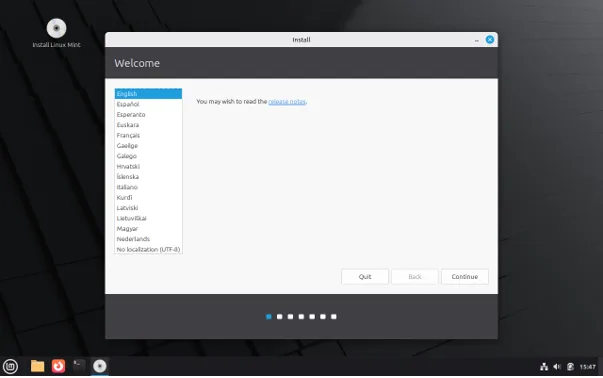
If you’ve decided to try Linux Mint, the process is straightforward:
- Download the ISO: Visit linuxmint.com and download the Cinnamon edition (unless you have specific preferences for MATE or Xfce)
- Create a live USB: Use tools like Etcher or Rufus to create a bootable USB drive
- Test before installing: Boot from the USB to try Mint without installing anything—this lets you verify hardware compatibility
- Install: The installation wizard guides you through the process, with options to install alongside Windows if you want to dual-boot
The entire process, from download to first use, typically takes less than an hour, even for complete beginners.
Final Thoughts
In 2026, Linux Mint continues to deliver on its fundamental promise: making Linux accessible, reliable, and comfortable for newcomers. While competitors have narrowed the gap and certain distributions excel in specific niches, Mint’s combination of familiarity, stability, comprehensive features, and supportive community keeps it at the top of beginner recommendations.
The question “Is Linux Mint still the best beginner distro in 2026?” doesn’t have a universal answer because “best” depends on individual needs. However, for the majority of users making their first Linux journey—particularly those coming from Windows who want a system that just works without constant tinkering—Linux Mint absolutely remains one of the very best choices available.
The distribution’s track record of consistency, combined with continued improvements in areas like software management and performance, suggests that Linux Mint will likely maintain its position as a top beginner recommendation well into the future. For anyone considering the switch to Linux in 2026, Linux Mint deserves to be at the top of your evaluation list.
Disclaimer
This article is based on publicly available information and official sources as of December 2025. Linux distributions evolve rapidly, and features, versions, and recommendations may change. Always visit the official Linux Mint website for the most current information before making installation decisions. The views expressed here are editorial opinions based on research and analysis, not official endorsements. We recommend testing any Linux distribution on a live USB before permanent installation.
Frequently Asked Questions
Is Linux Mint completely free to download and use?
Yes, Linux Mint is completely free and open-source. You can download, install, and use it without any cost, and there are no hidden fees, premium tiers, or subscription requirements. You can also install it on as many computers as you want.
Can I install Linux Mint alongside Windows on the same computer?
Absolutely. Linux Mint supports dual-booting, which allows you to keep Windows installed and choose which operating system to use when you start your computer. The installation process includes an option to install Mint alongside your existing operating system, making it safe to try without removing Windows.
Will my Windows programs work on Linux Mint?
Most Windows programs won’t run natively on Linux Mint, but you have several options. Wine and PlayOnLinux can run many Windows applications, and there are excellent Linux alternatives for most popular programs (LibreOffice instead of Microsoft Office, GIMP instead of basic Photoshop tasks, etc.). For critical Windows-only software, you can dual-boot or use virtualization.
How difficult is it to switch from Windows to Linux Mint?
Linux Mint is designed specifically to make this transition easy. If you can use Windows, you can use Linux Mint. The interface is familiar, with a taskbar, start menu, and file manager that work similarly to Windows. Most users adapt within a few days for basic tasks, though mastering advanced features takes longer—just like any operating system.
Will Linux Mint work on my old laptop?
Probably yes! Linux Mint runs well on older hardware that struggles with modern Windows versions. If your laptop has at least 2GB of RAM (4GB recommended) and 20GB of free disk space, Mint should work. You can test it without installing by running it from a USB drive to verify everything works before committing to installation.
Also Read
LibreOffice 25.8.4 just launched!


