A Deep Dive into the Latest Immutable Linux Release
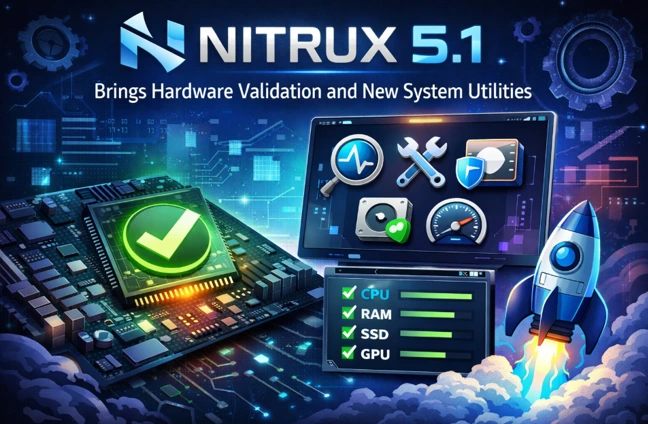
The Linux distribution landscape is full of options, but few stand out quite like Nitrux. Known for its bold choices—such as being systemd-free, immutable by design, and heavily focused on portable AppImages—Nitrux continues to evolve in ways that challenge conventional desktop Linux norms. With the recent arrival of Nitrux 5.1, the project takes another significant step forward. Nitrux 5.1 brings hardware validation and new system utilities that emphasize reliability, security, and performance on real hardware, while doubling down on its philosophy of a streamlined, modern computing experience.
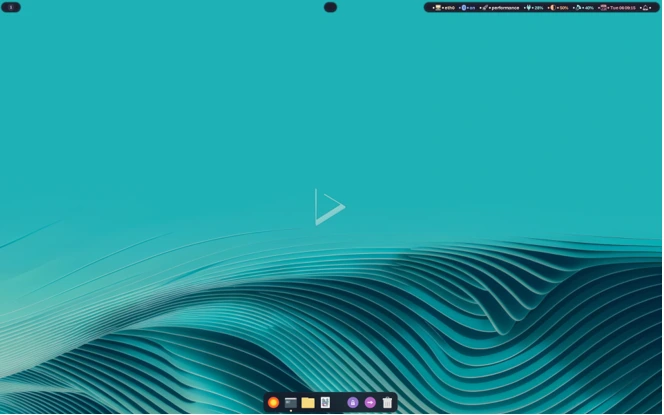
Released in early January 2026, Nitrux 5.1 builds on the major overhaul introduced in version 5.0, which shifted the default desktop to the dynamic tiling Wayland compositor Hyprland. This update refines that foundation with targeted improvements, new tools for everyday management, and a stronger commitment to bare-metal installations. If you’re considering switching to a fresh Linux distro or upgrading your current setup, understanding what Nitrux 5.1 offers—particularly its hardware validation features and expanded system utilities—can help you decide if it’s the right fit.
In this comprehensive guide, we’ll explore the key changes in Nitrux 5.1, break down its new hardware validation layer, highlight the innovative system utilities, and discuss how these enhancements impact real-world usage. We’ll also cover performance tweaks, desktop refinements, and the overall direction of the project.
What Makes Nitrux Unique in the Linux World?
Before diving into the specifics of version 5.1, it’s worth recapping why Nitrux appeals to a dedicated user base. Nitrux is a Debian-based distribution that prioritizes immutability through its NX Overlayroot system, meaning the core filesystem is read-only for enhanced stability and easy rollbacks. It avoids systemd in favor of OpenRC for init management, and it promotes AppImages as the primary way to install and run applications via tools like NX AppHub.
Unlike mainstream distros such as Ubuntu or Fedora, Nitrux doesn’t aim to be everything to everyone. It’s designed for modern hardware, with a focus on performance, Wayland-native experiences, and minimal bloat. The switch to Hyprland in Nitrux 5.0 marked a departure from the KDE Plasma era, embracing tiling window management for productivity enthusiasts. Nitrux 5.1 continues this trajectory, refining the experience while introducing safeguards to ensure consistent behavior across supported setups.
Major Changes in Nitrux 5.1: An Overview of the Update
Nitrux 5.1 arrives as a stable point release, incorporating the latest upstream components and project-specific enhancements. One of the most notable shifts is the complete drop of official support for virtual machines. The developers have made it clear: Nitrux is now exclusively tuned for physical hardware. Bug reports from VM environments will be closed, as the distro’s optimizations target bare-metal performance and stability.
At the heart of the release is a unified kernel approach. Both ISO variants now ship with Linux kernel 6.18 LTS, compiled with performance patches from CachyOS. This replaces the previous dual-kernel options (Liquorix for general use and CachyOS for NVIDIA), streamlining maintenance while delivering excellent responsiveness and throughput.
The desktop environment sees incremental but meaningful updates. Hyprland is bumped to version 0.52.2, bringing new keybindings, window blur support, and other polish. Waybar gets a stylish revamp with a floating “island” design, and the lock screen now includes practical additions like a battery indicator and media player controls.
Core libraries and frameworks are refreshed: KDE Frameworks 6.20, Qt 6.9.2, and other components ensure compatibility with modern applications. On the storage side, the new ADIOS (Adaptive Deadline I/O Scheduler) is introduced as a block-layer scheduler, potentially improving I/O performance in mixed workloads.
Removals continue the cleanup trend from previous releases. Components like SwayOSD, nwg-displays, Seatd, Tini, Plasma Firewall remnants, and lingering SysV scripts are gone, aligning with a pure Wayland and OpenRC stack.
These changes collectively make Nitrux 5.1 a more cohesive and focused distribution, ideal for users on laptops and desktops with recent hardware.
Spotlight on Hardware Validation: The New HCVL Layer
One of the standout features in Nitrux 5.1 is the introduction of the Hardware Compatibility Validation Layer (HCVL). This framework performs early boot-time checks to verify CPU capabilities, GPU alignment with the chosen ISO variant, and overall system configuration. The goal? To ensure Nitrux operates in a predictable, supportable environment from the very start.
Why is this important? Linux distributions often run on a vast array of hardware, leading to unpredictable issues. Nitrux, with its performance-oriented tuning and immutable design, benefits greatly from knowing it’s on compatible gear. HCVL enforces checks for things like supported instruction sets, proper driver matching (e.g., Mesa for Intel/AMD or open-source NVIDIA modules), and avoidance of unsupported workflows such as certain virtualization flags.
If discrepancies are detected, the system can alert users or even halt problematic boots, preventing frustrating experiences down the line. This proactive approach ties into the project’s bare-metal focus—Nitrux 5.1 brings hardware validation that reduces support overhead and improves reliability for targeted users.
For power users and enthusiasts, HCVL represents a thoughtful evolution. It doesn’t lock out experimentation entirely but guides installations toward optimal setups. Combined with hardened error handling in tools like Kernel Boot, SB Manager (for Secure Boot), and NX Overlayroot, it minimizes failure points during critical operations.
New System Utilities: Enhancing Security, Management, and Connectivity
Nitrux 5.1 shines when it comes to expanding its toolkit with practical, user-friendly utilities. These additions address common needs like firewall management, VPN connectivity, power efficiency, and battery monitoring—areas where stock Debian might feel sparse.
Cinderward and Firewalld Integration
Security gets a boost with Cinderward, a lightweight, Wayland-compatible graphical frontend for firewalld built using MauiKit. Firewalld itself is now included as a dynamic firewall daemon, allowing rule-based protection without the complexity of raw iptables.
Cinderward provides an intuitive interface for managing zones, services, and ports, making it accessible even for users new to Linux firewall configuration. In an era of increasing online threats, having a simple yet powerful tool like this out of the box is a welcome addition.
Wirecloak: Native WireGuard VPN Client
Privacy-conscious users will appreciate Wirecloak, a MauiKit-based graphical client for WireGuard VPNs. Tailored for Nitrux’s immutable setup, it offers easy configuration import, connection management, and integration with the desktop environment.
WireGuard’s speed and simplicity make it a favorite for secure tunneling, and Wirecloak lowers the barrier to entry—no more relying solely on command-line tools or third-party apps.
Power and Battery Management Tools
Laptop users benefit from new daemons like NX Dynamic PPD for adaptive power profile switching and NX Battery Notify for health monitoring and alerts. These tools help optimize battery life and prevent degradation, with notifications for low charge or unusual behavior.
Other Notable Utilities
- Playerctl: A command-line tool for controlling media players via MPRIS, useful for scripts and keybindings.
- Updated Nitrux Update Tool System (NUTS) to version 2.2.7: Features file locking for safer operations, Magic SysRq for emergency reboots, and enhanced validation in rescue modes.
- NX AppHub 1.0: Major upgrades in sandboxing, desktop entry handling, and cleanup, making AppImage management even smoother.
These system utilities demonstrate Nitrux’s commitment to building a self-contained ecosystem. Rather than pulling in heavy dependencies, the project develops lightweight, integrated tools that fit seamlessly into the Hyprland workflow.
Performance and Desktop Experience in Nitrux 5.1
With the CachyOS-patched Linux 6.18 LTS kernel, Nitrux 5.1 delivers noticeable gains in responsiveness, especially on AMD and Intel systems. NVIDIA users get the open-source driver stack in a dedicated ISO, ensuring broad compatibility with recent cards.
Hyprland’s updates make the desktop feel more polished. The floating Waybar “island” adds a modern aesthetic without sacrificing functionality, while blur effects and refined animations enhance the visual appeal. Custom keybindings cater to tiling workflows, but floating windows remain available for traditional use.
Immutability via NX Overlayroot ensures system files stay pristine, with changes isolated to overlay layers. Rollbacks are straightforward through NUTS, providing peace of mind for experimental users.
In daily tasks—browsing, office work, media consumption—Nitrux 5.1 feels snappy and efficient. Gaming benefits from the performance kernel patches, and AppImages allow quick access to proprietary software without compromising the base system.
Installation and Download Options
Nitrux 5.1 is available in two ISO flavors from the official website (nxos.org):
- Standard edition with Mesa graphics (recommended for Intel/AMD GPUs).
- NVIDIA edition with open-source drivers.
A fresh install is recommended, as in-place upgrades from older versions may not be fully supported due to architectural changes. The live environment lets you test compatibility, including the new HCVL checks.
System requirements remain geared toward modern hardware: at least 4GB RAM (8GB+ recommended), a 64-bit CPU with SSE4.2 support, and a capable GPU for Hyprland’s effects.
Who Should Use Nitrux 5.1?
This release is ideal for:
- Productivity-focused users who appreciate tiling window managers.
- Privacy enthusiasts seeking built-in VPN and firewall tools.
- Those on recent hardware wanting a lightweight, immutable alternative to mainstream distros.
- AppImage fans looking for seamless portable app management.
It may not suit beginners needing extensive hand-holding, users reliant on virtual machines, or those with older hardware.
The Future Direction of Nitrux
Nitrux 5.1 reinforces the project’s disruptive ethos. By introducing hardware validation and refining system utilities, it carves a niche as a forward-thinking, hardware-optimized Linux option. Future releases will likely continue polishing Hyprland integration, expanding MauiKit apps, and enhancing immutability features.
As Linux evolves with Wayland dominance and containerized apps, Nitrux positions itself at the forefront—unapologetically opinionated but rewarding for the right audience.
Frequently Asked Questions (FAQs)
What is the Hardware Compatibility Validation Layer (HCVL) in Nitrux 5.1?
HCVL is a new boot-time framework that checks CPU features, GPU matching, and configuration to ensure predictable performance and supportability on physical hardware.
Does Nitrux 5.1 support virtual machines?
No, official support for VMs has been dropped. Nitrux is now exclusively for bare-metal installations, and VM-related bugs will not be addressed.
What new system utilities are included?
Key additions include Cinderward (firewall GUI), Wirecloak (WireGuard VPN client), NX Dynamic PPD and NX Battery Notify (power management), and ADIOS I/O scheduler.
Which kernel does Nitrux 5.1 use?
Both ISOs use Linux 6.18 LTS with CachyOS performance patches for improved responsiveness.
Can I upgrade from Nitrux 5.0 to 5.1?
Yes, using the Nitrux Update Tool System, though a fresh install is recommended for the best experience.
Disclaimer
This article is based on publicly available information from official Nitrux announcements and reliable Linux news sources as of January 2026. Experiences may vary depending on hardware. Always download ISOs from the official site (nxos.org) and verify checksums for security. The author is not affiliated with the Nitrux project.
Also Read
Why Distro Hopping Makes Less Sense in 2026