

If you’ve ever had to scramble to upgrade a production server because your OS hit end-of-life, you already know why support cycles matter. A lot. For businesses running critical infrastructure, hospitals managing patient data, or developers maintaining long-lived applications, choosing one of the Linux distros with the longest support cycle can be the difference between a smooth decade of operations and a nightmare of forced migrations every few years.
This guide breaks down the top contenders, backed by official data as of February 2026, and gives you a real-world comparison so you can make an informed decision — not just pick the distro with the flashiest homepage.
Why Support Cycle Length Actually Matters
Here’s the thing people often miss: a shorter support window doesn’t just mean more upgrades. It means more unplanned downtime, more testing, more compatibility headaches, and for enterprises, more money spent on change management. Regulated industries — finance, healthcare, government — often have strict requirements around software stability and patch availability. Picking a distro with a long, predictable support window isn’t just convenient, it’s sometimes legally necessary.
The general rule is: the more mission-critical the system, the longer the support window you want. Five years might be plenty for a personal desktop, but for a database server running 24/7, you want as close to a decade as you can get — ideally more.
The Top Linux Distros with the Longest Support Cycle (2026)
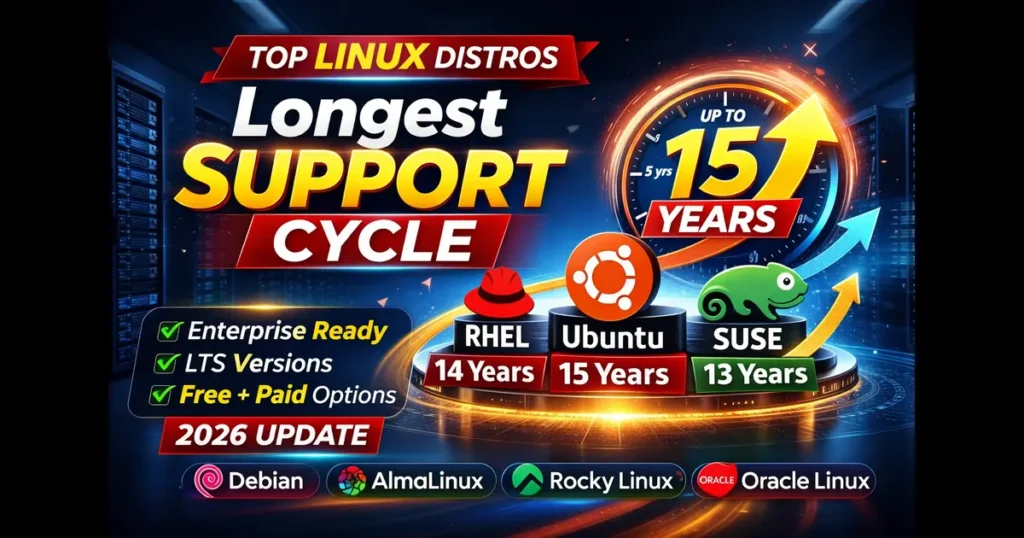
1. Ubuntu LTS — Up to 15 Years (with Ubuntu Pro + Legacy Add-On)

This is the headline news of late 2025 and into 2026. In November 2025, Canonical officially expanded Ubuntu’s support ceiling to 15 years for LTS releases, combining the standard 5-year free support, 10 years via Ubuntu Pro, and the new Legacy add-on for an additional 5 years on top.
To put that in perspective: Ubuntu 14.04 LTS, which launched in 2014, is now covered until April 2029 under this extended program. For Ubuntu 24.04 LTS (released April 2024), that means support extending out to 2039 under Ubuntu Pro, and potentially 2041 for future releases like 26.04 LTS.
The free tier still gives you 5 years, which is solid for personal use or small-scale deployments. But for enterprise users, Ubuntu Pro is available free for personal use and small businesses on up to five machines — making the 10-year coverage accessible without breaking the budget. The 15-year Legacy tier is a paid commercial add-on aimed at the kind of industrial and government workloads where hardware genuinely outlives typical software cycles.
Support breakdown:
- Standard (free): 5 years
- Ubuntu Pro: 10 years
- Ubuntu Pro + Legacy: 15 years
2. SUSE Linux Enterprise Server (SLES) — Up to 13 Years
SLES has long been one of the most respected enterprise distributions on the market, and its support lifecycle reflects that. As of February 2026, SUSE officially documents a 13-year support lifecycle for major SLES versions — 10 years of general support, followed by up to 3 years of paid Long-Term Service Pack Support (LTSS).
SLES 16 dropped in November 2025, introducing SELinux as the default security module (replacing AppArmor) and deprecating YaST. But for organizations still on SLES 15, the support runway remains long. Major releases come every 3 to 4 years, with service packs roughly every 12 months.
The LTSS add-on is a purchase, but it’s well worth it for SAP workloads, HPC environments, or any deployment where you simply cannot afford to rush a migration. Microsoft Azure also now offers SUSE LTSS directly through the Azure Marketplace, which makes lifecycle extension much more accessible for cloud-first organizations.
Support breakdown:
- General support: 10 years
- LTSS (paid): up to 3 additional years
- Total: up to 13 years
3. Red Hat Enterprise Linux (RHEL) — Up to 14 Years (select versions)
RHEL is the gold standard of enterprise Linux, and Red Hat’s lifecycle policy is one of the most mature in the industry. Standard RHEL releases come with 10 years of support across Full Support, Maintenance Support phases. On top of that, Red Hat offers Extended Life Cycle Support (ELS) add-ons for additional coverage.
For RHEL 7, the ELS program has been extended in annual terms running through at least 2027, which pushes total support to roughly 14 years for that specific release. Current major releases — RHEL 8, 9, and 10 — follow the standard model of up to 10 years of full maintenance support, with ELS available for an additional 2 to 4 years depending on the release and customer agreement.
It’s worth noting that RHEL requires a subscription, which puts it in a different cost category compared to the community distros below. But for organizations that need certified, commercially-backed Linux with extensive compliance support (FIPS, Common Criteria, CIS, STIG), RHEL remains hard to beat.
Support breakdown:
- Full + Maintenance Support: 10 years
- ELS add-on: 2–4 additional years (varies by release)
- Total: up to ~14 years (RHEL 7); up to ~12–13 years for RHEL 8/9/10 with ELS
4. AlmaLinux — 10 Years (Matching RHEL)
AlmaLinux stepped up as one of the primary community-driven replacements for CentOS after the infamous 2020 announcement, and it has held up well. Sponsored by CloudLinux but operated by an independent non-profit foundation, AlmaLinux provides 10 years of lifecycle support per major release — directly mirroring RHEL’s Full Support and Maintenance Support phases.
AlmaLinux active support (equivalent to RHEL’s Full Support phase) and Security Support (equivalent to Maintenance Support) follow the same end dates as RHEL. This makes AlmaLinux one of the most drop-in-compatible RHEL replacements available, and the no-cost model is a genuine advantage for smaller organizations and open-source projects.
As of early 2026, AlmaLinux 9 (based on RHEL 9) remains in active development, with end-of-life set for May 2032.
Support breakdown:
- Active + Security support: 10 years (matching RHEL)
5. Rocky Linux — 10 Years
Rocky Linux, founded by Gregory Kurtzer (one of CentOS’s original co-founders), is another strong RHEL-compatible option with a 10-year support lifecycle. It maintains close to 1:1 binary compatibility with RHEL by sourcing code from CentOS Stream, upstream packages, and RHEL SRPMs.
One important nuance: Rocky Linux does not support older minor (point) releases once a newer one is available. When a new minor release drops, the previous one immediately goes EOL. This differs from how RHEL and AlmaLinux handle minor releases, and it can create friction for applications tied to a specific minor version. If you’re running Rocky, staying on top of point release upgrades is non-negotiable.
Despite this, Rocky Linux has earned strong community trust, especially in HPC and research environments. Its 10-year major version lifecycle provides a solid foundation for long-term deployments when minor release management is factored in properly.
Support breakdown:
- Major version lifecycle: 10 years
- Note: point releases are EOL immediately upon next minor release
6. Oracle Linux — 10 Years + Extended Support

Oracle Linux offers 10 years of production support (Basic and Premier) for each major release, with the option to purchase Extended Support for several additional years after the production period. This means total coverage can stretch well beyond 10 years for organizations willing to pay.
Oracle Linux uses the Red Hat-compatible kernel (RHCK) alongside its own Unbreakable Enterprise Kernel (UEK), which offers performance and hardware tuning advantages but can introduce compatibility questions for applications expecting upstream RHEL behavior. For workloads already in the Oracle ecosystem — especially Oracle Database — the integration advantages are hard to ignore.
The Extended Support model is particularly relevant for organizations running Oracle Linux 7, where extended support has been available as the production period concluded.
Support breakdown:
- Premier/Basic support: 10 years
- Extended support: additional years (varies by version, paid)
7. Debian — ~5 Years (with LTS and ELTS extensions)
Debian is a different kind of animal. It’s community-run, no single company owns it, and its support model reflects that community structure. Official Debian releases are fully supported for about 3 years, with the Debian LTS project extending that to 5 years total. Beyond that, the Debian ELTS (Extended LTS) project — a paid service from Freexian — can push coverage further, though it covers a narrower set of packages.
Debian 13 “Trixie” reached stable status in August 2025, and Debian 12 “Bookworm” (2023) is supported until mid-2028. It’s not the longest lifecycle on this list, but Debian’s reputation for rock-solid stability and its role as the base for Ubuntu and Linux Mint make it worth including. For developers and experienced sysadmins who want a stable base without corporate strings attached, Debian remains a top choice.
Support breakdown:
- Official support: ~3 years
- LTS (community): up to 5 years total
- ELTS (Freexian, paid): additional 2–5 years (limited packages)
Comparison Table: Linux Distros with the Longest Support Cycle
| Linux Distribution | Base Support | Extended / Paid Support | Maximum Support | Cost | Best For |
|---|---|---|---|---|---|
| Ubuntu LTS | 5 Years (Free) | +5 Years (Ubuntu Pro) +5 Years (Legacy) | Up to 15 Years | Free → Paid (Optional) | Cloud, Enterprise, Desktop |
| SUSE Linux Enterprise (SLES) | 10 Years | +3 Years (LTSS – Paid) | 13 Years | Paid Subscription | SAP, HPC, Enterprise Servers |
| RHEL | 10 Years | +2–4 Years (ELS – Paid) | ~14 Years (RHEL 7) | Paid Subscription | Mission-Critical Enterprise |
| AlmaLinux | 10 Years | N/A (Community) | 10 Years | Free | RHEL Replacement, Mid-Market |
| Rocky Linux | 10 Years | N/A (Community) | 10 Years | Free | Research, HPC, DevOps |
| Oracle Linux | 10 Years | Extended Support (Paid) | 10+ Years | Free + Paid Support | Oracle Ecosystem, Enterprise |
| Debian | 3 Years (Official) | +2 Years (LTS) + ELTS (Paid) | 5+ Years | Free (ELTS Paid) | Servers, Dev Environments |
How to Choose the Right One for Your Needs
If you’re running a small business or personal server and cost is a concern, AlmaLinux or Rocky Linux give you a decade of coverage with zero licensing fees. They’re binary-compatible with RHEL, so enterprise software that certifies on RHEL typically works on these as well.
For cloud-native and DevOps workloads, Ubuntu LTS is probably the most practical option in 2026. The ecosystem support is enormous — AWS, Google Cloud, and Azure all publish official Ubuntu images, tooling is abundant, and Canonical’s November 2025 announcement of 15-year support under Ubuntu Pro makes it genuinely competitive with commercial enterprise distros.
If you’re running SAP applications or high-performance computing environments that need certified, tested, deeply supported software stacks, SLES is worth the subscription cost. The 13-year ceiling and SUSE’s track record in enterprise environments justify the price for the right workloads.
For organizations already deep in Red Hat’s ecosystem — using OpenShift, Ansible Tower, Satellite — sticking with RHEL is usually the most sensible path, even with the subscription cost. The compliance coverage, certifications, and support quality are class-leading.
And if you value independence, stability, and simplicity above all else, Debian continues to quietly power a significant portion of the world’s servers — and for good reason.
A Few Things to Keep in Mind
Support lifecycle numbers can look deceptively simple on paper, but there are nuances worth understanding before you commit.
First, not all support phases are equal. “Full Support” typically means bug fixes, security patches, and feature updates. Later phases like Maintenance Support or Extended Life Cycle often narrow down to security patches only, with some critical bug fixes at the vendor’s discretion. Read the fine print of what each phase actually covers.
Second, point release policies matter. Rocky Linux’s strict EOL policy for minor releases catches some organizations off guard, especially those running custom-compiled software or ISV-certified applications tied to a specific minor version. RHEL, AlmaLinux, and SLES are more forgiving here.
Third, paid extensions only help if you actually pay for them. The base free lifecycle is what most small teams will realistically rely on. If your organization doesn’t have a vendor support contract in place before EOL approaches, you may find yourself scrambling anyway.
Finally, third-party extended support providers like TuxCare offer extended lifecycle support for distros that have reached their official EOL — covering CentOS, Ubuntu, Oracle Linux, and others. This is a viable option if you’re stuck on an aging distro and can’t migrate immediately, but it shouldn’t be a long-term strategy.
Final Thoughts
Picking from the Linux distros with the longest support cycle isn’t just about finding the biggest number. It’s about matching the lifecycle model to your actual operational reality — your budget, your team’s skills, your compliance requirements, and how often you can realistically afford to plan a major OS migration.
As of February 2026, Ubuntu Pro with the Legacy add-on technically offers the longest official support at 15 years. SLES comes in at 13 years. RHEL reaches up to 14 years for older versions. And the free community options — AlmaLinux, Rocky Linux, Oracle Linux — all deliver solid 10-year windows without a licensing fee.
Whatever you choose, the key takeaway is this: pick a distro with a long support window before you need it. Because once you’re up against an EOL deadline with production systems on the line, your options get expensive fast.
Disclaimer
The information provided in this article is for general informational purposes only. While we have made every effort to ensure accuracy based on officially published data available as of February 2026, support lifecycle policies, pricing, and program terms are subject to change at any time at the discretion of each vendor. Always refer to the official documentation of the respective Linux distribution or vendor before making any business or infrastructure decisions. We are not affiliated with, endorsed by, or sponsored by any of the distributions or companies mentioned in this post. Use of any software or service mentioned here is at your own risk.
Frequently Asked Questions
Which Linux distro has the longest support cycle in 2026?
As of February 2026, Ubuntu LTS with Ubuntu Pro and the Legacy add-on offers the longest official support at 15 years, making it the top choice for organizations that need maximum stability without frequent OS migrations.
Is a 10-year support cycle enough for enterprise use?
For most businesses, yes. Distros like AlmaLinux, Rocky Linux, and Oracle Linux all offer 10-year lifecycles, which comfortably covers the typical hardware refresh cycle and gives IT teams plenty of runway for planned migrations.
Are free Linux distros reliable for long-term enterprise deployments?
Absolutely. AlmaLinux and Rocky Linux are both binary-compatible with RHEL and trusted by thousands of organizations worldwide, including research institutions and Fortune 500 companies — all without a licensing fee.
What happens when a Linux distro reaches end-of-life?
Once a distro hits EOL, it stops receiving security patches and bug fixes. Running an EOL system in production is a serious security risk. If migration isn’t immediately possible, third-party providers like TuxCare can offer temporary extended coverage.
Do I need to pay for long-term Linux support?
Not always. Ubuntu Pro is free for personal use and small teams on up to five machines, and community distros like AlmaLinux offer 10 years of support at no cost. Paid support becomes more relevant when you need vendor SLAs, compliance certifications, or coverage beyond the standard lifecycle.
Also Read
What Is Artificial Superintelligence? The Next Stage of AI Evolution


