If you’ve been sitting on the fence about switching to a KDE-based Linux distribution, the timing has never been better. The 10 Reasons to Try Netrunner 26 “Twilight” in 2026 come straight from what the Netrunner team officially dropped on April 2, 2026 — and it’s a genuinely compelling release. This isn’t just a version bump with a pretty wallpaper change. Netrunner 26 brings real, substantive upgrades across the kernel, desktop environment, security model, and pre-installed software stack.
Netrunner has always occupied an interesting corner of the Linux world. It’s not Ubuntu, not Fedora, not Arch. It’s a Debian-based distribution that prioritizes a polished KDE Plasma experience without making you configure everything from scratch. For people who want something that “just works” without sacrificing power-user flexibility, it’s been a quiet favourite for years.
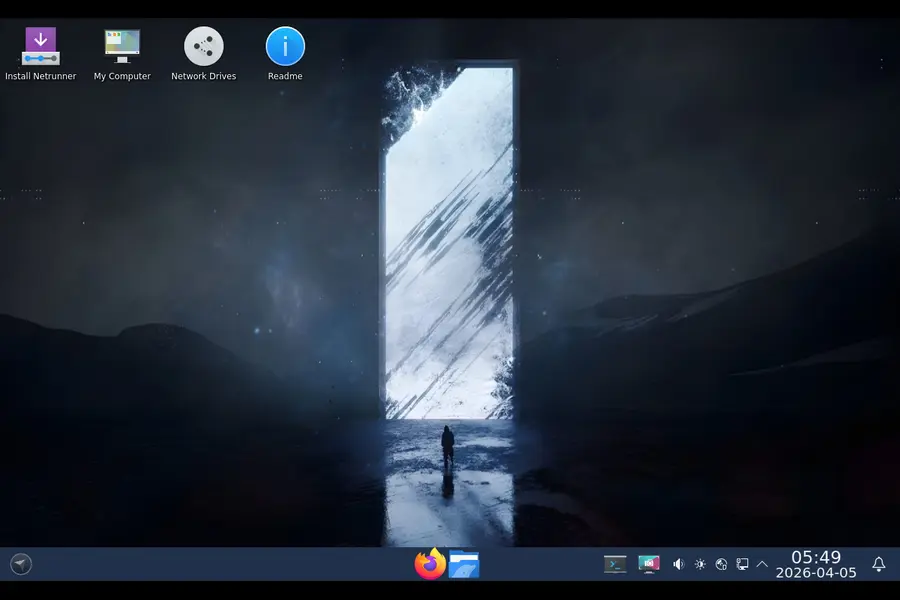
With Netrunner 26 “Twilight,” the team has built on the rock-solid foundation of Debian Stable 13 (Trixie) and layered in a suite of updates that push the experience forward significantly. Let’s get into why this release deserves your attention right now.
1. Built on Debian 13 “Trixie” — The Most Stable Base Available
Debian Stable isn’t just a base — it’s a philosophy. When a package lands in Debian Stable, it has been tested across multiple release cycles, bug-tracked aggressively, and vetted by one of the most rigorous volunteer communities in open source.
Netrunner 26 is based on Debian Stable 13, codenamed “Trixie,” and this matters enormously for day-to-day reliability. You’re not running a rolling release that might break after an update, and you’re not stuck on ancient software that was frozen two years ago. Debian 13 represents a genuine modernization over Debian 12 (Bookworm), with improvements across security, system stability, and package freshness.
For users who have had frustrating experiences with distributions that feel like they’re constantly in flux, Netrunner 26’s Debian Stable base is a breath of fresh air. Your system behaves predictably, updates don’t randomly break your workflow, and you get long-term support assurances that give you confidence for daily production use.
2. Linux Kernel 6.16 — Outstanding Hardware Support in 2026
The kernel is the engine, and Netrunner 26 ships with Linux Kernel 6.16.12+deb13, which is a significant step above Trixie’s default kernel (6.12). That jump matters more than the version numbers suggest.
Kernel 6.16 brings improved driver support for recent AMD RDNA graphics cards, Intel Arc GPUs, newer Wi-Fi chips, and a wide range of laptop hardware that was still hit-or-miss on earlier kernels. If you’ve ever booted a Linux ISO only to find your Wi-Fi adapter unrecognized or your GPU running in a degraded software mode, you know how frustrating hardware support gaps can be.
With Kernel 6.16 onboard, Netrunner 26 handles the kind of recent hardware that many distributions still struggle with out of the box. Think laptops released in 2024–2025, USB 4 peripherals, and modern NVMe storage configurations. The Netrunner team has specifically noted improved hardware support for recent AMD and Intel GPUs, sound hardware, and wireless chips — and that’s not marketing fluff, that’s a meaningful commitment to working on current machines without driver headaches.
3. Plasma 6.3.6 and KDE Frameworks 6.13.0 — The Best KDE Has Ever Been
KDE Plasma 6 was a watershed moment for the Linux desktop. Moving to Qt 6 as the underlying framework brought performance improvements, better Wayland support, and a more cohesive visual language across the entire desktop ecosystem. Netrunner 26 ships with Plasma 6.3.6 and KDE Frameworks 6.13.0, which are mature, polished iterations of this modern KDE stack.
If you haven’t used KDE Plasma in a few years — maybe you bounced off an older version that felt bloated or inconsistent — Plasma 6.x is a completely different proposition. It’s fast. It’s genuinely customizable without requiring you to dig through config files. And it looks great without needing heavy theming work.
Netrunner enhances the default Plasma experience with custom artwork, including a new SDDM login theme, an updated global theme, and a Plasma theme specifically designed for Plasma 6. The visual identity of “Twilight” feels cohesive from login screen to desktop — something that many distributions using KDE as a bolt-on afterthought simply don’t achieve.
4. XLibre Xserver — A Forward-Looking Display Stack
This is one of the more technically interesting inclusions in this release. Netrunner 26 ships with XLibre Xserver, a community fork of the X.Org server that continues development with a focus on security and longevity. Importantly, Plasma X11 sessions in Netrunner will use XLibre.
Why does this matter? The X.Org Foundation has essentially wound down active development of the traditional X server, leaving a gap for users who still rely on X11 — whether because their GPU drivers don’t fully support Wayland, their workflow involves specific X11-only software, or they simply prefer the X11 session for stability reasons.
XLibre fills that gap. It means X11 sessions in Netrunner 26 aren’t running on a dead-end codebase — they’re running on actively maintained software with a community behind it. This is a pragmatic, user-focused decision that acknowledges the reality that Wayland adoption is still incomplete across the Linux ecosystem.
5. Hardened Security Out of the Box
Security improvements in Netrunner 26 aren’t just about keeping up with patches — they’re baked into the Debian 13 foundation in meaningful ways.
The base system now includes hardening against ROP (Return-Oriented Programming) and COP/JOP (Call/Jump-Oriented Programming) attacks on amd64 and arm64 platforms. These are real-world exploit mitigation techniques that make it significantly harder for malicious code to hijack your running processes. This kind of protection used to require manual hardening or specialty security-focused distributions — now it’s part of the default Netrunner 26 install.
Additionally, the system introduces spell-checking support in Qt WebEngine-based browsers via BDIC Binary Hunspell Dictionary support, and APT has modernized its repository format from the old .list style to the more secure and flexible .sources format (.deb822). The apt modernize-sources command automates the conversion for existing setups, which is a thoughtful touch for users upgrading from older Debian bases.
For anyone running Netrunner on a laptop they carry outside the home, or on a machine with sensitive data, these aren’t minor checkbox items — they’re genuinely meaningful security improvements.
6. PipeWire and WirePlumber — Modern Audio That Actually Works
Audio on Linux has historically been… a topic. ALSA, PulseAudio, JACK — the alphabet soup of Linux audio has confused and frustrated users for years. Netrunner 26 ships with PipeWire and WirePlumber as the default audio stack, and this is the right call.
PipeWire has matured into a unified audio and video routing system that handles both the low-latency professional use cases that JACK excelled at and the everyday desktop use cases that PulseAudio covered — but it does both simultaneously and with significantly less configuration friction.
WirePlumber is PipeWire’s session manager, and together they handle Bluetooth audio, HDMI output, USB audio interfaces, and screen capture audio routing in a way that just works. If you’ve ever had a Bluetooth headset that worked intermittently, or a screen recorder that couldn’t capture system audio, PipeWire under Netrunner 26 addresses these scenarios cleanly.
Musicians, podcasters, streamers, and anyone who connects more than one audio device to their machine will appreciate how much of a non-issue audio has become in this release.
7. Power-Profiles-Daemon — Smarter Performance on Laptops
Laptop users get a specific win in Netrunner 26: power-profiles-daemon for dynamic performance selection. This is the modern replacement for older power management approaches, and it integrates cleanly with KDE Plasma’s power settings UI.
In practical terms, this means you can switch between balanced, power-saver, and performance profiles from the system tray — and the system actually responds in meaningful ways, adjusting CPU governor behavior, GPU performance states, and background task scheduling to match your current needs.
If you’re on battery writing a document in a coffee shop, the power-saver profile extends your runtime meaningfully. If you’re doing a video export or compiling code at your desk, flipping to performance mode squeezes real throughput out of your hardware. This is the kind of quality-of-life feature that Windows users take for granted but that Linux distributions have only recently nailed.
8. A Thoughtful Pre-Installed Software Selection
One of Netrunner’s defining characteristics has always been its curated software selection. Netrunner 26 continues this tradition with a strong default set of applications that covers most users’ daily needs without padding the ISO with duplicates or rarely-used utilities.
The highlights from the official release:
- Firefox 140.7 ESR — The extended support release of Firefox, which prioritizes stability and long-term security patches over being on the bleeding edge. Ideal for daily use.
- LibreOffice 25.2.3 — A mature, capable office suite that handles Word, Excel, and PowerPoint files without requiring a subscription.
- VLC 3.0.23 — Still the gold standard for media playback. Supports virtually every codec and container format you’ll encounter.
- GIMP 3.0.4 — The latest major GIMP release represents a significant leap for the project, with improved tooling and a more coherent UI compared to GIMP 2.x.
- Inkscape 1.4 — Solid vector graphics editing for designers.
- Kdenlive 24.12.3 — A capable, KDE-native video editor that has improved dramatically over the past few years.
- Thunderbird 140.6.0 ESR — For users who prefer local email management over web clients.
- VirtualBox 7.2.6 — For running virtual machines, particularly useful for testing other operating systems or sandboxing applications.
That’s a genuinely useful software stack right out of the box. You don’t need to spend your first two hours after installation hunting for a media player, image editor, or office suite.
9. Stacher7 — Powerful Multimedia Downloads Made Easy
This is one of the more pleasant surprises in Netrunner 26. Stacher7 is a graphical interface for yt-dlp, the powerful command-line tool for downloading video and audio from hundreds of online platforms.
If you’ve used yt-dlp from the terminal, you know how capable it is — and also how much you need to remember about flags and options. Stacher7 wraps that power in a clean GUI that lets you paste a URL, choose your format and quality, and download. It handles playlists, subtitles, metadata embedding, and format conversion without requiring you to write a single command.
For a Linux distribution to ship this by default in 2026 is a signal that the Netrunner team understands how people actually use their computers. Offline video consumption, archiving content, downloading podcasts for travel — these are real use cases for real users, and having a polished tool for them right on the desktop is a nice touch.
10. Multilingual Support and a More Inclusive Experience
Netrunner 26 ships with translations for Firefox and LibreOffice in English, Spanish, French, Italian, German, Polish, Russian, Turkish, and Chinese (both Simplified and Traditional). This is a meaningful commitment to making the distribution accessible beyond the English-speaking Linux community.
The broader Linux desktop ecosystem has sometimes felt anglophone-centric, with translations lagging or being incomplete in key applications. By explicitly shipping language packs for two of the most-used desktop applications in multiple major world languages, Netrunner 26 lowers the barrier to entry for a significantly wider audience.
Combined with the KDE Plasma desktop’s excellent native internationalization support, Netrunner 26 is one of the more genuinely multilingual out-of-the-box desktop Linux experiences available in 2026.
Who Should Try Netrunner 26 “Twilight”?
Let’s be honest about the fit here. Netrunner isn’t trying to be everything to everyone.
Netrunner 26 is a great fit if you:
- Want a KDE Plasma desktop that’s been thoughtfully configured, not just installed
- Value Debian’s stability but don’t want to build your application stack from scratch
- Are coming from Windows and want a desktop that feels polished and consistent
- Do creative work (photo editing, video editing, illustration) and want capable tools pre-installed
- Care about long-term system stability and predictable update cycles
It might not be your first choice if you:
- Want bleeding-edge packages updated daily (look at Arch or openSUSE Tumbleweed)
- Prefer GNOME or another desktop environment
- Need specialized server or embedded use cases
The target audience is desktop users who want a capable, good-looking, stable Linux system without spending hours configuring it. And for that audience, Netrunner 26 “Twilight” delivers.
How Does It Compare to Other Debian KDE Distributions?
The natural comparison point is KDE neon, which also ships recent KDE software on a stable base (Ubuntu LTS). The difference is philosophy: KDE neon is primarily a KDE showcase, with the base Ubuntu LTS system underneath. Netrunner is a fully configured, opinionated desktop distribution with its own identity, custom themes, and curated applications.
MX Linux KDE is another comparison. MX Linux is excellent, but it targets a slightly older aesthetic and a different user profile — one that leans more toward traditional Linux power users. Netrunner’s presentation and onboarding feel more contemporary.
Against Kubuntu, Netrunner wins on software freshness (the Debian 13 / Kernel 6.16 combination) and visual polish. Kubuntu is solid but conservative. Netrunner feels like someone actually cared about the end-to-end experience.
Getting Started with Netrunner 26 “Twilight”
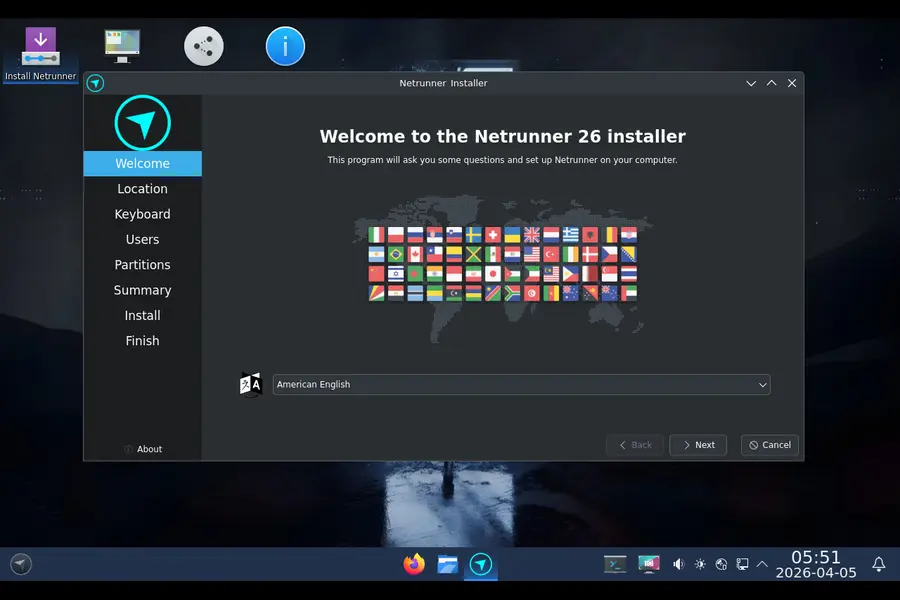
Installation is straightforward. Download the 64-bit ISO from netrunner.com/download, flash it to a USB drive with a tool like Balena Etcher or Ventoy, and boot from it. The live session lets you test hardware compatibility before committing to installation, which is the right way to evaluate any distribution.
The installer follows the standard Calamares flow that has become common across many distributions — it’s intuitive, handles partitioning sensibly, and doesn’t require command-line interaction for a typical desktop install.
For those upgrading from Netrunner 25 “Shockworm”, the team has introduced unified Netrunner packages that are explicitly designed to make upgrade handling smoother. It’s worth checking the forums at support.blue-systems.com for upgrade-specific guidance, as some changes (like the /tmp now being stored in tmpfs, and the APT format migration) have specific steps worth following.
Final Thoughts
The 10 Reasons to Try Netrunner 26 “Twilight” in 2026 aren’t manufactured for the sake of a listicle — they reflect a release that has genuinely moved the project forward across multiple dimensions simultaneously. A modern kernel, a mature and polished Plasma desktop, serious security improvements, a thoughtful application selection, and multilingual accessibility make this a strong recommendation for anyone looking for a Debian-based KDE desktop in 2026.
What makes Netrunner 26 “Twilight” stand out in a crowded field isn’t any single feature — it’s the coherence of the whole package. Everything from the login screen to the pre-installed applications to the kernel version feels like it was chosen with intention. In a Linux landscape full of distributions that feel like committee decisions, Netrunner 26 feels like a team that knows what it wants to build and has built it well.
If you’ve been curious about it, now is a great time to give it a real look. Download the ISO, spend an afternoon in the live session, and see if it clicks for you. The worst that happens is you learn something new about the Linux desktop. The best that happens is you find your new daily driver.
Disclaimer
This blog post is written for informational purposes only. All product details, features, and specifications mentioned are based on the official Netrunner 26 “Twilight” release announcement published on April 2, 2026. We are not affiliated with the Netrunner team or Blue Systems. Opinions expressed are our own. Always refer to the official Netrunner website for the most up-to-date information before making any decisions.