

If you’ve been thinking about switching from Windows to Linux but keep putting it off because it “seems too complicated” — this post is for you. Why Zorin OS 18.1 is perfect for beginners isn’t just a catchy headline; it’s something that becomes obvious the moment you boot it up for the first time.
Released officially on April 15, 2026, Zorin OS 18.1 arrives just six months after its predecessor and already boasts over 3.3 million downloads. That’s not a number that happens by accident. It reflects a distro that genuinely understands what people coming from Windows need — familiarity, stability, and a system that doesn’t make them feel like they need a computer science degree to use it.
In this post, we’ll walk through everything new in this release, why it matters for everyday users, and why 2026 might finally be the year you make the switch.
What Makes Zorin OS Different from Other Linux Distros?
There’s no shortage of Linux distributions out there. Ubuntu, Mint, Fedora, Manjaro — the list goes on. So why does Zorin OS keep coming up in conversations about the best option for new Linux users?
The short answer: it was built from the ground up with Windows users in mind.
Most Linux distros ask you to adapt to them. Zorin OS does the opposite. The desktop looks and behaves like Windows. The taskbar is at the bottom. Apps open and close the way you’d expect. The Start Menu equivalent works just like you’re used to. You don’t have to unlearn years of muscle memory just to use your computer.
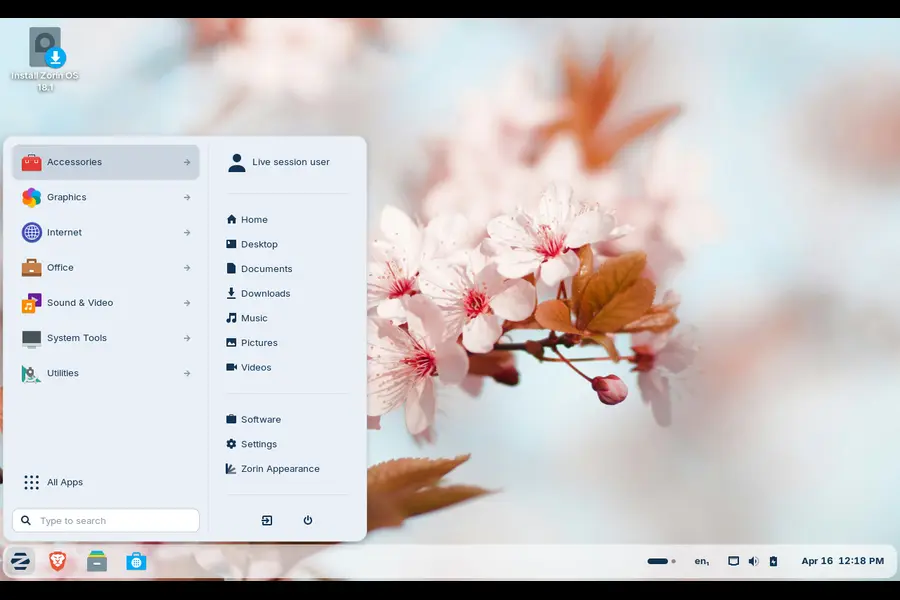
Zorin OS 18.1 takes that philosophy even further. Let’s get into the specifics.
A Smooth Transition from Windows — Now Even Smoother
One of the biggest concerns people have when switching operating systems is: “Will my apps still work?”
Over 240 Windows App Alternatives Built In
Zorin OS 18.1 has expanded its built-in database of Windows app detection by more than 40%, now supporting over 240 apps. Here’s how it works in practice: when you try to run a Windows installer — say, the Plex setup file — Zorin OS automatically detects it and pops up a dialog that says, in effect, “Hey, there’s a better way to do this.”
It either points you to the native Linux version of that app in the Software Store, or suggests the closest equivalent. For example, if you try to run the Microsoft Outlook installer, Zorin OS will suggest Evolution Mail — a fully featured email client that works natively on Linux without any compatibility layers.
This is a genuinely smart feature. Instead of struggling with Wine or getting frustrated when a .exe file won’t run, the OS guides you to the right path automatically. For beginners, that kind of hand-holding (in the best possible sense) removes a huge source of friction.
The Desktop Experience Is Better Than Ever
Advanced Window Tiling for Power Users Who Are Growing Into It
You might not use advanced window tiling on day one. But as you get more comfortable with Zorin OS, you’ll appreciate having it available. Version 18.1 introduces several new tiling options:
- When you click a tiled app in the taskbar, all windows in that tiled group come to the foreground together
- You can now reorder tiling layouts directly from the settings dialog
- Enhanced edge tiling lets you snap windows to your custom layout rather than just snapping to halves or quarters
This is the kind of feature that grows with you. Beginners won’t feel overwhelmed by it, and intermediate users will love it as they start working more efficiently.
Right-to-Left Language Support
If you use Arabic, Hebrew, Urdu, or any other right-to-left script, the taskbar and panel now display correctly in that orientation. This might seem like a minor detail, but for millions of users around the world, it’s the difference between an OS that feels like it was made for them versus one where they’re always fighting the interface.
Tray Icon Control
You now have proper control over which app icons appear in the system tray. A simple toggle in Zorin Appearance lets you decide what shows up there. Small thing, but it makes the desktop feel cleaner and more personal.
Performance and Smoothness Improvements
Across the board, 18.1 just feels more polished. Multiple performance enhancements and bug fixes have been baked in throughout the desktop. You might not notice any single change, but the cumulative effect is a desktop that feels snappier and more reliable.
LibreOffice 26.2 — Microsoft Office Compatibility Gets Serious
For anyone who uses their computer for work, school, or even basic document editing, office suite compatibility is non-negotiable.
Zorin OS 18.1 ships with LibreOffice 26.2, the newest version of the award-winning free office suite. The headline improvement here is better compatibility with Microsoft Office and Office 365 documents. If you receive a .docx or .xlsx file from a colleague, it’ll open cleanly without weird formatting issues eating up your time.
Other upgrades in LibreOffice 26.2 include Markdown support, new connector shape objects in Calc and Writer, and a round of performance improvements. For anyone who was worried about giving up Microsoft Office, LibreOffice 26.2 makes that concern much smaller.
Why Zorin OS 18.1 Is Perfect for Beginners: The Security Angle
Security is one area where Windows users are often pleasantly surprised by Linux. Viruses and malware designed to target Linux systems are far less common, and the way Linux handles system permissions makes it harder for malicious software to cause damage even if it does get in.
Zorin OS 18.1 builds on that foundation.
Linux Kernel 6.17
The OS is now powered by Linux kernel 6.17, the same version used in Ubuntu 25.10. This brings improved driver support across a wide range of hardware, including:
- NVIDIA graphics cards
- Intel Xe3 graphics
- AMD hybrid laptop GPUs
- Lenovo ThinkPad and Samsung Galaxy Book laptops
- Apple input devices (Magic Mouse 2, Touch Bar on Intel MacBook Pros)
- Game controllers: PlayStation 5 DualSense, Acer Nitro NGR200, Turtle Beach Recon
- Gaming handhelds: ASUS ROG Ally, Lenovo Legion Go, OneXPlayer
The practical upshot is that Zorin OS 18.1 is more likely to work perfectly on whatever hardware you’re running — including some pretty niche devices — right out of the box.
Latest Security Patches Pre-Installed
Every security patch available at the time of release has been pre-installed. You don’t need to immediately run a long update process after installation just to get your system secured. It’s ready from the moment you boot in.
Supported Until June 2029
This is a big deal, especially if you’re setting up a computer for a family member or deploying Zorin OS in a school or small business. You’ll continue receiving software updates and security patches until June 2029. That’s several years of long-term support baked in — no scrambling to upgrade when an OS version goes end-of-life.
Zorin OS 18.1 Lite — Giving Old Computers a New Life
Not everyone has a modern machine. If you have an older laptop collecting dust, or a low-spec desktop that struggles with Windows 10, Zorin OS 18.1 Lite was made for exactly that situation.
The Lite edition launches alongside the main release and is designed specifically for computers that can’t run heavyweight operating systems. Here’s what’s new in it compared to the previous Lite release:
Built on XFCE 4.20
XFCE is a lightweight desktop environment that’s been around for decades — and version 4.20 brings the most significant improvements in years. It’s efficient, stable, and doesn’t demand much from your hardware.
Redesigned File Manager
The default file manager in Lite has been streamlined. The interface is more compact and easier to navigate, which is particularly useful on smaller displays or lower-resolution screens.
Fingerprint Reader Support
Even on older hardware, if your laptop has a fingerprint reader, you can now enroll your fingerprints directly through the Settings app. This is a welcome quality-of-life addition that feels modern without requiring modern specs.
Refreshed Visual Themes
The default theme has been updated with a more rounded, softer appearance — two new colour options (Yellow and Brown) join the existing palette. It might sound superficial, but a desktop you actually enjoy looking at makes a real difference in daily use.
Web Apps Integration
Turn any website into a desktop app. Your web apps appear in the start menu and behave just like native applications. For someone who lives in Gmail or Google Docs all day, this makes the experience feel seamless rather than browser-dependent.
App Support That Grows With You
One concern new Linux users often raise is app availability. Will they be able to find and install what they need? The answer with Zorin OS is a confident yes.
Zorin OS 18.1 comes with built-in support for Flatpak, AppImage, and Snap packages. These are three of the most popular ways to distribute modern Linux apps, and supporting all three means you have access to a massive library of software — from creative tools to productivity apps to games.
The other benefit of this approach is that these packaging formats update independently of the OS. So your apps stay current for years, even as the underlying operating system remains on a stable, supported version.
Upgrading Is Easy — Even from an Older Version
Already on Zorin OS 18?
Just open Software Updater and install the latest updates. That’s it. You’ll be on 18.1 without needing to reinstall anything or touch your files.
On Zorin OS 17?
You can upgrade directly to 18.1 without erasing your files or data. The upgrade guide on the Zorin Help site walks you through the process clearly.
Starting Fresh?
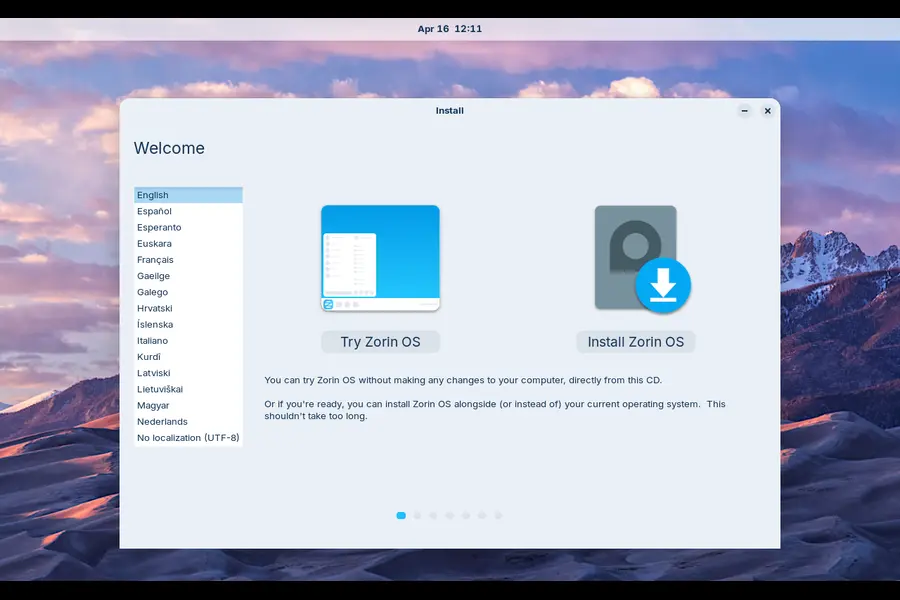
All editions of Zorin OS 18.1 — Core (free), Pro (paid), and Lite (free) — are available for download from zorin.com. Core is completely free and genuinely excellent. Pro adds additional desktop layouts and a curated set of extra software for those who want a more premium out-of-the-box experience.
Who Should Actually Use Zorin OS 18.1?
Let’s get specific about who benefits most from this release.
Windows users who are frustrated with Windows 11 — whether it’s performance issues, forced updates, hardware requirements, or just the general feeling that Windows keeps getting in your way. Zorin OS offers a familiar interface without the baggage.
People with older hardware — if your laptop struggles with Windows 10 and dreads the thought of Windows 11’s requirements, Zorin OS (especially the Lite edition) can breathe new life into machines that are perfectly capable of running a great OS.
Students and home users — LibreOffice handles everything you need for documents, spreadsheets, and presentations. The Software Store makes finding and installing apps straightforward. And the whole system is free.
Families setting up a spare computer — it’s secure, it doesn’t require constant maintenance, and the interface is intuitive enough that you won’t spend weekends troubleshooting.
Small businesses and schools — the long-term support window through June 2029 makes this a serious option for institutional deployments where stability and security matter more than having the bleeding edge.
Common Concerns — Addressed Honestly
“Will gaming work?”
Better than it used to, honestly. With Steam for Linux, Proton, and Lutris, a large portion of the Steam library runs on Linux. Hardware support in kernel 6.17 even extends to gaming handhelds like the ROG Ally and Legion Go. It’s not perfect parity with Windows gaming, but it’s closer than it’s ever been.
“What about my Windows programs?”
The new app alternative system in 18.1 is genuinely helpful here. For most common software categories, there are excellent native Linux alternatives. For software that absolutely has no substitute, Wine or CrossOver can run many Windows apps — and Zorin OS makes setting that up less painful than most distros.
“Is it hard to install?”
No. The Zorin OS installer is one of the most beginner-friendly in the Linux world. You can even try it live from a USB drive before committing to a full installation, which means zero risk to your current setup.
Final Thoughts
The question isn’t really whether Zorin OS 18.1 is good — it clearly is. The question is whether it’s good for you.
If you’ve been curious about Linux but assumed it wasn’t meant for regular people, Zorin OS 18.1 is the most convincing argument that assumption is wrong. The combination of a familiar Windows-like interface, excellent hardware support, a polished app ecosystem, and long-term security updates makes it a complete package.
Why Zorin OS 18.1 is perfect for beginners comes down to one simple truth: it was designed to respect your time. It meets you where you are, guides you when you need it, and stays out of your way when you don’t. For anyone considering making the switch in 2026, this is the release to do it with.
Disclaimer
This blog post is written for informational purposes only. All product details, features, and release information referenced here are based on the official Zorin OS 18.1 release notes published on April 15, 2026. We are not affiliated with or sponsored by Zorin Group in any way. Some features may vary depending on your hardware, edition (Core, Pro, or Lite), or system configuration. Always refer to the official Zorin OS documentation for the most accurate and up-to-date information.


