

If you’ve been searching for a Linux distribution that gives you the rock-solid dependability of Debian without making you feel like you’re staring at a 1999 server terminal, Mauna Linux deserves a serious look. This Mauna Linux 25.2 review dives into everything that landed in the April 2026 release — from kernel updates and APT improvements to a refreshed GIMP and a smarter installer. Spoiler: it’s a genuinely impressive minor update that punches well above its version number.
What Is Mauna Linux, and Why Should You Care?
Mauna Linux is a Brazilian-made, Debian-based distribution with a clear mission: be simple, complete, and visually pleasing for both beginners and power users alike. It sits in a sweet spot between the raw, no-frills Debian experience and the heavy hand-holding of something like Ubuntu — and it does so elegantly.
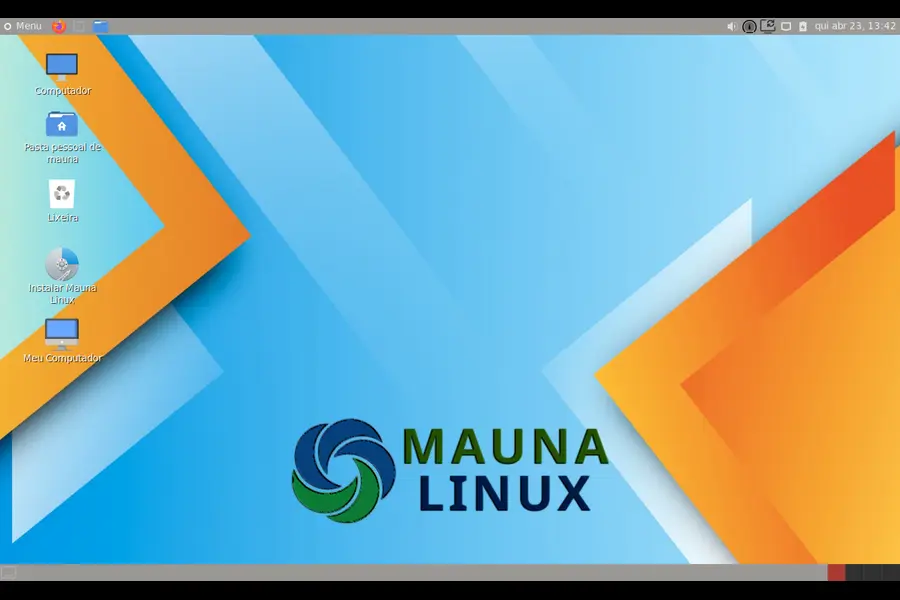
The project prides itself on fast, light, and simple usage, with no need for a powerful computer, easy installation from hard drive or USB, and its own repository packed with additional applications. It works straight out of the box, even as a live session, which makes it a fantastic option for anyone testing the waters of Linux for the first time.
The 25.x series, codenamed Polaris, is built on Debian 13 Trixie and has been steadily refined across point releases. Version 25.2 — officially launched on April 22, 2026 — continues that momentum.
Mauna Linux 25.2 Review: What’s Actually New?
Before we dig in, it’s worth noting: Mauna Linux 25.2 is a minor release. Existing Mauna 25 users will receive update notifications automatically and can install them through the Mauna Update application. That means you don’t need to do a fresh install if you’re already on the 25 series. But for newcomers, the updated ISOs are available on the official site.
Let’s break down everything that’s new.
The Foundation: Debian 13.4 Trixie
Mauna 25.2 is now based on Debian 13.4 Trixie, the latest point release of the Trixie cycle. This matters more than it might seem. Debian’s point releases carry accumulated security patches, driver updates, and bug fixes — meaning 25.2 ships with a tighter, more secure base than its predecessors without introducing instability. That’s the beauty of the Debian foundation: you get reliability without sacrificing currency.
Kernel: Two Paths, One Goal
One of the more interesting aspects of Mauna Linux is its dual-kernel approach.
The standard kernel ships at version 6.12.73, while the Xfce AHE (Advanced Hardware Enablement) edition uses kernel 6.17.8.
The AHE edition is specifically aimed at users with newer hardware — think modern AMD Ryzen or Intel Core Ultra chips, recent Wi-Fi cards, and the like. If your machine was built in the last year or two and you’re having driver issues with other distros, the Xfce AHE edition is worth trying specifically for that reason.
APT 3.2: A Game-Changer for Package Management
This is arguably the most technically significant addition in Mauna Linux 25.2. The Xfce AHE edition introduces APT 3.2, the new version of the package manager.
Native Rollback and Transaction History
For years, Linux users on Debian-based systems envied the rollback capabilities of Red Hat’s DNF. APT 3.2 finally changes that equation. The new release brings native rollback and transaction history, a long-awaited feature similar to what DNF offers in Red Hat-based distributions.
The new commands available are:
- apt history-list — shows all past transactions
- apt history-info <ID> — displays details of a specific transaction
- apt history-redo <ID> — redoes a transaction
- apt history-undo <ID> — undoes a transaction
- apt history-rollback <ID> — fully reverts a series of changes
This is a massive quality-of-life improvement. Installed a package that broke something? Instead of hunting down what changed, you can now simply undo the transaction. System administrators managing multiple machines will appreciate this enormously.
Smarter Dependency Resolution
APT 3.2 also brings an improved dependency resolver that supports upgrades by source package, avoids accidental removal of essential software on systems where binaries aren’t published for all architectures, and allows ordering dependency targets against current alternatives while removing manually installed packages.
Additional improvements include performance counter logging in JSONL format and a safeguard that prevents the system from entering sleep mode while dpkg is running — a small but genuinely useful fix anyone who’s had a laptop suspend mid-installation will appreciate.
Firefox 150.0 and LibreWolf 149.0.2
Mauna Linux 25.2 ships with Firefox 150.0 as the default browser, alongside LibreWolf 149.0.2.
Firefox 150.0 brings performance improvements, enhanced privacy controls, and compatibility updates for modern web standards. LibreWolf — the privacy-hardened Firefox fork — continues to serve users who want tighter browser defaults without the telemetry.
Having both pre-installed is a smart move. Power users who care about privacy can switch immediately, while newcomers get the familiar Firefox experience without friction.
GIMP 3.2.2: A More Polished Image Editor
GIMP 3.2.2 arrives as the first maintenance update in the 3.2 series, and it’s a solid one. Here’s what changed:
SVG path import improvements — imported paths now scale according to user preferences, fixing a long-standing annoyance
PSD layer support — better handling of multi-channel PSD images, vector layers, and PSD resources embedded in TIFF and JPEG files
Plug-in fixes — improved importers for FITS, TIM, PAA, ICNS, PVR, SFW, and JIF formats; the PaintShop Pro plug-in now correctly loads active selection shapes
For photographers and designers using Mauna Linux as a daily driver, this is a welcome refinement. GIMP 3.x has been a significant leap forward for the project overall, and 3.2.2 tightens the experience further.
OnlyOffice 9.3.1: Serious Office Work on Linux
OnlyOffice Desktop Editors 9.3.1 is the bundled office suite, offering full compatibility with Office Open XML formats — .docx, .xlsx, and .pptx — and works entirely offline.
For anyone making the switch from Windows or macOS, OnlyOffice’s compatibility story is genuinely strong. Documents shared with Windows colleagues open and close without the formatting headaches that plague LibreOffice in some workflows. Version 9.3.1 is the latest stable release and brings UI refinements alongside the usual round of bug fixes.
Calamares 3.4.2: A Smarter Installer
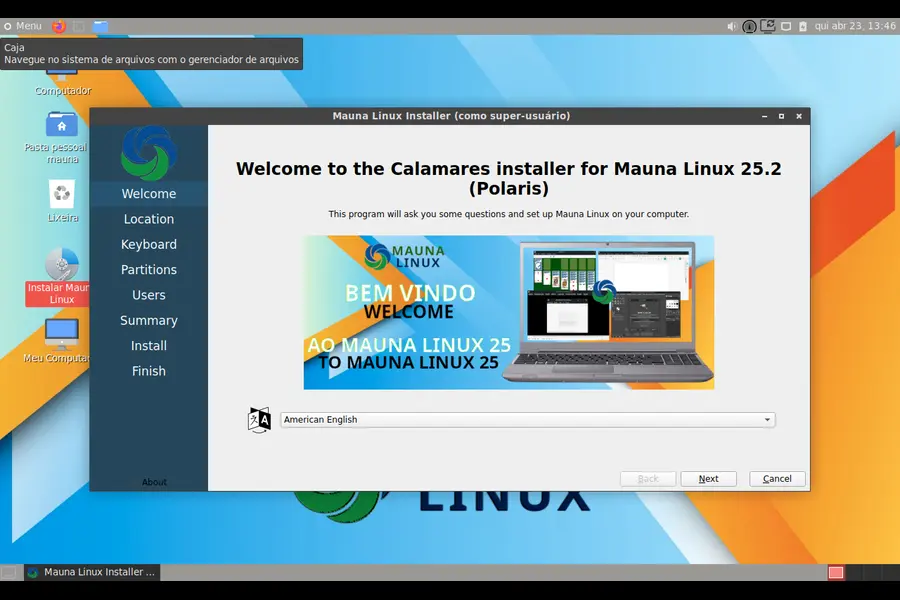
The Calamares installer gets a meaningful upgrade in 25.2. Calamares 3.4.2 introduces support for the Plasma Login Manager, compatibility with alternative LightDM greeter paths, proper recognition of NVMe and MMC devices as SSDs, and 4KB partition alignment for improved SSD performance.
The NVMe recognition fix is worth highlighting — older Calamares versions sometimes failed to identify NVMe drives correctly, which caused confusion during partitioning. That’s now resolved. The 4KB partition alignment improvement is also a quiet but important win for anyone installing on a modern SSD, as proper alignment has a measurable effect on write performance and drive longevity.
Updated Firmware Collection
The firmware collection has been updated to version 20260410, released on April 10, 2026. This means Mauna Linux 25.2 ships with some of the most current firmware blobs available for Wi-Fi adapters, Bluetooth chipsets, and other hardware components. If you’ve had hardware compatibility issues with older Linux releases, this updated firmware collection alone might resolve them.
Desktop Environments Available
Mauna Linux 25.2 continues its tradition of offering multiple desktop environments so users can pick the experience that suits them:
| Desktop Environment | Version |
|---|---|
| Cinnamon | 6.4.10 |
| MATE | 1.26.1 |
| LXQt | 2.1.0 |
| Xfce | 4.20 |
Each edition is essentially a full-featured operating system — not just a stripped-down variant. Cinnamon remains the most popular choice for users coming from Windows thanks to its familiar taskbar layout and polished visuals. MATE is ideal for older hardware. LXQt is featherweight and snappy. Xfce (especially the AHE edition) is the go-to for anyone with newer hardware needing modern kernel support.
The “About Mauna” System App Gets Love Too
It’s easy to overlook the smaller system applications, but the updated “About Mauna” app (version 1.1.3) in 25.2 received genuinely useful additions:
- More detailed logs and command outputs for diagnostics
- Additional kernel configuration visibility
- New: The ability to change the hostname directly from the app
- Security issue fixes
- Updated translations
The hostname feature is a small but practical touch — especially for users setting up home servers or development environments where machine names matter.
Other Notable Software Versions in 25.2
Here’s the complete software highlights list at a glance:
- Kernel (Standard): 6.12.73
- Kernel (AHE): 6.17.8
- Firefox: 150.0
- LibreWolf: 149.0.2
- OnlyOffice: 9.3.1
- GIMP: 3.2.2
- Calamares: 3.4.2
- APT: 3.2 (AHE edition)
- Telegram Desktop: 5.7.2
- Mauna App Manager: 8.4.1
- Firmware: 20260410
- Base: Debian 13.4 Trixie
System Requirements
Mauna Linux is not a resource hog. The minimum requirements are refreshingly modest:
- Processor: Intel Atom or equivalent (64-bit)
- RAM: 2 GB minimum
- Storage: 30 GB disk space
- Firmware: BIOS or UEFI supported
This makes it a compelling choice for reviving older laptops or desktops that would struggle with heavier distributions. Running Mauna Linux 25.2 on a 10-year-old machine with 4 GB of RAM is absolutely viable, particularly with the MATE or LXQt desktop.
Who Is Mauna Linux 25.2 For?
Honestly, Mauna Linux has broader appeal than many people realize. It’s particularly well-suited for:
- Beginners transitioning from Windows who want a polished desktop without complexity
- Portuguese-speaking users — the project has deep roots in Brazil and offers excellent Portuguese language support out of the box
- Users who want Debian stability without having to configure everything manually
- Anyone with newer hardware who needs better driver support than stable Debian provides
- Power users who appreciate the new APT 3.2 rollback features and want Debian under the hood
- Privacy-conscious users who appreciate having LibreWolf pre-installed alongside Firefox
It’s also worth mentioning that Mauna Linux has a Christian Edition (MaunaCE) — a unique flavor that includes Bible study software and church-oriented applications. It’s a thoughtful niche that few distributions address.
What Could Be Better?
No distribution is without quirks, and this Mauna Linux 25.2 review wouldn’t be complete without a realistic look at the limitations.
- Documentation is primarily in Portuguese. The download page and much of the official documentation remain in Portuguese, which can be a barrier for English-speaking users exploring the project.
- The GNOME edition has had intermittent availability issues. As of version 25.1, the GNOME desktop was temporarily unavailable due to installation problems. Check the official site for GNOME edition availability before downloading if that’s your preference.
- Smaller community. Compared to Ubuntu or Fedora, Mauna Linux has a smaller user base, which means fewer forum threads and community guides in English. That said, Debian’s own documentation is extensive and largely applies.
Final Verdict
The Mauna Linux 25.2 review paints a picture of a distribution that quietly gets better with each release. It doesn’t make headlines with flashy redesigns or revolutionary changes — but it doesn’t need to. What it delivers is something more valuable: a stable, beautiful, and well-equipped operating system that respects your time and hardware.
The addition of APT 3.2 with native rollback is the standout feature of this release. Paired with an updated Debian 13.4 base, fresh firmware, GIMP 3.2.2, and a smarter Calamares installer, 25.2 is the most complete version of Mauna Linux yet.
If you’ve never given it a try, now is a genuinely good time to download it. And if you’re already on Mauna 25, just run the update — everything you need is already waiting for you.
How to Download Mauna Linux 25.2
Mauna Linux 25.2 is available for free from the official website at maunalinux.top/download. Choose your preferred desktop environment (Cinnamon, MATE, LXQt, or Xfce/Xfce AHE) and download the ISO. Installation via Calamares takes roughly 10–15 minutes on most systems.
If you find the project valuable, the team also welcomes financial support through their donations page — Mauna Linux is developed by a small, passionate team without commercial backing.
Disclaimer
This article is written for informational purposes only and reflects the state of Mauna Linux 25.2 as of its official release on April 22, 2026. All specifications and features are sourced from the official Mauna Linux release notes. We are not affiliated with the Mauna Linux project or its development team. Software versions and availability may change over time — always refer to the official Mauna Linux website for the most current information.


