On June 9, 2025, Apple unveiled macOS Tahoe 26 at WWDC 2025, marking a monumental update to its desktop operating system that redefines how we experience the Mac experience. Named after the crystal-clear Lake Tahoe, this release introduces a breathtaking “Liquid Glass” design, enhanced iPhone integration, a revamped Spotlight search, and powerful Apple Intelligence features. With the developer beta already available and a public beta set for July, macOS Tahoe 26 is poised to transform productivity, creativity, and personalization for Mac users worldwide.
Drawing directly from the official macOS Tahoe 26 Beta Release Notes on Apple’s Developer Documentation, this blog post dives into the key updates, new APIs, and features that make macOS Tahoe 26 a game-changer. Let’s explore why this update is being hailed as a liquid glass revolution!
Introducing macOS Tahoe 26
macOS Tahoe 26 is the latest evolution of Apple’s desktop operating system, succeeding macOS Sequoia (version 15). In a significant shift, Apple has adopted a year-based versioning scheme, aligning macOS 26 with iOS 26, iPadOS 26, and other Apple platforms. This move underscores Apple’s commitment to a unified ecosystem, where software updates across devices share a consistent version number, similar to model years for cars.
Announced at WWDC 2025, macOS Tahoe 26 introduces a visually stunning redesign, new developer tools, and seamless cross-device functionality. According to the release notes, developers are encouraged to “update your apps to use new features, and test your apps against API changes” to leverage the full potential of this update. Available as a developer beta since June 10, 2025, with a public beta in July and a full release expected in September or October, macOS Tahoe 26 is a free upgrade for compatible Macs. Let’s break down the standout features and technical details that make this release so exciting.
The Liquid Glass Design: A Visual Transformation
At the heart of macOS Tahoe 26 is the Liquid Glass design, a translucent, adaptive aesthetic that redefines the Mac’s user interface. Inspired by the reflective clarity of glass, this design language introduces layered, dynamic visuals that adapt to ambient light and surrounding colors. The release notes highlight updates to frameworks like AppKit and UIKit, which support the new translucent effects across the system.
Key Design Features
- Transparent Menu Bar: The menu bar is now fully transparent, creating a spacious, open feel that maximizes screen real estate. Developers can use new AppKit APIs to ensure their apps align with this transparent aesthetic, as noted in the release notes.
- Refined Dock and Sidebars: The Dock features glass-like translucency, with updated animations for a smoother experience. Sidebars and toolbars in apps like Finder and Safari reflect workspace depth, enhancing visual hierarchy. The release notes mention new UIKit controls for implementing these effects in custom apps.
- Dynamic Widgets and Icons: Widgets and app icons leverage multiple layers of Liquid Glass, with specular highlights that shift between light and dark modes. Developers can tap into SceneKit updates to create similar 3D effects in their apps.
- Clear Look Mode: For a minimalist aesthetic, the “Clear Look” mode strips away colors, rendering icons as if engraved in glass. This is supported by new system-wide theming APIs, allowing apps to adapt to user preferences.
Customization Options
macOS Tahoe 26 is Apple’s most customizable macOS yet. Users can personalize their desktop with new light and dark tints, colorful app icon themes, and custom folder designs. The release notes detail new APIs in the Finder framework, enabling developers to support custom folder colors and emoji-based icons. The Control Center has been overhauled with interactive toggles and layouts, accessible via updated System Settings APIs, making it easier to tailor the Mac experience to individual workflows.
Enhanced Continuity with iPhone Integration
macOS Tahoe 26 strengthens Apple’s Continuity features, bringing your Mac and iPhone closer than ever. The release notes highlight new frameworks like ContinuityKit and PhoneKit, which power these cross-device capabilities.
Phone App on Mac
A standout feature is the introduction of the iPhone’s Phone app on macOS, allowing users to make and receive cellular calls directly from their Mac. Synced via iCloud, the app includes Recents, Contacts, Favorites, and Voicemails, with new features like Call Screening (for unknown callers) and Hold Assist (to maintain your place in phone queues). The release notes mention PhoneKit APIs for developers to integrate call-related functionality into their apps, ensuring compatibility with this feature.
Live Activities in the Menu Bar
Live Activities, previously iPhone-exclusive, now appear in the Mac’s menu bar, providing real-time updates for tasks like tracking flights or monitoring Uber rides. Clicking a Live Activity opens the relevant app via iPhone Mirroring. The release notes detail new NotificationKit APIs for developers to implement Live Activities in their apps, enhancing cross-device integration.
Spotlight: A Command Center for Productivity
Spotlight, Apple’s universal search tool, receives a major overhaul in macOS Tahoe 26, described in the release notes as “the most significant update to Spotlight yet.” Powered by Apple Intelligence and new SearchKit APIs, Spotlight now serves as a command center for executing actions and accessing content.
Spotlight Enhancements
- Unified Search Results: Spotlight combines files, apps, messages, and events into a single, AI-ranked view. New SearchKit APIs allow developers to integrate third-party cloud storage (e.g., Google Drive) into Spotlight searches.
- Quick Keys: Users can trigger actions with short commands, such as “sm” for “send message” or “ar” for “add reminder.” Developers can create custom Quick Keys for their apps using the App Intents API.
- Clipboard History: Spotlight now includes a clipboard manager, accessible via new ClipboardKit APIs, streamlining workflows for power users.
- App Menu Search: Users can search app menu bar commands directly from Spotlight, supported by updated AppKit APIs for menu integration.
These enhancements make Spotlight a central hub for productivity, reducing app-switching and boosting efficiency. Developers are encouraged to test these features to ensure compatibility, as noted in the release notes.
Apple Intelligence: AI-Powered Features
Apple Intelligence is deeply integrated into macOS Tahoe 26, offering AI-driven tools for communication, creativity, and productivity. The release notes highlight updates to CoreML and NaturalLanguage frameworks, enabling developers to leverage on-device AI capabilities.
Key Apple Intelligence Features
- Live Translation: Available in Messages, FaceTime, and phone calls, Live Translation provides real-time text and audio translations. Developers can use new TranslationKit APIs to add similar functionality to their apps.
- Genmoji and Image Playground: Users can create custom emojis or generate images in styles like vector art using Image Playground. These features are powered by CreateML updates, allowing developers to build AI-driven creative tools.
- Writing Tools in Shortcuts: The Shortcuts app now supports Apple Intelligence for tasks like text summarization and email drafting. The release notes detail new Shortcuts APIs for integrating AI models, including Apple’s Private Cloud Compute and optional ChatGPT support.
- Reminders and Notes: Apple Intelligence enhances task management in Reminders and supports markdown and call transcriptions in Notes, with new APIs for third-party integration.
These features are optimized for M1 Macs and later, ensuring privacy through on-device processing and secure cloud infrastructure.
Apple Games App: A New Era for Mac Gaming
macOS Tahoe 26 introduces the Apple Games app, a centralized hub for gaming on Mac, iOS, and iPadOS. The release notes highlight new GameKit and Metal 4 APIs, which support advanced rendering and social features.
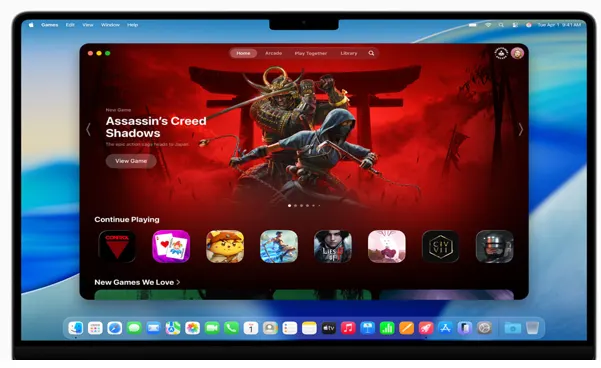
Gaming Highlights
- Apple Games App: Showcases your game library, leaderboards, and friends’ activities. Developers can use GameKit APIs to integrate social features like multiplayer and achievements.
- Game Overlay: Allows in-game adjustments (e.g., volume, brightness) and chatting without exiting full-screen mode, supported by new Metal APIs.
- Metal 4: Introduces MetalFX Frame Interpolation and Denoising for improved frame rates and visuals. Titles like Cyberpunk 2077 and HITMAN World of Assassination showcase the Mac’s gaming potential.
The Game Porting Toolkit has also been updated, simplifying the process of bringing advanced games to macOS, as noted in the release notes.
Core App Updates
macOS Tahoe 26 brings significant updates to core apps, all supported by new APIs:
- Safari: Features rounded tabs, a refreshed sidebar, and 50% faster performance than Chrome. New WebKit APIs enhance developer support.
- Messages: Supports custom backgrounds, polls, and advanced search, with new MessagingKit APIs.
- Journal: Now on Mac, synced via iCloud, with JournalKit APIs for developers.
- Photos: Features a Liquid Glass redesign and improved editing tools, supported by PhotosKit updates.
- FaceTime: Includes floating controls, with new FaceTimeKit APIs.
Accessibility and Performance
The release notes detail new accessibility features, including Magnifier for Mac, which uses an iPhone or USB camera for vision-impaired users, supported by AccessibilityKit APIs. Performance optimizations include a Low Power Mode for MacBooks and enhanced Rosetta 2 support for Intel Macs. Compatibility is limited to Apple Silicon Macs and select Intel models with T2 chips.
Compatibility and Release Timeline
macOS Tahoe 26 supports most Apple Silicon Macs and select Intel models, including:
- MacBook Pro (2018 and later)
- MacBook Air (2018 and later)
- iMac (2019 and later)
- Mac mini (2018 and later)
- Mac Pro (2019 and later)
- iMac Pro (2017)
Some features, particularly those powered by Apple Intelligence, require an M1 chip or later. The developer beta is available now, with a public beta in July and a full release in fall 2025.
Why macOS Tahoe 26 Matters
macOS Tahoe 26 is a bold leap forward, combining a stunning Liquid Glass design with powerful productivity tools and seamless iPhone integration. The release notes highlight Apple’s focus on developer empowerment, with new APIs enabling apps to leverage Spotlight, Apple Intelligence, and gaming features. For users, the update offers unmatched customization, smarter workflows, and a vibrant gaming ecosystem.
As Apple continues to refine its ecosystem, macOS Tahoe 26 sets a new standard for desktop operating systems. Whether you’re a developer building cutting-edge apps or a user seeking a more personalized Mac experience, this update delivers. Join the public beta in July or await the full release this fall to experience the liquid glass revolution firsthand.
Conclusion
macOS Tahoe 26 is a testament to Apple’s ability to innovate while staying true to what makes the Mac special. With its Liquid Glass design, smarter Spotlight, seamless iPhone integration, and robust gaming features, this update sets a new standard for desktop operating systems. As we await its full release this fall, macOS Tahoe 26 promises to transform how you interact with your Mac, making every task more intuitive, beautiful, and delightful.
Ready to dive into the Liquid Glass revolution? Join the public beta in July or wait for the official release to experience macOS Tahoe 26 firsthand. Share your thoughts in the comments below, and stay tuned for more updates on Apple’s latest innovations!
Disclaimer
The information in this blog post about macOS Tahoe 26 is based on the official macOS Tahoe 26 Beta Release Notes from Apple’s Developer Documentation and WWDC 2025 announcements as of June 10, 2025. While every effort has been made to ensure accuracy, features, specifications, and release details are subject to change as macOS Tahoe 26 is currently in beta. Always refer to Apple’s website for the latest updates and official documentation before making decisions.
This post is for informational purposes only and does not constitute professional advice. Installing beta software, such as the macOS Tahoe 26 developer or public beta, may cause data loss or system instability. Always back up your Mac before installing beta software and proceed at your own risk. The author and publisher are not responsible for any damages or losses resulting from the use of information in this post.
Links to external sources, such as Apple’s Developer Documentation, are provided for reference and do not imply endorsement. Opinions expressed are those of the author and are intended to provide a general overview of macOS Tahoe 26’s features and potential.
FAQs about macOS Tahoe 26
What is macOS Tahoe 26, and why is it called a “Liquid Glass Revolution”?
macOS Tahoe 26 is Apple’s latest desktop operating system, unveiled at WWDC 2025. It’s named after Lake Tahoe and introduces a stunning Liquid Glass design with translucent, adaptive visuals for the menu bar, Dock, and apps. This sleek, modern look, combined with features like smarter Spotlight and iPhone integration, makes it feel like a revolutionary leap for your Mac’s style and functionality.
Which Macs are compatible with macOS Tahoe 26?
macOS Tahoe 26 supports most Apple Silicon Macs and some Intel models with T2 chips, including MacBook Pro (2018+), MacBook Air (2018+), iMac (2019+), Mac mini (2018+), Mac Pro (2019+), and iMac Pro (2017). Some features, like Apple Intelligence, require an M1 chip or later. Check Apple’s website for the full compatibility list before upgrading.
When can I try macOS Tahoe 26, and is it safe to install the beta?
The developer beta is out now (June 2025), with a public beta coming in July and the full release expected in September or October. Beta versions can be buggy, so they’re best for testing on a secondary Mac. Always back up your data before installing to avoid any hiccups. Ready to dive in? Join the public beta for an early look!
How does the new Phone app on macOS Tahoe 26 work?
The Phone app lets you make and receive iPhone cellular calls right from your Mac, synced via iCloud. It includes features like Call Screening for unknown callers and Hold Assist to stay in phone queues while you work. You’ll need a nearby iPhone, but it’s a game-changer for keeping your calls and tasks in one place.
What makes Spotlight better in macOS Tahoe 26?
Spotlight in macOS Tahoe 26 is a productivity beast! It now combines files, apps, and messages into one AI-ranked view, supports Quick Keys for fast actions (like “sm” for sending a message), and even includes a clipboard history. Plus, it searches third-party cloud storage like Google Drive, making it your go-to command center.
Also Read
Top 10 Mobile Antivirus Apps to Keep Your Phone Secure in 2025 🔒📱