Rocky Linux 10, codenamed “Red Quartz,” has officially arrived, bringing a wave of exciting updates and features that solidify its position as a leading enterprise-grade, open-source operating system. Released on June 11, 2025, this major version builds on the foundation of its predecessors while introducing significant changes to enhance performance, security, and hardware support. As a 100% bug-for-bug compatible alternative to Red Hat Enterprise Linux (RHEL) 10, Rocky Linux 10 is designed for businesses, developers, and enthusiasts seeking a stable, secure, and community-driven platform.
In this comprehensive blog post, we’ll dive into the key features, updates, and improvements in Rocky Linux 10, sourced directly from the official Rocky Linux website and documentation. Whether you’re an IT professional planning a deployment or a Linux enthusiast curious about the latest advancements, this guide will walk you through everything you need to know about Rocky Linux 10.
Introduction to Rocky Linux 10
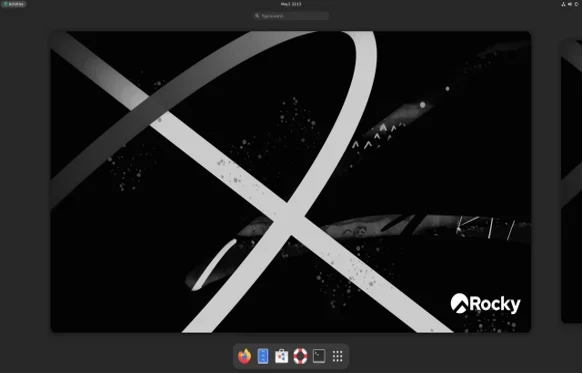
Rocky Linux, developed by the Rocky Enterprise Software Foundation (RESF), is a free, community-supported operating system that emerged as a direct response to the discontinuation of CentOS Linux. Since its inception in 2021, Rocky Linux has gained widespread adoption for its reliability, long-term support, and compatibility with RHEL. With the release of Rocky Linux 10, the project continues to deliver on its promise of providing a production-ready, enterprise-focused OS that’s accessible to all.
Rocky Linux 10 is a major release that introduces new hardware support, updated software stacks, and enhanced security features. It’s designed to meet the demands of modern enterprise environments, from data centers to cloud deployments, while also catering to specialized use cases like high-performance computing (HPC) and edge computing. Let’s explore the standout features and updates in this release.
Key Features of Rocky Linux 10
1. Expanded Hardware Support with RISC-V Architecture
One of the most exciting additions to Rocky Linux 10 is official support for the RISC-V architecture. RISC-V is an open-source instruction set architecture (ISA) that’s gaining traction for its flexibility and cost-effectiveness. By including RISC-V support, Rocky Linux 10 positions itself as a versatile OS for emerging hardware platforms, from embedded systems to high-performance servers.
- Why It Matters: RISC-V support opens doors for developers and enterprises to deploy Rocky Linux on a broader range of devices, including those from vendors like SiFive and Rivos, Inc. This move aligns with the growing industry push toward open-source hardware, driven by initiatives like RISC-V International and the RISE Project.
- Details: The RISC-V builds are considered an Alternative Architecture (AltArch), meaning they won’t block releases for other architectures if build failures occur. This ensures stability for primary architectures like x86_64, aarch64, ppc64le, and s390x while fostering RISC-V development.
- Get Involved: Interested in RISC-V? Join the ~SIG/AltArch channel on the Rocky Linux Mattermost to collaborate with the community and test RISC-V images (available soon on the Rocky Linux Downloads page).
2. Removal of x86-64-v2 and 32-Bit Support
Rocky Linux 10 marks a significant shift in hardware requirements by dropping support for x86-64-v2 architectures and all 32-bit packages. This change reflects the industry’s move toward modern 64-bit systems and aligns with RHEL 10’s requirements.
- What’s Changed: The baseline for x86_64 systems is now x86-64-v3, which was introduced with AMD’s Excavator microarchitecture. Older processors, including some Intel Atom models (e.g., Elkhart Lake-family x6416RE), are no longer supported. Users can verify processor compatibility using the procedure outlined in the Rocky Linux 10 documentation.
- Impact on 32-Bit: All 32-bit applications are unsupported in Rocky Linux 10. Users relying on legacy 32-bit dependencies must transition to 64-bit libraries or use containerized solutions.
- Why It Matters: By focusing on x86-64-v3 and 64-bit systems, Rocky Linux 10 optimizes performance for modern hardware, reduces maintenance overhead, and enhances security by eliminating outdated architectures.
3. Default Administrative Privileges
Rocky Linux 10 introduces a user-friendly change by granting administrative privileges to users by default during installation, unless explicitly deselected. This simplifies system management for single-user systems or small teams.
Why It Matters: This feature reduces the need for manual configuration of sudo privileges, making Rocky Linux 10 more accessible for new users while maintaining flexibility for enterprise environments where stricter controls are needed.
Use Case: Ideal for desktop or workstation setups where users require frequent administrative access without compromising security.
4. Updated Kernel and Scheduler
The default kernel in Rocky Linux 10 has been upgraded to version 6.12.0, bringing improved performance and support for modern hardware. Additionally, the CFS (Completely Fair Scheduler) has been replaced with the Earliest Eligible Virtual Deadline First (EEVDF) scheduler.
- EEVDF Benefits: The EEVDF scheduler prioritizes latency-sensitive tasks with shorter time slices, enhancing responsiveness for interactive applications and real-time workloads.
- Kernel Changes: Some kernel features have been disabled due to being unmaintained, insecure, or deprecated. Users can re-enable these features using the rh_waived kernel command-line argument if needed.
- Why It Matters: The updated kernel and scheduler improve system efficiency, making Rocky Linux 10 a strong choice for performance-critical environments like HPC and cloud computing.
5. Wayland as the Default Graphical Stack
Rocky Linux 10 transitions to Wayland as the default display server protocol, replacing X.Org for graphical environments. This change aligns with modern Linux trends and enhances security and performance.
- What’s Removed: X.Org, along with related packages like X11, Firefox, LibreOffice, Evolution, TigerVNC, Inkscape, WebKit2, and XSane, has been removed from Rocky Linux 10. XWayland is retained for compatibility with X11 applications.
- Why It Matters: Wayland offers better security through sandboxing, improved multi-monitor support, and smoother graphics performance. However, users relying on removed GUI applications may need to explore alternatives or use containerized solutions.
- Use Case: Ideal for modern desktop and workstation setups, but infrastructure servers are unaffected as they typically run headless.
6. Enhanced Networking Features
Rocky Linux 10 introduces significant updates to networking capabilities, improving configuration and performance for enterprise environments.
- NetworkManager: The deprecated ifcfg-rh network scripts are no longer available, requiring users to adopt NetworkManager tools like nmcli, nmtui, or nmstate.
- NIC Teaming Removal: The NIC teaming feature has been removed in favor of bonding for network interface aggregation.
- Other Updates: Enhancements to DHCP clients/servers, network configuration, and device drivers improve reliability and compatibility.
- Why It Matters: These changes streamline network management and ensure compatibility with modern hardware, making Rocky Linux 10 a robust choice for cloud and data center deployments.
7. Storage and File System Updates
Rocky Linux 10 includes several storage-related improvements, but also removes support for certain legacy features.
- Discontinued Features: The GFS2 file system and Device Mapper (DM) Multipath on NVMe devices are no longer supported.
- Updated Packages: The cryptsetup package has been rebased to version 2.7, improving support for LUKS-encrypted devices with the kernel dump (kdump) service.
- Driver Changes: New, updated, and removed storage-related device drivers enhance compatibility with modern hardware.
- Why It Matters: These updates ensure Rocky Linux 10 remains secure and efficient for enterprise storage needs, while phasing out unsupported technologies.
8. Security Enhancements
Security is a cornerstone of Rocky Linux 10, with several new features and updates to protect systems in enterprise environments.
- Integrity Measurement Architecture (IMA): Rocky Linux 10 prioritizes support for IMA, a kernel-level feature for file attestation using a dedicated signing certificate authority (CA). This enhances system integrity and compliance.
- Cryptographic Policies: OpenSSL and OpenSSH now support post-quantum algorithms, preparing systems for future cryptographic threats.
- Sequoia PGP: A memory-safe implementation of OpenPGP improves security for cryptographic operations.
- OpenSSH: Stricter SSH host key permissions (0600 vs. 0640) enhance access control.
- Why It Matters: These security features make Rocky Linux 10 a trusted platform for organizations prioritizing compliance and data protection.
Updated Software Stack
Rocky Linux 10 includes a refreshed software stack with modern versions of key tools and libraries, ensuring compatibility with the latest applications and development workflows.
Programming Languages:
- Python 3.12: The latest Python version for modern development.
- PHP 8.3: Enhanced performance and security for web applications.
Databases:
- PostgreSQL 16.8: Advanced features for enterprise database management.
- MySQL 8.4: Improved performance and scalability.
- MariaDB 10.11: A robust open-source database alternative.
Web Servers:
- Nginx 1.26: Optimized for high-traffic websites.
Development Tools:
- GDB 14.2: Enhanced debugging capabilities.
- Valgrind 3.23: Improved memory analysis for developers.
Monitoring Tools:
Grafana 10.2.6: Advanced visualization for system metrics.
Performance Co-Pilot 6.3: Comprehensive performance monitoring.
RPM Updates: The RPM package manager is updated to version 4.19, introducing the rpmsort command for better version string ordering and enhancing build tools.
Installation and Upgrade Considerations
Installation Enhancements
The Anaconda installer in Rocky Linux 10 has been updated with an improved graphical interface, making installation more intuitive. Default administrative privileges simplify post-installation setup, and updated installation media (ISO images, containers, cloud images, and live images) are available on the Rocky Linux Downloads page.
No Upgrade Path from Previous Versions
Rocky Linux 10 does not support in-place upgrades from earlier versions (e.g., Rocky Linux 8 or 9). Users must perform a clean installation to adopt version 10. This ensures a stable and consistent system but requires careful planning for data migration and backups.
Recommendation: Back up critical data using tools like rsync or tar before installing Rocky Linux 10. For enterprise deployments, test the installation in a non-production environment first.
Release Engineering and Testing
Rocky Linux 10 underwent two weeks of rigorous testing to ensure stability and accuracy across diverse environments. The testing process included manual and automated checks, with artifacts and discussions available in the Rocky Release (v10) Playbook. The community’s commitment to quality is evident in this thorough validation process.
Temporary Shift to Koji: Due to the unfinished state of the Peridot Two build system, Rocky Linux 10 uses Koji for release engineering. This ensures stability and proper IMA signing, with Peridot Two planned for future releases.
Community and Ecosystem Contributions
Rocky Linux 10 is a testament to the power of open-source collaboration. The RESF extends gratitude to volunteers, sponsors, and partners, including:
- Fedora Linux and CentOS Stream for upstream development.
- RISC-V International, RISE, Rivos, Inc., and the Fedora RISC-V Community for RISC-V support.
- Community contributors who compiled, tested, and documented the release.
The Rocky Linux community is vibrant and growing, with opportunities to contribute via the Testing Team, Documentation Team, or AltArch SIG. Join the conversation on chat.rockylinux.org or participate in events like Ohio Linux Fest or SC24.
Support and Lifecycle
Rocky Linux 10 offers a 10-year maintenance lifecycle, with general support until May 31, 2030, and security support through May 31, 2035. This long-term commitment makes it an ideal choice for enterprises requiring stability and predictability.
- Supported Architectures: x86_64-v3, riscv64, aarch64, ppc64le, s390x.
- Commercial Support: Available through partners like CIQ and OpenLogic, ensuring enterprise-grade assistance for mission-critical deployments.
Conclusion
Rocky Linux 10 is a bold step forward for the open-source enterprise Linux ecosystem. With RISC-V support, a modernized software stack, enhanced security features, and a focus on 64-bit architectures, it’s well-equipped to meet the needs of today’s IT environments. Whether you’re running production servers, developing applications, or exploring new hardware platforms, Rocky Linux 10 offers a stable, secure, and community-driven solution.
Ready to try Rocky Linux 10? Visit the Rocky Linux Downloads page to get started with installation media, containers, or cloud images. Join the community on chat.rockylinux.org to share feedback, contribute, or learn more about this exciting release. What are your thoughts on Rocky Linux 10’s new features? Let us know in the comments below, and don’t forget to share this post with your network!
Disclaimer
The information provided in this blog post about Rocky Linux 10 is based on official documentation and announcements from the Rocky Linux website and related sources as of June 13, 2025. While every effort has been made to ensure accuracy, features, updates, and other details may change with subsequent releases or updates. Users are encouraged to verify information directly from the official Rocky Linux website (https://rockylinux.org) or community channels before making deployment decisions.
The author and publisher are not responsible for any errors, omissions, or damages resulting from the use of this information. Always perform thorough testing and backups before installing or upgrading to Rocky Linux 10 in production environments.
Also Read
Bottlerocket OS: Secure Linux for Containers by AWS