


Linux has solidified its reputation as a powerhouse in the world of operating systems, known for its flexibility, security, and open-source nature. Whether you’re a beginner dipping your toes into the Linux ecosystem or an enterprise IT manager seeking a rock-solid server solution, choosing a reliable Linux distribution (distro) is critical. With hundreds of distros available, each tailored to specific needs, identifying the most dependable ones can feel overwhelming.
This blog post Most Reliable Linux Operating Systems Ranked in 2025, based on the latest official data, community feedback, and expert reviews. We’ll explore their stability, support, and use cases to help you find the perfect fit for your needs.
What Makes a Linux Distro Reliable?
Before diving into the rankings, let’s define what “reliability” means for a Linux distro. A reliable Linux operating system typically excels in:
- Stability: Minimal crashes, bugs, or unexpected behavior, even under heavy workloads.
- Long-Term Support (LTS): Regular updates and security patches over extended periods.
- Community and Documentation: Active communities and comprehensive resources for troubleshooting.
- Hardware Compatibility: Broad support for various hardware configurations, from legacy systems to modern servers.
- Security: Robust mechanisms to protect against vulnerabilities and unauthorized access.
With these criteria in mind, let’s explore the most reliable Linux distros for 2025, ranked based on stability, support, and real-world performance.
1. Debian

Overview
Debian is often hailed as the gold standard for stability and reliability, earning its top spot in our ranking. With over 20 years of development, Debian’s rigorous testing process ensures that only thoroughly vetted software makes it into its stable releases. The latest stable version, Debian 12 “Bookworm,” released in 2023, continues to uphold this legacy.
Why It’s Reliable
- Rigorous Testing: Debian’s “Stable” branch undergoes months of testing in the “Testing” branch before release, minimizing bugs and ensuring a polished experience.
- Long-Term Support: Debian offers three years of support for stable releases, with an additional two years through the Long Term Support (LTS) program, making it ideal for servers and mission-critical systems.
- Vast Hardware Support: Debian supports a wide range of architectures, including ARM, x86, and RISC-V, making it versatile for both old and new hardware.
- Package Management: The Advanced Package Tool (APT) simplifies software installation and dependency management, reducing the risk of conflicts.
- Community Support: Debian’s active community and extensive documentation, including the Debian Wiki, provide robust resources for users.
Best For
- Enterprises running servers or workstations.
- Developers needing a stable base for software development.
- Users with older hardware seeking compatibility.
Drawbacks
- Software in the stable branch can be slightly outdated compared to rolling-release distros.
- Initial setup may require more technical knowledge than beginner-friendly distros.
Verdict
Debian’s meticulous testing and long-term support make it the most reliable Linux distro for users prioritizing stability over cutting-edge features. It’s a go-to choice for servers and enterprise environments.
2. Ubuntu (LTS Releases)

Overview
Ubuntu, built on Debian, is one of the most popular Linux distros globally, especially for its Long Term Support (LTS) releases. Ubuntu 24.04 LTS, released in 2024, is a cornerstone for both desktop and server environments, balancing user-friendliness with enterprise-grade reliability.
Why It’s Reliable
- Long-Term Support: Ubuntu LTS releases are supported for five years with free security and maintenance updates, ensuring longevity for production systems.
- Enterprise Backing: Developed by Canonical, Ubuntu benefits from professional support and integration with major cloud platforms like AWS, Azure, and GCP.
- ZFS Support: Ubuntu’s support for the ZFS file system enhances data integrity and system recovery, making it a robust choice for servers.
- Accessibility: Improved accessibility options, such as screen readers and keyboard navigation, ensure a polished experience for diverse users.
- Community and Documentation: Ubuntu’s massive community and detailed documentation make troubleshooting straightforward.
Best For
- Beginners transitioning from Windows or macOS.
- Enterprises deploying cloud or internal servers.
- Developers seeking a versatile, well-supported platform.
Drawbacks
- Canonical’s use of Snap packages has drawn criticism for slower performance compared to Flatpaks.
- Some users have raised privacy concerns due to past data-sharing practices, though these have been addressed.
Verdict
Ubuntu LTS is a reliable, user-friendly option for both beginners and professionals. Its widespread adoption and extensive support make it a safe bet for diverse use cases.
3. Linux Mint

Overview
Linux Mint, based on Ubuntu and Debian, is renowned for its beginner-friendly interface and rock-solid stability. The latest version, Linux Mint 22.1 “Virginia,” released in 2024, continues to prioritize ease of use and reliability.
Why It’s Reliable
- Stable Base: Built on Ubuntu LTS, Linux Mint inherits its stability while adding a user-friendly layer with the Cinnamon, MATE, or Xfce desktop environments.
- Pre-Installed Software: Mint comes with essential applications like LibreOffice, Firefox, and GIMP, reducing the need for post-installation tweaks.
- No Snap Bloat: Unlike Ubuntu, Mint avoids Snap packages, opting for Flatpaks and traditional APT for faster, more reliable software management.
- Lightweight Options: The Xfce and MATE editions are optimized for older hardware, ensuring smooth performance on low-spec systems.
- Community-Driven: Mint’s active community and detailed forums provide ample support for users.
Best For
- Windows users transitioning to Linux due to its familiar interface.
- Users with older hardware seeking a lightweight, stable OS.
- Beginners looking for an out-of-the-box experience.
Drawbacks
- The Cinnamon desktop can be resource-heavy on very old systems.
- Less frequent updates compared to rolling-release distros.
Verdict
Linux Mint is a top choice for beginners and users seeking a Windows-like experience with Ubuntu’s stability. Its lightweight options and robust community support cement its reliability.
4. AlmaLinux

Overview
AlmaLinux emerged as a community-driven alternative to CentOS after its shift to CentOS Stream. The latest release, AlmaLinux 9, is a binary-compatible replacement for Red Hat Enterprise Linux (RHEL), making it a favorite for enterprise environments.
Why It’s Reliable
- RHEL Compatibility: AlmaLinux’s binary compatibility with RHEL ensures seamless integration with enterprise software and tools.
- Long-Term Support: Offers up to 10 years of support, aligning with RHEL’s lifecycle, making it ideal for long-term deployments.
- Robust Security: Features like SELinux and AppArmor provide strong security mechanisms, critical for server environments.
- Versatile Deployment: Supports various architectures and provides images for cloud, containers, and bare-metal setups.
- Community Support: Backed by the AlmaLinux OS Foundation, it has a growing community and reliable documentation.
Best For
- Enterprises needing a free, RHEL-compatible OS.
- IT managers deploying servers or workstations.
- Users replacing CentOS in production environments.
Drawbacks
- Primarily server-focused, so the desktop experience is less polished.
- Requires some technical expertise for setup and maintenance.
Verdict
AlmaLinux is a powerhouse for enterprise users needing a stable, RHEL-compatible distro. Its long-term support and security features make it a reliable choice for mission-critical systems.
5. openSUSE (Leap)

Overview
openSUSE Leap is a stable, community-driven distro that balances reliability with access to modern software. The latest version, openSUSE Leap 15.5, is a robust option for both desktop and server use.
Why It’s Reliable
- Stable Release Model: Leap uses a fixed release cycle with regular updates, ensuring stability without sacrificing modernity.
- YaST Tool: The YaST configuration tool simplifies system management, reducing errors during setup and maintenance.
- Enterprise Roots: Incorporates features from SUSE Linux Enterprise, ensuring enterprise-grade reliability.
- Btrfs Support: The Btrfs file system with Snapper enables easy system snapshots and rollbacks, enhancing recovery.
- Community and Documentation: openSUSE’s active community and detailed guides provide strong support.
Best For
- Developers and system administrators needing a stable, feature-rich environment.
- Enterprises seeking a free alternative to SUSE Linux Enterprise.
- Users who want advanced configuration tools.
Drawbacks
- Steeper learning curve for beginners compared to Ubuntu or Mint.
- Less beginner-friendly documentation than Ubuntu.
Verdict
openSUSE Leap is a reliable choice for users who need a balance of stability and modern features. Its enterprise roots and powerful tools make it ideal for technical users.
6. Slackware
Overview
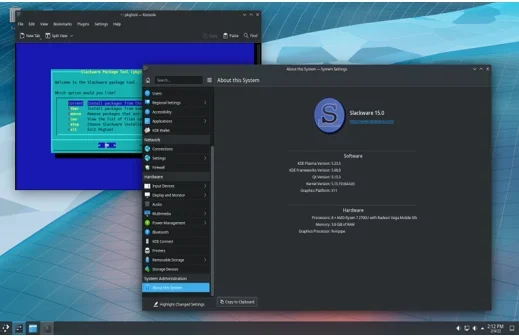
Slackware, one of the oldest Linux distros, has been around since 1993 and remains a favorite for advanced users seeking simplicity and stability. Slackware 15.0, released in 2022, is its latest major version.
Why It’s Reliable
- Minimalist Design: Slackware avoids unnecessary complexity, reducing the risk of software conflicts.
- Stable Releases: Infrequent but thoroughly tested releases ensure long-term reliability.
- Customizability: Offers full control over system components, allowing users to build a stable, tailored setup.
- Wide Hardware Support: Compatible with a broad range of hardware, from legacy to modern systems.
- Community Support: While smaller than Ubuntu’s, Slackware’s community is dedicated and provides valuable resources.
Best For
- Advanced users who prioritize control and simplicity.
- Servers and workstations requiring minimal, stable setups.
- Enthusiasts who enjoy manual configuration.
Drawbacks
- Lacks a graphical installer, which can intimidate beginners.
- Smaller community compared to Debian or Ubuntu.
Verdict
Slackware’s minimalist approach and stable releases make it a reliable choice for advanced users who value control and simplicity over out-of-the-box ease.
7. Fedora (Workstation)

Overview
Fedora Workstation, sponsored by Red Hat, is known for its cutting-edge features and reliable performance. Fedora 41, released in 2024, is a stable option for developers and desktop users.
Why It’s Reliable
- Regular Updates: Fedora’s fixed release cycle ensures timely security patches and bug fixes.
- Hardware Support: Works closely with vendors for excellent compatibility across devices.
- GNOME Integration: The default GNOME desktop is polished and stable, offering a smooth user experience.
- Developer Tools: Includes modern container tools and virtualization support, ideal for development environments.
- Community and Red Hat Support: Backed by a strong community and Red Hat’s expertise.
Best For
- Developers needing the latest tools and technologies.
- Desktop users seeking a modern, stable OS.
- Enterprises testing features for future RHEL releases.
Drawbacks
- Shorter support cycle (13 months) compared to LTS distros.
- GNOME can be resource-intensive on older hardware.
Verdict
Fedora Workstation is a reliable, forward-looking distro for users who want modern features without sacrificing stability. It’s ideal for developers and tech enthusiasts.
8. Zorin OS

Overview
Zorin OS, based on Ubuntu, is designed for ease of use and reliability, particularly for Windows users transitioning to Linux. Zorin 17, released in 2023, is its latest stable version.
Why It’s Reliable
- Ubuntu Base: Inherits Ubuntu’s stability and extensive software ecosystem.
- Lightweight Options: The Lite edition runs smoothly on older hardware, ensuring broad compatibility.
- Security Features: Built-in encryption and privacy tools protect user data.
- User-Friendly Interface: The Zorin Appearance app allows easy customization, reducing setup errors.
- Community Support: Growing community and detailed guides enhance reliability.
Best For
- Windows users switching to Linux.
- Users with older hardware needing a lightweight, stable OS.
- Beginners seeking a polished, reliable experience.
Drawbacks
- Fewer advanced features compared to distros like Fedora or Arch.
- Smaller community than Ubuntu or Debian.
Verdict
Zorin OS is a reliable, beginner-friendly distro that combines Ubuntu’s stability with a Windows-like interface, making it perfect for newcomers.
Conclusion
Choosing the most reliable Linux distro depends on your needs, expertise, and hardware. For enterprise-grade stability, Debian and AlmaLinux are unbeatable, especially for servers. Ubuntu LTS and Linux Mint excel for beginners and desktop users, offering user-friendly interfaces and long-term support. openSUSE Leap and Fedora Workstation cater to developers and technical users who need modern features with stability. Slackware appeals to advanced users who prioritize simplicity, while Zorin OS is ideal for Windows users transitioning to Linux.
Each distro on this list has been vetted for reliability through rigorous testing, long-term support, and strong community backing. Whether you’re running a server, reviving an old PC, or building a development environment, these Linux distros offer dependable solutions for 2025. Ready to dive in? Download your chosen distro and explore the power of open-source computing!
Disclaimer
The information provided in this blog post is based on data from official websites, community feedback, and expert reviews available as of June 16, 2025. While every effort has been made to ensure accuracy, the rankings and opinions expressed are subjective and intended for general informational purposes only. Reliability of a Linux distribution may vary depending on individual use cases, hardware configurations, and user expertise.
We recommend conducting your own research and testing before selecting a Linux operating system for critical or production environments. The author and publisher are not responsible for any issues, damages, or losses arising from the use of the information or software mentioned in this post. Always back up your data and consult official documentation or professional support when deploying any operating system.
Also Read
Exploring LastOS Linux: A Fresh Take on Open-Source Freedom


