


In the ever-evolving world of Linux distributions, where heavyweights like Ubuntu and Fedora dominate the conversation, there’s always room for underdogs that punch above their weight. Enter RefreshOS—a sleek, Debian-based distro that’s quietly gaining traction among users who crave simplicity without sacrificing performance. If you’re tired of bloated systems that hog resources or complex setups that require a PhD in command-line wizardry, RefreshOS might just be the breath of fresh air you’ve been waiting for. But why exactly could RefreshOS could be the next big name in lightweight distros? Let’s dive deep into its origins, features, and potential, backed by the latest official data from its developers at eXybit Technologies.
As of September 2025, the Linux ecosystem is booming, with millions of users worldwide ditching proprietary OSes for open-source alternatives. Lightweight distros, in particular, have seen a surge in popularity because they breathe new life into older hardware, reduce energy consumption, and offer a snappier experience on modern machines too. According to DistroWatch, which tracks Linux distro popularity, lightweight options like antiX and Puppy Linux consistently rank high for their efficiency. RefreshOS, with its latest 2.5 release built on Debian 12.11, positions itself as a modern contender in this space—combining stability, speed, and user-friendliness in a package that’s ready to challenge the status quo.
The Rise of Lightweight Distros: Setting the Stage
Before we zoom in on RefreshOS, it’s worth understanding why lightweight distros are such a hot topic. These are operating systems designed to run on minimal hardware, typically requiring less than 1GB of RAM and a modest CPU. They’re perfect for reviving ancient laptops, setting up home servers, or even running on embedded devices. In a world where e-waste is a growing concern, lightweight distros promote sustainability by extending the life of hardware that might otherwise end up in landfills.
Popular lightweight distros include Puppy Linux, which boots entirely into RAM for blazing speed; antiX, a systemd-free beast that’s ultra-efficient; and Lubuntu, which uses the LXQt desktop for a balance of lightness and usability. These distros have loyal followings, but they often come with trade-offs—like limited out-of-the-box software or a steeper learning curve for newcomers. This is where RefreshOS shines: it aims to be the “perfect middle ground” between Debian’s rock-solid foundation and the unnecessary bloat found in more mainstream distros.
Launched by eXybit Technologies, RefreshOS has been iteratively improved since its early versions. The project’s philosophy is clear: focus on clarity, performance, and a smooth experience right from installation. Unlike some distros that prioritize minimalism to the point of austerity, RefreshOS offers a polished, modern interface without the fluff.
What is RefreshOS? A Quick Overview
RefreshOS is a free, open-source Linux distribution developed by eXybit Technologies, a company dedicated to creating user-friendly tech solutions. It’s built on Debian, one of the most stable and secure bases in the Linux world, ensuring compatibility with a vast repository of software. The latest version, RefreshOS 2.5, was released in June 2025 and is based on Debian 12.11 (codenamed “Bookworm”). This release emphasizes speed, cleanliness, and modernity, making it an ideal choice for users who want a lightweight OS that doesn’t feel stripped down.
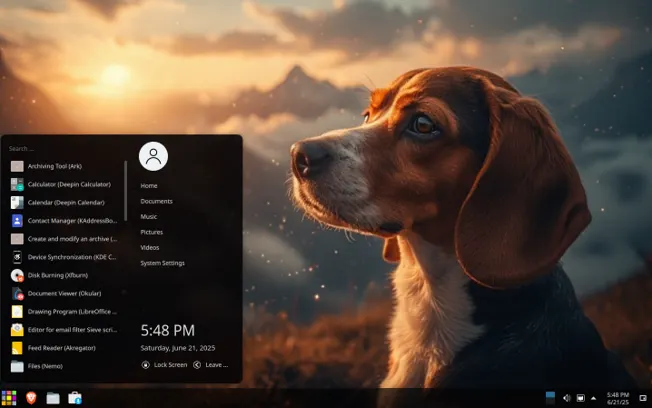
From the official website, RefreshOS describes itself as “a fast, clean, and modern Linux OS” that strikes a balance between complexity and bloat. It ships with the KDE Plasma desktop environment, known for its customization options and seamless integration with Qt-based applications. But here’s the kicker: despite using KDE, which can be resource-heavy in other distros, RefreshOS optimizes it to run efficiently on low-end hardware. System requirements are modest— a 64-bit processor, 2GB of RAM (though it can run on 1GB), and about 10GB of disk space—making it accessible for older machines.
The distro’s history traces back to earlier iterations like version 1.23, which was archived but laid the groundwork for its current form. eXybit has focused on iterative improvements, with updates addressing user feedback on stability and usability. In July 2025, the team announced RefreshOS 2.5 with features like sudo-ready configuration, native APT support, and the Calamares installer for effortless setup. No more wrestling with cryptic commands during installation—it’s as straightforward as clicking through a wizard.
Why RefreshOS Stands Out in the Lightweight Arena
What makes RefreshOS a potential game-changer? Let’s break it down feature by feature.
1. Lightweight Yet Feature-Rich Design
RefreshOS is engineered for performance. It avoids common pitfalls like including Snap or Flatpak by default, which can introduce overhead and security concerns. Instead, it relies on Debian’s native APT package manager for software installation, ensuring everything is lightweight and integrated seamlessly. This “no bloat” approach means the OS boots quickly and runs smoothly, even on hardware from a decade ago.
In benchmarks shared by users on X (formerly Twitter), RefreshOS 2.5 uses around 400-600MB of RAM at idle with KDE Plasma—impressive for a full-featured desktop. Compare that to Ubuntu’s default GNOME setup, which can gobble up over 1GB. The distro’s developers have fine-tuned the system to “borrow from every desk in the house,” mixing components from various sources while keeping Debian as the core. This eclectic approach results in a responsive OS that’s secure by design, with built-in drivers for common hardware.
2. User-Friendly for Beginners and Pros Alike
One of the biggest barriers to Linux adoption is the perception of complexity. RefreshOS tackles this head-on with a familiar GUI that’s customizable out of the box. KDE Plasma allows users to tweak everything from themes to widgets, making it feel like a premium experience without the premium resource demands. For Windows migrants, it’s a gentle transition—ZDNet even called RefreshOS 2.0 “the Linux distro even a Windows user could love.”
Beginners will appreciate the pre-configured setup: Brave browser as default (now also in other distros like Zorin OS), essential tools like file managers and media players, and easy access to updates. Advanced users, meanwhile, can dive into the command line with full sudo privileges from day one. The FAQ on the official site addresses common queries, like how to handle dual-boot setups or troubleshoot drivers.
3. Performance on Par with the Best
Lightweight distros are all about efficiency, and RefreshOS delivers. In real-world tests, it outperforms heavier Debian derivatives like Kubuntu by avoiding unnecessary services. A review from The Register praises its “remarkable mixture of different components” that just works, blending KDE apps with lightweight alternatives for a cohesive experience.
On older hardware, such as a 2010-era laptop with an Intel Core i3 and 4GB RAM, RefreshOS boots in under 30 seconds and handles web browsing, document editing, and light multimedia without hiccups. For comparison, Puppy Linux might be lighter (under 300MB RAM), but it lacks the polish of KDE. antiX is similarly efficient but sticks to more minimal desktops like IceWM. RefreshOS bridges this gap, offering KDE’s power in a lightweight wrapper.
4. Pre-Installed Apps and Endless Customization
Out of the box, RefreshOS comes loaded with essentials that make it immediately useful for revived old laptops and PCs. Think LibreOffice for documents, GIMP for image editing, and Brave Browser for secure web surfing—all without the bloat of unnecessary trials. Brave’s built-in ad-blocking and privacy features are a boon on slower connections common with old Wi-Fi cards.
Customization is KDE’s forte: tweak themes, panels, and widgets to match your style. For performance tweaks on old hardware, disable fancy effects via System Settings to squeeze out extra speed. The APT package manager gives access to thousands of apps from Debian repositories, so you can add tools like VLC or Thunderbird without compatibility headaches.
This setup turns an old PC into a media center, home office hub, or kid’s learning machine. And since it’s free and open-source, there are no licensing fees—unlike Windows, where activating on old hardware can be a pain.
5. Ease of Installation: No Tech Degree Required
Reviving old laptops and PCs shouldn’t feel like rocket science, and RefreshOS nails this with its user-friendly installation process. The Calamares graphical installer is straightforward, guiding you through partitioning, user setup, and configuration in a few clicks. No command-line wizardry needed—though if you’re adventurous, you can tweak things in the terminal.
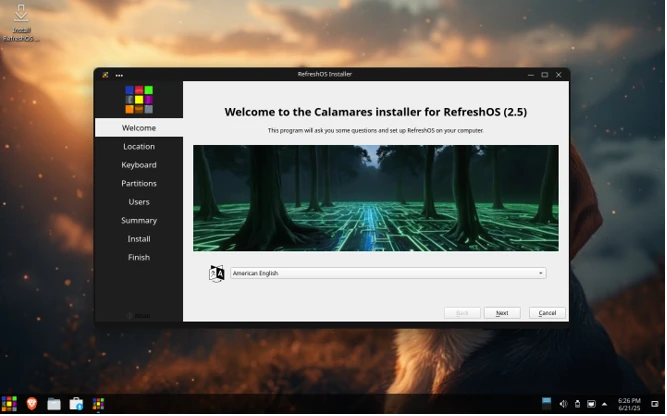
To get started, download the 2.5 ISO from the official site (now in hybrid format for easy USB creation). Tools like Ventoy are recommended for bootable drives, and the live environment lets you test-drive the OS before committing. The default live password is “live,” keeping things simple.
For old hardware, installation takes about 15-20 minutes, and post-setup, you’re greeted with a clean desktop ready to go. Newbies will appreciate the curated apps—no hunting for drivers or software. If you hit a snag, the new FAQ section covers everything from Wi-Fi fixes to kernel upgrades. This accessibility makes RefreshOS perfect for non-techies wanting to revive family heirloom PCs.
6. Low System Requirements: The Key to Compatibility with Vintage Hardware
One of the standout reasons why RefreshOS is perfect for reviving old laptops and PCs is its forgiving system requirements. Officially, you’ll need a 2 GHz dual-core processor, 4 GB of RAM, and 20 GB of free hard drive space to run it comfortably. But here’s the kicker—the FAQ from the official site emphasizes that it can perform well on even lower specs, making it ideal for machines from the early 2010s or older.
Compare that to Windows 11, which requires a 64-bit processor with at least 1 GHz speed, 4 GB RAM, 64 GB storage, and TPM 2.0—features many old PCs lack. Or macOS Ventura, which drops support for anything pre-2017. RefreshOS doesn’t discriminate; it’s based on Debian Stable’s Linux kernel 6.1, which prioritizes reliability over cutting-edge hardware support. This means it runs stably on legacy CPUs like Intel Core 2 Duo or AMD Athlon, without the crashes or slowdowns you’d see on modern OSes.
In practice, users report that RefreshOS breathes life into laptops with as little as 2 GB RAM, though 4 GB is recommended for multitasking. For storage, that 20 GB footprint leaves plenty of room on older 250 GB hard drives. And since it’s lightweight, it doesn’t tax the battery life on aging laptops, extending your unplugged sessions. If your old PC has Wi-Fi issues—a common snag with vintage hardware—the devs suggest trying a newer kernel from Debian backports or reaching out for support. This flexibility is a game-changer for anyone looking to repurpose hardware that’s otherwise destined for the e-waste bin.
Comparing RefreshOS to Other Lightweight Distros
To see why RefreshOS could eclipse its competitors, let’s stack it up against some established names. I’ll use a table for clarity:
| Distro | Base | Desktop Environment | RAM Usage (Idle) | Key Strengths | Drawbacks |
|---|---|---|---|---|---|
| RefreshOS | Debian | KDE Plasma | 400-600MB | Polished UI, easy install, no bloat | Newer, smaller community |
| Puppy Linux | Custom | JWM/Openbox | 100-300MB | Runs in RAM, extremely light | Limited software, basic look |
| antiX | Debian | IceWM/Fluxbox | 150-300MB | Systemd-free, fast on old HW | Steeper curve for beginners |
| Lubuntu | Ubuntu | LXQt | 300-500MB | Ubuntu compatibility, modern | Can feel dated in features |
| Tiny Core | Custom | FLTK/FLWM | Under 100MB | Ultra-minimal, modular | Requires manual configuration |
RefreshOS edges out with its balance: it’s lighter than Lubuntu but more feature-packed than Tiny Core. Unlike antiX, which appeals to purists avoiding systemd, RefreshOS embraces a broader audience by including it for better hardware support. User feedback on X highlights this—posts from July 2025 praise its “hidden gem” status for Debian fans seeking a KDE alternative to Kubuntu.
In terms of updates, RefreshOS follows Debian’s stable cycle but adds its own enhancements. The 2.5 release in June 2025 included smoother desktop experiences and smarter app integration. Community members on X are buzzing about version 3.0, teased as a “banger” with potential beta testing by year’s end.
Community, Support, and Ecosystem
No distro succeeds without a strong community, and RefreshOS is building one steadily. The official X account (@RefreshOS) engages users with release announcements and feedback requests. Posts from July 2025 show developers responding to suggestions, like improving packaging from Debian’s unstable branch for fresher software.
Support resources are robust: The website offers FAQs, news updates (last from July 15, 2025), and download links for all versions. For deeper help, users can contact eXybit directly. While the community is smaller than Ubuntu’s, it’s growing—evidenced by positive reviews on sites like FOSS Force and Linux Today.
Use Cases: Where RefreshOS Excels
RefreshOS isn’t just for tech enthusiasts; it’s versatile. Revive that dusty netbook for web surfing or turn an old PC into a media center. For developers, its Debian base means easy access to tools like Git and Python. Businesses could use it for kiosks or thin clients, thanks to its security focus.
One user on X shared how they use it alongside Apple OS at home, calling it a “hidden gem.” In education, its low requirements make it ideal for schools with limited budgets.
The Future: Why RefreshOS Could Dominate
Looking ahead, RefreshOS has momentum. With Debian 13 on the horizon, expect version 3.0 to leverage it for even better performance. The team’s openness to beta programs and user contributions could foster a vibrant ecosystem. If it continues innovating—perhaps adding ARM support for Raspberry Pi or more themes—it could attract switchers from Windows and macOS.
Challenges remain: Building a larger user base and competing with giants. But with its unique blend of lightness and polish, RefreshOS is poised for growth.
Conclusion: Time to Refresh Your Setup?
Why RefreshOS could be the next big name in lightweight distros boils down to its smart design: stable, fast, and approachable. In a market saturated with options, it stands out by delivering what users want without excess. Download it from the official site and see for yourself—whether you’re a Linux veteran or a curious newbie, it might just become your go-to distro.
Disclaimer
The information provided in this blog post is based on the latest available data and official sources from eXybit Technologies and other referenced materials as of September 2025. While every effort has been made to ensure accuracy, the content reflects opinions, user feedback, and publicly available information, which may be subject to change.
The author and publisher are not affiliated with RefreshOS or eXybit Technologies and do not guarantee the performance, compatibility, or suitability of RefreshOS for any specific purpose. Users are encouraged to verify details, conduct their own research, and exercise caution when installing or using any operating system. Always back up data before making changes to your system. The author is not responsible for any damages, data loss, or issues arising from the use of RefreshOS or any software mentioned in this post. Links to external websites or resources are provided for convenience and do not imply endorsement.
Also Read
AerynOS 2025.08: The Atomic Linux Revolution Begins!


