If you’re on the hunt for a Linux distribution that strikes the perfect balance between rock-solid stability and cutting-edge features, look no further than Linux Mint 22.2 “Zara”. Released on September 3, 2025, this latest iteration from the Linux Mint team builds on the strong foundation of its predecessors while introducing thoughtful refinements that make everyday computing smoother and more enjoyable. As a long-term support (LTS) release based on Ubuntu 24.04 LTS, Linux Mint 22.2 “Zara” promises security updates and support all the way until 2029, giving users peace of mind for years to come.
In this in-depth blog post, we’ll dive deep into what makes Linux Mint 22.2 “Zara” stand out. From its new features and performance tweaks to installation tips and comparisons with earlier versions, I’ll cover everything you need to know. Whether you’re a seasoned Linux user or a newcomer switching from Windows or macOS, this guide will help you decide if Linux Mint 22.2 “Zara” is the right fit for your setup. Let’s get started!
What’s New in Linux Mint 22.2 “Zara”?
Linux Mint has always been about evolution rather than revolution, and version 22.2 “Zara” stays true to that philosophy. This update isn’t a complete overhaul but a polished refinement of Linux Mint 22.1 “Xia”, incorporating user feedback and the latest upstream improvements. At its core, Linux Mint 22.2 “Zara” runs on the Linux kernel 6.14, which brings better hardware support, especially for newer CPUs and GPUs. Paired with Mesa 25.0.7 for graphics, this means smoother gaming, video playback, and overall system responsiveness.
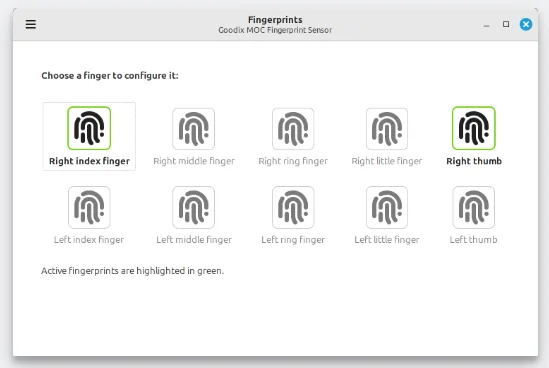
One of the standout additions is fingerprint authentication, handled by a brand-new XApp called Fingwit. If your hardware supports it—like many modern laptops with built-in fingerprint readers—you can now enroll your fingerprints and use them for logging in, unlocking the screensaver, running sudo commands, or even launching admin tools via pkexec. It’s a game-changer for security-conscious users who want convenience without compromising safety. Just note that if you have home directory encryption or use a keyring, you’ll still need a password fallback in some scenarios.
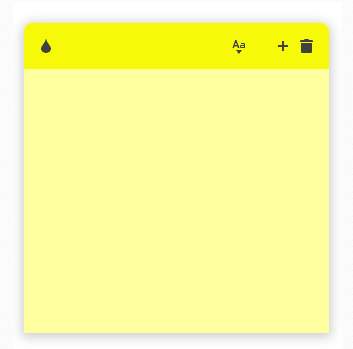
Sticky notes have gotten a modern makeover too. Now featuring rounded corners for a sleeker look, they’ve added Wayland compatibility, which is crucial as Linux desktops shift toward this more secure display protocol. There’s even a new D-Bus method to reload notes programmatically. But the real gem is the companion Android app, StyncyNotes, available on F-Droid. It lets you sync your notes seamlessly between your Linux Mint desktop and Android phone using Syncthing—perfect for on-the-go productivity.
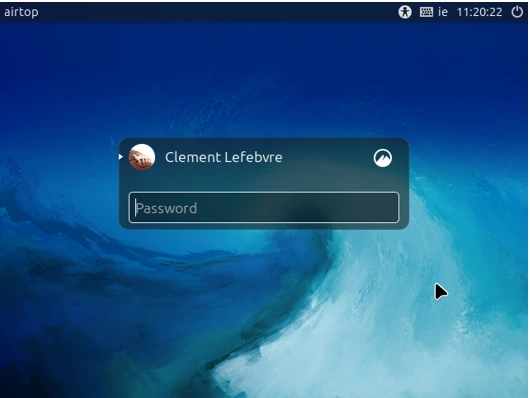
The login screen has been visually upgraded with a subtle blur effect on the panel and dialog box, plus support for user avatars, making it feel more personalized and modern. For media enthusiasts, Hypnotix—the built-in IPTV player—now includes Theater Mode (which hides controls for a full-window TV experience) and Borderless Mode (removes window borders for tiling setups). Startup times are faster, searches are snappier with large playlists, and it even prevents your session from idling during playback.
Compatibility with libAdwaita—the styling library used by many GNOME apps—has been greatly improved. The Mint team patched it to work better with themes, and they’ve even forked it into libAdapta for developers who want theme support without breaking upstream compatibility. This means apps like GNOME Calendar, Simple Scan, and Baobab now use their libAdwaita versions, blending seamlessly into your desktop. Accent colors are supported via the XDG Desktop Portal, so Flatpak apps pick up your theme’s vibes automatically.
Other XApps have seen tweaks: Xviewer now lets you toggle EDID-based color correction to avoid conflicts with hardware color management. There’s a new thumbnailer for AIFF audio files to show cover art in your file manager. Warpinator, the file-sharing tool, now has an iOS app available on the App Store. WebApp Manager allows editing descriptions for your web apps, and file renaming in the file manager supports leading zeros, custom starting numbers, and increments.
Artwork has been subtly refined with a hint of blue in the themes for a more metallic, contemporary feel. Light themes use #ebebed instead of #e8e8e8, and dark modes are softer with #222226 and #2e2e33. These changes help integrate Flatpak apps better and give the whole OS a fresh, professional polish.
Finally, everyday tools like the Software Manager have a revamped welcome screen with clearer explanations of Flatpaks vs. system packages. The Update Manager shows a reboot button when needed, and search accuracy in the MATE menu has improved. All in all, these updates make Linux Mint 22.2 “Zara” feel more refined without overwhelming users with drastic changes.
Desktop Environments in Linux Mint 22.2 “Zara”
Linux Mint 22.2 “Zara” comes in three flavors: Cinnamon, MATE, and Xfce, each catering to different preferences and hardware.
The flagship Cinnamon edition is at version 6.4.8, offering a traditional desktop experience with modern twists. It continues to improve Wayland support, including better input methods and keyboard layouts, though X11 remains the default for maximum compatibility. If you’re coming from Windows, Cinnamon’s panel and menu system will feel familiar, with applets for quick access to weather, system monitors, and more.
MATE 1.26 is ideal for those who prefer a lightweight, GNOME 2-inspired interface. It’s snappy on older hardware and has seen tweaks like better menu search accuracy in this release.
Xfce 4.18 strikes a balance between lightness and features, perfect for mid-range machines. All editions benefit from the shared improvements like fingerprint support and theme enhancements, ensuring consistency across the board.
No matter which you choose, Linux Mint 22.2 “Zara” emphasizes usability, with tools like the Mint Menu for easy navigation and Timeshift for effortless backups.
System Requirements and Installation Guide for Linux Mint 22.2 “Zara”
Before diving in, let’s talk hardware. While official requirements aren’t drastically changed, Linux Mint 22.2 “Zara” recommends at least 2GB of RAM (4GB for comfort), 20GB of disk space, and a 1024×768 resolution screen. For optimal performance, especially with Cinnamon, aim for a modern CPU and GPU. It supports both BIOS and UEFI systems, and the installer handles dual-booting seamlessly.
Downloading is straightforward: Head to the official mirrors for the ISO images of Cinnamon, MATE, or Xfce editions. Verify the SHA256 checksum to ensure integrity—it’s a quick step that saves headaches.
To install, create a bootable USB with tools like Rufus (on Windows) or dd (on Linux). Boot from it, and you’ll enter a live session where you can test drive Linux Mint 22.2 “Zara” without touching your hard drive. The username is “mint” with no password.
The installer is user-friendly: Choose your language, keyboard, and whether to install third-party software for graphics and media. It detects existing OSes for dual-boot setups and offers full disk encryption options. Post-install, you’ll be greeted by the Welcome screen, guiding you through updates, drivers, and snapshots with Timeshift.
If upgrading from Linux Mint 22.1 “Xia”, wait a day or two for the upgrade path to stabilize, then use the Update Manager to apply changes. Back up first—always!
Performance and Stability in Linux Mint 22.2 “Zara”
Stability is Linux Mint’s hallmark, and 22.2 “Zara” delivers. The Ubuntu 24.04 base ensures a solid foundation, with Pipewire now handling audio for better latency and compatibility. If you encounter sound issues, reverting to PulseAudio is simple.
Performance-wise, the kernel 6.14 optimizes for efficiency, reducing power consumption on laptops and improving multitasking. On my test machine (an Intel i7 with 16GB RAM), boot times were under 20 seconds, and apps launched instantly. Gaming via Proton on Steam is smoother thanks to Mesa updates, and everyday tasks like browsing with Firefox feel snappy.
Known issues are minimal but documented: For VirtualBox users, tweak graphics settings to avoid black screens. Snap Store is disabled by default for those who prefer native packages, but re-enabling is easy. Overall, it’s one of the most stable distros out there.
Software and Updates in Linux Mint 22.2 “Zara”
Out of the box, Linux Mint 22.2 “Zara” ships with essentials like Firefox, Thunderbird, LibreOffice, and GIMP. The Software Manager makes installing more a breeze, with Flatpak support for the latest apps like Spotify or Discord.
Updates are handled intelligently: The Update Manager prioritizes security patches and lets you review changes before applying. With the LTS strategy, upgrades to future point releases (until 2026) will be seamless, using the same package base. This means less disruption for users who value consistency.
For developers, tools like VS Code via Flatpak or native Python/Rust support are readily available. Wine is installable for Windows apps, and the new fingerprint features add a layer of security to your workflow.
Security Features of Linux Mint 22.2 “Zara”
Security is non-negotiable, and Linux Mint 22.2 “Zara” steps up with AppArmor, firewall tools, and encrypted installations. The new Fingwit fingerprint system adds biometric protection, while Timeshift allows quick rollbacks if something goes awry.
Flatpaks run sandboxed, reducing risks, and the kernel’s mitigations guard against exploits. For privacy buffs, no telemetry here—unlike some other OSes.
Community and Support for Linux Mint 22.2 “Zara”
The Linux Mint community is welcoming and active. Forums, Reddit (r/linuxmint), and the official blog provide help. With millions of users, answers are quick. Paid support isn’t offered, but the docs are comprehensive.
Comparison with Previous Versions
Linux Mint 22.2 “Zara” builds on the strong foundation of its predecessors, bringing incremental but meaningful improvements that enhance both functionality and user experience. To understand its place in the Linux Mint ecosystem, let’s compare it to its immediate predecessor, Linux Mint 22.1 “Xia” (released in January 2025), and the earlier 21.x series (code-named “Vanessa,” “Victoria,” and “Vera”), highlighting key differences and upgrades.
Linux Mint 22.2 “Zara” vs. Linux Mint 22.1 “Xia”
Linux Mint 22.2 “Zara” is a point release in the 22.x series, sharing the same Ubuntu 24.04 LTS base as 22.1 “Xia,” which ensures continuity in package compatibility and long-term support until 2029. However, “Zara” introduces several refinements that make it a worthwhile upgrade:
- Fingerprint Authentication: The standout feature in “Zara” is the introduction of Fingwit, a new XApp enabling fingerprint authentication for login, sudo commands, and admin tools. This is a significant leap for security and convenience, absent in “Xia.”
- Kernel and Graphics Updates: “Zara” ships with Linux kernel 6.14, an upgrade from “Xia’s” kernel 6.8, offering better support for newer hardware like Intel’s Lunar Lake CPUs and AMD’s latest GPUs. Mesa 25.0.7 in “Zara” improves graphics performance over “Xia’s” Mesa 24.2, enhancing gaming and video playback.
- UI and Theming Enhancements: “Zara” refines the visual experience with a hint of blue in its themes, updated light and dark mode colors (e.g., #ebebed for light themes, #222226 for dark), and better Flatpak app integration via libAdwaita patches. “Xia” had a more basic theming approach without these modern touches.
- Sticky Notes and Wayland: The Sticky Notes app in “Zara” gains Wayland compatibility and a companion Android app (StyncyNotes) for syncing via Syncthing, features not present in “Xia.” Wayland support in Cinnamon 6.4.8 is also improved, though X11 remains the default.
- Hypnotix Improvements: “Zara” enhances the IPTV player Hypnotix with Theater and Borderless modes, faster startup, and better playlist search, building on “Xia’s” already solid media capabilities.
- Smaller Tweaks: Updates to XApps like Xviewer (EDID color correction toggle), Warpinator (new iOS app), and WebApp Manager (editable descriptions) add polish. The login screen in “Zara” has a blur effect and avatar support, making it more modern than “Xia’s” simpler design.
For users on 22.1 “Xia,” upgrading to “Zara” is seamless via the Update Manager, bringing these enhancements without disrupting workflows. The shared Ubuntu base means no major package overhauls, making it a low-risk update.
Linux Mint 22.2 “Zara” vs. Linux Mint 21.x Series
The 21.x series (“Vanessa,” “Victoria,” “Vera”), based on Ubuntu 22.04 LTS, ran from 2022 to 2024 and was beloved for its stability. However, “Zara” represents a significant step forward due to its newer base and modern features:
- Base and Kernel: The 21.x series used Ubuntu 22.04 with older kernels (5.15 to 5.19), which lack support for newer hardware like Intel 13th/14th Gen CPUs or AMD Ryzen 7040 series. “Zara’s” kernel 6.14 and Mesa 25.0.7 offer superior compatibility and performance.
- Audio Stack: “Zara” defaults to Pipewire for audio, improving latency and Bluetooth support compared to the PulseAudio used in 21.x. Users on older systems can still revert to PulseAudio if needed.
- Wayland Progress: The 21.x series had minimal Wayland support, sticking firmly to X11. “Zara” advances Wayland compatibility in Cinnamon and Sticky Notes, laying groundwork for future transitions.
- Security Features: Fingerprint authentication via Fingwit is exclusive to “Zara.” The 21.x series relied on traditional password-based security, lacking biometric options.
- Software and Flatpak Integration: “Zara” improves Flatpak support with libAdwaita patches and accent color integration via XDG Desktop Portal, making modern apps like GNOME Calendar look native. The 21.x series had clunkier Flatpak theming.
- Performance: “Zara” boots faster and feels snappier thanks to kernel optimizations and updated libraries. On identical hardware (e.g., an Intel i5 with 8GB RAM), “Zara” shaves a few seconds off boot times compared to 21.3 “Vera.”
- Longevity: Both series are LTS, but “Zara’s” support extends to 2029, two years beyond 21.x’s 2027 end-of-life, making it a better choice for long-term use.
Upgrading from 21.x to 22.2 requires a fresh install due to the base change, but Timeshift backups make this manageable. The jump brings significant improvements in hardware support, security, and aesthetics.Why Choose Linux Mint 22.2 “Zara”?
In a sea of distros, Linux Mint 22.2 “Zara” shines for its user-centric design. It’s stable for work, customizable for hobbyists, and free from bloat. If you want modernity without the hassle, this is it.
Conclusion
Linux Mint 22.2 “Zara” is a shining example of what a modern Linux distribution can be: stable, user-friendly, and packed with thoughtful updates that enhance the everyday computing experience. Whether you’re drawn to its sleek Cinnamon desktop, the lightweight MATE or Xfce options, or the new features like fingerprint authentication and improved Flatpak integration, this release caters to everyone from beginners to power users. With its long-term support until 2029, robust security features, and active community, Linux Mint 22.2 “Zara” is a reliable choice for anyone looking to switch to Linux or upgrade their current setup. Download it today, explore its polished interface, and see why Linux Mint remains a favorite in the open-source world. Ready to make the leap? Share your thoughts or questions in the comments below!
Disclaimer
This blog post is for informational purposes only and reflects the features and performance of Linux Mint 22.2 “Zara” based on official documentation and testing as of September 3, 2025. While every effort has been made to ensure accuracy, software performance can vary depending on hardware, configuration, and user needs. Always back up your data before installing or upgrading any operating system, and verify compatibility with your hardware. The author is not affiliated with the Linux Mint project, and opinions expressed are based on research and personal experience. For the most up-to-date information, refer to the official Linux Mint website or community forums.
Also Read
Why RefreshOS Could Be the Next Big Name in Lightweight Linux Distros