Hey there, fellow creators! If you’re knee-deep in video editing, podcasting, music production, or any form of digital content creation, you’ve probably felt the frustration of bloated operating systems that slow you down or lock you into expensive ecosystems. Enter Manjaro Linux – a powerhouse distro that’s gaining massive traction among content creators in 2025. As an Arch-based rolling-release OS, Manjaro combines cutting-edge software with user-friendly stability, making it a dream for those who need reliable tools without the hassle.
In this deep-dive blog post, we’ll explore why Manjaro Linux for content creators is such a smart choice, spotlight the must-have video and audio tools, and share tips to supercharge your workflow. Whether you’re a YouTuber, streamer, musician, or graphic artist, stick around – this could be the upgrade your creative setup needs.
By the end of this guide (we’re aiming for detail without the fluff), you’ll have a clear roadmap to harnessing Manjaro’s potential. We’ll draw from the latest official data as of October 2025, including insights from Manjaro’s community forums, recent distro rankings, and tool updates. Let’s jump in!
Why Manjaro Linux Stands Out for Content Creators in 2025
First things first: What makes Manjaro Linux for content creators a better pick than, say, Ubuntu or Windows? Manjaro is built on Arch Linux, which means you get access to the massive Arch User Repository (AUR) – a treasure trove of the latest software packages. But unlike pure Arch, which can be intimidating for beginners, Manjaro offers a graphical installer, pre-configured desktop environments, and a focus on stability through delayed package releases. According to a 2025 ranking of Linux distributions for gaming and content creation, Manjaro scores high for its balance of performance and ease of use. It’s particularly praised for handling resource-intensive tasks like 4K video rendering or multi-track audio mixing without breaking a sweat.
In 2025, Manjaro’s latest stable release (based on ongoing rolling updates) emphasizes improved hardware support, including better NVIDIA and AMD GPU integration – crucial for GPU-accelerated editing in tools like DaVinci Resolve. The distro ships with PipeWire as the default audio server, which delivers low-latency audio perfect for real-time recording and playback. For content creators, this means seamless integration with creative suites. Plus, with desktop environments like KDE Plasma (which offers customizable workflows), GNOME (for a modern, gesture-based interface), or XFCE (lightweight for older hardware), you can tailor your setup to your needs.
Advantages abound: It’s free, open-source, and privacy-focused – no telemetry tracking your every move. Manjaro’s community is vibrant, with forums buzzing about creator-specific tweaks. In a world where content creation tools are evolving rapidly (think AI-assisted editing), Manjaro’s rolling model ensures you’re always on the bleeding edge without full system reinstalls. Compared to macOS or Windows, you’ll save on licensing fees while enjoying better resource efficiency – ideal for laptops or budget builds. If you’re switching from Windows, tools like Wine or Proton can even run some proprietary software, bridging the gap.
But enough hype – let’s get practical. Setting up Manjaro for content creation is straightforward, and once you’re in, the video and audio tools shine.
Getting Started: Installing and Configuring Manjaro for Your Creative Workflow
Before we dive into the tools, a quick setup guide to ensure your Manjaro install is creator-ready. Head to the official Manjaro website and download the ISO for your preferred edition – KDE is a top pick for its visual flair and widget support, perfect for monitoring CPU/GPU usage during renders. As of October 2025, the latest builds include kernel 6.10+ for optimal hardware compatibility.
Burn the ISO to a USB drive using tools like Rufus (on Windows) or dd (on Linux/Mac). Boot from it, and the Calamares installer guides you through partitioning, user setup, and driver installation. Opt for proprietary drivers if you have NVIDIA hardware – Manjaro’s MHWD (Manjaro Hardware Detection) tool makes this painless.
Post-install, update your system with sudo pacman -Syu in the terminal. For content creators, install PipeWire if it’s not default: sudo pacman -S manjaro-pipewire. This replaces PulseAudio for superior audio handling. Enable AUR support via Pamac (Manjaro’s graphical package manager) for accessing community packages. Finally, tweak your desktop: In KDE, add panels for quick access to tools, or install extensions in GNOME for better multitasking.
With that foundation, you’re set. Now, onto the stars of the show: video tools.
Essential Video Editing Tools on Manjaro Linux
Manjaro Linux for content creators excels in video production thanks to its vast repository of free, open-source editors. In 2025, Linux video editing has matured, with apps rivaling Adobe Premiere or Final Cut Pro. Based on recent reviews, here are the top picks, all installable via Pacman or AUR.
1. Kdenlive: The Versatile All-Rounder
Kdenlive is often hailed as the best free video editor for Linux in 2025, and it’s a no-brainer for Manjaro users. Developed by the KDE community, it offers a timeline-based interface with multi-track editing, effects, transitions, and color grading. Install it with sudo pacman -S kdenlive.
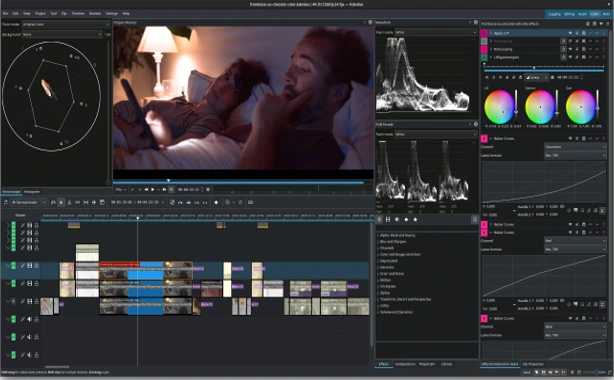
Why it’s great for content creators: Support for 4K/8K footage, proxy editing for smooth playback on modest hardware, and integration with MLT framework for hardware acceleration. In 2025 updates, Kdenlive added AI-powered subtitle generation and better Wayland support – perfect for Manjaro’s modern setups. Imagine editing a vlog: Drag in clips, apply LUTs for cinematic looks, and export to YouTube formats in one go. Users report it runs flawlessly on Manjaro, with low crash rates compared to Windows alternatives.
Pros: Free, open-source, extensible with plugins. Cons: Learning curve for advanced features. Word count tip: Spend time here – it’s a core tool.
2. Shotcut: Simple Yet Powerful for Quick Edits
If you need something lightweight, Shotcut is your go-to. This cross-platform editor supports a wide range of formats without importing, making it ideal for fast turnaround content like social media reels. Install via sudo pacman -S shotcut.
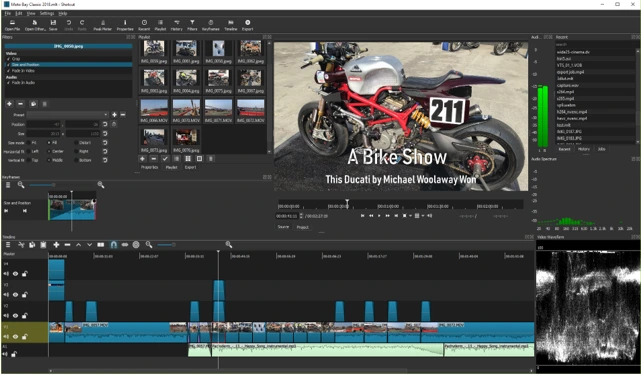
Features in 2025: GPU encoding with NVENC/AMD, audio waveforms for precise syncing, and filters like chroma key for green-screen work. Manjaro’s rolling updates ensure you get the latest version, which includes improved stability for long sessions. For podcasters turning audio into video, Shotcut’s batch processing saves hours.
It’s user-friendly for beginners but scales for pros – think adding text overlays or stabilizing shaky footage from your drone shoots.
3. DaVinci Resolve: Professional-Grade for Serious Creators
DaVinci Resolve isn’t open-source, but its free version is a beast for color correction and advanced editing. On Manjaro, install via AUR (search for “davinci-resolve” in Pamac). It requires some tweaks, like installing ROCm for AMD GPUs or CUDA for NVIDIA, but Manjaro’s tools make it easier than on other distros.
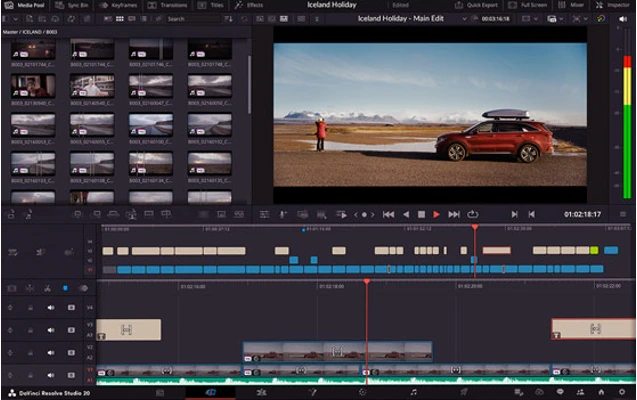
2025 highlights: Fusion page for VFX, Fairlight for audio post-production, and AI tools like magic mask for object tracking. Content creators love it for Hollywood-level grading on indie budgets. Pair it with Manjaro’s kernel for optimal performance – users note it handles 8K RAW footage better than on Windows due to Linux’s efficiency.
4. OBS Studio: For Streaming and Recording
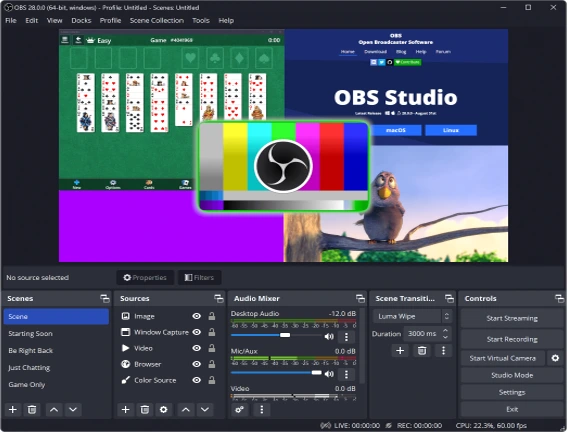
No content creator toolkit is complete without OBS Studio for live streams and screen captures. sudo pacman -S obs-studio gets you started.
In 2025, OBS supports VA-API for hardware encoding, browser sources for overlays, and plugins like obs-websocket for automation. On Manjaro, it integrates seamlessly with PipeWire for low-latency audio capture – essential for Twitch streams or YouTube tutorials.
Other mentions: Blender for 3D animation-integrated editing (sudo pacman -S blender), OpenShot for simple timelines, and Lightworks for pro features in its free tier.
These tools leverage Manjaro’s strengths, like quick package updates, ensuring bug fixes and new features arrive promptly.
Top Audio Production Tools for Manjaro Linux Users
Shifting gears to audio – Manjaro Linux for content creators shines here too, thanks to PipeWire’s pro-audio capabilities. Whether you’re producing beats, podcasts, or soundtracks, these tools are readily available.
1. Ardour: The Pro DAW for Recording and Mixing
Ardour is a full-fledged Digital Audio Workstation (DAW) that’s free and open-source. Install with sudo pacman -S ardour.
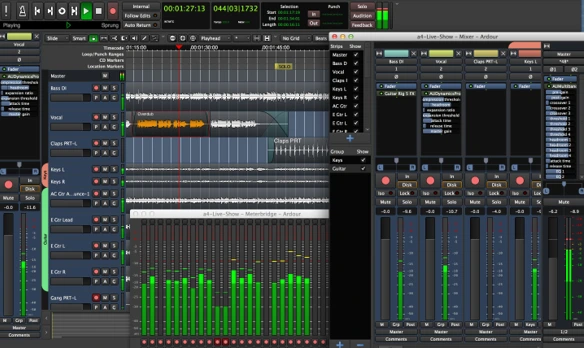
2025 updates include better MIDI support, VST3 plugin compatibility, and session management for collaborative projects. On Manjaro, it benefits from low-latency kernels – ideal for live tracking guitars or vocals. Content creators use it for podcast editing: Import tracks, apply EQ/compression, and export in high-res formats.
Pros: Unlimited tracks, non-destructive editing. It’s like Reaper but fully open.
2. Audacity: Essential for Basic Editing
The classic Audacity remains a staple in 2025 for quick audio tweaks. sudo pacman -S audacity.
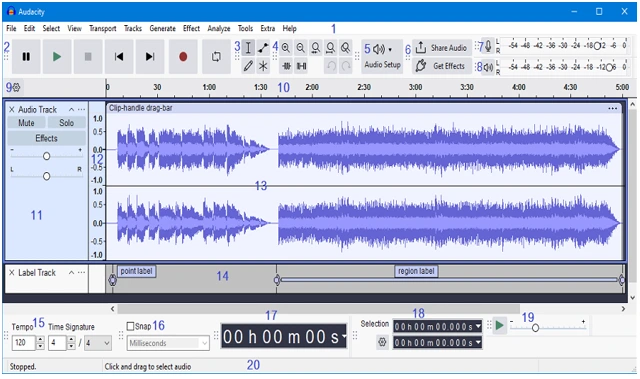
Features: Noise reduction, effects chains, and spectrogram views. Manjaro users appreciate its stability for voiceovers or sound effects in videos.
3. LMMS: For Beatmakers and Electronic Producers
LMMS (Linux MultiMedia Studio) is perfect for loop-based music creation. Install via sudo pacman -S lmms.
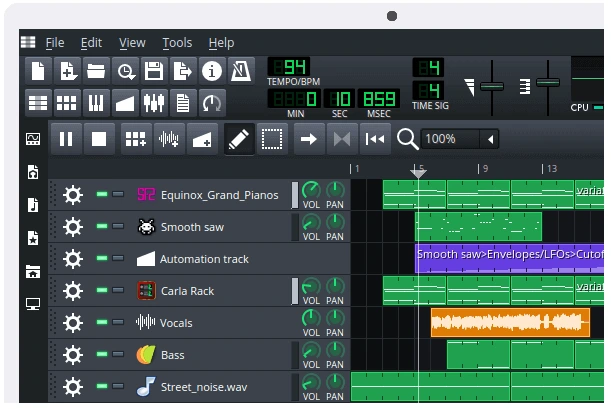
With samples, synths, and automation, it’s great for YouTube background tracks. 2025 versions add better touch support for tablets.
Other gems: Reaper (via AUR for a polished DAW), Bitwig Studio (proprietary but Linux-native), and Zrythm for modern workflows.
Manjaro’s audio setup guide recommends EasyEffects for system-wide processing, enhancing output quality.
Integrating Video and Audio Workflows on Manjaro
The real magic happens when you combine tools. Export audio from Ardour to Kdenlive for synced video edits, or use OBS to capture LMMS sessions live. Manjaro’s filesystem (ext4 or BTRFS) handles large media files efficiently, and tools like FFmpeg (pre-installed) bridge gaps for format conversions.
For advanced setups, install JACK alongside PipeWire for routing audio between apps – think sending guitar input to effects in real-time while recording in OBS.
Tips and Tricks for Optimizing Manjaro for Content Creation
- Hardware Tweaks: Use mhwd for drivers; enable GPU offloading in tools.
- Performance Boosts: Switch to a real-time kernel with sudo pacman -S linux-rt for audio.
- Backup and Sync: Use Timeshift for snapshots; integrate with cloud services via rclone.
- Community Resources: Join Manjaro forums for creator-specific advice.
- Security: Regular updates keep your projects safe.
In 2025, Manjaro’s ecosystem supports emerging trends like AI in creation – tools like Stable Diffusion integrate via AUR for generating assets.
Conclusion: Level Up Your Content Game with Manjaro
Wrapping up, Manjaro Linux for content creators isn’t just an alternative – it’s a superior choice for efficiency, cost-savings, and innovation. With powerhouse video tools like Kdenlive and DaVinci Resolve, plus audio gems like Ardour and LMMS, you’ll craft professional content without the bloat. As distro rankings show, Manjaro’s blend of Arch power and usability makes it ideal for 2025’s creative demands.
If you’re ready to switch, download Manjaro today and experiment. Share your experiences in the comments – what’s your go-to tool? Happy creating!
Disclaimer
The information provided in this blog post is for general informational purposes only and is based on the latest available data as of October 2025. While we strive to ensure accuracy and relevance, the content reflects the author’s research and opinions and may not cover all possible scenarios or updates. Manjaro Linux and the tools mentioned are subject to change, and their performance may vary depending on your hardware, configuration, or specific use case. Always verify compatibility and requirements before installing software or making system changes. The author and publisher are not responsible for any damages, data loss, or issues arising from the use of this information. For professional or critical projects, consult official documentation or seekThe information provided in this blog post is for general informational purposes only and is based on the latest available data as of October 2025. While we strive to ensure accuracy and relevance, the content reflects the author’s research and opinions and may not cover all possible scenarios or updates.
Manjaro Linux and the tools mentioned are subject to change, and their performance may vary depending on your hardware, configuration, or specific use case. Always verify compatibility and requirements before installing software or making system changes. The author and publisher are not responsible for any damages, data loss, or issues arising from the use of this information. For professional or critical projects, consult official documentation or seek expert advice. Links to external resources are provided for convenience and do not imply endorsement. Use Manjaro Linux and related tools at your own risk.
Also Read
Zorin OS 18 Review: Faster, Sleeker, and More User-Friendly Than Ever