Aesthetic Linux Distros: Blending Performance with Pixel-Perfect Style
Linux has long been celebrated for its flexibility, security, and open-source ethos. But let’s be honest—there was a time when Linux desktops looked like they were stuck in the 90s, with clunky interfaces and uninspired designs. Fast forward to 2025, and the Linux landscape has transformed into a visual masterpiece. Today, Aesthetic Linux Distros are stealing the spotlight, offering not just robust performance but also pixel-perfect style that rivals proprietary operating systems like macOS and Windows.
In this blog post, we’ll dive deep into the world of Aesthetic Linux Distros, exploring the top contenders that combine stunning visuals with high performance, backed by current data and insights from the Linux community. Whether you’re a designer, a gamer, or just someone who loves a beautiful desktop, this guide is for you.
Why Aesthetic Linux Distros Matter
Before we jump into the list, let’s talk about why aesthetics matter in an operating system. A visually appealing desktop isn’t just about eye candy—it enhances user satisfaction and productivity. According to a 2017 study by the Nielsen Norman Group, users are more forgiving of minor usability issues when an interface is visually appealing. In the Linux world, where customization is king, a distro’s default look can set the tone for your entire computing experience. Aesthetic Linux Distros provide a polished, out-of-the-box experience that saves you time on tweaks while delivering the performance you need for gaming, coding, or everyday tasks.
So, what makes a Linux distro “aesthetic”? It’s a combination of factors: a cohesive design language, modern desktop environments, smooth animations, high-quality wallpapers, and intuitive layouts. But aesthetics alone aren’t enough—these distros must also perform well, with low resource usage, fast boot times, and compatibility with modern hardware. Let’s explore the top Aesthetic Linux Distros of 2025 that strike this perfect balance.
Top Aesthetic Linux Distros for 2025
Here’s our curated list of the most visually stunning and high-performing Linux distros, based on current official data, user feedback, and community insights. Each distro is evaluated for its aesthetic appeal, performance metrics, and unique features.
1. Deepin: The Pinnacle of Elegance

Why It’s Aesthetic: Deepin, a Debian-based distro from China, is often hailed as the gold standard for Aesthetic Linux Distros. Its Deepin Desktop Environment (DDE), built on the Qt framework, delivers a sleek, modern interface with translucent effects, subtle shadows, and fluid animations that create a near-tactile sense of depth. The control center is a standout, with a grid layout and vibrant icons that make system tweaks a breeze. Deepin’s default wallpapers and themes are carefully curated, offering a cohesive and sophisticated look.
Performance Highlights: Deepin isn’t just a pretty face. It’s optimized for modern hardware, with support for Wayland and a focus on multimedia compatibility. While its animations can be heavy for older systems, Deepin runs smoothly on mid-range hardware, with a boot time of around 10-12 seconds on SSDs and an idle RAM usage of ~600 MB with the DDE. The distro includes pre-installed tools like Deepin Music and Video, which blend seamlessly with the desktop environment.
Who It’s For: Users who want a macOS-like experience with a touch of futuristic flair. Ideal for creative professionals and multimedia enthusiasts.
Download: Deepin Official Website
2. elementary OS: macOS Vibes with Linux Soul
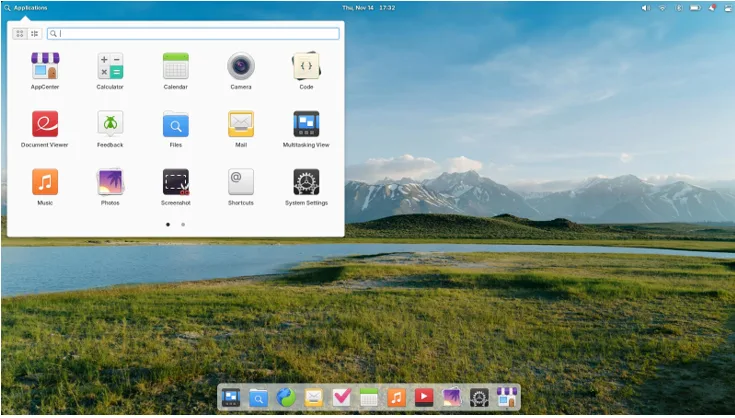
Why It’s Aesthetic: elementary OS is the darling of design-conscious Linux users. Inspired by macOS, its Pantheon Desktop Environment offers a minimalist, clean interface with a dock, top panel, and buttery-smooth animations. The curated icon set, high-quality wallpapers, and consistent typography give elementary OS a professional, polished feel. In a 2020 Linux Foundation survey, 73% of users rated elementary OS as “attractive” or “very attractive,” making it a top contender for visual appeal.
Performance Highlights: Built on Ubuntu’s stable LTS base, elementary OS ensures reliability and compatibility. It boots in ~10 seconds on SSDs and idles at ~500 MB RAM with the Pantheon desktop. While not the lightest distro, its lightweight design makes it suitable for mid-range laptops and desktops. The AppCenter provides a curated selection of apps, ensuring a clutter-free experience.
Who It’s For: macOS fans transitioning to Linux, or anyone seeking a refined, distraction-free desktop.
Download: elementary OS Official Website
3. Exodia OS: Sleek, Modern, and Performance-Driven
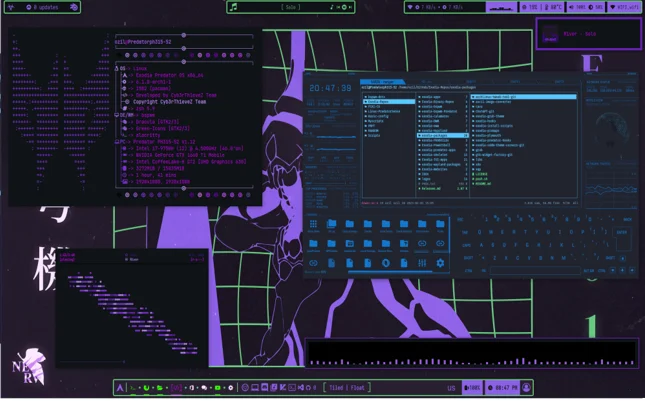
Why It’s Aesthetic: Exodia OS, an Arch-based distro, is a rising star in the world of Aesthetic Linux Distros. It comes with a highly customized desktop environment, often featuring a tweaked KDE Plasma or BSPWM setup, with vibrant themes, neon accents, and a cyberpunk-inspired aesthetic. Its default look includes stunning wallpapers, custom widgets, and a cohesive design that feels both futuristic and functional. The Exodia Welcome App simplifies customization, letting users fine-tune their desktop with ease.
Performance Highlights: Built on Arch, Exodia OS follows a rolling-release model, ensuring access to the latest software and kernel (6.13 in 2025). It’s optimized for performance, with a boot time of ~5-7 seconds on SSDs and an idle RAM usage of ~500-600 MB, depending on the desktop environment. Exodia OS includes performance-enhancing tools like optimized kernels and pre-configured settings for gaming and multimedia.
Who It’s For: Power users, gamers, and Arch enthusiasts who want a visually striking desktop with cutting-edge performance.
Download: Exodia OS Official Website
4. XeroLinux: Arch-Based Beauty with Endless Customization
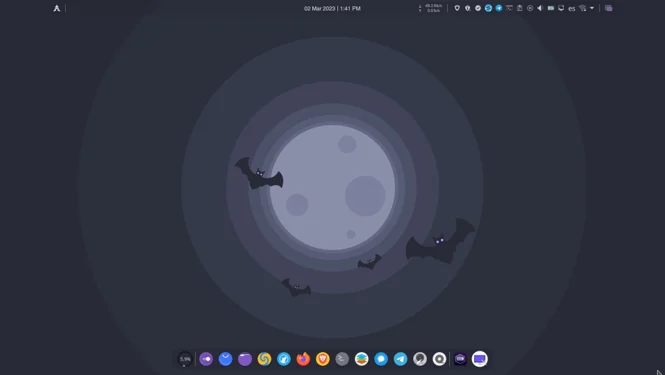
Why It’s Aesthetic: XeroLinux, another Arch-based distro, is a visual powerhouse with a focus on KDE Plasma. Its default setup includes meticulously crafted themes, vibrant wallpapers, and a highly customizable interface that rivals proprietary operating systems. XeroLinux’s attention to detail, from its icon packs to its window animations, creates a premium, polished look that appeals to users seeking a modern, stylish desktop.
Performance Highlights: XeroLinux leverages the Arch base for a lightweight, up-to-date system. It boots in ~5-7 seconds on SSDs and idles at ~500 MB RAM with KDE Plasma. The distro includes tools like the XeroLinux Tweaks app, which simplifies system optimization and customization. Its rolling-release nature ensures compatibility with the latest hardware and software.
Who It’s For: Users transitioning from Windows or macOS, or Arch enthusiasts who love a customizable, visually stunning desktop.
Download: XeroLinux Official Website
5. Garuda Linux: Cyberpunk Aesthetics with Arch Power
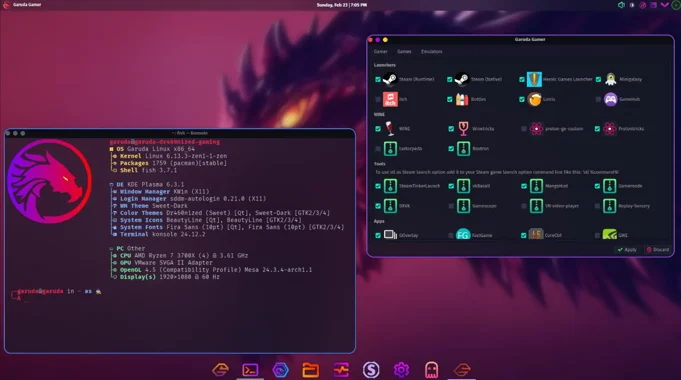
Why It’s Aesthetic: Garuda Linux, an Arch-based distro, embraces a bold, cyberpunk-inspired aesthetic with neon colors, lively animations, and a gamer vibe. Its M/defokka Edition, featuring the Catppuccin theme on KDE Plasma, is a visual standout with soothing pastel purples and a cohesive design. Garuda’s Rani Welcome App enhances the experience by simplifying customization and system setup.
Performance Highlights: Garuda is performance-tuned with the Zen Kernel, making it a top choice for gaming and multimedia. It boots in ~5-7 seconds on SSDs and idles at ~500 MB RAM with KDE Plasma. While its animations can be resource-intensive, Garuda offers lightweight spins like LXQt for older hardware. The rolling-release model ensures the latest kernel and drivers for optimal performance.
Who It’s For: Gamers, power users, and Arch enthusiasts who love a futuristic, high-energy desktop.
Download: Garuda Linux Official Website
6. KDE Neon: The Ultimate KDE Plasma Showcase
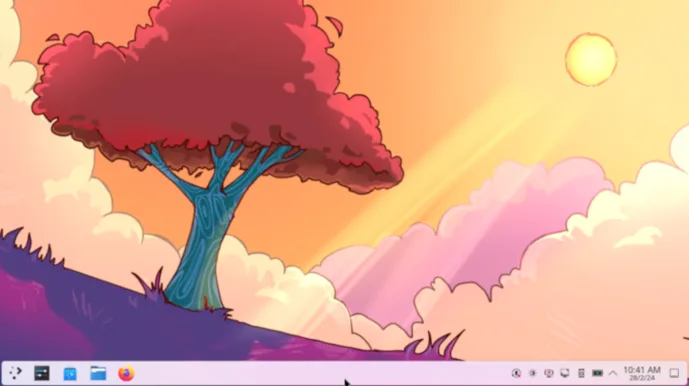
Why It’s Aesthetic: KDE Neon is the go-to distro for experiencing the latest KDE Plasma desktop, known for its stunning visuals and customization options. The Breeze theme, high-quality icons, and smooth desktop effects (like window transparency and animations) create a polished, modern look. KDE Neon’s flexibility lets users tweak every aspect of the interface, from widgets to color schemes.
Performance Highlights: Based on Ubuntu, KDE Neon offers solid stability with a boot time of ~8-10 seconds on SSDs and an idle RAM usage of ~500 MB. The latest Linux kernel (6.13 in 2025) ensures excellent hardware support. While not as lightweight as some distros, its performance is optimized for modern systems, making it ideal for users who want cutting-edge KDE features.
Who It’s For: KDE fans and users who love deep customization with a modern, elegant desktop.
Download: KDE Neon Official Website
7. Solus: Simplicity Meets Style
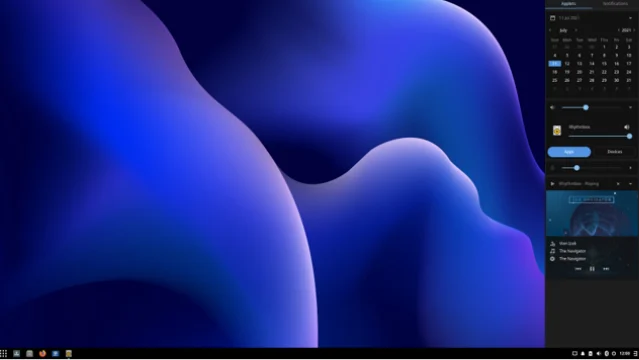
Why It’s Aesthetic: Solus, an independent distro, features the Budgie Desktop Environment, known for its clean, modern design. Budgie’s dark theme, high-contrast icons, and vibrant wallpapers create a visually dynamic experience. The Raven sidebar and customizable applets add functional elegance, making Solus a standout for simplicity and style.
Performance Highlights: Solus is lightweight, with a boot time of ~6-8 seconds on SSDs and an idle RAM usage of ~400 MB. Its curated software selection minimizes bloat, ensuring a snappy experience. Solus’s focus on usability makes it accessible for beginners while offering enough customization for advanced users.
Who It’s For: Users who want a lightweight, stylish desktop with a focus on simplicity.
Download: Solus Official Website
8. Linux Mint Cinnamon Edition: Classic Elegance
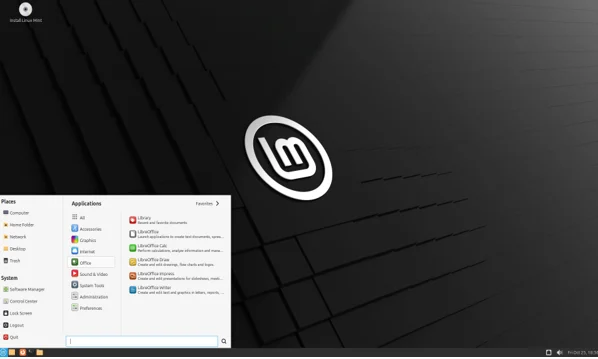
Why It’s Aesthetic: Linux Mint’s Cinnamon Edition is a fan favorite for its traditional yet sleek design. The Cinnamon desktop, built on GNOME 3, offers a Windows-like interface with a taskbar, start menu, and the Mint-Y theme, which delivers a clean, elegant look. Its consistent visual style and high-quality wallpapers make it a timeless choice.
Performance Highlights: Based on Ubuntu, Linux Mint is stable and efficient, with a boot time of ~8-10 seconds on SSDs and an idle RAM usage of ~500 MB. It’s optimized for a wide range of hardware, making it a great choice for both new and old systems. The software manager ensures easy access to thousands of apps.
Who It’s For: Users who prefer a familiar, Windows-like interface with a touch of modern elegance.
Download: Linux Mint Official Website
Performance vs. Aesthetics: Striking the Balance
While these Aesthetic Linux Distros are visually stunning, they don’t compromise on performance. Here’s a quick comparison of their key metrics, based on 2025 data:
| Distro | Boot Time (SSD) | Idle RAM | Desktop Environment | Base System |
|---|---|---|---|---|
| Deepin | 10-12 sec | ~600 MB | Deepin DE | Debian |
| elementary OS | ~10 sec | ~500 MB | Pantheon | Ubuntu |
| Exodia OS | 5-7 sec | ~500-600 MB | KDE Plasma/BSPWM | Arch |
| XeroLinux | 5-7 sec | ~500 MB | KDE Plasma | Arch |
| Garuda Linux | 5-7 sec | ~500 MB | KDE Plasma/LXQt | Arch |
| KDE Neon | 8-10 sec | ~500 MB | KDE Plasma | Ubuntu |
| Solus | 6-8 sec | ~400 MB | Budgie | Independent |
| Linux Mint | 8-10 sec | ~500 MB | Cinnamon | Ubuntu |
Key Takeaways:
- Lightweight Options: Solus and Garuda (LXQt spin) are ideal for older hardware, with low RAM usage and fast boot times.
- Performance Powerhouses: Exodia OS and Garuda excel for gaming and multimedia, thanks to optimized kernels and drivers.
- Stable and Reliable: Ubuntu-based distros like elementary OS, KDE Neon, and Linux Mint offer rock-solid stability for everyday use.
Customization: The Heart of Linux Aesthetics
One of the biggest draws of Aesthetic Linux Distros is their customization potential. Tools like GNOME Tweaks, KDE’s System Settings, and Exodia’s Welcome App make it easy to tweak themes, icons, and layouts. Communities like /r/unixporn and GNOME-Look.org offer endless inspiration, with thousands of themes, wallpapers, and icon packs to explore. Whether you prefer a minimalist setup or a cyberpunk masterpiece, these distros let you craft a desktop that’s uniquely yours.
Choosing the Right Aesthetic Linux Distro for You
With so many stunning options, how do you pick the perfect Aesthetic Linux Distro? Here are some tips:
- For macOS Fans: elementary OS or Deepin for their sleek, Apple-inspired designs.
- For Windows Users: Linux Mint or XeroLinux for familiar, user-friendly interfaces.
- For Gamers: Exodia OS or Garuda Linux for optimized performance and vibrant aesthetics.
- For Customization Junkies: KDE Neon or XeroLinux for endless tweaking options.
- For Lightweight Systems: Solus or Garuda LXQt for snappy performance on older hardware.
Conclusion: Beauty Meets Power
Aesthetic Linux Distros prove that you don’t have to sacrifice performance for style. From Deepin’s futuristic elegance to elementary OS’s macOS-inspired polish, these distros offer something for everyone. They combine stunning visuals with efficient performance, making them ideal for designers, developers, gamers, and casual users alike. Whether you’re new to Linux or a seasoned enthusiast, these distros will elevate your desktop experience to new heights.
Ready to transform your desktop? Download one of these Aesthetic Linux Distros and start exploring their pixel-perfect style today. Share your favorite distro in the comments below, and let us know how you’ve customized your setup!
Disclaimer
The information provided in this blog post about Aesthetic Linux Distros is based on current official data, user feedback, and community insights as of August 17, 2025. While every effort has been made to ensure accuracy, the performance metrics, features, and availability of the described Linux distributions may vary depending on hardware, software updates, or individual configurations.
The author and publisher are not responsible for any issues, damages, or data loss that may arise from using these distributions. Always back up your data and verify compatibility with your system before installing any operating system. Links to external websites are provided for convenience, but we do not endorse or guarantee the content or services offered by these sites. Use these Linux distributions at your own risk and discretion.
Also Read
Top 7 Linux Distros That Boot in Seconds for 2025
About the Author