
antiX 26 Explained The Fastest Linux for Old PCs
If you have an old laptop collecting dust in a corner or a desktop that crawls on modern operating systems, there is a good chance you have not yet tried antiX Linux. With the official release dropping on March 21, 2026, there has never been a better time to dig into what makes this distribution so special. antiX 26 Explained is not just a catchy phrase — it is the exact question thousands of Linux enthusiasts and everyday users are asking right now, because this release brings genuinely impressive changes that make old hardware feel relevant again.
antiX has always stood for two things: speed and freedom. It does not rely on systemd, it does not bloat your machine with unnecessary services, and it runs beautifully on hardware that Windows 11 would outright refuse to boot. But antiX 26 takes those principles further than any previous version — building on Debian 13 (Trixie), shipping with five different init systems, and packing an impressive software stack into an ISO that keeps 32-bit users firmly in the picture.
What Is antiX Linux and Who Is It For?
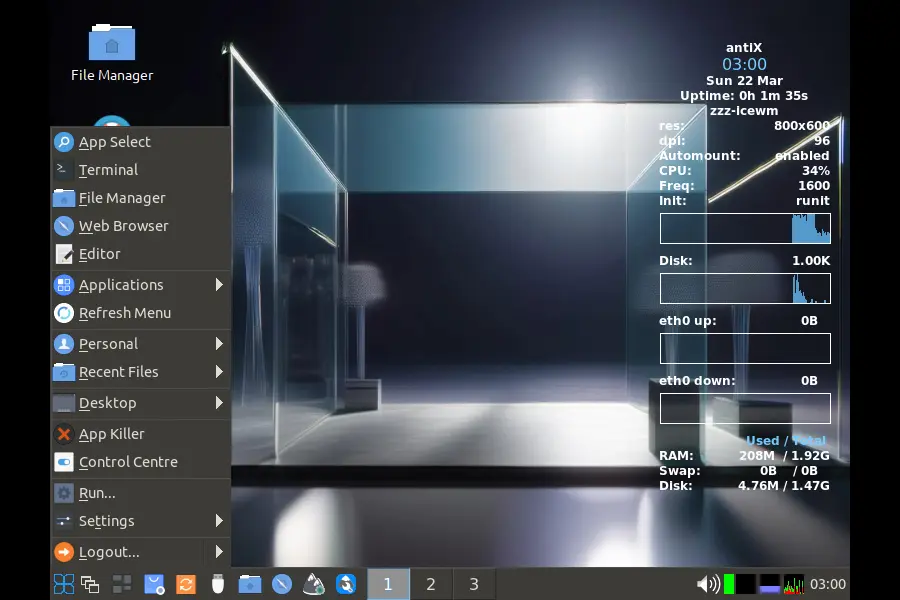
antiX is a proudly anti-fascist, systemd-free Linux distribution that has been targeting old and underpowered computers for years. Rather than running a traditional desktop environment, it uses lightweight window managers that consume far less RAM — and it skips the heavy dependencies that slow down most mainstream distros.
So who actually uses antiX? Think IT professionals giving refurbished laptops a second life. Think students in regions where cheap or older hardware is the norm. Think privacy-conscious users who want a lean, controllable system they actually understand. Think tinkerers who do not want their OS making background decisions they never asked for. antiX is for anyone who wants their computer to work for them, not against them.
antiX 26: The Big Picture
This release is named after Stephen Kapos — a figure celebrated for his remarkable life of resilience, surviving dictatorship and the Holocaust while remaining a lifelong activist. It fits perfectly with antiX’s philosophy.
Built on Debian 13 (Trixie), antiX 26 gives users a modern package base while maintaining the team’s strict no-systemd stance. Here are the headline facts straight from the official release:
- Based on Debian 13 (Trixie), but ships without systemd/libsystemd0 and without elogind/libelogind0
- Uses eudev instead of udev for device management
- Ships with five init systems: runit (default), sysVinit, dinit, s6-rc, and s6-66
- Available in two flavours: full (~2GB) and core (~660MB)
- Supports both 64-bit and 32-bit architectures
- No snaps (require systemd) and no flatpaks (require elogind)
Five Init Systems: Why This Is a Big Deal
Most Linux users never think about their init system — it is the first process that starts when your computer boots, responsible for managing everything else that follows. On mainstream distros like Ubuntu, Fedora, and Arch, that means systemd with no choice in the matter.
antiX 26 gives you genuine choice. Five init systems ship with this release, and the person who deserves credit for pulling this off is ProwlerGR, who integrated the various inits into antiX and also implemented the experimental turnstile. This is remarkable engineering work.
Here is a quick breakdown of each:
runit (Default)
Lightweight and fast. runit uses a service supervision tree and is known for clean, predictable process management. This is what antiX boots with out of the box.
sysVinit
The classic Unix init system. Battle-tested and familiar to any long-time Linux user. If you have been around since the early 2000s, this will feel like home.
dinit
A newer service manager focused on correctness and speed, offering dependency tracking and parallel startup without the complexity of systemd.
s6-rc
Part of the s6 supervision suite, known for extremely fast boot times and solid process supervision. Popular in the more technical corners of the Linux community.
s6-66
An extension of s6 developed by Eric of Obarun, who receives a well-deserved shoutout in the official release notes. It adds a higher-level service management layer on top of s6.
The Kernel Story: Customised for Performance
antiX does not just grab a stock Debian kernel and ship it. The team builds customised kernels optimised for their specific use case. In antiX 26, you get:
- Customised 5.10.240 kernel — available for both 32-bit and 64-bit builds, making it the workhorse for older hardware
- Customised 6.6.119 kernel — exclusive to the 64-bit full ISO, bringing newer hardware support for more capable machines
This is a thoughtful split. The 5.10 branch is a Long Term Support (LTS) line known for rock-solid stability and compatibility with hardware going back well over a decade — exactly what someone reviving a 2008 laptop needs. The 6.6 kernel on 64-bit gives users with more capable machines access to modern driver support without sacrificing the antiX philosophy.
Window Managers: Keeping It Light and Fast
One of the smartest things antiX has always done is choose window managers over full desktop environments. No GNOME, no KDE, no Cinnamon — just lean window managers that stay out of your way and let your RAM do actual work.
antiX 26 ships with four:
IceWM (Default)
The out-of-the-box experience. IceWM looks clean, starts instantly, and presents a familiar taskbar layout for users coming from Windows. It is the right choice for most new antiX users.
Fluxbox
A classic in the lightweight Linux world. Fluxbox is configurable, snappy, and well-suited for older hardware where every megabyte of RAM counts.
JWM (Joe’s Window Manager)
Ultra-minimal and one of the lightest options available — great for machines where even IceWM feels heavy. JWM is the choice when you are squeezing every last drop of performance from ancient hardware.
Herbstluftwm
A tiling window manager for power users who prefer keyboard-driven workflows and precise, distraction-free window management. A genuinely satisfying experience once you learn its keybindings.
It is also worth noting the inclusion of wingrid-antix, which lets you turn any of the stacking window managers into a tiler on the fly — a neat touch for users who like tiling without committing to herbstluftwm full-time.
Full ISO vs Core ISO: Which Should You Pick?
Full ISO (~2GB)
The full ISO is the complete antiX experience. It ships with LibreOffice for productivity, Firefox ESR for browsing, Claws-Mail for email, and a rich media stack. On 64-bit, audio is handled by PipeWire and WirePlumber (with ALSA as the default on 32-bit). Video playback is covered by Celluloid, MPV, and Xine. There is even gtk-pipe-viewer for streaming YouTube without opening a browser — a surprisingly handy tool that most users will quickly come to love.
Core ISO (~660MB)
The core ISO strips things back to essentials. If you are an experienced user who wants to build up their own environment from scratch, or if you need a base for creating a custom respin, this is your starting point. It is also ideal for machines with very limited storage.
Importantly, both flavours remain available for 32-bit hardware — which is increasingly rare in the Linux world. This sustained commitment to 32-bit support is one of the things that genuinely separates antiX from almost every other active distribution in 2026.
What’s Inside: A Full App Breakdown
The full antiX 26 ISO packs a surprising amount of software for its size. Here is what you get:
Productivity & Office
- LibreOffice — full office suite
- Firefox ESR — reliable extended support browser
- Claws-Mail — lightweight but capable email client
- Geany and Leafpad — for coding and quick text editing
- Evince — PDF reader
- CherryTree — note-taking application
Multimedia
- Celluloid, MPV, and Xine — video playback
- XMMS — classic lightweight audio player
- gtk-pipe-viewer and pipe-viewer (CLI) — stream YouTube without a browser
- WinFF and Asunder — video and audio format conversion
- antiX TV and antiX Radio — in-house streaming receivers
- antiX equaliser toggle — activate/deactivate PipeWire equaliser (Easyeffects)
- antiX acoustic colours — adjust the acoustic character of audio output
File Management
- zzzFM — antiX’s own file manager
- ROX-Filer — fast desktop file manager
- MC (Midnight Commander) — veteran terminal-based file manager
Networking & Connectivity
- ConnMan — network connection manager
- Ceni — console network interface configurator
- gnome-ppp — yes, even dial-up is supported
- connectshares-antix — for network shares (Samba)
- droopy-antix — simple file transfer over a local network
- antiX SAMBA manager — manage Samba shares from the control centre
- 1-to-1-voice-antix — encrypted voice chat between two PCs via mumble
- 1-to-1-assistance-antix — remote access help application
- ssh-conduit — remote resources over an SSH encrypted connection
System Tools
- antiX Control Centre — the central hub for managing just about everything
- Package Installer, Repo Manager, and User Manager
- ddm-mx — install NVIDIA drivers
- bootrepair — fix boot issues
- iso-snapshot and remaster tools — create your own system snapshots
- luckybackup — excellent backup tool (the release notes note there is nothing lucky about it)
- simple-scan and XSane — for scanning documents
- transmission-gtk — torrent downloader
- Xfburn — burn CDs and DVDs
- Mirage — image viewer
- HexChat — GUI chat client
- meld — graphical tool to diff and merge files
The CLI Side: antiX Loves the Terminal
antiX has a strong terminal culture, and the release notes specifically encourage users to explore the CLI apps that ship with the distro:
- nano and vim-tiny — text editors for the terminal
- newsboat — RSS/Atom newsreader
- irssi — IRC chat client
- mocp — Music on Console audio player
- mpv — video player that also runs beautifully from the terminal
- pipe-viewer — watch YouTube from the command line
- rtorrent — CLI torrent client
- cdw — CD/DVD burning from the terminal
- Chroot Rescue Scan — repair a broken installation
No Systemd, No Snaps, No Flatpaks — Here Is Why That Matters
This is where antiX gets genuinely philosophical, and it is worth taking a moment to understand why these decisions matter beyond just being contrarian.
Systemd is the init system used by virtually every mainstream Linux distribution today. It is powerful, but also complex, opaque, and tightly integrated in ways that make it difficult to remove cleanly. antiX 26 is built specifically without libsystemd0 and without libelogind0, using eudev for device management instead of the systemd-linked udev.
Snaps require systemd to function. Flatpaks require elogind. By shipping neither, antiX keeps its dependency tree clean and avoids containerised packaging formats that many users find unnecessarily heavy and opaque. This is not anti-progress — it is a deliberate, principled choice to keep the system auditable, understandable, and fast.
For old hardware, this matters enormously. Every background service you do not need is RAM freed up for actual work. antiX’s guiding principle is that a computer should serve the user — not the software ecosystem.
Visual Polish: Not Just Fast, But Nice to Look At
One criticism sometimes levelled at minimal Linux distros is that they look dated. The antiX team has clearly taken this feedback seriously. antiX 26 ships with:
- Qogir icon theme — a clean, modern icon set
- arc-evopro2-theme-antix — a polished GTK theme
- A new default wallpaper created by Freja
It also ships App Select — described in the release notes as much more than a launcher — and User Language for localisation setup. The live system received improvements from fehlix, and the installer’s extended features received impressive work from AK-47. The Finder script lets you search files, installed apps, and the web from a single lightweight interface.
Audio in antiX 26: PipeWire on 64-bit, ALSA on 32-bit
The audio stack reflects a smart architecture split. The 64-bit full ISO defaults to PipeWire and WirePlumber — the modern audio framework gradually becoming the Linux standard, offering low latency and compatibility with both PulseAudio and JACK applications. The 32-bit full ISO defaults to ALSA — the classic, ultra-stable audio layer that works reliably on older hardware without the overhead of a session manager.
The antiX equaliser toggle and antiX acoustic colours scripts round out the audio experience, giving users genuine control over how their system sounds.
The antiX Community: The Real Engine Behind the Project
Reading the antiX 26 release notes, what stands out immediately is the care taken to acknowledge the people who make this project happen. There is a long list of thanks — not just to the core team but to forum members, alpha and beta testers, translators, and script writers. This is a community-driven project in the truest sense of the word.
Special recognition goes to:
- Robin — for scripts, localisation, and much more
- PPC — for numerous user improvements
- dave — for tireless work keeping the antiX repos updated
- peregrine — for all the work on the website
- CharlesV — for keeping the forum running
- BitJam — for developing the antiX live system and build infrastructure
- fehlix — for improvements to the live system
- AK-47 — for the installer’s extended features
- Eric of Obarun — for developing s6-66
- Freja — for the new default wallpaper
- Translators — special mention to marcelocripe, Wallon, and Robin for championing localisation
This kind of acknowledgment tells you something important: antiX is not a corporate product driven by quarterly targets. It is a labour of love maintained by people who genuinely believe in what they are building.
Who Should Download antiX 26?
antiX 26 is an excellent fit if you fall into one of these situations:
- You have hardware from 2005–2015 that modern distros struggle with
- You want to run Linux on a 32-bit machine and still get Debian Trixie-based packages
- You are philosophically opposed to systemd and want a genuinely systemd-free experience
- You are building or maintaining refurbished computers for schools, charities, or community organisations
- You are a Linux enthusiast who wants to explore different init systems in a real, usable environment
- You want a lightweight but fully functional desktop that gives you real control over your system
If you are a complete newcomer expecting a heavily guided, hand-holding experience, antiX may have a slightly steeper learning curve than Ubuntu or Linux Mint. But the active forum at antixforum.com, the antiX wiki, and the video tutorials on the official site make it far more accessible than its technical depth might suggest.
How to Download antiX 26
The official ISOs are hosted on SourceForge. You can find both the full and core flavours for 64-bit and 32-bit at the official antiX Linux SourceForge page linked from antixlinux.com/download. Torrent files are also available directly on the antiX website.
Monthly community respins maintained by abc-nix are available for users who want a continuously updated snapshot between major releases. Before installing, a visit to the antiX wiki and the quick tips page is well worth the few minutes it takes.
Final Thoughts: antiX 26 Explained in One Paragraph
antiX 26 Explained comes down to this: it is a fast, modern, Debian 13-based Linux distribution that respects old hardware, respects user choice, and respects the Unix philosophy of keeping things simple and controllable. Five init systems give power users an unprecedented level of control over their boot process. The dual-kernel approach balances compatibility with modernity. The no-systemd, no-snaps, no-flatpaks stance keeps the dependency tree clean and the system lean. And the dedicated volunteer community behind it ensures the project stays alive, well-maintained, and genuinely useful year after year.
Whether you are rescuing a decade-old laptop or simply tired of operating systems that feel like they are managing you rather than the other way around, antiX 26 is absolutely worth your time. Download it, boot it from a USB stick, and see just how fast Linux can actually be.
Disclaimer
This blog post is written for informational purposes only. The content is based on the official antiX 26 release notes published on March 21, 2026, at antixlinux.com. While every effort has been made to ensure accuracy, we make no guarantees that all information remains current after the date of publication, as software projects can change without notice.
We are not affiliated with, endorsed by, or officially connected to the antiX Linux project or the Debian project in any way. All product names, logos, and trademarks mentioned belong to their respective owners.
Any opinions expressed in this article are solely those of the author and do not represent the views of the antiX development team. Readers are encouraged to visit the official antiX Linux website and forum for the most up-to-date and authoritative information before making any decisions based on this post.
Also Read
What Is a TPU? A Beginner’s Guide to Google’s AI Accelerator (2026 Edition)
About the Author






Thank you for your review. In addition to the people listed in your report, there is an active forum in which I participate as a moderator, and I was deeply involved in the entire process, beginning in 2024, when I suggested reducing the number of images produced by taking advantage of the technology that our friend ProwlerGr shared with us. That technology, the init-diversity effort, became a major theme of the release. ProwlerGr shared the first generation of his work with antiX in 2024 and followed up with a more substantial effort again in 2025.
We also used to ship FOUR varieties of code: Full, Base, Core, and Net. The net image was similar to an old Debian tool called netinst. The Base image is a complete system with a limited selection of applications. One of our forum members, anticapitalX, worked hard on generating a tool to clean down a Full image to a Base image, so we don’t have to build Base any longer. Net had limited use, so we cut it out, so now we produce four images – Full and Core for 32 and 64 bit systems, instead of Full, Base, Core and Net with runit or sysVinit across 32 and 64-bit images, so we’ve greatly reduced the final ISO image count while continuing to provide nearly the same services, nicely integrated into a system.
Now for those who don’t want FIVE init alternatives, we have a simple graphical tool that can do TWO things: chose the default boot init or reduce the system to ONLY the init chosen in the tool. Again this answers community comments and does so with ingenious, yet usable system tools, a major “feature” of this nimble, intelligently designed and developed system.