
Arch Linux Rings in 2026 with a Powerful New ISO
As the clock struck midnight on January 1, 2026, Linux enthusiasts around the world had something extra to celebrate beyond the usual fireworks and resolutions. Arch Linux, the beloved rolling-release distribution known for its simplicity, flexibility, and “do-it-yourself” ethos, kicked off the new year with a bang—or should I say, a fresh ISO? The Arch Linux 2026.01.01 ISO release isn’t just another monthly snapshot; it’s a powerful new entry that packs in significant updates, making it a must-have for anyone looking to start fresh or experiment with cutting-edge features. If you’ve been waiting for a reason to dive into Arch or refresh your setup, this is it.
In this in-depth blog post, we’ll explore everything you need to know about how Arch Linux rings in 2026 with a powerful new ISO. From the headline-grabbing Linux kernel upgrade to the enhanced Archinstall tool that’s making installation smoother than ever, I’ll break it all down with the latest official data straight from the source. Whether you’re a seasoned Arch user or a curious newcomer, stick around—there’s a lot to unpack here. Let’s get started.
A Brief History of Arch Linux and Its ISO Releases
To appreciate why the Arch Linux 2026.01.01 ISO is such a big deal, it’s worth taking a quick trip down memory lane. Arch Linux was first released in 2002 by Judd Vint, inspired by distributions like CRUX and Slackware. What set it apart from the beginning was its commitment to the KISS principle—Keep It Simple, Stupid. No bloated defaults, no hand-holding; just a lightweight, customizable system that puts the user in the driver’s seat.
Arch operates on a rolling-release model, meaning packages are updated continuously rather than in fixed versions. This keeps your system bleeding-edge, but it also means that for new installations, you rely on periodic ISO snapshots. These ISOs are typically dropped on the first of each month, bundling the latest kernel, base packages, and tools. They’re not meant for upgrading existing systems (that’s what pacman -Syu is for), but they’re perfect for bootstrapping a new machine or virtual environment.
Over the years, Arch ISOs have evolved significantly. Early versions were bare-bones, requiring users to manually partition disks, configure networks, and install bootloaders via the command line. Then came Archinstall in 2021, a guided installer that democratized the process without compromising Arch’s core philosophy. Fast-forward to today, and the monthly ISOs reflect the distro’s maturity: robust hardware support, security patches, and integrations with modern desktop environments.
The 2026.01.01 release builds on this legacy, arriving hot on the heels of December 2025’s updates. According to official sources, this ISO weighs in at about 1.4 GB and includes all the security fixes and package enhancements from the previous month. It’s designed exclusively for new installs, ensuring that your fresh Arch setup starts with the most stable and feature-rich foundation possible.
But what makes this particular ISO “powerful”? It’s the combination of a brand-new LTS kernel and a revamped installer that’s stealing the show. Let’s dive deeper.
What’s New in the Arch Linux 2026.01.01 ISO
The star of the show in how Arch Linux rings in 2026 with a powerful new ISO is undoubtedly the integration of Linux kernel 6.18 LTS. This marks the first time an Arch ISO ships with this kernel series, which was officially released in late November 2025 and designated as the 2025 LTS branch. LTS stands for Long-Term Support, meaning it’ll receive updates and bug fixes until at least December 2027—perfect for users who prioritize stability without sacrificing performance.
Diving into Linux Kernel 6.18 LTS
Kernel 6.18 brings a slew of enhancements that make it a powerhouse for modern hardware. One of the standout features is the improved memory allocation performance via “slub sheaves.” This optimization streamlines how the kernel handles memory slabs, resulting in faster allocation and deallocation—especially beneficial for high-load scenarios like servers or multitasking desktops. If you’re running resource-intensive applications, you’ll notice snappier response times right out of the gate.
Another key addition is the new device mapper target for persistent cache (dm-pcache). This allows for more efficient caching of data across reboots, which is a game-changer for systems with mixed storage setups, like SSDs paired with HDDs. It reduces wear on your drives and speeds up access to frequently used files.
Hardware support has seen major boosts too. Kernel 6.18 includes mainline support for Qualcomm’s Snapdragon X1 Elite processors, making Arch a viable option for the latest ARM-based laptops. There’s also enhanced haptic feedback for touchpads, better AMD refinements for graphics and power management, and the new Tyr driver for ARM Mali GPUs. Storage improvements abound, with updates to Btrfs, EXT4, and NVMe drivers for better reliability and speed.
On the security front, 6.18 hardens the kernel with new mitigations against speculative execution vulnerabilities and improved sandboxing for modules. Virtualization gets a lift with KVM enhancements, making it easier to run virtual machines on Arch hosts. For desktop users, expect smoother networking, reduced latency in audio processing, and broader compatibility with peripherals like Wi-Fi 6E adapters and USB4 devices.
In short, kernel 6.18 isn’t just an incremental update—it’s a robust foundation that positions Arch Linux as a forward-thinking distro for 2026 and beyond.
Archinstall 3.0.15: The Installer Gets Smarter
No discussion of the new ISO would be complete without spotlighting Archinstall 3.0.15, the menu-driven installer that’s now more capable than ever. Released just in time for this ISO, it introduces a host of features that streamline the setup process while offering more customization options.
First up is stable support for the COSMIC desktop environment. COSMIC, developed by System76 for their Pop!_OS, is a Rust-based DE that’s gaining traction for its modern look, tiling window management, and performance. Previously an experimental option, it’s now fully integrated, allowing you to select it during installation without extra flags. This opens up Arch to users who want a sleek, customizable interface out of the box.
Another big win is the addition of rEFInd boot manager support. rEFInd is a popular alternative to GRUB, known for its clean UI and easy theming. Now, you can choose it directly in Archinstall, complete with automatic configuration for dual-boot setups or EFI systems.
Zram configuration has been overhauled too. Zram creates a compressed RAM disk for swap space, which is ideal for low-RAM machines. The new version lets you dynamically set it up based on best practices, with options to choose compression algorithms like lz4 or zstd for optimal performance.
Printing enthusiasts will appreciate the built-in support for CUPS (Common UNIX Printing System). No more post-install tinkering—just select it during setup, and your printers are ready to go. Power management gets a nod with integration for power-profiles-daemon and tuned, allowing you to balance performance and battery life effortlessly.
Other tweaks include:
- Adaptive sizing for LVM root volumes, ensuring your partitions scale intelligently.
- IWD (iNet Wireless Daemon) as a backend for network selection, improving Wi-Fi handling.
- Explicit selection of additional repositories, making it easier to pull in AUR packages or community repos from the start.
- A post-install timer that gives you a grace period to review changes before rebooting.
- Bug fixes galore, from mirror list hangs to better handling of /etc/resolv.conf with systemd-resolved.
These updates make Archinstall more user-friendly without diluting Arch’s minimalist spirit. If you’re new to Arch, this is the easiest entry point yet.
NVIDIA Changes: A Shift to Open Modules
One noteworthy change in this ISO affects NVIDIA users. Following the NVIDIA 590 driver’s decision to drop support for Pascal-era GPUs (like GTX 10xx series), Arch has transitioned its main packages to open kernel modules. This means nvidia is now nvidia-open, and similar swaps for DKMS and LTS variants. It’s a forward-looking move that emphasizes open-source drivers for better integration and future-proofing. If you have older hardware, you might need to stick with legacy drivers or consider an upgrade.
Overall, these enhancements make the 2026.01.01 ISO a powerful tool for ringing in the new year with Arch Linux.
How to Download and Install the New Arch Linux ISO
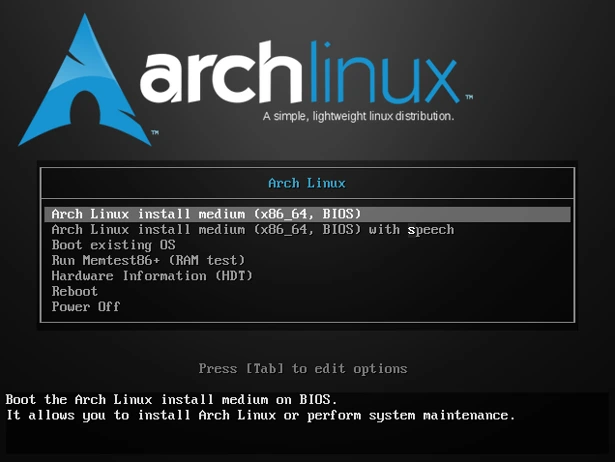
Ready to get your hands on it? Downloading and installing the Arch Linux 2026.01.01 ISO is straightforward, but let’s walk through it step by step to ensure a smooth experience.
Step 1: Downloading the ISO
Head over to the official Arch Linux download page. You’ll find the latest ISO listed as archlinux-2026.01.01-x86_64.iso. For the best experience, use the BitTorrent link—it’s faster and helps distribute the load on mirrors. If you prefer HTTP, select a mirror close to your location from the extensive list (sorted by country).
Before downloading, grab the checksum files (sha256sums.txt and b2sums.txt) and the PGP signature. Verify the ISO’s integrity with commands like sha256sum -c sha256sums.txt or gpg –verify archlinux-2026.01.01-x86_64.iso.sig. This step is crucial to avoid corrupted or tampered files.
Step 2: Preparing Your Media
Burn the ISO to a USB drive using tools like Rufus (on Windows), Etcher, or dd on Linux/Mac. For example, on Linux: sudo dd if=archlinux-2026.01.01-x86_64.iso of=/dev/sdX bs=4M status=progress && sync (replace /dev/sdX with your USB device).
If you’re testing in a VM, tools like VirtualBox or QEMU work great—just mount the ISO as a virtual CD.
Step 3: Booting and Installation
Boot from the USB (adjust BIOS/UEFI settings if needed). You’ll land in a live environment. Connect to the internet with iwctl for Wi-Fi or ip link for Ethernet.
Launch Archinstall with archinstall. The menu-driven interface guides you through:
- Selecting your language and keyboard layout.
- Partitioning disks (manual or guided; support for LUKS encryption and LVM).
- Choosing a filesystem (EXT4, Btrfs, etc.).
- Selecting a desktop environment—now including COSMIC!
- Configuring the bootloader (GRUB, systemd-boot, or rEFInd).
- Setting up users, root password, and network.
- Enabling extras like CUPS, Zram, or power daemons.
The process takes 10-30 minutes, depending on your hardware. Once done, reboot and enjoy your new Arch system.
Pro tip: If you encounter issues, check the Arch Wiki—it’s the best resource out there. For advanced users, you can still opt for the traditional manual install if Archinstall feels too “easy.”
Why This ISO Matters: Benefits for Users and Developers
So, why bother with the Arch Linux 2026.01.01 ISO when you could just update an existing install? For starters, it’s ideal for new hardware that benefits from kernel 6.18’s improved support. If you’ve got a Snapdragon X1 laptop or a new AMD GPU, this ISO ensures compatibility from day one.
For developers, the rolling-release model combined with LTS kernel stability means fewer disruptions. You can tinker with the latest packages without worrying about kernel regressions. The enhanced Archinstall also lowers the barrier for onboarding teams or setting up test environments.
Performance-wise, users report smoother multitasking and better battery life thanks to the kernel optimizations and power management tools. Security patches from December 2025 are baked in, reducing vulnerabilities out of the box.
Compared to other distros like Ubuntu (with its fixed releases) or Fedora (semi-rolling), Arch’s approach offers unmatched customization. No bloat, no telemetry—just pure Linux.
Community Buzz Around the New Release
The Arch community is abuzz with the release. On X (formerly Twitter), users are sharing their excitement: “Happy New Year, Arch users! Arch Linux 2026.01.01 ISO is out—powered by Linux 6.18 LTS kernel, with Archinstall 3.0.15 adding stable COSMIC desktop support, rEFInd bootloader, CUPS printing, and more!” Forums like Reddit’s r/archlinux are lighting up with installation stories and tips.
This enthusiasm underscores Arch’s vibrant ecosystem, where users contribute to the AUR (Arch User Repository) and help shape the distro’s future.
Looking Ahead: The Future of Arch Linux in 2026
As Arch Linux rings in 2026 with this powerful new ISO, what’s next? Expect more monthly snapshots, with potential integrations like Wayland improvements or AI-accelerated packages. The shift to open NVIDIA modules hints at broader open-source advocacy.
The distro’s maintainers continue to emphasize simplicity and user control, so don’t expect radical changes—just steady, reliable progress. If trends hold, we might see even tighter integration with Rust-based tools, given COSMIC’s success.
For now, this ISO sets a high bar for the year ahead.
Conclusion: Time to Ring in Your Own Arch Adventure
There you have it—a comprehensive look at how Arch Linux rings in 2026 with a powerful new ISO. From the robust Linux kernel 6.18 LTS to the feature-packed Archinstall 3.0.15, this release embodies what makes Arch special: power, flexibility, and community-driven innovation.
If you’re itching to try it, head to the download page and give it a spin. Whether for a daily driver, server, or hobby project, Arch delivers. Happy installing, and here’s to a fantastic 2026 in the Linux world!
Frequently Asked Questions (FAQ)
Should I use this new ISO to upgrade my existing Arch installation?
No. Arch ISOs are for new installations only. To update an existing system, simply run sudo pacman -Syu—your rolling-release setup will pull in all the latest packages, including kernel 6.18 LTS if you’re on the standard kernel.
What’s the main difference between this ISO and previous ones?
The key upgrades are Linux kernel 6.18 LTS for better long-term stability and hardware support, plus Archinstall 3.0.15 with new options like COSMIC desktop, rEFInd bootloader, CUPS printing, and improved power/Zram management.
Is the COSMIC desktop environment ready for daily use in this release?
Yes! Archinstall 3.0.15 provides stable (non-experimental) support for COSMIC, making it easy to install a modern, performant desktop right from the start.
Will this ISO work on older hardware?
Arch Linux targets modern x86_64 systems. While it may run on older hardware, the new kernel and packages are optimized for recent CPUs/GPUs. For legacy NVIDIA GPUs (e.g., Pascal series), you might need alternative drivers.
How long will kernel 6.18 LTS be supported?
As an LTS release, it will receive maintenance and security updates for several years, typically until at least late 2027 or beyond, depending on upstream decisions.
Disclaimer
This article is for informational purposes only and based on publicly available data as of January 2026. Always refer to the official Arch Linux website, wiki, and forums for the most accurate and up-to-date information. Installing Arch Linux requires technical knowledge—back up your data and proceed at your own risk.
Also Read
Linux Distros Without Telemetry in 2026
About the Author