Aurora Linux The Ultimate KDE Workstation for 2025 Productivity
Hey there, tech enthusiasts! If you’re on the hunt for a Linux distribution that’s sleek, powerful, and designed to supercharge your productivity in 2025, let me introduce you to Aurora Linux. Built on the rock-solid foundation of Fedora and powered by the highly customizable KDE Plasma desktop environment, Aurora is making waves as the ultimate workstation for developers, creatives, and everyday users alike.
In this deep dive, we’ll explore why Aurora Linux stands out, what makes it a productivity powerhouse, and how it’s shaping up to be the go-to choice for 2025. Buckle up—this is going to be an exciting ride!
What is Aurora Linux?
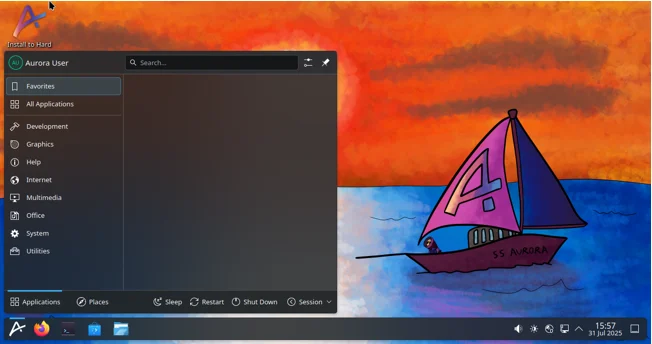
Aurora Linux is a Fedora-based Linux distribution that’s all about delivering a delightful, reliable, and maintenance-free desktop experience. It’s tailored for users who want a polished, Windows-like interface with the flexibility and power of Linux. Aurora combines the cutting-edge technology of Fedora with a lightly customized KDE Plasma desktop, creating a seamless environment that’s both visually stunning and highly functional. Whether you’re a developer coding your next big project, a creative designing a masterpiece, or just someone who wants a smooth and efficient daily driver, Aurora has you covered.
Unlike traditional Linux distributions, Aurora takes a cloud-native approach, using image-based updates and containerized workflows to ensure stability and ease of use. It’s built by a passionate community for the community, with a focus on making your computing experience as productive and enjoyable as possible. And with its developer-focused edition, Aurora-DX, it’s a dream come true for coders looking for a hassle-free setup.
Why Choose Aurora Linux in 2025?
The Linux landscape is vast, with distros like Ubuntu, Fedora, and Arch Linux vying for attention. So, what makes Aurora stand out in 2025? Here are some key reasons why it’s the ultimate KDE workstation for productivity:
1. A Gorgeous and Customizable KDE Plasma Desktop
KDE Plasma is renowned for its flexibility and eye-catching design, and Aurora takes it to the next level. The desktop environment is lightly customized to offer a smooth, intuitive experience right out of the box. Think of it as a perfect balance between Windows-like familiarity and Linux’s endless customization options. Whether you want to tweak every pixel of your desktop or stick with the sleek defaults, Aurora’s KDE Plasma setup makes it easy.
In 2025, KDE Plasma 6.2 is the star of the show, bringing features like Wayland support for smoother graphics, time-of-day wallpapers, and a refined user interface. Aurora’s implementation ensures you get the latest Plasma features without the instability often associated with bleeding-edge updates. Plus, with a focus on usability, the desktop feels welcoming for both Linux newcomers and seasoned pros.
2. Built for Productivity
Aurora is designed with productivity in mind. It comes preloaded with a curated set of applications that cater to a wide range of users. From productivity tools like LibreOffice and KOrganizer to development powerhouses like Visual Studio Code, Aurora ensures you have everything you need to hit the ground running. The inclusion of Homebrew—a package manager typically associated with macOS—makes it a breeze to install and update command-line tools, with thousands of libraries at your fingertips.
For multitasking enthusiasts, Aurora’s KDE Plasma environment offers intuitive features like virtual desktops, customizable panels, and a powerful Activities system to organize your workflows. Whether you’re juggling multiple projects or need a distraction-free setup for writing your next novel, Aurora’s got your back.
3. Developer-Friendly Features with Aurora-DX
If you’re a developer, Aurora-DX is where things get really exciting. This developer-focused edition comes preconfigured with tools like Docker and Podman for containerized workflows, making it easy to spin up isolated development environments. Visual Studio Code is preinstalled and set up to support DevContainers, streamlining your coding process. If you’re a fan of JetBrains products like IntelliJ IDEA or PyCharm, they’re just a command away thanks to Homebrew integration.
Aurora-DX also embraces cloud-native principles, with image-based system updates that ensure your OS stays reliable and up-to-date without breaking your workflow. And with Ptyxis, a modern terminal emulator, you can access containerized CLI environments with a single click. This is a game-changer for developers who want a hassle-free setup without sacrificing power.
4. Maintenance-Free and Reliable
One of Aurora’s standout features is its maintenance-free design. Unlike some Linux distributions that require constant tweaking, Aurora uses image-based updates to keep your system stable and secure. These updates are automatic and seamless, ensuring you always have the latest features without the headache of manual intervention. Plus, Aurora supports Secure Boot by default, adding an extra layer of security for peace of mind.
5. Community-Driven and Accessible
Aurora is built and maintained by a passionate community that’s dedicated to making Linux accessible to everyone. Whether you’re a newbie or a Linux veteran, you’ll find plenty of support through Aurora’s forums, Discord server, and comprehensive documentation. The community is active and welcoming, making it easy to get help, contribute, or just geek out with fellow Linux enthusiasts.
Key Features of Aurora Linux in 2025
Let’s break down some of the standout features that make Aurora Linux a productivity beast in 2025:
Seamless KDE Plasma Experience
Aurora’s KDE Plasma desktop is customized to feel familiar yet modern. With support for Wayland, you’ll enjoy smoother animations, better scaling on high-DPI displays, and improved compatibility with modern hardware. The desktop is highly customizable, allowing you to tweak everything from panel layouts to window decorations. And with features like time-of-day wallpapers and session restore, your workspace always feels personal and polished.
Preinstalled Productivity Tools
Aurora comes with a carefully selected suite of applications to boost your productivity:
- LibreOffice: A full-featured office suite for documents, spreadsheets, and presentations.
- KOrganizer: A powerful calendar and task management tool.
- Gwenview: A versatile image viewer for quick edits and organization.
- Okular: A robust PDF viewer and annotator.
- Firefox: A privacy-focused web browser for secure browsing.
These tools are ready to go from the moment you boot up, saving you time and effort.
Developer Powerhouse
For developers, Aurora-DX is a treasure trove of tools:
- Visual Studio Code: Preconfigured for DevContainers, making it easy to set up isolated coding environments.
- Docker and Podman: Support for containerized workflows, perfect for testing and deployment.
- Homebrew: Access thousands of CLI tools and libraries with a familiar package manager.
- Ptyxis: A modern terminal emulator that integrates seamlessly with containerized environments.
Cloud-Native Approach
Aurora’s cloud-native design sets it apart from traditional Linux distributions. Applications are logically separated from the system using Flatpaks for graphical apps and Homebrew for CLI tools. This ensures your system remains stable even as you install new software. Image-based updates mean you get a consistent, reliable experience with minimal maintenance.
Hardware Compatibility
Aurora offers tailored editions for specific hardware, including Surface and ASUS devices, ensuring optimal performance out of the box. With support for Wayland and proprietary drivers, it’s well-equipped to handle modern hardware, from high-resolution displays to powerful GPUs.
How Aurora Enhances Productivity in 2025
Productivity isn’t just about having the right tools—it’s about creating an environment that lets you focus and get things done. Here’s how Aurora Linux delivers:
Streamlined Workflows
Aurora’s KDE Plasma desktop is designed to minimize distractions and maximize efficiency. The Activities feature lets you create separate workspaces for different tasks—say, one for coding, another for writing, and a third for browsing. Virtual desktops make it easy to organize your open applications, while the powerful Krunner search tool lets you launch apps, open files, or run commands with a few keystrokes.
Containerized Development
For developers, Aurora’s containerized workflows are a game-changer. With Docker, Podman, and DevContainers, you can isolate your development environments, ensuring that dependencies for one project don’t interfere with another. This is especially useful for teams working on multiple projects or experimenting with new tools.
Minimal Maintenance
Aurora’s image-based updates and maintenance-free design mean you spend less time tinkering with your system and more time getting work done. The system is designed to “just work,” with automatic updates that don’t disrupt your workflow.
Customization for Power Users
If you love tweaking your setup, Aurora’s KDE Plasma environment is a playground. You can customize everything from the desktop layout to the window decorations (thanks to the Aurorae theme engine). Whether you want a minimalist setup or a flashy, widget-filled desktop, Aurora lets you make it your own.
Aurora vs. Other Linux Distros in 2025
How does Aurora stack up against other popular Linux distributions like Kubuntu, Fedora KDE Spin, or KDE Neon? Let’s take a quick look:
- Kubuntu: Kubuntu offers a solid KDE Plasma experience on an Ubuntu base, making it a great choice for beginners. However, Aurora’s cloud-native approach and developer-focused features give it an edge for power users and coders.
- Fedora KDE Spin: As a Fedora-based distro, Aurora shares some similarities with Fedora KDE Spin. But Aurora’s curated app selection, Homebrew integration, and maintenance-free design make it more polished and user-friendly.
- KDE Neon: KDE Neon is the go-to for the latest Plasma features, but it’s not a full distro and lacks the robust app ecosystem and developer tools that Aurora provides.
- openSUSE Tumbleweed: A rolling-release distro with cutting-edge Plasma updates, openSUSE Tumbleweed is great for enthusiasts but can be less stable than Aurora’s image-based update system.
Aurora strikes a unique balance between stability, modern features, and ease of use, making it a top contender for 2025.
Getting Started with Aurora Linux
Ready to give Aurora a try? Here’s how to get started:
- Download the ISO: Head to getaurora.dev and download the latest Aurora ISO. Be sure to use Fedora Image Writer to burn the image to a USB drive, as Ventoy is not supported.
- Install Aurora: Follow the straightforward installation process, which includes enrolling a Secure Boot key (password: universalblue) for added security.
- Explore the Desktop: Boot into Aurora and explore the KDE Plasma environment. Customize your desktop, install your favorite apps via Homebrew or Flatpak, and dive into your projects.
- Join the Community: Check out Aurora’s forums and Discord server for support, tips, and community discussions.
Tips for Maximizing Productivity with Aurora
To make the most of Aurora Linux in 2025, try these tips:
- Use Activities: Create separate Activities for different tasks (e.g., work, personal, coding) to keep your desktop organized.
- Leverage Krunner: Press Alt + Space to open Krunner and quickly launch apps, search files, or run commands.
- Explore Flatpaks: Install apps like Spotify, Slack, or Zoom via Flatpak for a sandboxed, secure experience.
- Set Up DevContainers: If you’re a developer, use Visual Studio Code with DevContainers to streamline your coding workflow.
- Customize Your Desktop: Dive into System Settings to tweak your desktop theme, widgets, and panel layout to suit your style.
The Future of Aurora Linux
As we look ahead to 2025 and beyond, Aurora Linux is poised to continue evolving. The community is actively working on new features, with a focus on enhancing the developer experience, improving hardware compatibility, and refining the KDE Plasma desktop. With KDE Plasma 6.5 on the horizon, we can expect even more exciting updates, from lower RAM usage to advanced Wayland features.
Aurora’s commitment to a maintenance-free, cloud-native approach ensures it will remain a reliable choice for users who want a modern Linux experience without the hassle. Whether you’re a developer, a creative, or just someone looking for a better way to work, Aurora is ready to take your productivity to the next level.
Conclusion
Aurora Linux is more than just another Linux distribution—it’s a carefully crafted workstation that blends the best of KDE Plasma, Fedora, and cloud-native technology to deliver an unparalleled productivity experience. With its gorgeous desktop, developer-friendly tools, and maintenance-free design, it’s no wonder Aurora is being hailed as the ultimate KDE workstation for 2025.
So, what are you waiting for? Download Aurora, fire up that KDE Plasma desktop, and see how it can transform your workflow. Whether you’re coding the next big app, writing a novel, or just browsing the web, Aurora Linux is here to make every moment productive and enjoyable. Let’s make 2025 the year of Aurora!
Disclaimer
The information provided in this blog post about Aurora Linux is based on the latest available data from official sources and community resources as of July 31, 2025. While every effort has been made to ensure accuracy, the features, specifications, and details of Aurora Linux may change over time due to updates, community contributions, or other factors. The author and publisher are not affiliated with Aurora Linux, Fedora, or the KDE community and do not guarantee the performance, suitability, or reliability of Aurora Linux for any specific purpose.
Users are encouraged to verify information through official channels such as getaurora.dev and conduct their own research before installing or using Aurora Linux. Always back up your data before making significant changes to your operating system. The author is not responsible for any issues, damages, or data loss that may arise from following the guidance in this post.
About the Author