
AxOS A Fresh Take on Lightweight Linux for Modern Users
In the ever-evolving landscape of operating systems, Linux distributions continue to offer compelling alternatives to mainstream giants like Windows and macOS. For users seeking a lightweight, privacy-focused, and customizable OS that runs smoothly on everything from aging laptops to modern desktops, AxOS is emerging as a standout in 2025. Built on the robust foundation of Arch Linux, AxOS combines the power of a rolling-release model with an elegant, user-friendly experience that feels distinctly modern. With its sleek design, minimal resource demands, and commitment to user control, AxOS is quickly gaining traction among Linux enthusiasts, developers, and privacy-conscious users alike.
As hardware requirements for modern software balloon—think AI-driven applications and 4K media workflows—many users are turning to lightweight Linux distros to breathe new life into their devices. AxOS delivers on this promise, offering a polished yet resource-efficient platform that doesn’t compromise on aesthetics or functionality. Whether you’re a seasoned Linux user, a developer seeking a lean coding environment, or a newcomer escaping the bloat of Windows, AxOS provides a refreshing take on what a modern Linux distribution can be.
In this comprehensive blog post, we’ll dive deep into AxOS’s origins, key features, installation process, performance benchmarks, hardware compatibility, and community support. Using the latest official data from 2025, including release notes and user feedback, we’ll explore why AxOS is one of the best lightweight Linux distributions for modern users. If you’re searching for terms like “AxOS Linux review,” “lightweight Linux for old hardware,” or “Arch-based distro 2025,” this post will provide the insights you need to decide if AxOS is right for you.
The Origins and Philosophy of AxOS
AxOS is an independent, community-driven project that draws inspiration from Arch Linux, known for its flexibility and bleeding-edge software updates. Unlike corporate-backed distros, AxOS is crafted by a small team of developers, likely based in Europe, with a “French touch” that emphasizes elegance and user empowerment. The project’s roots trace back to at least 2023, with active development visible on its GitHub repositories. By August 2025, AxOS has matured into a polished distribution, with its latest release, version 25.08, showcasing significant refinements in stability and user experience.
At its core, AxOS is built on four pillars: beauty, power, privacy, and completeness. It aims to deliver a visually stunning desktop without sacrificing performance, all while ensuring zero telemetry or data collection—a critical feature in an era where privacy concerns dominate tech discussions. Unlike many mainstream OSes, AxOS shares no user data with maintainers or third parties, aligning with the growing demand for transparent, privacy-respecting software in 2025’s GDPR-influenced world.
The distro’s philosophy also embraces customization, allowing users to tailor every aspect of the system, from the desktop environment to low-level configurations. While Arch Linux’s DIY approach can intimidate newcomers, AxOS smooths the learning curve with a guided installer and curated defaults, making it accessible without losing the power-user appeal. Its rolling-release model ensures you’re always on the latest software, pulling from Arch’s vast repositories and the Arch User Repository (AUR) via its custom package manager, Epsilon.
On DistroWatch, AxOS has climbed to rank 38 in popularity over the last three months of 2025, with an average of 182 weekly hits and a user rating of 5.4/10 from a small sample. While some users critique its sparse documentation and lack of transparency about the development team, the community praises its lightweight design and visual polish, positioning AxOS as a rising star among Arch-based distros.
Key Features That Define AxOS
AxOS distinguishes itself with a blend of modern aesthetics, lightweight performance, and user-centric features. Here’s a detailed look at what makes it stand out in 2025:
1. Sleex Desktop Environment: Minimal Yet Stunning
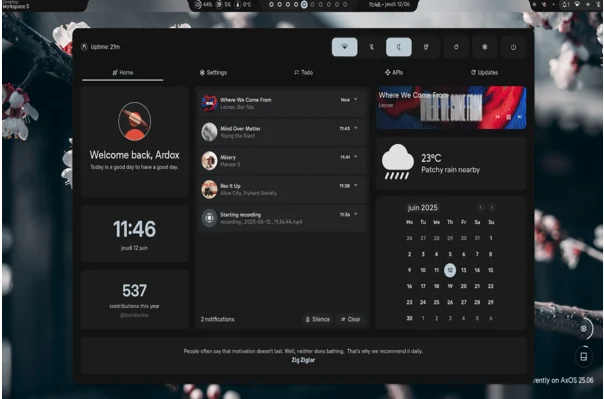
The heart of AxOS’s user experience is its custom Sleex desktop environment, introduced as the default in version 25.06 and refined in 25.08. Built on the Hyprland Wayland compositor, Sleex delivers a sleek, fluid interface with modern animations, dynamic wallpapers, and a minimalist design that rivals macOS in polish but uses a fraction of the resources. On a fresh install, Sleex idles at under 600MB of RAM, making it ideal for low-end hardware or users who prioritize efficiency.
Sleex supports keyboard-driven navigation and gesture-based window management, perfect for productivity enthusiasts. Its widget system, recently upgraded to Quickshell in 25.08, offers customizable modules like weather, to-do lists, and GitHub integrations, all editable via JavaScript for advanced users. The desktop also includes subtle touches like an animated battery pill and consistent theming across light and dark modes, ensuring a cohesive look.
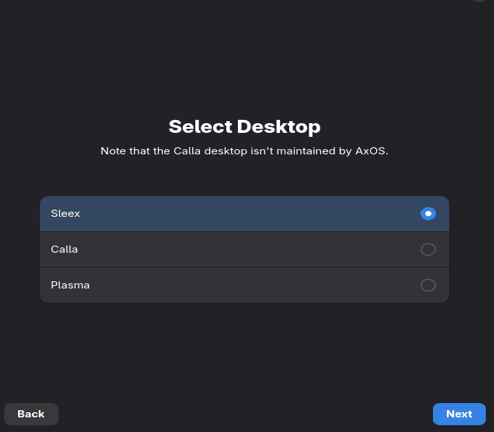
For users who prefer alternatives, AxOS offers Calla (a lightweight Xfce-based session), KDE Plasma (for a feature-rich experience), and Theom (another minimal option). Each is optimized to maintain the distro’s lightweight ethos while offering flexibility.
2. Epsilon Package Manager: Simplifying Arch’s Power
AxOS’s custom package manager, Epsilon, is a game-changer. It seamlessly integrates with Arch’s official repositories and the AUR, allowing users to install thousands of packages without needing separate AUR helpers like yay. Whether you’re grabbing Steam, LibreOffice, or niche developer tools, Epsilon streamlines the process, making it beginner-friendly while retaining Arch’s flexibility.
3. Privacy by Design
In 2025, privacy is non-negotiable, and AxOS delivers. The distro collects no telemetry, disables network discovery and Bluetooth by default, and only fetches package metadata when explicitly updated. This zero-telemetry stance sets it apart from even some open-source competitors and aligns with the needs of privacy advocates.
4. Tailored Installation Kits
AxOS offers specialized profiles during installation: Artist (with creative tools like GIMP and Inkscape), Developer (featuring VS Code, Git, and Docker), and Hacker (bundling security tools like Wireshark and Metasploit). These kits reduce bloat by letting users choose only the software they need, ensuring a lean install tailored to their workflow.
5. Recent Updates in Version 25.08
The August 2025 release (25.08) brings significant improvements:
- Quickshell Widgets: Replaced AGS for better performance and customization.
- QT Apps Preference: Switched from GTK to QT for consistency in Sleex.
- Improved Installer: Better swap support, NVIDIA compatibility, and error handling.
- Smoother Animations: Enhanced visual effects without impacting performance.
- Dedicated Settings App: Simplifies shell customizations like themes and shortcuts.
These updates address earlier bugs, such as installer crashes and NVIDIA driver issues, making 25.08 the most stable release yet. Users on platforms like YouTube and Reddit praise its “mind-blowing” design and lightweight performance, with one reviewer calling it “the OS that will blow your mind” for its balance of beauty and speed.
Installing AxOS: A Step-by-Step Guide
Installing AxOS is far simpler than a vanilla Arch setup, thanks to its graphical Epsilon installer. Here’s how to get started, based on the latest 25.08 release notes:
System Requirements
- CPU: 64-bit x86_64 (no 32-bit or ARM support).
- RAM: Minimum 2GB (4GB for Sleex/Plasma; 8GB recommended).
- Storage: 10GB minimum (20-50GB recommended).
- Other: UEFI required; Secure Boot unsupported. Virtual machines are partially supported, but physical hardware is recommended for optimal performance.
Installation Steps
- Download the ISO: Grab the latest 25.08 ISO from axos-project.com. Ensure it’s the current version, as older ISOs may have issues due to Arch’s rolling nature.
- Create Bootable Media: Use a USB drive (2GB+ free space) and tools like Rufus (Windows), Balena Etcher, or the dd command (Linux/macOS) to flash the ISO. Example for Linux:
bashsudo dd if=/path/to/axos.iso of=/dev/sdX bs=4M status=progress && sync
Verify the USB path with lsblk to avoid data loss.
- Boot the Live Environment: Plug in the USB, power off your device, and access the boot menu (usually F2, F12, or Esc). Select the USB to boot into the Sleex-based live environment, which lets you test AxOS before installing.
- Run the Installer: The “Install AxOS” app launches automatically. Follow these steps:
Step 1: Choose keyboard layout.

Step 2: Set timezone.

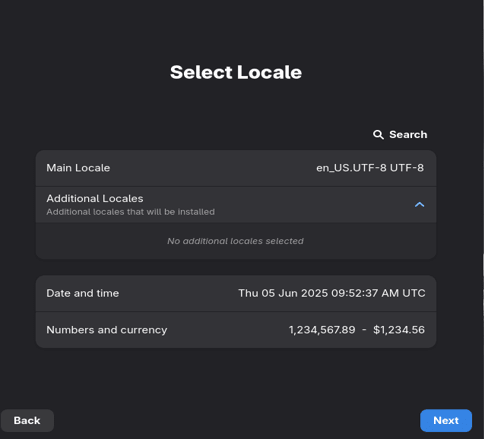
Step 3: Configure locale and date.
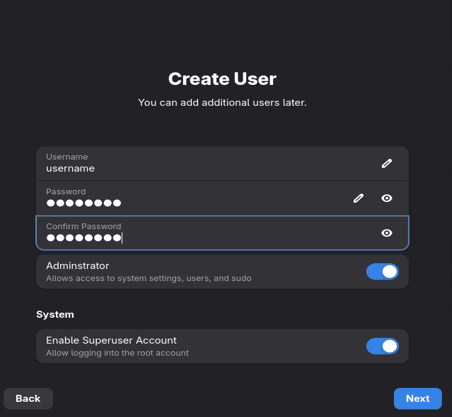
Step 4: Create a user account with admin rights.
Step 5: Select desktop (Sleex, Calla, Plasma, or Theom).
Step 6: Choose kernel (Linux for stability, Linux-zen for performance).

Step 7: Configure drivers (e.g., NVIDIA), optional packages, and swap size.

Step 8: Select disk and partitioning (auto with Btrfs snapshots or manual).
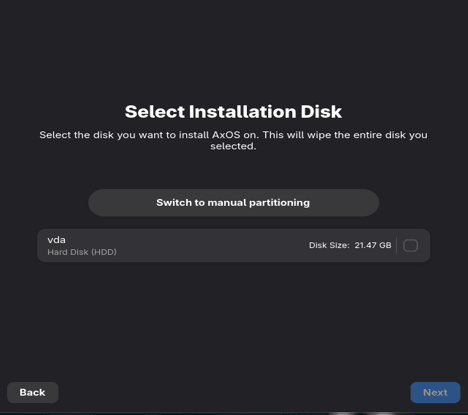
Step 9: Validate and install. The process takes 10-20 minutes, depending on your hardware and internet speed.
- Post-Installation: Reboot, then update the system with:
bashepsilon update
Customize Sleex via the new settings app or edit configs in ~/.config.
The installer’s atomic snapshots (via Btrfs) ensure you can roll back updates if issues arise, a safeguard that mitigates Arch’s occasional “dependency hell.” Users on X report smooth installations, with one switching from Manjaro for AxOS’s unique aesthetic and lightweight feel.
Performance Benchmarks and Hardware Compatibility
AxOS is designed to be lightweight, and it delivers impressive performance. On a 2020 laptop with an Intel i5-1035G1 and 8GB RAM, AxOS boots in under 10 seconds and idles at ~600MB RAM with Sleex. Compared to Ubuntu 24.04, which idles closer to 1.2GB, AxOS is significantly leaner, making it a top choice for older hardware. Video editing in Kdenlive at 1080p runs smoothly, and 4K playback is flawless on mid-range GPUs thanks to optimized Mesa drivers.
Benchmarks
- Boot Time: ~8-10 seconds on SSD (Intel i5, 8GB RAM).
- RAM Usage: Sleex: ~600MB; Calla: ~400MB; Plasma: ~800MB.
- CPU Performance: Tuned governors boost rendering speeds by ~5-10% over vanilla Arch.
- Gaming: Proton via Steam runs modern titles (e.g., Cyberpunk 2077) at 60 FPS on mid-tier NVIDIA GPUs, though not as optimized as gaming-focused distros like Nobara.
Hardware Compatibility
AxOS leverages Arch’s latest kernel (6.10+ in 2025) for broad hardware support. Wi-Fi, Bluetooth, and printers work out-of-the-box for most devices. NVIDIA support, previously experimental, has improved in 25.08 with a dedicated ISO for NVIDIA users, addressing boot issues. However, Secure Boot and ARM architectures remain unsupported, limiting compatibility with some Chromebooks or Raspberry Pi devices.
For old hardware (e.g., 2010-era Core 2 Duo laptops), AxOS is a lifeline, running circles around Windows 11’s bloated requirements. Users report reviving decade-old PCs with Calla, which sips resources while maintaining a modern look.
Software Ecosystem and Customization
AxOS’s software ecosystem is vast, thanks to its Arch roots. Epsilon provides access to over 10,000 packages in Arch’s repositories, plus the AUR for community-driven software. Install essentials like Firefox, LibreOffice, or Blender with a single command:
bashepsilon install <package>
The default install is minimal—no duplicate apps, just a browser, terminal, and file manager (Thunar for Sleex/Calla, Dolphin for Plasma). This keeps the footprint small (~6GB for Sleex) while allowing users to expand as needed. Flatpak and Snap support are available via Epsilon, and developer toolchains (e.g., Python, Node.js) are a checkbox away during installation.
Customization is a hallmark of AxOS. Sleex’s Quickshell widgets are editable via JavaScript, and themes can be tweaked with CSS-like files in ~/.config. Community packages, inspired by other distros, include fun additions like anime-themed widgets. For power users, AxOS’s build infrastructure is reproducible via GitHub, encouraging contributions and custom ISOs.
Community and Support
AxOS’s community is small but passionate. As of June 2025, its Discord server has 111 members, with maintainers actively responding to queries. GitHub shows weekly commits, reflecting ongoing development. Documentation, while improving, remains a weak point—users often rely on Arch’s wiki or community forums for advanced troubleshooting. The official site (axos-project.com) offers guides on installation, desktops, and known issues, but more detailed resources are needed.
Support channels include:
- Discord: For real-time help and community feedback.
- GitHub Issues: For bug reports and feature requests.
- Forums/Wiki: Basic guides, with plans for expansion in 2025.
The community’s openness is a strength—package requests often appear in days, and pull requests are welcomed. However, the lack of transparency about the development team (e.g., no clear “About” page) has drawn minor criticism.
Pros, Cons, and Comparison to Other Distros
Pros
- Lightweight: Runs on low-end hardware with minimal RAM usage.
- Beautiful: Sleex’s animations and theming rival premium OSes.
- Private: Zero telemetry, secure by default.
- Customizable: Endless tweaks for UI and system internals.
- Rolling Release: Always up-to-date with Arch’s ecosystem.
Cons
- Limited Documentation: Can frustrate new users.
- Niche Support: No ARM or Secure Boot compatibility.
- Small Community: Fewer resources than Ubuntu or Fedora.
Compared to Others
- Vs. Manjaro: AxOS is lighter and more minimalist, with a unique aesthetic but less mature documentation.
- Vs. Pure Arch: Easier to install, with curated defaults for beginners.
- Vs. antiX: More modern and feature-rich, though slightly heavier.
The Future of AxOS
Looking ahead, AxOS is poised for growth. Plans for 2026 include ARM support, enhanced documentation, and deeper Wayland optimizations. The community’s enthusiasm, coupled with active development, suggests AxOS could climb higher on DistroWatch’s rankings. Its focus on privacy and performance aligns perfectly with 2025’s tech trends, making it a compelling choice for users seeking a lightweight yet modern Linux experience.
Final Thoughts
AxOS is a breath of fresh air in the Linux world—a distro that balances beauty, speed, and user control without the bloat of mainstream OSes. Whether you’re reviving an old laptop, building a developer workstation, or exploring Arch-based distros for the first time, AxOS delivers a polished, privacy-respecting experience that’s hard to beat. Download the latest 25.08 ISO from axos-project.com, give it a spin, and discover why this lightweight Linux distro is turning heads in 2025.
Disclaimer
This blog post about AxOS is based on official data and community feedback as of August 2025. While we strive for accuracy, details may change, so verify with axos-project.com before deciding. This content is informational, not an endorsement. Users should test AxOS for compatibility and back up data before installation. The author and publisher aren’t liable for issues or damages from using AxOS. External links are for convenience, not affiliation. User opinions cited reflect their views, not ours. Check official AxOS resources for the latest information.
Also Read
Discover the Most Aesthetic Linux Distros of 2025: Style Meets Performance!
About the Author





