Best Linux Distros With Budgie Desktop by Default
The Budgie desktop environment has carved out a special place in the Linux ecosystem. It offers that rare combination of visual elegance, user-friendly design, and genuine functionality. If you’re searching for the best Linux distros with Budgie desktop by default in 2026, you’ve landed in the right place. This comprehensive guide examines the top distributions that ship Budgie out of the box, helping you make an informed decision based on your specific needs.
What Makes Budgie Desktop Special?
Before we explore the best Linux distros with Budgie desktop by default, let’s understand what sets this environment apart. Budgie started its journey back in 2014 when Ikey Doherty created it for his EvolveOS distribution, which later became Solus. The desktop was completely rewritten in 2015 using the Vala programming language, marking a significant milestone in its development.
Today, Budgie stands as an independent project under the Buddies of Budgie organization. The team focuses on delivering a cohesive desktop experience across all distributions rather than favoring any single platform. This approach ensures that users get a consistent, polished experience regardless of their chosen distribution.
The desktop features a clean, modern interface that feels immediately familiar to users coming from Windows or macOS. Yet it retains the flexibility and customization options that Linux enthusiasts expect. The signature Raven sidebar brings together notifications, calendar, media controls, and system applets in one convenient location.
Current State of Budgie Development: Budgie 10.10 Released
The Budgie desktop reached a major milestone in January 2026 with the release of Budgie 10.10. This marks a historic transition as Budgie becomes the first mainstream Linux desktop environment to ship as Wayland-only, completely dropping X11 support.
The move to Wayland represents more than just a technical change. The development team spent over a year ensuring that every component works seamlessly under the new display protocol. Users still have their familiar panels, applets, and the Raven sidebar, but now everything runs on modern, secure Wayland foundations.
Key features in Budgie 10.10 include:
Labwc Integration: Budgie now uses Labwc as its recommended Wayland compositor. The team created a dedicated bridge that automatically synchronizes settings between Budgie Control Center and Labwc configuration files. This provides keyboard shortcuts, theming, window snapping, and window switching with thumbnails right out of the box.
New Component Suite: Budgie Desktop Services, written in Qt6 and C++, serves as the foundation for future development. It currently handles persistent display configuration, ensuring your monitor setup survives restarts and updates.
Enhanced Applets: Multiple applets received updates for Wayland compatibility. The Night Light applet now uses the wlr gamma control protocol through gammastep. The Keyboard Layout, Tasklist, and Workspaces applets all function properly under Wayland.
Updated Control Center: Budgie Control Center gained Wayland-aware panels, improved accessibility features, and better AppStream metadata. The display configuration moved to a separate Budgie Display Configurator application for better usability.
Better Application Integration: The desktop uses XDG Desktop Portals for standardized communication with applications. This enables secure screen sharing, proper file dialogs, and better app sandboxing.
With Budgie 10.10 finalized, the team shifts focus to Budgie 11. This next generation will use Qt6 and the Kirigami framework, promising even more modularity and flexibility. The architecture changes will allow users and distribution maintainers to customize Budgie more extensively while maintaining stability.
1. Ubuntu Budgie
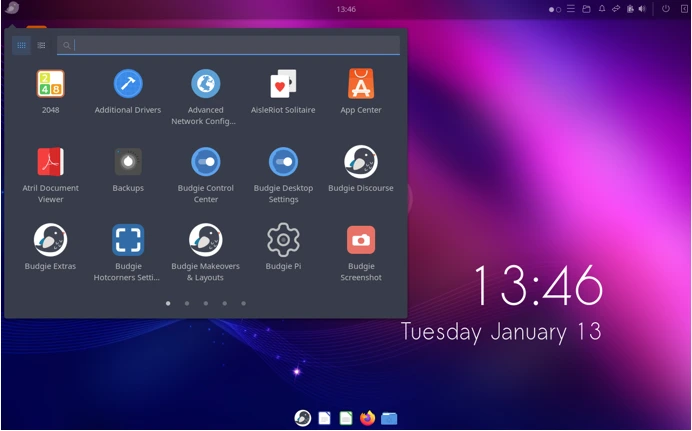
Ubuntu Budgie stands as the flagship distribution for experiencing Budgie desktop at its finest. As an official Ubuntu flavor, it combines Ubuntu’s rock-solid foundation with Budgie’s elegant interface. The distribution has earned official recognition from Canonical, guaranteeing long-term support and regular updates.
Why Choose Ubuntu Budgie?
The team behind Ubuntu Budgie doesn’t just ship vanilla Budgie. They enhance the experience with custom applets and thoughtful defaults that make the desktop shine. The Budgie Welcome application greets new users with easy access to drivers, themes, and additional applets. This attention to detail makes Ubuntu Budgie particularly welcoming for newcomers.
The distribution ships with carefully selected applications that complement Budgie’s design philosophy. Firefox handles web browsing, Thunderbird manages email, LibreOffice takes care of productivity tasks, and Files (formerly Nautilus) provides file management. Everything works together harmoniously from the first boot.
Ubuntu Budgie also excels in customization options. The team develops their own set of applets through the budgie-extras package. These include features like Hot Corners for quick actions, the Shuffler for advanced window tiling, QuickNote for jotting down ideas, and Workspace Switcher for better desktop organization.
Latest Version Details
The current stable release is Ubuntu Budgie 24.04 LTS, providing support until April 2029. Users can expect regular updates every six months, with Ubuntu Budgie 26.04 scheduled to arrive in April 2026 featuring the new Budgie 10.10 desktop.
System Requirements:
- Minimum: 2 GB RAM, 20 GB storage
- Recommended: 4 GB RAM, 40 GB storage
- Works on both 32-bit and 64-bit systems
Strengths and Considerations
Ubuntu Budgie shines in several areas. The LTS releases offer extended support periods, making them ideal for users who value stability over cutting-edge features. The Ubuntu software ecosystem provides access to thousands of applications through apt, snap, and flatpak. The active community ensures quick help when problems arise.
However, some users might find that Ubuntu’s six-month release cycle feels restrictive compared to rolling release distributions. Snap packages, while convenient, can consume more disk space than traditional packages.
2. Solus Budgie
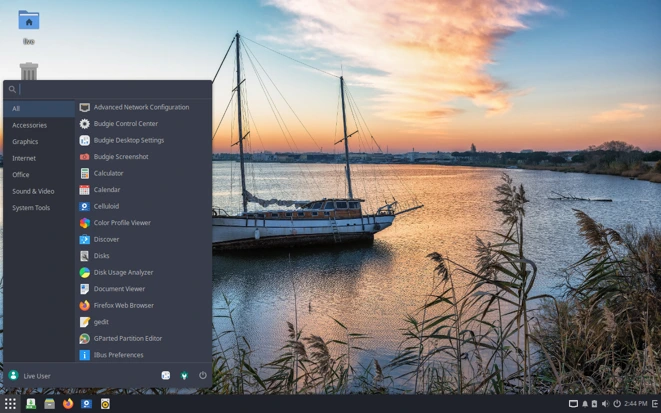
Solus holds a special place in Budgie’s history as the distribution where it all began. Even though Budgie development moved to an independent organization, Solus continues to offer the most integrated Budgie experience. The distribution was built from scratch with Budgie in mind, resulting in exceptional polish and cohesion.
The Solus Philosophy
Solus takes an independent approach to Linux distribution development. Rather than building on top of existing systems like Debian or Fedora, the team creates everything from the ground up. This independence allows them to make decisions purely based on what benefits desktop users, without worrying about server or enterprise requirements.
The distribution follows a curated rolling release model. Unlike traditional rolling releases that push updates as soon as they’re available, Solus tests updates in their unstable repository before releasing them to users every Friday. This approach provides access to recent software while maintaining stability.
Software Management
Solus uses eopkg, a package manager derived from the PiSi system. The recently updated approach encourages users to rely on GNOME Software or Plasma Discover instead of the older Solus Software Center. This shift provides better Flatpak integration and improved application descriptions.
The distribution comes with essential applications pre-installed. Firefox, Thunderbird, and LibreOffice handle common tasks right away. Additional software installs easily through the software center or eopkg commands.
Latest Release Information
Solus 4.8 “Opportunity” shipped in November 2025 with significant improvements. The release includes Linux kernel 6.17.8 (with LTS kernel 6.12.58 available), Mesa 25.2.6 graphics stack, and systemd 257.10. Budgie 10.9.4 comes pre-installed, with Budgie 10.10 rolling out to users once thorough testing completes.
System Requirements:
- Minimum: 2 GB RAM, 20 GB storage
- Recommended: 4 GB RAM, 50 GB storage
What Sets Solus Apart
Solus offers the most refined Budgie experience available today. The integration runs deeper than simply installing Budgie on top of a base system. Every aspect of the distribution considers how it affects the desktop experience. The Pocillo theme, default icon sets, and application selection all work together seamlessly.
The rolling release model means users never face the disruption of major version upgrades. Security patches and new features arrive regularly without requiring system reinstallation. The community, while smaller than Ubuntu’s, consists of dedicated users and developers who provide thoughtful support.
On the flip side, the independent nature means Solus doesn’t have Ubuntu’s massive software repository. Some niche applications might require manual installation or compilation. The smaller user base can occasionally mean waiting longer for answers to uncommon questions.
3. Fedora Budgie Spin
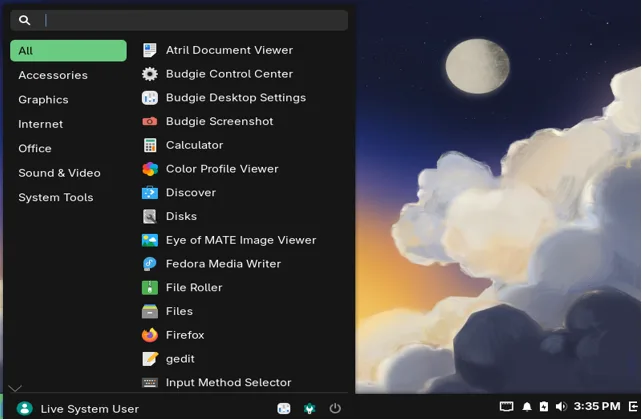
Fedora Budgie represents the newest addition to official Linux distributions offering Budgie by default. The spin became official with Fedora 38, bringing Red Hat’s cutting-edge technology together with Budgie’s elegant design. This combination attracts users who want access to latest features while enjoying a polished desktop environment.
The Fedora Advantage
Fedora serves as the upstream source for Red Hat Enterprise Linux, giving it a unique position in the Linux ecosystem. The distribution receives extensive testing and development from Red Hat engineers alongside community contributors. This professional backing ensures high quality and reliability.
The distribution follows a predictable six-month release cycle. Each version receives support for approximately 13 months, providing a middle ground between the stability of LTS releases and the freshness of rolling distributions. Users get access to recent kernel versions, graphics drivers, and desktop software without excessive instability.
Budgie Integration in Fedora
The Fedora Budgie Spin aims to deliver an upstream-focused experience. Rather than heavily customizing Budgie, the team provides a vanilla installation with sensible defaults. This approach benefits users who want the standard Budgie experience without distribution-specific modifications.
The spin includes GNOME Terminal for command-line work, Firefox for web browsing, and Mozilla Thunderbird for email management. LibreOffice handles document creation and editing. The application selection focuses on quality over quantity, giving users a clean starting point for customization.
What’s New in Fedora 44
Fedora 44, scheduled for release in 2026, will ship with Budgie 10.10. This makes Fedora one of the first major distributions to offer the Wayland-only Budgie experience. The move demonstrates Fedora’s commitment to modern Linux technologies.
The release will feature SDDM as the default display manager, which uses Wayland by default. Users can expect improved display configuration through the new Budgie Display Configurator and Bluejay for Bluetooth management.
System Requirements:
- Minimum: 2 GB RAM, 20 GB storage
- Recommended: 4 GB RAM, 40 GB storage
Fedora’s Strengths and Limitations
Fedora excels at providing recent software versions. Users gain access to the latest kernel releases, updated graphics stacks, and current development tools. The SELinux security framework offers enhanced protection compared to distributions without mandatory access controls.
The DNF package manager provides a robust system for software installation and updates. Fedora’s repositories contain thousands of packages, with additional software available through Flatpak and third-party repos like RPM Fusion.
However, Fedora’s focus on free software means some proprietary drivers and codecs require additional setup. The relatively short support period necessitates upgrades every 13 months, which might not suit users preferring longer stability windows.
4. EndeavourOS (Budgie Edition)
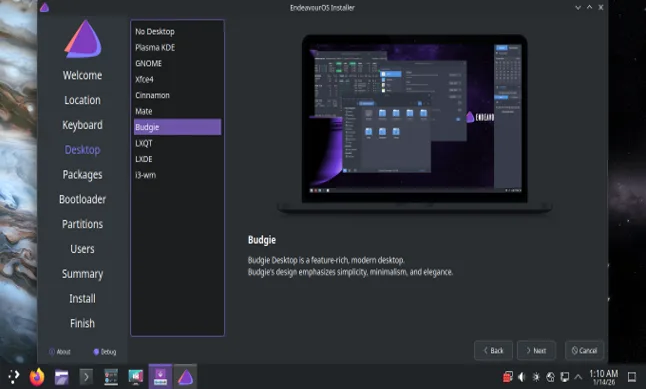
EndeavourOS brings Budgie to the Arch Linux ecosystem. This Arch-based distribution provides an accessible entry point for users interested in Arch’s rolling release model and extensive package availability. The online installer offers Budgie among several desktop environment options.
The Arch Linux Foundation
Arch Linux follows a rolling release model, continuously updating packages as new versions become available. This approach eliminates the need for major version upgrades while providing access to cutting-edge software. EndeavourOS builds on this foundation while making Arch more approachable.
The distribution includes a graphical installer that handles disk partitioning, bootloader setup, and desktop environment installation. Users can choose between systemd-boot or GRUB bootloaders for modern systems. The installer also handles encryption and LVM configuration for users who need these features.
The EndeavourOS Approach
Unlike other distributions that heavily customize their desktop environments, EndeavourOS provides a relatively minimal Budgie installation. The team adds some EndeavourOS-specific theming and a welcome application but otherwise delivers a close-to-vanilla experience.
This minimal approach appeals to users who prefer building their system to their exact specifications. The base installation includes essential tools without overwhelming users with pre-installed software. Terminal enthusiasts will appreciate the selection of command-line utilities included by default.
Access to the AUR
One of Arch Linux’s greatest strengths is the Arch User Repository. This community-maintained collection contains build scripts for thousands of applications not available in official repositories. EndeavourOS users gain full access to the AUR, dramatically expanding available software.
The distribution includes yay, an AUR helper that simplifies installing packages from the repository. While the AUR requires more user discretion than official repositories, it provides unmatched software availability.
Current Status
EndeavourOS continuously updates its installation media. The latest ISOs include Linux kernel 6.17, systemd 257, and updated desktop environments. Budgie installs as version 10.9, with Budgie 10.10 becoming available through system updates once it enters Arch’s stable repositories.
System Requirements:
- Minimum: 2 GB RAM, 20 GB storage
- Recommended: 4 GB RAM, 50 GB storage
Why Choose EndeavourOS?
EndeavourOS suits users who value having the latest software versions immediately. The rolling release model ensures continuous updates without waiting for scheduled releases. The Arch Linux base provides excellent documentation through the Arch Wiki, one of the best Linux documentation resources available.
The distribution works well for tinkerers and enthusiasts who enjoy customizing their systems. The minimal base installation provides a clean slate for building a personalized computing environment.
The main consideration is that rolling releases require more attention than fixed-release distributions. Updates arrive frequently, and occasionally issues might need troubleshooting. Users should feel comfortable with command-line tools and be willing to investigate problems when they arise.
5. Ultramarine Linux (Budgie Edition)
Ultramarine Budgie represents a refined take on Fedora Linux with the Budgie desktop environment as its flagship edition. Developed by Fyra Labs, this distribution positions itself as the spiritual successor to Korora Linux, aiming to make Fedora more accessible while preserving its powerful foundation. Ultramarine focuses on delivering an out-of-the-box experience that “just works” for users at all skill levels.
The Ultramarine Philosophy
Ultramarine builds upon Fedora’s solid foundation while addressing common pain points that new users encounter. The distribution includes codecs, proprietary drivers, and additional repositories pre-configured, eliminating the post-installation setup that Fedora typically requires. This pragmatic approach makes cutting-edge technology accessible without sacrificing the benefits of Fedora’s ecosystem.
The team maintains a philosophy of meeting users where they are. Whether you’re new to Linux or an experienced developer, Ultramarine provides the tools and polish needed for productive work. The distribution doesn’t lock users into simplified interfaces but rather removes barriers to getting started.
Budgie as the Flagship Experience
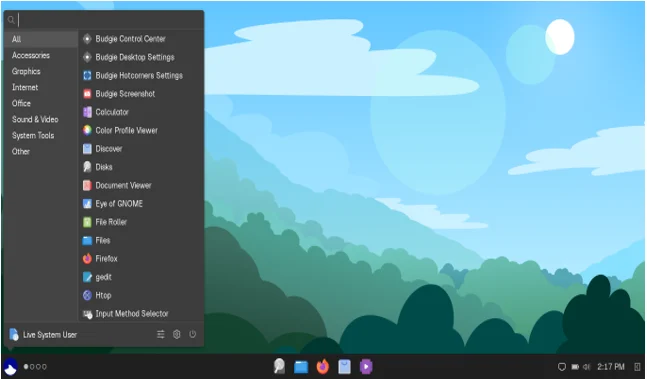
Ultramarine’s Budgie edition serves as the flagship offering, receiving the most attention and polish from the development team. The implementation stays close to stock Budgie while adding custom theming and sensible defaults. The result is a beautiful desktop experience that feels premium without being overwhelming.
The default setup features a custom dark theme with carefully chosen wallpapers that follow consistent design language. Users can easily customize the appearance through Budgie Desktop Settings, adjusting panels, applets, and themes to match their preferences. The distribution includes the Budgie Control Center for system-wide configuration.
Enhanced Out-of-Box Experience
One of Ultramarine’s standout features is Taidan, the custom out-of-box experience (OOBE) and welcome application. This tool guides users through initial setup, providing options for additional software installation, theme selection, and system configuration. The interface uses modern technologies built with Rust and follows contemporary design principles.
The distribution comes with essential applications pre-installed: Firefox for web browsing, LibreOffice for productivity, Rhythmbox for music, and GNOME Software for application management. The selection avoids bloat while ensuring users have necessary tools immediately available.
Package Management and Software
Ultramarine uses DNF (now DNF5 for improved performance) as its package manager, inheriting Fedora’s robust package management system. The distribution adds several repositories by default, including RPM Fusion for additional codecs and drivers, and Terra, Ultramarine’s own custom repository for distribution-specific packages.
Flatpak support comes enabled out of the box, providing access to the extensive Flathub catalog. GNOME Software integrates both DNF packages and Flatpaks, offering users a unified interface for software installation. This approach gives users maximum software availability without complexity.
The distribution also includes the Starship prompt for the terminal and Pop Launcher for quick application launching, enhancing productivity for power users while remaining unobtrusive for beginners.
Current Release Information
Ultramarine follows Fedora’s six-month release cycle, typically shipping new versions within weeks of Fedora releases. The current version is Ultramarine 43, based on Fedora 43, featuring Linux kernel 6.17 and Budgie 10.9.4. Budgie 10.10 will arrive through system updates once it reaches Fedora’s stable repositories.
The distribution recently added Xfce as a fourth edition alongside Budgie, GNOME, and KDE Plasma. However, Budgie remains the flagship offering with the most development attention.
System Requirements:
- Minimum: 1 GB RAM, 10 GB storage
- Recommended: 4 GB RAM, 30 GB storage
Performance Enhancements
Ultramarine includes performance optimizations not present in standard Fedora. The System76 CPU scheduler improves system responsiveness, particularly beneficial when running demanding applications or working with multiple programs simultaneously. The distribution also employs modern technologies like systemd-repart for better disk management.
Applications launch quickly, animations remain smooth, and the system feels responsive even under moderate load. In testing, idle RAM usage typically ranges from 1.3 to 1.4 GB, leaving plenty of resources for applications.
Ultramarine’s Strengths
Ultramarine excels at providing Fedora’s cutting-edge technology in a more approachable package. Users gain immediate access to the latest kernels, graphics drivers, and desktop software without extensive configuration. The inclusion of codecs and proprietary drivers out-of-the-box removes common frustrations that new Fedora users encounter.
The distribution maintains Fedora’s excellent hardware detection and driver support. NVIDIA graphics cards work properly without manual driver installation. Audio and video playback functions immediately without additional codec installation. This attention to first-run experience significantly reduces the learning curve.
For developers, Ultramarine retains all of Fedora’s advantages. SELinux remains active by default, providing enhanced security. The latest development tools, libraries, and programming languages are readily available. The distribution serves equally well as a development platform or daily driver desktop.
Considerations
While Ultramarine improves upon Fedora’s user experience, it remains fundamentally a Fedora-based system. This means following Fedora’s six-month upgrade cycle and dealing with occasional upgrade issues. The distribution’s smaller user base compared to Ubuntu or Fedora means community resources are more limited, though the team maintains active Discord and Matrix channels for support.
The distribution dropped Pantheon desktop support in version 40 due to maintenance burden and declining interest. This decision reflects the team’s pragmatic approach but also highlights that smaller distributions must make difficult choices about resource allocation.
Comparison Table: Best Linux Distros With Budgie Desktop by Default
| Distribution | Base | Release Model | Budgie Version | Package Manager | Best For | System Requirements |
|---|---|---|---|---|---|---|
| Ubuntu Budgie | Ubuntu | Fixed (LTS available) | 10.9.4 (10.10 in 26.04) | APT, Snap, Flatpak | Beginners, stability seekers | 2 GB RAM / 20 GB storage |
| Solus | Independent | Curated Rolling | 10.9.4 (10.10 soon) | eopkg, Flatpak | Budgie enthusiasts, desktop focus | 2 GB RAM / 20 GB storage |
| Fedora Budgie | Fedora | Fixed (6-month cycle) | 10.10 in Fedora 44 | DNF, Flatpak | Latest features, Red Hat ecosystem | 2 GB RAM / 20 GB storage |
| EndeavourOS | Arch Linux | Rolling | 10.9 (10.10 via updates) | Pacman, AUR, yay | Arch lovers, customizers | 2 GB RAM / 20 GB storage |
| Ultramarine Budgie | Fedora | Fixed (6-month cycle) | 10.9.4 (10.10 via updates) | DNF5, Flatpak, Terra | Polished Fedora, out-of-box experience | 1 GB RAM / 10 GB storage |
How to Choose the Best Linux Distro With Budgie Desktop by Default
Selecting the right distribution depends on your specific needs, experience level, and preferences. Consider these factors when making your decision:
Experience Level
Newcomers to Linux should strongly consider Ubuntu Budgie. The extensive documentation, large community, and long-term support releases provide a solid foundation for learning. The distribution handles most tasks through graphical interfaces, reducing the need for command-line expertise.
Experienced Linux users might prefer EndeavourOS or Manjaro Budgie for access to Arch’s cutting-edge packages and the AUR. These distributions reward users comfortable with system maintenance and occasional troubleshooting.
Update Preferences
Users who prefer stability over novelty should choose Ubuntu Budgie LTS releases or Solus. These options provide tested, stable software with security updates but infrequent major version changes.
Those who want access to the latest features immediately should consider EndeavourOS or Manjaro. Rolling releases ensure continuous access to new software versions without waiting for scheduled releases.
Software Availability
Ubuntu Budgie offers the largest software repository among these distributions. The combination of Ubuntu repositories, PPAs, Snap, and Flatpak provides access to virtually any Linux software.
EndeavourOS and Ultramarine provide unmatched software availability through the AUR and Terra/RPM Fusion repositories, though installation sometimes requires more manual intervention than traditional package managers.
Hardware Support
Ultramarine and Ubuntu Budgie excel at hardware detection and driver installation. Both distributions include proprietary drivers and codecs by default, making them ideal for users with newer or less common hardware.
Ubuntu Budgie also provides good hardware support, particularly for common devices. The distribution includes restricted drivers and codecs through additional repositories.
System Philosophy
Solus appeals to users who appreciate an independent distribution built specifically for desktop use. The team’s focus on desktop computing results in thoughtful decisions about default software and configuration.
Fedora Budgie suits users who value open source principles and want to contribute to the broader Linux ecosystem. The distribution’s upstream focus means improvements benefit the entire community.
Installation Tips for Budgie Distributions
Installing any of these distributions follows similar general steps, though specific details vary:
Pre-Installation Preparation
Download the ISO image from the distribution’s official website. Verify the download using provided checksums to ensure file integrity. Create a bootable USB drive using tools like Balena Etcher, Rufus (on Windows), or the dd command on Linux.
Back up important data before installation. Even when dual-booting, backup ensures protection against accidental data loss. Document any special hardware configurations you might need to replicate.
Installation Process
Boot from the USB drive by selecting it in your computer’s boot menu. Most modern systems require pressing F2, F12, or DEL during startup to access boot options.
Follow the graphical installer’s prompts. Key decisions include disk partitioning, timezone selection, and user account creation. Choose encryption if you need additional security for your data.
For dual-boot setups, choose “Install alongside” options when available. Manual partitioning provides more control but requires understanding of disk layout and partition purposes.
Post-Installation Steps
Update your system immediately after installation. Open the terminal and run distribution-specific update commands, or use the graphical update tool.
Install additional software according to your needs. The software centers provide easy browsing of available applications. Consider setting up Flatpak for access to distribution-neutral applications.
Configure Budgie settings through Budgie Desktop Settings. Adjust panel layout, add applets, choose themes, and customize keyboard shortcuts to match your preferences.
The Future of Budgie Desktop
The release of Budgie 10.10 marks the end of the Budgie 10 series and sets the stage for Budgie 11’s development. The team now focuses entirely on building the next generation using Qt6 and the Kirigami framework.
Budgie 11 promises significant architectural improvements. The redesign focuses on modularity, allowing better customization and easier maintenance. The new foundation will support desktop convergence, enabling Budgie to work across different device types while maintaining its signature simplicity.
The transition to Qt6 brings several benefits. Better graphics performance, improved scaling for high-resolution displays, and enhanced Wayland integration will make Budgie more competitive with other modern desktop environments. The component-based architecture allows distributions to customize Budgie more extensively without forking the codebase.
Conclusion
The best Linux distros with Budgie desktop by default offer something for everyone. Ubuntu Budgie provides the most beginner-friendly experience with extensive support and stability. Solus delivers the most refined and integrated Budgie implementation. Fedora Budgie brings cutting-edge features backed by Red Hat’s engineering. EndeavourOS offers Arch’s power in an accessible package. Ultramarine Budgie combines Fedora’s technology with out-of-the-box polish that eliminates common setup frustrations.
Your choice ultimately depends on your priorities. Consider your experience level, desired update frequency, hardware requirements, and philosophical preferences. Each distribution brings unique strengths to the Budgie desktop experience.
The release of Budgie 10.10 demonstrates the desktop environment’s commitment to modern Linux technologies. The Wayland transition positions Budgie well for the future while maintaining the familiar, elegant interface users love. As development shifts toward Budgie 11, the desktop environment’s future looks brighter than ever.
Try these distributions in virtual machines or live sessions before committing to installation. This hands-on experience provides the best insight into which distribution matches your needs. The Linux community’s diversity ensures that somewhere among these excellent options, you’ll find your perfect Budgie desktop experience.
Frequently Asked Questions
Can I install Budgie desktop on any Linux distribution?
Most major distributions allow Budgie installation through their package managers, though distributions with native Budgie support provide more polished experiences and better integration.
Is Budgie 10.10’s Wayland-only approach compatible with all my applications?
Most applications work through XWayland, though some older X11-specific software might encounter compatibility issues; check application documentation for Wayland support status.
Which distribution offers the best performance for older computers?
Solus typically provides excellent performance on older hardware due to its lightweight approach, though all listed distributions run efficiently on modest systems.
Do these distributions support dual-booting with Windows?
Yes, all mentioned distributions support dual-boot configurations with Windows through their installation processes with varying degrees of automatic setup assistance.
Will my existing GNOME or KDE applications work with Budgie?
Budgie uses GTK and integrates well with GNOME applications; Qt/KDE applications also work but might look slightly inconsistent with the default theme.
Disclaimer
This article provides information based on official sources and current distributions as of January 2026. Linux distributions evolve continuously, with new releases, features, and changes arriving regularly. Always verify information with official distribution documentation before making installation decisions.
System requirements listed represent general guidelines. Actual performance depends on specific hardware configurations, enabled features, and installed applications. Test distributions in live sessions or virtual machines to assess performance on your hardware before installation.
While these distributions receive recommendations, they represent a curated selection rather than an exhaustive list. Other distributions also offer Budgie desktop environments. Individual needs vary, and the “best” distribution depends entirely on your specific use case, preferences, and technical requirements.
Also Read
Best Linux Distros for Daily Use in 2026 (Stable & Fast)
About the Author