EndeavourOS Titan Is Here 10 New Features You Should Know
If you’ve been following the Arch Linux world at all, you already know EndeavourOS has earned a serious reputation as one of the most polished Arch-based distros around. And just two days ago — on March 12, 2026 — the team dropped something worth getting excited about. EndeavourOS Titan is here, and this release isn’t just a routine ISO refresh. It’s a proper major release, complete with a name borrowed from Saturn’s largest moon — which feels fitting, because the changes packed into this one are genuinely substantial.
Named after the second-largest moon in our solar system, Titan was built around one key goal: make EndeavourOS easier to install and smoother to run right from the first boot — without compromising the clean, minimal Arch experience that the community loves. And from what’s in the official release notes, they’ve pulled it off pretty well.
Whether you’re a fresh install candidate eyeing EndeavourOS for the first time, or a long-time user just curious what’s changed, this post breaks down the 10 most important new features in EndeavourOS Titan.
What Is EndeavourOS and Why Does Titan Matter?
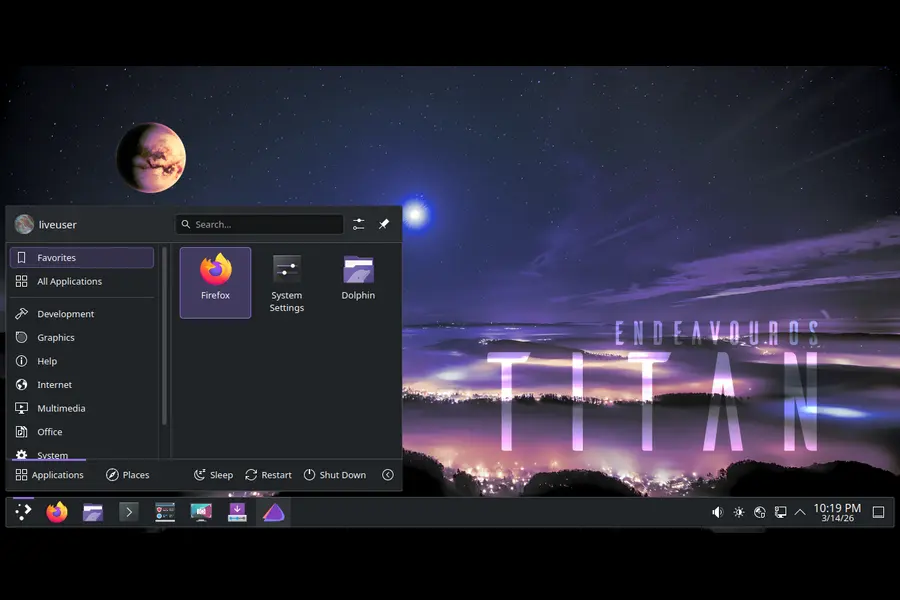
Before diving into features, a quick refresher. EndeavourOS is an Arch-based rolling release distro that ships with a nearly-vanilla KDE Plasma (or other DEs) on top of Arch Linux. It’s designed for people who want the power and freshness of Arch without having to manually install everything from scratch using the CLI. Think of it as Arch with a friendly graphical installer and a strong community.
The previous major ISO was Ganymede Neo, released back in January 2026. Titan follows that and has been given a proper major release designation — not just a “Neo” update — because the scope of changes was large enough to warrant one.
Now let’s get into what’s actually new.
1. Linux Kernel 6.19 — The Latest and Greatest
The headline under the hood is Linux kernel 6.19. The EndeavourOS team has confirmed that Titan ships with Linux 6.19.6.arch1-1, and this was actually the primary trigger for refreshing the ISO in the first place.
Kernel 6.19 brings improved hardware support for newer devices, better power management (particularly beneficial for modern laptops), and general stability improvements. For users on newer AMD or Intel hardware, this kernel bump alone is a meaningful upgrade. If you’re installing fresh, you’re starting with one of the most current kernel releases available on any mainstream Linux distro.
Existing EndeavourOS users don’t need to reinstall — a simple sudo pacman -Syu will bring you to the same kernel. But for new installs, having 6.19 baked in from the start means fewer immediate updates after setup.
2. KDE Plasma 6.6.2 — A Polished Desktop Out of the Box
Titan ships with KDE Plasma 6.6.2 as the default desktop environment, and this applies to both the live environment and the offline installer. This is accompanied by KDE Frameworks 6.23 and KDE Gear 25.12.3 — so the entire KDE software stack is fresh and current.
KDE Plasma 6.6.x is a notably stable and feature-rich iteration of the Plasma desktop. Compared to earlier 6.x releases that had some rough edges, 6.6 feels much more polished. Wayland support has improved significantly, animations are smoother, and the System Settings panel has been cleaned up considerably.
For anyone coming from a Windows background or even from other Linux desktops like GNOME, Plasma 6.6.2 is genuinely impressive in how customizable and snappy it feels.
3. Full GPU and VM Hardware Detection — A Big Deal
This is one of the most impactful changes in Titan and deserves its own section. The installer now includes hardware detection for all GPUs and virtual machines. Previously, driver setup during installation could be hit-or-miss depending on your hardware — especially if you had a multi-GPU setup or were installing inside a VM.
With Titan, the Calamares installer detects your graphics hardware automatically and handles driver installation accordingly. This covers Intel integrated GPUs, AMD discrete cards, NVIDIA cards, and virtual machine graphics environments. It reduces the “it installed fine but my graphics are broken” scenario that new users used to sometimes encounter.
This hardware detection is powered partly by the new eos-hwtool (more on that below), and it marks a clear step toward EndeavourOS being accessible to a broader range of hardware configurations right out of the box.
4. Vulkan Drivers Installed by Default
Paired with the GPU detection improvements, Titan now installs Vulkan drivers by default for all supported GPUs. This is a meaningful change, especially for gamers and developers using GPU-accelerated applications.
In the past, Vulkan support wasn’t always guaranteed after a fresh EndeavourOS install — you might have had to manually install the relevant Vulkan ICD loader and driver packages depending on your GPU. Titan takes care of this automatically. Whether you’re on an AMD RX 7000 series card, an Intel Arc, or an NVIDIA GPU, the correct Vulkan packages get pulled in during installation.
For Steam users, Proton users, or anyone relying on Vulkan-based games and applications, this is a welcome out-of-the-box improvement that removes one common post-install setup step.
5. Hardware-Accelerated Video Decoding — Finally Automatic
Similar to Vulkan, Titan now installs the packages needed for hardware-accelerated video decoding where applicable. This means your GPU’s dedicated video decode block (VA-API for Intel/AMD, NVDEC for NVIDIA) will actually be used for decoding video in browsers, media players, and streaming apps right after installation.
This matters a lot for battery life on laptops and for system performance in general. Software video decoding puts a heavy load on your CPU, while hardware decoding is handled by a dedicated chip that consumes far less power. If you’ve ever had a laptop running hot while watching YouTube on Linux, this change addresses a core reason for that.
Again, this is all handled automatically now. No more hunting for intel-media-driver or libva-mesa-driver post-install.
6. Early GPU Driver Loading by Default
One of the more technical but genuinely impactful changes in Titan is that GPU drivers are now loaded early in the boot process by default. This applies to the initramfs configuration, meaning the GPU driver modules are included in the early boot environment rather than being loaded later in the startup sequence.
The practical effect of this is a smoother boot experience and fewer graphical glitches during startup. Systems with NVIDIA GPUs in particular benefit from this, since NVIDIA’s proprietary driver can sometimes cause screen flickering or a black screen during early boot if not loaded early enough. With Titan, this is handled correctly by default.
It’s the kind of polish change that experienced Arch users sometimes set up manually. Now it just works.
7. Introducing eos-hwtool — A New GPU Management Utility
EndeavourOS Titan introduces a brand-new utility: eos-hwtool. This tool is used internally by the Calamares installer to detect and configure GPU drivers during installation, but it’s also available to you as a user after your system is up and running.
What does this mean practically? If you ever swap out your GPU — say you upgrade from an AMD card to an NVIDIA one — you can use eos-hwtool to install or remove GPU drivers as needed, without manually figuring out which packages to install and which to remove. It’s a proper management layer for GPU driver handling that EndeavourOS was previously missing.
This also positions EndeavourOS well for multi-GPU setups and hybrid graphics configurations (like laptops with Intel + NVIDIA). It’s a small tool, but it fills a real gap and is likely to become a go-to utility for many EOS users.
8. Improved Mirror Ranking — Faster Downloads During and After Install
Titan brings improved mirror ranking support, including the ability to provide an optimized mirror list even when the installer is running in offline mode.
For those unfamiliar: when you install an Arch-based system, the package manager downloads updates and packages from mirror servers distributed around the world. Which mirror you’re using can dramatically affect download speeds. A poorly ranked mirror list means slow installs and slow updates indefinitely.
Titan’s improved mirror ranking means the installer picks geographically appropriate, fast mirrors for your location from the start. This speeds up both the installation process and day-to-day pacman operations after setup. It’s a quality-of-life improvement that might not sound exciting but noticeably improves the day-to-day experience.
9. Updated Calamares Installer — Smoother, More Reliable Setup
Titan ships with Calamares 26.03.1.3, the latest version of the graphical installer used by EndeavourOS and several other distros. The EndeavourOS team has noted that the installation process has been cleaned up and streamlined for this release.
The updated Calamares brings better error handling, a more stable partition management step, and improved compatibility with UEFI systems. Combined with the GPU detection and mirror ranking improvements, the installer experience in Titan is noticeably smoother than what you’d have gotten even six months ago. One past irritant — a long startup delay when launching Calamares — was already resolved in Ganymede Neo, and Titan continues to build on that. For anyone who has been put off by EndeavourOS installer quirks in the past, it’s worth giving Titan a fresh look.
10. Updated Software Stack — Mesa 26, Firefox 148, Xorg 21.1.21
Rounding out the ten features is the overall freshness of the software stack baked into the Titan ISO:
- Mesa 1:26.0.1-1 — the open-source graphics stack for Intel and AMD GPUs, bringing improved OpenGL/Vulkan performance and better support for newer GPU architectures
- Firefox 148.0 — the latest Firefox with security and performance improvements
- Xorg-server 21.1.21 — updated display server for X11 users
- NVIDIA-utils 590.48.01 — latest NVIDIA proprietary driver utilities
Starting with a fresh, current software base matters because it means you need to download fewer updates immediately after install, and you’re not starting with known-vulnerable packages. For a rolling release distro, the ISO is essentially your starting point — and Titan gives you a very solid one.
EndeavourOS Titan: Pros and Cons
✅ Pros
- Ships with the very latest Linux 6.19 kernel from day one
- Automatic GPU detection covers AMD, Intel, NVIDIA, and VMs
- Vulkan and hardware video decode now install automatically
- eos-hwtool provides a proper post-install GPU management layer
- Improved mirrors mean faster installs and updates
- KDE Plasma 6.6.2 is polished and feature-rich out of the box
- Rolling release model — install once, update forever
- Still maintains the clean, minimal Arch philosophy
- Strong and active community for support
❌ Cons
- ISO size has grown from ~3 GB to ~3.4 GB (minor, but worth noting)
- Not beginner-friendly compared to Ubuntu or Fedora — some Arch knowledge still helps
- Rolling release can occasionally introduce regressions
- Limited DE options at install time (KDE is the primary focus)
- No LTS kernel option bundled — you’re on the latest kernel by default
EndeavourOS Titan vs. Alternatives: Quick Comparison
| Feature | EndeavourOS Titan | Manjaro | Arch Linux | Fedora 41 |
|---|---|---|---|---|
| Base | Arch | Arch | Arch | RPM / Fedora |
| Kernel | 6.19 (latest) | 6.18 LTS | Rolling | 6.12 LTS |
| Desktop | KDE 6.6.2 | KDE 6.5 | DIY | GNOME 47 |
| Installer | Calamares (GUI) | Calamares (GUI) | CLI only | Anaconda (GUI) |
| GPU Setup | Automatic (new!) | Semi-automatic | Manual | Automatic |
| Vulkan | Auto-installed | Manual | Manual | Auto-installed |
| Release Model | Rolling | Rolling | Rolling | Semi-annual |
| AUR Access | Yes | Yes | Yes | No |
| Beginner Friendly | Moderate | High | Low | High |
| Community Size | Medium | Large | Very Large | Large |
EndeavourOS Titan sits in a sweet spot: it’s more hands-off than vanilla Arch but much closer to Arch in spirit than Manjaro. The automatic GPU handling in Titan narrows the gap with more beginner-friendly distros without adding unnecessary bloat.
Who Should Download EndeavourOS Titan?
If you’re a Linux user who wants a rolling release based on Arch, wants KDE Plasma without the overhead of configuring everything manually, and wants something that actually handles GPU drivers sensibly, Titan is an excellent choice right now.
It’s particularly well-suited for:
- Gamers who need Vulkan and hardware decode working out of the box
- Developers who want a fresh, current package base with AUR access
- Arch curious users who want the Arch experience without a completely manual install
- VM users who now benefit from proper VM graphics detection
- Existing EndeavourOS users who just want to know what’s new (you don’t need to reinstall — just update)
If you’re completely new to Linux and have never touched the terminal, Titan is still a step up in complexity compared to Ubuntu or Linux Mint. But if you have even a moderate comfort level with Linux, EndeavourOS Titan is one of the best distros you can install right now.
How to Get EndeavourOS Titan
For new installations, head to endeavouros.com and download the Titan ISO (2026.03.06). The ISO is approximately 3.4 GB.
For existing EndeavourOS users, no reinstall is required. Since EndeavourOS is a rolling release, running:
sudo pacman -Syuwill bring your system up to date with all the packages included in Titan. The installer changes and live environment improvements obviously only apply to fresh installs, but the software stack updates — including kernel 6.19 and KDE 6.6.2 — all flow through normally via updates.
Final Thoughts
EndeavourOS Titan is here, and it genuinely delivers. This isn’t a minor “we updated the kernel and called it a day” release. The team tackled real pain points — GPU driver setup, mirror ranking, hardware detection, early driver loading — and shipped a collection of improvements that make EndeavourOS meaningfully better for both new and experienced users.
The introduction of eos-hwtool alone is the kind of thoughtful tooling that shows the team is thinking beyond just “does it install” to “does it stay easy to maintain.” Combined with a fresh kernel, a polished KDE 6.6.2 desktop, and Vulkan/hardware decode handling out of the box, Titan stands as the best version of EndeavourOS released to date.
Whether you’re installing fresh or just running your weekly update, March 2026 is a good time to be an EndeavourOS user.
Disclaimer
This blog post is written for informational purposes only. All information is based on the official EndeavourOS Titan release announcement published on March 12, 2026. We are not affiliated with the EndeavourOS team or the Arch Linux project in any way. Product names, logos, and trademarks mentioned belong to their respective owners. While we strive to keep the content accurate and up to date, we recommend visiting the official EndeavourOS website for the most current information before making any installation decisions.
Also Read
Origami Linux Review: A Beautifully Simple Linux Experience (2026)
About the Author