
Exploring LastOS Linux: A Fresh Take on Open-Source Freedom
In the ever-evolving world of open-source software, Linux distributions continue to capture the imagination of tech enthusiasts, developers, and everyday users seeking alternatives to proprietary operating systems. Among the latest offerings in this vibrant ecosystem is LastOS Linux, a custom remix of Linux Mint designed to bridge the gap between Windows familiarity and Linux flexibility. Launched in its latest iteration in March 2025, LastOS Linux has garnered attention for its unique approach, blending a Windows-like experience with the power and freedom of open-source software.
In this comprehensive blog post, we’ll dive deep into what makes LastOS Linux stand out, its features, installation process, performance, and why it’s a compelling choice for users in 2025.
What is LastOS Linux?
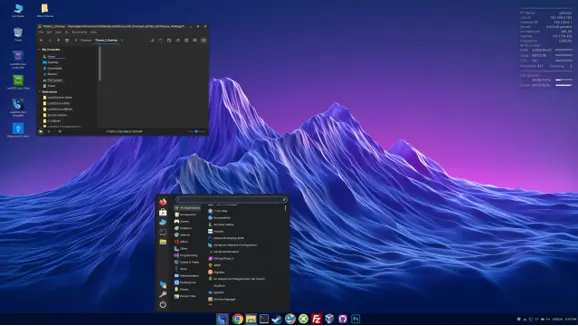
LastOS Linux is a Linux distribution based on Linux Mint 22.1, itself built upon Ubuntu 24.04.1 LTS. Created by Glenn Chugg, also known as LiveFreeDead, LastOS is tailored specifically for Windows users transitioning to Linux. It aims to provide a familiar interface while leveraging the robustness, security, and open-source ethos of Linux. The distribution uses the Cinnamon 6.4.8 desktop environment, customized with a vibrant, neon-hued aesthetic that sets it apart from the more restrained look of standard Linux Mint.
Unlike many Linux distributions that prioritize minimalism or advanced customization, LastOS focuses on ease of use for newcomers, particularly those accustomed to Windows. It comes pre-installed with WINE, a compatibility layer that allows users to run Windows applications seamlessly, and includes a custom app store called the LL Store, designed to simplify software installation. According to its official documentation, LastOS Linux version 2025.03 is a work in progress but is stable and feature-rich, making it an exciting option for both new and seasoned Linux users.
Why Choose LastOS Linux in 2025?
The open-source movement has gained significant momentum in recent years, especially with initiatives like the End of 10 campaign, which promotes Linux as a sustainable alternative to Windows 10 as its support ends on October 14, 2025. LastOS Linux aligns perfectly with this movement, offering users a way to extend the life of their hardware without sacrificing functionality or security. Here’s why LastOS stands out:
1. Windows-Like Experience
For Windows users hesitant to switch to Linux due to unfamiliarity, LastOS Linux offers a comforting bridge. The Cinnamon desktop is customized with Windows 10-style icons, a modified Start menu featuring a blue-tinted yin-yang symbol, and a desktop layout that feels intuitive. This makes it easier for users to navigate without the steep learning curve often associated with Linux.
2. Pre-Installed WINE for Windows Compatibility
One of LastOS’s standout features is its out-of-the-box support for WINE, which allows users to run Windows applications and games directly on Linux. This is a game-changer for users who rely on specific Windows software but want to embrace the open-source ecosystem. The inclusion of WINE eliminates the need for complex setup processes, making LastOS a practical choice for mixed-use environments.
3. The LL Store: A User-Friendly App Hub
The LL Store is LastOS’s custom application marketplace, offering a categorized selection of software, including:
- ssApps: Silent Setup Windows Installers (white)
- ppApps: Permanent Portable Windows Apps (yellow)
- ppGames: Permanent Portable Windows Games (green)
- LLApps: Native Linux Apps (blue)
- LLGames: Native Linux Games (purple)
This store simplifies software installation, especially for Windows users accustomed to downloading apps from vendor websites. However, some users have noted that the LL Store includes a subscription-based proprietary app, which has sparked debate within the open-source community for deviating from the purely free software ethos. Despite this, the LL Store’s ease of use is a significant draw for newcomers.
4. Open-Source Freedom
LastOS Linux embodies the core principles of open-source software: freedom to use, study, modify, and share. Built using the open-source remastering tool Penguins’ Eggs, LastOS allows users to customize and redistribute the operating system, aligning with the values championed by organizations like the Open Source Initiative (OSI) and the Software Freedom Conservancy. This flexibility ensures that users have control over their computing environment, free from the restrictions of proprietary systems.
5. Sustainability and Hardware Longevity
With Microsoft’s Windows 10 reaching end-of-life in October 2025, millions of devices face obsolescence due to incompatible hardware for Windows 11. LastOS Linux offers a solution by running efficiently on older hardware, reducing e-waste and saving users the cost of new devices. Its lightweight design, based on Linux Mint, ensures smooth performance even on modest systems.
Key Features of LastOS Linux
Let’s explore the standout features that make LastOS Linux a unique player in the open-source world.
Custom Cinnamon Desktop
The Cinnamon 6.4.8 desktop environment in LastOS is both functional and visually striking. The default setup includes:
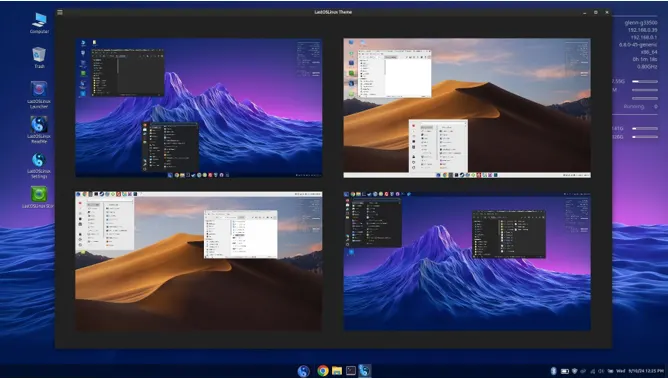
- A neon-hued GUI mountain wallpaper that adds a modern, vibrant touch.
- A Conky system monitor displayed on the desktop for real-time system stats.
- A customized Start menu with a yin-yang logo, blending Linux aesthetics with Windows familiarity.
- Windows 10-style icons for a cohesive look across applications and folders.
While some users might find the neon aesthetic a bit bold compared to Linux Mint’s darker, more subdued theme, it adds personality and appeal for those who enjoy a flashy interface.
LL Store and LL Launcher
The LL Store is more than just an app marketplace; it’s a gateway to a curated selection of software tailored for LastOS users. The LL Launcher, a dedicated tool for launching games installed via the LL Store, enhances the gaming experience by providing quick access to both Linux and Windows-based games. However, some links in the LL Store, such as those for the Free Mega Games Pack, have been reported as broken, indicating that the project is still refining its ecosystem.
Built-In Tools and Extras
LastOS Linux comes with a robust set of tools inherited from Linux Mint, including:
- Flatpak support for easy software installation (though no Flatpak packages are pre-installed).
- A README file on the desktop, providing detailed information about the OS and its features.
- Pre-installed applications like Firefox, LibreOffice, and GIMP, ensuring immediate productivity.
- The macOS Mojave wallpaper, an unexpected but quirky addition for users who appreciate cross-platform aesthetics.
Additionally, LastOS includes a few unique touches, such as a selection of open-source software curated for Windows users and a focus on multimedia and gaming capabilities.
Performance and System Requirements
LastOS Linux is slightly heavier than standard Linux Mint, with an ISO size of 4.6 GB compared to Mint’s 2.8 GB. Once installed, it occupies around 13 GB of disk space, largely due to extras like WINE and the LL Store. Despite its larger footprint, LastOS performs well on mid-range hardware, making it suitable for both modern and older systems. Recommended minimum specs include:
- CPU: 2 GHz dual-core processor
- RAM: 4 GB (8 GB recommended for smoother performance)
- Storage: 20 GB free disk space
- Graphics: Any GPU with OpenGL support
For users with high-end systems, LastOS delivers a snappy experience, while those with older hardware can still run it effectively with minimal tweaks.
Installation Process
Installing LastOS Linux is straightforward, especially for users familiar with Linux Mint. Here’s a step-by-step guide:
- Download the ISO: Visit the official LastOS Linux page on SourceForge to download the latest version (2025.03 as of June 2025). Ensure you verify the ISO’s checksum for security.
- Create a Bootable Drive: Use tools like Rufus (Windows) or Etcher (cross-platform) to create a bootable USB drive.
- Boot from USB: Restart your computer, enter the BIOS/UEFI settings, and set the USB as the primary boot device.
- Install LastOS: Follow the on-screen installer, which mirrors Linux Mint’s user-friendly setup. Choose your language, timezone, and disk partitioning options. The installer automatically configures WINE and the LL Store.
- Post-Installation Setup: After installation, the desktop’s README file guides you through initial setup, including connecting to the LL Store and updating the system.
The entire process takes about 20-30 minutes, depending on your hardware. For users new to Linux, LastOS’s installer is intuitive, with clear prompts and minimal technical jargon.
Community and Support
LastOS Linux is a community-driven project with an active presence on platforms like Reddit and its own forums. The community subreddit provides a space for users to share tips, troubleshoot issues, and discuss updates. However, as a relatively new and idiosyncratic project, LastOS’s documentation can be inconsistent, with occasional spelling errors and incomplete guides. The project’s forums are the best place to seek help, though response times may vary due to its small development team.
For broader Linux support, users can tap into Linux Mint’s extensive community resources, as LastOS shares much of its codebase. Additionally, organizations like the Linux Foundation and Open Source Initiative offer resources for learning about open-source software, which can complement the LastOS experience.
Pros and Cons of LastOS Linux
Pros
- User-Friendly for Windows Users: The familiar interface and pre-installed WINE make transitioning from Windows seamless.
- Custom App Store: The LL Store simplifies software installation, especially for Windows apps and games.
- Open-Source Freedom: Built on Linux Mint, LastOS offers full control over the OS, aligning with open-source values.
- Sustainability: Extends the life of older hardware, supporting the End of 10 campaign.
- Vibrant Aesthetic: The neon-themed Cinnamon desktop adds a unique visual flair.
Cons
- Larger Footprint: At 4.6 GB, the ISO is heavier than Linux Mint, requiring more storage.
- Proprietary App Concerns: The inclusion of a subscription-based app in the LL Store has raised eyebrows in the open-source community.
- Incomplete Documentation: The README and website could benefit from better organization and fewer errors.
- Broken Links: Some LL Store links, such as those for the Free Mega Games Pack, are currently non-functional.
LastOS Linux vs. Other Distributions
How does LastOS stack up against other popular Linux distributions? Let’s compare it to Linux Mint, Zorin OS, and Ubuntu:
- Linux Mint: As its parent distribution, Linux Mint is lighter and more polished, with a focus on simplicity. LastOS adds Windows compatibility and a flashier interface but sacrifices some of Mint’s minimalism.
- Zorin OS: Like LastOS, Zorin OS targets Windows users but takes a more refined approach to Windows app integration. LastOS’s LL Store is less polished than Zorin’s software center.
- Ubuntu: Ubuntu is more versatile but less beginner-friendly. LastOS’s focus on Windows-like usability gives it an edge for newcomers, though Ubuntu offers broader hardware support.
For users seeking a balance between familiarity and open-source power, LastOS is a strong contender, though it may not suit those who prefer a minimalist or highly customizable distro like Arch Linux.
The Future of LastOS Linux
As a work in progress, LastOS Linux has immense potential but also areas for improvement. Its creator, Glenn Chugg, continues to refine the distribution, with plans to enhance the LL Store, fix broken links, and improve documentation. The project’s alignment with the End of 10 campaign positions it as a timely solution for Windows 10 users facing obsolescence. Future updates may include:
- Enhanced LL Store functionality with more reliable links.
- Improved documentation and community support.
- Additional customization options for the Cinnamon desktop.
- Tighter integration with open-source gaming platforms like Steam.
Given its community-driven nature, user feedback will play a crucial role in shaping LastOS’s evolution.
Why LastOS Linux Matters in 2025
LastOS Linux is more than just another Linux distribution; it’s a testament to the open-source community’s creativity and commitment to user empowerment. By combining the stability of Linux Mint with Windows-like familiarity, LastOS offers a fresh take on open-source freedom. It caters to users who want to break free from proprietary systems without sacrificing the tools they rely on, all while promoting sustainability and digital autonomy.
In a world where proprietary software often dictates hardware upgrades and data privacy, LastOS Linux stands as a beacon of choice. Whether you’re a Windows user looking to dip your toes into Linux or a tech enthusiast seeking a new project, LastOS is worth exploring. Its vibrant community, unique features, and alignment with open-source values make it a compelling option in 2025.
How to Get Started with LastOS Linux
Ready to try LastOS Linux? Here’s how to begin:
- Download: Grab the latest ISO from SourceForge.
- Test Drive: Use a virtual machine or live USB to test LastOS without installing.
- Join the Community: Visit the LastOS forums or subreddit to connect with other users.
- Explore the LL Store: Experiment with the app store to install your favorite software and games.
- Provide Feedback: As a community-driven project, LastOS thrives on user input to improve.
Conclusion
LastOS Linux is a bold and innovative addition to the Linux ecosystem, offering a unique blend of Windows familiarity and open-source freedom. While it has some rough edges, its user-friendly design, pre-installed WINE, and custom LL Store make it an excellent choice for Windows users transitioning to Linux. As the open-source movement continues to grow, fueled by initiatives like the End of 10 campaign, LastOS Linux is well-positioned to empower users to take control of their digital lives.
Whether you’re looking to revive an old PC, explore open-source software, or simply try something new, LastOS Linux offers a fresh and exciting path forward. Download it today, join the community, and experience the freedom of open-source computing in 2025.
Disclaimer
The information provided in this blog post about LastOS Linux is based on the latest available data from official sources, such as the LastOS Linux page on SourceForge and related community forums, as of June 15, 2025. While every effort has been made to ensure accuracy, the details, features, and performance of LastOS Linux may change with future updates or releases. The author is not affiliated with LastOS Linux, Linux Mint, or any related projects and does not guarantee the functionality, security, or suitability of LastOS Linux for any specific purpose.
Users are encouraged to verify information, test the operating system in a safe environment (e.g., via a live USB or virtual machine), and consult the official LastOS Linux documentation or community for support. Installing and using LastOS Linux is at the user’s own risk, and the author is not liable for any data loss, system issues, or other consequences that may arise from its use. Always back up important data before installing any new operating system.
Also Read
Kali Linux 2025.2 Unleashed: Revamped Menu, New Tools, and Car Hacking with CARsenal
About the Author





