Firefox Goes 64-bit Only: Time to Upgrade Your System?
In the ever-evolving world of web browsers, Mozilla Firefox has been a steadfast companion for millions of users worldwide. Known for its commitment to privacy, speed, and customization, Firefox has consistently pushed the boundaries of what a browser can do. But a significant shift is on the horizon: Firefox Goes 64-bit Only. This move marks a pivotal moment for users, particularly those on older systems, as Mozilla phases out support for 32-bit versions of Firefox on certain platforms. Is it time to upgrade your system? Let’s dive into the details of this transition, what it means for you, and whether now is the time to make the leap.
What Does “Firefox Goes 64-bit Only” Mean?
The phrase Firefox Goes 64-bit Only refers to Mozilla’s decision to discontinue support for 32-bit versions of Firefox on specific operating systems, notably Linux, with the release of Firefox 145, scheduled for November 11, 2025. This follows a trend that began with Windows, where 64-bit versions became the default for compatible systems starting with Firefox 43 in 2015. By moving to 64-bit only, Mozilla aims to optimize performance, enhance security, and align with modern computing standards.
For context, 32-bit and 64-bit refer to the way a computer’s processor handles information. A 64-bit system can process more data at once, access larger amounts of memory, and run more efficiently than its 32-bit counterpart. While 32-bit systems were once the norm, the industry has largely shifted to 64-bit architecture, and Mozilla’s decision reflects this reality. If you’re running an older system or a 32-bit version of Firefox, this change could impact you significantly.
Why Is Firefox Making This Change?
Mozilla’s shift to a Firefox Goes 64-bit Only model isn’t just about keeping up with the times—it’s about delivering a better browsing experience. Here are the key reasons behind this transition:
1. Improved Performance
64-bit applications can access more memory and utilize modern processor capabilities more effectively. According to Mozilla, 64-bit Firefox reduces crashes by 39% on systems with 4GB of RAM or more. This is a game-changer for users who multitask or run memory-intensive web applications. Whether you’re streaming videos, playing browser-based games, or managing multiple tabs, a 64-bit browser ensures smoother performance.
2. Enhanced Security
Security is a cornerstone of Firefox’s appeal, and the 64-bit version takes it up a notch. A feature called Address Space Layout Randomization (ASLR) works more effectively in 64-bit applications, making it harder for malicious actors to exploit vulnerabilities. As cyber threats grow more sophisticated, this added layer of protection is crucial.
3. Industry-Wide Shift to 64-bit
Most modern operating systems and applications are now 64-bit. Windows, macOS, and many Linux distributions have long supported 64-bit architecture, and hardware manufacturers have followed suit. By focusing on 64-bit, Mozilla can optimize Firefox for the majority of users while phasing out support for outdated systems that can’t keep up with modern demands.
4. Future-Proofing Firefox
As web technologies evolve, browsers need to handle increasingly complex tasks—think WebAssembly, advanced JavaScript frameworks, and high-definition media. A 64-bit architecture provides the foundation for Firefox to support these innovations without being held back by the limitations of 32-bit systems, which are capped at 4GB of virtual memory.
The Timeline: When Is Firefox Going 64-bit Only?
The transition to Firefox Goes 64-bit Only is already well underway, but the specifics depend on your operating system:
- Windows: Mozilla began offering 64-bit Firefox as the default for compatible Windows systems (with at least 3GB of RAM) starting with Firefox 43 in 2015. If you’re running a 64-bit version of Windows 10 or 11, your Firefox installation is likely already 64-bit. However, users on older systems or those who manually installed the 32-bit version may need to upgrade.
- Linux: The big news here is that Firefox 144, due for release on October 14, 2025, will be the final version to support 32-bit Linux distributions. Starting with Firefox 145 on November 11, 2025, Mozilla will require a 64-bit Linux distribution. Users can check if their system is affected by running uname -m in a terminal—if the output shows i386 or i686, you’re on a 32-bit system and will need to act.
- macOS: macOS users have been enjoying 64-bit Firefox for years, as Apple’s operating system has long been optimized for 64-bit architecture. No immediate changes are expected here, but staying updated ensures you’re getting the best performance.
How to Check If You’re Running 32-bit or 64-bit Firefox
Not sure which version of Firefox you’re using? It’s easy to find out:
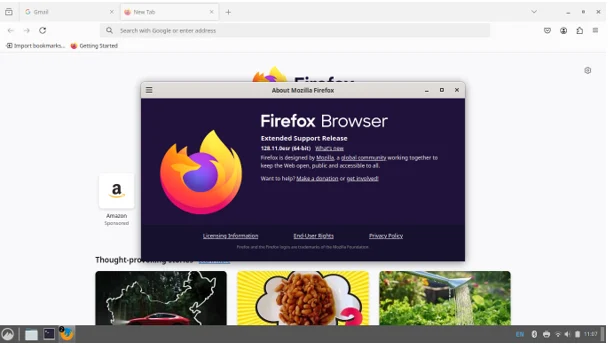
- Open Firefox.
- Click the menu button (three horizontal lines) in the top-right corner.
- Select Help > About Firefox.
- In the window that appears, look for “(32-bit)” or “(64-bit)” next to the version number.
If you see “(32-bit)” and are running a 64-bit operating system, you can upgrade to the 64-bit version without reinstalling. Simply download the 64-bit installer from Mozilla’s official download page and run it. Your bookmarks, passwords, and settings will be preserved.
Who Will Be Affected by Firefox Going 64-bit Only?
The Firefox Goes 64-bit Only shift primarily impacts users on 32-bit systems, particularly those running Linux. Here’s a breakdown of who needs to pay attention:
- Linux Users on 32-bit Systems: If you’re using a 32-bit Linux distribution (check with uname -m), you’ll lose access to Firefox updates after version 144. This means no new features, security patches, or compatibility improvements, leaving your browser vulnerable over time.
- Windows Users on Older Systems: If you’re running Windows 8.1 or below, Firefox no longer supports these systems. Mozilla recommends downloading Firefox ESR (Extended Support Release) 32-bit for continued use, but this is a temporary solution.
- Users with Low RAM: If your system has less than 3GB of RAM, Firefox may default to the 32-bit version, even on a 64-bit OS. Upgrading your hardware or manually installing the 64-bit version may be necessary.
Should You Upgrade Your System?
The Firefox Goes 64-bit Only announcement raises an important question: is it time to upgrade your system? Here are some factors to consider:
Reasons to Upgrade
- Security Risks of Staying on 32-bit: Without updates, 32-bit Firefox versions will become increasingly vulnerable to security threats. Modern browsers need regular patches to stay safe, and sticking with an outdated version isn’t worth the risk.
- Performance Gains: Upgrading to a 64-bit system and browser can significantly improve your browsing experience, especially if you use resource-heavy websites or extensions.
- Future Compatibility: As more software moves to 64-bit, staying on a 32-bit system will limit your access to new applications and updates. Investing in a 64-bit system now future-proofs your setup.
- Hardware Affordability: Modern 64-bit hardware is more affordable than ever. Even budget laptops and desktops come with 64-bit processors and sufficient RAM to run Firefox smoothly.
Reasons You Might Hold Off
- Older Hardware Limitations: If your computer is too old to support a 64-bit operating system, upgrading may require purchasing new hardware, which could be costly.
- Temporary Workarounds: For Linux users, Firefox ESR 32-bit may remain an option for a while, providing security updates without requiring an immediate system upgrade.
- Minimal Needs: If you only use Firefox for basic browsing and don’t rely on cutting-edge features, a 32-bit system might still suffice in the short term.
How to Upgrade to a 64-bit System
If you’ve decided that Firefox Goes 64-bit Only is your cue to upgrade, here’s how to make the transition:
1. Check Your Hardware
Run uname -m (Linux) or check your system properties (Windows) to confirm whether your processor supports 64-bit. Most computers from the last decade are 64-bit capable, but older models may not be.
2. Upgrade Your Operating System
- Linux: Switch to a 64-bit distribution like Ubuntu, Debian, or Fedora. Most major distros offer 64-bit versions, and many provide upgrade paths that preserve your data.
- Windows: If you’re on Windows 7 or 8.1, consider upgrading to Windows 10 or 11 (64-bit). Note that Windows XP and Vista are no longer supported by Firefox.
- macOS: Most macOS systems are already 64-bit, but ensure you’re running a recent version (e.g., macOS Ventura or later) for optimal compatibility.
3. Install 64-bit Firefox
Download the 64-bit Firefox installer from Mozilla’s official download page. Follow the installation prompts, and your existing profile (bookmarks, passwords, etc.) will carry over.
4. Consider Hardware Upgrades
If your system is underpowered (e.g., less than 4GB of RAM), consider adding more RAM or upgrading to a new device. Even budget laptops with 8GB of RAM and a 64-bit processor can handle modern browsing needs.
Alternatives to Upgrading
If upgrading isn’t feasible right now, you have a few options:
- Switch to Firefox ESR: The Extended Support Release is designed for users who need stability over new features. It will continue to receive security updates for a while, even on 32-bit systems.
- Explore Other Browsers: Browsers like Chrome, Edge, or Opera may still support 32-bit systems, though they’re also moving toward 64-bit. Check their system requirements before switching.
- Use a Lightweight Browser: For very old systems, lightweight browsers like Pale Moon or Basilisk may offer 32-bit support, though they lack Firefox’s robust feature set.
The Bigger Picture: Why This Matters
The Firefox Goes 64-bit Only shift is more than just a technical update—it’s a reflection of how technology is evolving. As websites become more complex and cyber threats grow, browsers need to keep pace. Mozilla’s decision ensures that Firefox remains a competitive, secure, and future-ready option for users worldwide.
For the average user, this change might go unnoticed if you’re already on a 64-bit system. But for those on older hardware or 32-bit Linux, it’s a wake-up call to evaluate your setup. Staying on an unsupported browser version isn’t just about missing out on new features—it’s about risking your online security.
Conclusion: Is It Time to Upgrade?
The Firefox Goes 64-bit Only transition is a clear signal that the era of 32-bit computing is nearing its end. If you’re running a 32-bit system, particularly on Linux, now is the time to start planning your upgrade. Whether it’s installing a 64-bit OS, adding more RAM, or investing in a new device, the benefits of moving to 64-bit—better performance, enhanced security, and future compatibility—are hard to ignore.
For most users, upgrading to 64-bit Firefox is as simple as downloading the latest installer. For others, it might mean a bigger leap. Either way, Mozilla’s commitment to privacy, speed, and innovation makes the transition worthwhile. So, take a moment to check your Firefox version, assess your system, and decide: is it time to upgrade? With Firefox Goes 64-bit Only, the future of browsing is here—don’t get left behind.
Disclaimer
The information provided in this blog post is based on the latest available data from Mozilla and other reliable sources as of September 9, 2025. While we strive to ensure accuracy, technology and software updates are subject to change, and Mozilla may alter its plans or timelines for the Firefox Goes 64-bit Only transition. Always verify system requirements and compatibility with your hardware and operating system before upgrading. The author and publisher are not responsible for any issues, data loss, or compatibility problems that may arise from following the suggestions in this post. For the most up-to-date information, visit Mozilla’s official website or support channels.
Frequently Asked Questions About Firefox Goes 64-bit Only
What does it mean that Firefox is going 64-bit only?
Basically, Mozilla is phasing out support for the 32-bit version of Firefox on certain systems, like Linux, starting with Firefox 145 in November 2025. This means if you’re using a 32-bit system, you won’t get new updates or security patches after Firefox 144. The 64-bit version is faster, more secure, and better suited for modern web browsing, so Mozilla’s focusing on that.
How do I know if I’m using a 32-bit or 64-bit version of Firefox?
Super easy! Open Firefox, click the three-line menu in the top-right corner, go to Help, then select About Firefox. You’ll see “(32-bit)” or “(64-bit)” next to the version number. If it’s 32-bit and you’re on a 64-bit system, you can just download the 64-bit version from Mozilla’s website without losing your settings.
Will I need to buy a new computer to keep using Firefox?
Not necessarily! If your computer supports a 64-bit operating system (most from the last decade do), you can upgrade your OS to a 64-bit version, like a newer Linux distro or Windows 10/11. If your hardware is really old and can’t handle 64-bit, you might need to consider new hardware, but check your system specs first with something like uname -m on Linux.
What happens if I keep using the 32-bit version after Firefox 144?
You can still use it, but you won’t get any updates, including security fixes, which is risky. Over time, websites might not work properly, and your browser could be vulnerable to attacks. If upgrading isn’t an option, you could try Firefox ESR (Extended Support Release) for a bit longer or look into lightweight browsers that still support 32-bit.
Is it worth upgrading to a 64-bit system for Firefox?
Honestly, yeah, it’s worth considering. A 64-bit system and browser will give you better performance, especially if you’re juggling lots of tabs or using heavy web apps. Plus, it’s more secure and future-proof since most software is moving to 64-bit. If your system can handle it, upgrading is a smart move to keep your browsing smooth and safe.
Also Read
Top Chromium OS Distros for Old PCs and Laptops
About the Author