

Grml Linux: Your Secret Weapon for Conquering System Crashes
System crashes are a nightmare. One minute, your server or workstation is running smoothly; the next, it’s frozen, leaving you in a race against time to diagnose and fix the issue before downtime becomes a disaster. Whether you’re a seasoned sysadmin, a tech enthusiast, or just someone trying to rescue a personal machine, you need a tool that’s reliable, fast, and packed with everything you need to get back on track. That’s where Grml Linux comes in—a Debian-based live Linux distribution that’s been saving systems for over 20 years.
In this comprehensive blog post, we’ll explore why Grml Linux, specifically its latest release, Grml 2025.08 (Oneinonein), is your secret weapon for conquering system crashes. We’ll dive into its features, practical applications, and what’s new in the August 2025 release. Let’s get started!
What is Grml Linux?
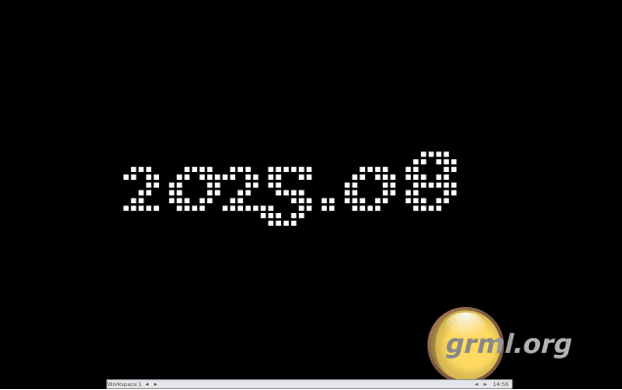
Pronounced “gremmel”, Grml is a lightweight, bootable Linux distribution built on Debian, designed for system administrators and users who love text-based tools. It’s tailored to run directly from a live CD or USB drive, requiring no installation to the hard disk, which makes it perfect for emergency situations. Since its debut in 2004 at the OS04 event in Graz, Austria, Grml has grown into a powerhouse for system rescue, network diagnostics, and data recovery. Its latest stable release, Grml 2025.08, launched on August 16, 2025, to celebrate Debian’s 32nd birthday, bringing fresh software from Debian 13 “Trixie” and the Linux 6.12 LTS kernel. With over 2 GiB of compressed tools, Grml packs a punch in a portable package, ready to tackle any system crash.
Why Grml is Your Go-To for System Recovery
When a system crashes, you need a tool that’s quick to deploy, versatile, and equipped for the job. Grml stands out for several reasons, making it a must-have in any sysadmin’s toolkit. Here’s why it shines:
1. Boot Anywhere, No Installation Needed
Grml’s live CD/USB design lets you boot it on almost any machine without touching the hard drive. This is a lifesaver when dealing with corrupted operating systems, broken bootloaders, or unbootable hardware. Since Grml 2010.12, the ISOLINUX loader provides a consistent boot menu, and the manifold-boot technology (introduced in 2009.05) ensures ISOs can be written directly to USB sticks, CF/SD cards, or hard drives for immediate use.
To create a bootable USB, simply use the dd command:
dd bs=4M status=progress if=grml-full-2025.08-amd64.iso of=/dev/sdX
Warning: Replace /dev/sdX with your USB device, and note that this will erase all data on it. For more flexibility, the grml2usb tool lets you customize boot options, like enabling SSH by default for remote access.
2. A Sysadmin’s Dream Toolkit
Grml is packed with tools tailored for system rescue and diagnostics. Need to troubleshoot a network? Tools like Wireshark and nmap have you covered. Recovering data? ddrescue and TestDisk are at your fingertips. Grml also includes forensic tools (Sleuth Kit), security utilities, and text-based editors for every scenario. Its focus on command-line tools keeps resource usage low, making it ideal for older hardware or servers with limited memory.
The Z shell (zsh), Grml’s default login shell, is a game-changer. Its customized configuration, available on Grml’s GitHub, offers powerful command completion and scripting. Run grml-tips network for quick network configuration tips or grml-lang de to switch to a German keyboard layout. The grml-zshrc package has been improved in 2025.08, making it even more user-friendly.
3. Accessibility for All
Grml prioritizes accessibility, with kernel support for speakup and tools like brltty, emacspeak, and flite for visually impaired users. To use a braille display, boot Grml, wait for the four-note tone, press q to exit the quick help menu, and follow the steps outlined on linuxaccess.org. This makes Grml a versatile choice for diverse teams.
4. Top-Notch Hardware Support
Powered by the Linux 6.12 LTS kernel, Grml 2025.08 offers excellent support for modern hardware, including 64-bit x86 (amd64) and 64-bit ARM (arm64) architectures. The release also improves hardware detection, ensuring compatibility with new GPUs, Wi-Fi cards, and storage controllers. For older systems, boot parameters like ide0=noprobe can bypass problematic hardware probing.
5. Customizable and Persistent
Grml’s persistent home feature lets you save configurations and data across sessions, turning the live system into a semi-permanent environment. You can also use boot options like lang=de or ssh=password to customize the experience on the fly. For advanced users, grml-debootstrap allows installing a full Debian system from Grml, perfect when Debian’s native installer struggles with specific hardware.
How to Use Grml to Conquer System Crashes
Let’s walk through a real-world scenario: your Linux server has crashed due to a corrupted filesystem, and you need to recover critical data and get it back online. Here’s a step-by-step guide using Grml 2025.08:
Step 1: Boot Grml
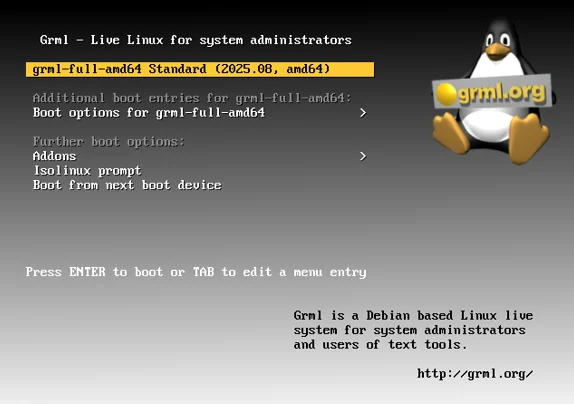
Download the Grml 2025.08 ISO (Full or Small edition) from grml.org/download. The Full edition includes graphical tools like Mozilla Firefox, while the Small edition (~150 MB) is a minimalist rescue system without X.org. Write the ISO to a USB drive using:
dd bs=4M status=progress if=grml-full-2025.08-amd64.iso of=/dev/sdX
Boot the affected machine from the USB, selecting the appropriate architecture (amd64 for most modern systems).
Step 2: Diagnose the Issue
Grml boots into a zsh prompt. Start by assessing the system:
- Check disk health: Run smartctl -a /dev/sda to inspect SMART data for drive errors.
- Inspect filesystems: Use fsck /dev/sda1 to check and repair filesystems. For ext4, try fsck.ext4 -f /dev/sda1 for a thorough check.
- Review logs: If the crashed system’s logs are accessible, mount the root partition (mount /dev/sda1 /mnt) and use less /mnt/var/log/syslog or journalctl to identify issues like kernel panics.
Step 3: Recover Data
If data is at risk, Grml’s recovery tools are your best friends. To create a bit-for-bit copy of a failing drive:
ddrescue /dev/sda /mnt/backup.img /mnt/backup.log
For deleted files or partitions, use TestDisk:
testdisk /dev/sda
Follow the prompts to recover partitions or files, then mount the partition and copy data to a safe location using rsync or cp.
Step 4: Repair the System
If the bootloader (e.g., GRUB) is broken, reinstall it:
grub-install /dev/sda
update-grub
For network issues, use grml-network to configure interfaces and DNS interactively. If the kernel is corrupted, chroot into the system to reinstall packages:
mount /dev/sda1 /mnt
chroot /mnt
apt update && apt install linux-image-amd64
Step 5: Test and Reboot
Verify repairs by mounting filesystems and checking configurations. If everything looks good, eject the Grml media and reboot into the restored system.
What’s New in Grml 2025.08?
The Oneinonein release, launched on August 16, 2025, builds on the 2025.05 (Nudlaug) release with significant updates:
- Debian 13 “Trixie” Base: Grml 2025.08 is based on the newly released Debian 13, ensuring the latest software packages and security patches.
- Linux 6.12 LTS Kernel: Offers long-term support and improved compatibility with modern hardware, including 64-bit ARM (arm64) and UEFI 32-bit boot for 64-bit PCs with 32-bit firmware.
- New Signing Key: The grml-keyring package now uses ECC ed25519 keys for the deb.grml.org repositories, improving security. Users must update the package to avoid authentication issues.
- Improved Tools: Enhancements to grml-lang and the lang= boot option improve localization support. The grml-live build system now integrates previously separate packages (grml-autoconfig, grml-etc, grml-scripts, grml-udev-config) for a streamlined experience.
- Housekeeping: Old scripts like grml-config-root and grml-setservices were dropped, and grml-zshrc was refined for better usability.
The release also marks Debian’s 32nd birthday, with thanks to sponsors like netcup and individual GitHub donors for supporting the project.
Real-World Applications Beyond Crashes
Grml’s versatility extends far beyond crash recovery:
- Network Diagnostics: Use Wireshark or nmap to troubleshoot connectivity issues or scan for vulnerabilities.
- Forensic Analysis: Sleuth Kit helps investigate security breaches or data loss.
- Accessibility Testing: Test systems with brltty and speakup for visually impaired users.
- Custom Debian Installs: Use grml-debootstrap to install Debian on tricky hardware.
Getting Started with Grml
- Download the ISO: Grab Grml 2025.08 from grml.org/download. Choose grml-full for a complete toolkit or grml-small for a minimalist rescue system.
- Master Zsh: Explore Grml’s customized zsh with zsh-help or check the zsh reference card.
- Use grml-tips: Run grml-tips recovery or grml-tips network for quick guides.
- Engage with the Community: Follow blog.grml.org for updates or join the IRC channel for support. Send a postcard to celebrate Grml’s 20th anniversary
Conclusion
System crashes are inevitable, but with Grml Linux 2025.08, you’re armed with a powerful, portable toolkit to tackle them head-on. Its Debian 13 “Trixie” base, Linux 6.12 LTS kernel, and extensive toolset make it the ultimate solution for sysadmins and tech enthusiasts. From recovering lost data to fixing boot issues, Grml gets you back in control fast. Download it today, keep it in your toolkit, and never fear a crash again. Happy Grml-ing!
Disclaimer
The information provided in this blog post about Grml Linux and its use for system recovery is intended for informational and educational purposes only. While we strive to ensure the accuracy and reliability of the content, based on the latest official data from grml.org as of August 2025, we make no guarantees or warranties regarding the completeness, accuracy, or suitability of the information for your specific situation.
Using Grml Linux or any system recovery tools involves risks, including potential data loss or system damage if not used correctly. Always back up critical data before attempting any system repairs or modifications. The authors and publishers are not responsible for any damages, data loss, or other issues arising from the use of Grml Linux or the instructions provided. Consult a qualified IT professional if you are unsure about any procedures. Links to external websites are provided for convenience, and we do not endorse or take responsibility for their content.
Frequently Asked Questions About Grml Linux
What is Grml Linux, and why should I use it for system crashes?
Grml Linux is a Debian-based live distribution designed for system administrators and tech enthusiasts who need to troubleshoot or repair broken systems. Think of it as a Swiss Army knife for your computer—boot it from a USB or CD, and you’ve got a full toolkit with tools like ddrescue, TestDisk, and Wireshark to diagnose and fix crashes, recover data, or troubleshoot networks. It’s super lightweight, runs without installation, and works on almost any hardware, making it perfect for emergencies when your system won’t boot.
How do I get started with Grml Linux 2025.08?
Getting started is easy! Head to grml.org/download and grab the latest Grml 2025.08 ISO (Oneinonein release). Choose grml-full for a complete toolkit (including graphical tools like Firefox) or grml-small for a minimalist rescue system. Write the ISO to a USB drive using a tool like dd on Linux (dd bs=4M status=progress if=grml-full-2025.08-amd64.iso of=/dev/sdX) or Rufus on Windows. Boot your machine from the USB, and you’re in! The Z shell (zsh) prompt will greet you, ready for action.
Can I use Grml Linux on modern hardware, like a new laptop or server?
Absolutely! Grml 2025.08 is built with the Linux 6.12 LTS kernel and supports both 64-bit x86 (amd64) and 64-bit ARM (arm64) architectures, so it’s ready for modern hardware, including new GPUs, Wi-Fi cards, and storage controllers. It even handles UEFI 32-bit boot for 64-bit PCs with older firmware. If you run into quirky hardware, boot parameters like ide0=noprobe can help smooth things out. Grml’s automatic hardware detection makes it a breeze to use on most systems.
What if I need to save my settings or data while using Grml?
No problem! Grml supports a persistent home feature, which lets you save your configurations and files across sessions. When booting, use the persistent boot option to store your data on a designated partition or USB drive. This is super handy if you’re using Grml repeatedly for a project or want to keep custom scripts and settings. Plus, tools like grml-debootstrap let you install a full Debian system from Grml if you need a more permanent setup.
Is Grml Linux beginner-friendly, or is it just for pros?
Grml is designed with sysadmins in mind, so it leans heavily on command-line tools, which can feel intimidating if you’re new to Linux. That said, it’s not just for pros! The zsh shell comes with awesome features like command completion, and the grml-tips command (e.g., grml-tips recovery) offers quick guides for common tasks. If you’re a beginner, start with the basics like checking disk health (smartctl -a /dev/sda) or fixing filesystems (fsck /dev/sda1). You can also join the Grml community on IRC or check blog.grml.org for tips. With a bit of practice, you’ll be rescuing systems like a pro!
Also Read
AxOS: A Fresh Take on Lightweight Linux for Modern Users
About the Author





