Is Nitrux 6.0 Good for Daily Use Full Guide
If you’ve been following the Linux world lately, you’ve probably seen the buzz around Nitrux 6.0. Released on March 3, 2026, this is a major leap forward for one of the more unique distributions out there. But the real question people are asking is: Is Nitrux 6.0 good for daily use? That’s exactly what this guide digs into — no fluff, no recycled talking points, just an honest breakdown of what you’re getting and whether it fits into your everyday workflow.
What Is Nitrux 6.0, Exactly?
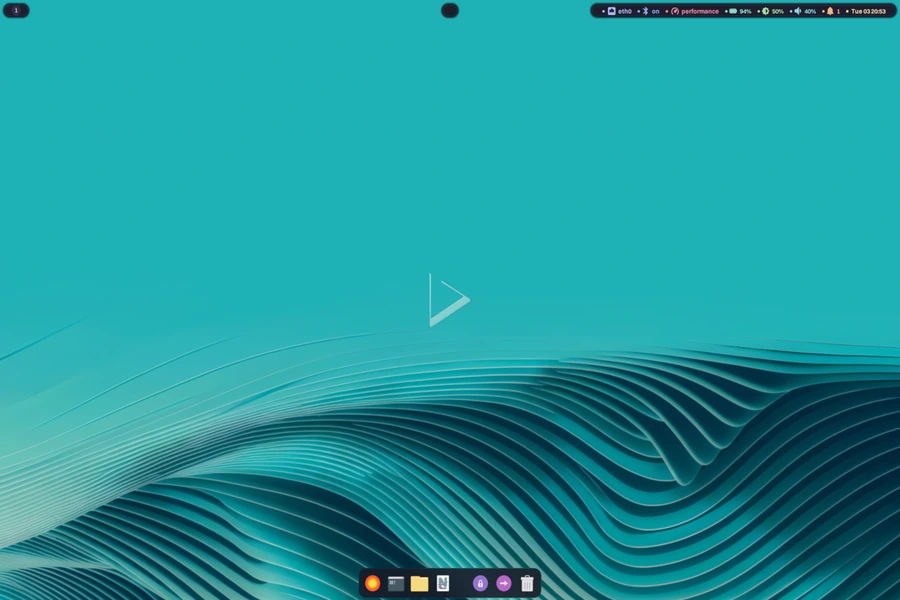
Before diving into the daily-use question, it helps to understand what kind of distro Nitrux actually is. It’s not trying to be Ubuntu. It’s not competing with Fedora or Linux Mint for the “easiest Linux for beginners” crown. Nitrux is a Debian-based, systemd-free, immutable Linux distribution developed by Nitrux Latinoamericana. It uses AppImage-based software delivery, runs Hyprland as its default desktop environment, and has a design philosophy centered on being both modern and secure.
Version 6.0 takes that foundation and makes it significantly more capable, particularly for power users and hardware enthusiasts. But as you’ll see, there’s a growing case for casual users too — depending on what your daily workflow looks like.
What’s New in Nitrux 6.0? The Key Features
A Cutting-Edge Kernel with Performance Patches
Nitrux 6.0 ships with Linux kernel 6.19.2, built with CachyOS performance patches. CachyOS patches are known for squeezing extra responsiveness out of the scheduler and I/O subsystems — which in plain English means snappier application launches, better multitasking, and improved responsiveness under load. If you’ve ever felt your system drag during heavy tasks, this kind of kernel tuning is noticeable in day-to-day use.
NVMe power management has also been adjusted to prevent drives from entering deep power-saving states that were causing slow boot times in earlier versions. Your machine wakes up faster. Small thing, but it matters when you’re booting every morning.
A Modern Desktop Experience: Hyprland 0.53.3
The default desktop environment is Hyprland 0.53.3, a dynamic tiling Wayland compositor. It ships with the full suite of companion tools — Hyprlock for screen locking, Hyprpaper for wallpapers, Hypridle for idle management, and Hyprsysteminfo for system stats.
If you haven’t used a tiling window manager before, there’s a learning curve. But once it clicks, the productivity gains are real. Windows snap into place, workspaces are fast to navigate, and you spend less time dragging windows around and more time actually working.
The desktop configuration has been refined with updates to Hyprland rules and animations, improved Waybar styling, and tweaks to SwayNC (the notification center) and Hyprlock. These aren’t just cosmetic — they mean the desktop behaves more predictably and looks more polished out of the box.
QMLGreet: A Clean New Login Screen
Nitrux 6.0 replaces the older QtGreet login system with QMLGreet, a modern, lightweight Wayland-native login screen. It runs natively on Wayland compositors and communicates with logind (or elogind) via D-Bus. For daily users, this means a smoother, cleaner login experience that feels consistent with the rest of the Wayland-first design.
NudgeOSD: System Notifications Done Right
A genuinely useful addition for everyday use is NudgeOSD, a QML-based on-screen display that handles keyboard shortcut overlays and system notifications. It runs in the background, listens for D-Bus commands, and supports both system icon themes and Nerd Fonts. If you’ve ever used a tiling setup and wished there was a cleaner way to see what keyboard shortcut you just triggered — this is the answer.
The Big Technical Additions (And Why They Matter for Daily Use)
VxM: GPU Passthrough for Serious Users
One of the headline additions is VxM, a new hypervisor orchestration utility written in C++. It enables virtual machines to run with near-native performance by passing GPU hardware directly to guest operating systems using VFIO PCI passthrough with IOMMU isolation.
For most people reading this, you might be wondering if you even care about that. Here’s when you do: if you need to run Windows inside Linux for gaming, professional software, or work applications — VxM makes that experience dramatically better. The developers have noted that a graphical interface for VxM is planned for a future release, so right now it’s primarily a tool for technically confident users.
Nitrux Rescue Mode: Saving You from Disasters
This one is genuinely great for daily use and deserves more attention than it’s getting. Nitrux Rescue Mode is an initramfs-based recovery mechanism that allows you to restore the system to a working state directly from the boot menu — no USB drive, no Live ISO required. It uses cryptographically verified XFS snapshots created by the update tool, wipes the root partition, and rebuilds the bootloader automatically.
Translation: if an update breaks your system, you can recover without hunting for a flash drive at midnight. That kind of safety net makes running a cutting-edge distribution considerably less stressful on a daily basis.
NUTS-CPP: A Smarter Update System
The Nitrux Update Tool System has been completely rewritten in C++ (formerly it was a shell script). Now called NUTS-CPP, it runs as a client-server setup with a MauiKit graphical interface. Updates use atomic operations to preserve transaction integrity, and the system creates XFS snapshots with cryptographic verification before applying any changes.
What this means practically: updates are safer, rollbacks are possible, and the whole process is more transparent. For people who’ve been burned by a bad update on a rolling-release distro before, this architecture is reassuring.
Nitrux 6.0 System Requirements
Before you download the ISO, let’s talk hardware. Nitrux 6.0 specifically targets recent, high-performance hardware — and unlike many distros, it’s upfront about that. There’s even a built-in Hardware Compatibility Validation Layer (HCVL) that checks your system at boot and gives you explicit feedback if something isn’t supported, rather than letting things fail silently.
Here’s a clear breakdown of what you need, straight from the official Nitrux documentation:
Minimum Requirements
| Component | Minimum Requirement |
|---|---|
| CPU | 64-bit x86 processor with AVX2 support (x86-64-v3) |
| RAM | 4 GB |
| Storage | 64 GB total (at least 7 GB free on root filesystem) |
| Storage Type | SATA SSD (HDD not recommended for daily use) |
| Firmware | EFI or UEFI |
| GPU (NVIDIA) | Turing architecture or newer |
| GPU (AMD) | RDNA or newer with Mesa GBM/KMS support |
| GPU (Intel) | Intel Xe or Arc with Mesa GBM/KMS support |
| VRAM | 2 GB minimum for Wayland and GPU-accelerated workloads |
| Internet | Not required for installation; required for updates |
Recommended Requirements
| Component | Recommended Specification |
|---|---|
| CPU (Intel) | 8th-gen Core (Coffee Lake) or newer |
| CPU (AMD) | Ryzen 1000 series or newer |
| RAM | 8 GB minimum; 16 GB or more preferred |
| Storage | 128 GB+ NVMe SSD (PCIe 3.0 or newer) |
| Boot | USB 3.0 boot support and NVMe storage support |
| Kernel Features | IOMMU, virtualization extensions, PS/SMT control |
| Firmware | UEFI with Secure Boot (optional but recommended) |
A few things worth noting here. The AVX2 CPU requirement is non-negotiable — this is what x86-64-v3 means in practice, and it rules out processors older than roughly 2013–2015. Intel Haswell and AMD Excavator are the earliest architectures that qualify. If you’re running a Core i7 from 2012 or older, Nitrux 6.0 won’t run on your machine.
The 128 GB storage recommendation is specifically for users who plan to run multiple AppBoxes (Distrobox containers) or install a lot of Flatpak apps. For lighter use, 64 GB works, but storage fills up faster than you’d expect with containerized software.
And if you’re planning to use VxM for GPU passthrough, you’ll want that 16 GB RAM and IOMMU support confirmed in your BIOS/UEFI before you even start.
GPU Support: Two ISO Flavors for Different Hardware
Nitrux 6.0 ships as two separate ISO images:
- cachy-nvopen — for systems with NVIDIA GPUs, using the NVIDIA Open Kernel Module 590.48.01
- cachy-mesa — for AMD and Intel graphics hardware, using Mesa 25.3.3
One important caveat for NVIDIA users: the 590-series driver only supports Turing architecture and newer. If you’re running an older GPU (Pascal or earlier), you’ll want to check compatibility before installing.
There’s also a new GRUB entry labeled “Intel Xe Mode” for users with supported Intel iGPUs and Intel Arc GPUs, allowing them to choose the newer xe driver over the older i915 driver. Supported hardware includes Gen12 (Xe-LP), Meteor Lake (Xe-LPG), and Lunar Lake with Xe2. Older Intel graphics hardware (Ice Lake, Skylake-era) is not compatible with this new driver path.
Is Nitrux 6.0 Good for Daily Use? The Honest Answer
So let’s get to it directly. Is Nitrux 6.0 good for daily use?
The honest answer is: yes, for the right person — and a qualified yes for a broader audience than previous versions served.
Where Nitrux 6.0 Shines in Daily Use
For developers and power users, Nitrux 6.0 is genuinely excellent. The performance-tuned kernel, immutable filesystem, Flatpak support via Flatpak 1.16.2, and Distrobox 1.8.2 integration mean you get a secure, fast base while still having access to virtually any software through containers. Python 3.13.9 is included, networking is handled by NetworkManager 1.54.3, and the overall stack is modern without being unstable.
For privacy and security-focused users, the combination of an immutable root filesystem, cryptographic verification in the update system, systemd-free design, and DNSCrypt-proxy integration makes Nitrux one of the more thoughtfully secured desktop distros available right now. You’re not bolting security onto an insecure foundation — it’s built in from the ground up.
For people tired of Windows, BetaNews noted on March 4, 2026 that Nitrux presents a credible alternative for those frustrated with Windows 11’s hardware demands and sluggish performance. The AppImage-first approach means applications are self-contained, there’s no dependency hell, and Flatpak fills in the gaps for popular apps.
Where You Should Temper Your Expectations
Nitrux is not a beginner distro. Hyprland does not look or behave like Windows or macOS. There’s no application menu to click through. You’ll need to learn keyboard shortcuts and understand how a tiling compositor works. The developers are transparent about targeting hardware enthusiasts and power users — they’re not pretending to be Ubuntu.
Software availability requires adjustment. Because Nitrux uses an immutable root filesystem, you can’t just apt install things system-wide the traditional way. Most software comes through AppImages or Flatpak, and more complex setups use Distrobox. For experienced Linux users, this is fine. For someone just switching from Windows expecting the same workflow, there’s adaptation required.
Hardware compatibility matters. The NVIDIA driver limitation to Turing and newer is a real-world concern if you have older hardware. And while Intel Xe Mode support is a nice addition, it excludes a sizable chunk of older Intel hardware.
Software Available for Daily Tasks
Despite the immutable architecture, everyday software is very accessible through supported channels:
- Browsers: Firefox and Chromium are available via Flatpak
- Office work: LibreOffice via Flatpak, with full document compatibility
- Media: VLC, mpv, and other media players as AppImages or Flatpaks
- Communication: Discord, Slack, Telegram — all available through Flatpak
- Development: VS Code, JetBrains tools, and terminal-based workflows all work well
- Containers: Distrobox makes running any other Linux distribution’s software as easy as a single command
The Flatpak ecosystem has matured enormously, and combined with AppImages, the software gap that once made immutable distros frustrating is largely closed.
Performance in Practice
The CachyOS-patched kernel in Nitrux 6.0 contributes to snappy, responsive performance. The NVMe boot delay fix mentioned in the release notes is a welcome change — systems with NVMe drives boot noticeably faster. Hyprland is also one of the lighter Wayland compositors in terms of resource usage, meaning you’re not burning RAM on visual effects.
For users with mid-range to high-end hardware, this is a fast system. It doesn’t have the bloat of a full GNOME or KDE Plasma setup, and the Wayland-native approach means compositing overhead is minimal.
Should You Switch to Nitrux 6.0?
Switch if:
- You’re a developer or technically experienced Linux user
- You want a secure, modern, Wayland-first desktop
- You have NVIDIA (Turing+), AMD, or recent Intel graphics hardware
- You value system stability through immutability and snapshot-based recovery
- You’re interested in running VMs with GPU passthrough
- You’ve used a tiling WM before or are willing to learn
Hold off if:
- You’re new to Linux and expect a familiar desktop experience
- You’re running older NVIDIA hardware (pre-Turing)
- You need heavy traditional software that doesn’t play well with Flatpak or containers
- You prefer the flexibility of a traditional mutable distro
Final Verdict
Nitrux 6.0 is a genuinely impressive release. The Rescue Mode alone is worth celebrating — it’s the kind of feature that transforms an adventurous choice into a practical daily driver. The NUTS-CPP rewrite makes updates trustworthy. The performance kernel keeps things responsive. And the overall Wayland-native direction is clearly where Linux desktop development is heading.
Is Nitrux 6.0 good for daily use? For the technically confident user, the answer is a clear yes — and version 6.0 makes that case more convincingly than any previous release. The safety nets are better, the hardware support is broader, and the software ecosystem through Flatpak and AppImages is mature enough to cover most real-world needs.
If you’re ready to invest a weekend into learning a new setup, you might just find that Nitrux 6.0 becomes the daily driver you didn’t know you were looking for.
Disclaimer
The information provided in this article is for general informational purposes only. While we strive to keep content accurate and up to date based on official release data available as of March 2026, software features, hardware compatibility, and system requirements may change over time. We are not affiliated with Nitrux Latinoamericana or any of its products. Always refer to the official Nitrux website and release notes before making any installation or upgrade decisions. Any third-party tools, software, or services mentioned are the property of their respective owners. We are not responsible for any data loss, system issues, or damages that may result from following the guidance in this post. Use at your own discretion.
Also Read
Best Lightweight Linux Apps for 2GB RAM PCs (2026 Guide)
About the Author