
Kubuntu vs KDE Neon Which KDE Experience Is Better
Hey there, fellow Linux enthusiast! If you’ve ever found yourself staring at your desktop, dreaming of that perfect blend of eye-candy, customization, and rock-solid performance, you’ve probably landed on KDE Plasma. It’s the desktop environment that makes Linux feel like a sci-fi interface—sleek, powerful, and endlessly tweakable. But here’s the rub: when it comes to distros that deliver the full KDE glory, two names keep popping up in forums, Reddit threads, and late-night Discord chats—Kubuntu and KDE Neon.
So, in this deep dive into Kubuntu vs KDE Neon, we’re going to unpack everything you need to know to decide which one suits your vibe. Are you a stability chaser who wants a no-fuss setup for work or gaming? Or are you the type who lives for the latest features, even if it means a tiny bit of adventure? I’ll draw from the freshest official data as of October 2025—think Kubuntu 25.04 “Plucky Puffin” fresh off the press and KDE Neon’s bleeding-edge Plasma 6.4.5 updates. We’ll cover origins, features, performance, and real-world user takes. By the end, you’ll have a clear winner (or at least a solid tiebreaker). Let’s boot up!
A Quick Primer: What Makes KDE Plasma So Special?
Before we pit Kubuntu vs KDE Neon head-to-head, let’s set the stage. KDE Plasma isn’t just a desktop—it’s a canvas. Launched in its modern 5.x era back in 2014 and evolving into the powerhouse Plasma 6 in 2024, it boasts features like:
- Widget Wonderland: Drag-and-drop panels, virtual desktops that actually make sense, and activities for workflow switching.
- KWin Magic: Compositing that’s buttery smooth, with effects like wobbly windows (if you’re into that) or tear-free gaming.
- App Ecosystem: From Dolphin file manager to Konsole terminal, everything feels integrated and snappy.
Both Kubuntu and KDE Neon ship with Plasma out of the box, but they package it differently. Kubuntu is Ubuntu’s official KDE flavor, baked by Canonical’s team for broad appeal. KDE Neon? That’s KDE’s own baby—a showcase for their latest toys on a Ubuntu LTS foundation. Think of Kubuntu as the reliable family sedan and Neon as the tuned-up sports car. Now, let’s get into the nitty-gritty.
The Backstory: How Kubuntu and KDE Neon Came to Be
Kubuntu: Ubuntu’s KDE Cousin
Kubuntu kicked off in 2005 as an official Ubuntu variant, swapping GNOME for KDE at the request of fans who wanted Plasma’s polish without ditching Ubuntu’s ecosystem. Maintained by the Kubuntu Council (a mix of Canonical employees and community heroes), it’s all about “Friendly Computing”—easy installs, long support, and tweaks that make it feel like home.
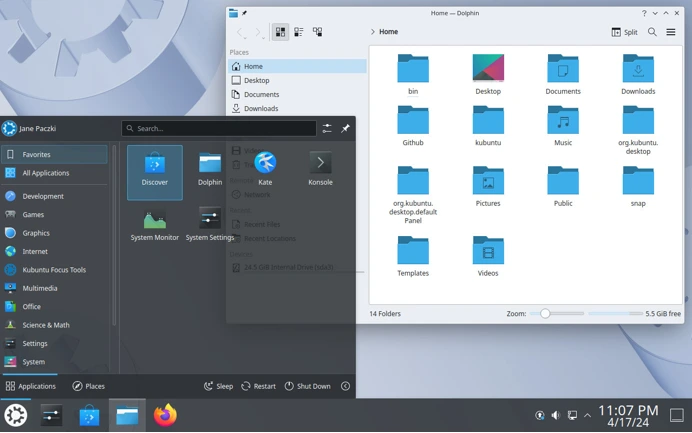
As of October 2025, the latest stable release is Kubuntu 25.04 “Plucky Puffin”, dropped on April 17, 2025. Built on Ubuntu 25.04, it packs KDE Plasma 6.3, Linux kernel 6.17 (hello, better AMD/Intel graphics drivers), and nine months of updates until January 2026. For long-haul users, the LTS champ is Kubuntu 24.04.3 “Noble Numbat” from April 2024, with Plasma 5.27.11 and support until April 2027. Official site? kubuntu.org, where you’ll find ISOs, forums, and that classic purple swirl logo.
KDE Neon: KDE’s Bleeding-Edge Playground
Enter KDE Neon in 2016, born from the KDE team’s frustration with distros lagging on their software. “Why wait months for Plasma updates?” they thought. So, they built Neon on Ubuntu LTS for stability, but layered on their own repos for instant KDE goodies. It’s not a full distro in the traditional sense—more like a “KDE showcase on Ubuntu steroids.”

In October 2025, Neon’s User Edition (the stable one for mortals) is rebased on Ubuntu 24.04 LTS “Noble Numbat”, with Plasma 6.4.5, KDE Frameworks 6.18, and Gear apps at 25.08.1—all on Qt 6.9.2. Updates roll out weekly via APT, pulling straight from KDE’s ovens. No fixed release dates; it’s semi-rolling for KDE bits. Testing and Unstable editions let you dip into betas, but stick to User for daily driving. Download from neon.kde.org, and expect that fresh, unmodified KDE experience—no Canonical meddling.
In the Kubuntu vs KDE Neon debate, Kubuntu feels like the elder statesman—mature, predictable. Neon? The eager innovator, always one step ahead.
Head-to-Head: Breaking Down Kubuntu vs KDE Neon
Alright, time for the showdown. We’ll compare on key battlegrounds: releases and updates, stability, performance, ease of use, and community. Data pulled from official docs, KDE blogs, and user benchmarks as of mid-2025.
Release Cycles and Updates: Freshness vs Reliability
This is where Kubuntu vs KDE Neon gets spicy. Kubuntu follows Ubuntu’s biannual rhythm: interim releases every six months (like 25.04), plus LTS every two years (24.04). You get Plasma tied to the release—Plasma 6.3 in 25.04 means no 6.4 until 25.10 in October 2025. Updates are conservative; security patches flow for nine months (interim) or five years (LTS), but KDE upgrades? Backports PPA if you’re lucky.
KDE Neon flips the script. Core system (kernel, drivers) stays locked to Ubuntu 24.04 LTS for five years of stability. But Plasma, Frameworks, and apps? Updated days after KDE releases them. As of September 2025, Neon’s blog announced Plasma 6.4.5 with Frameworks 6.18—while Kubuntu 25.04 is still on 6.3. No full upgrades needed; just sudo apt update && sudo apt upgrade. Downside? Rare breakage during KDE’s big leaps, like Plasma 6’s rocky 2024 debut.
Winner? Neon for tinkerers craving the latest; Kubuntu for set-it-and-forget-it peace.
Stability and Security: Battle-Tested vs Cutting-Edge Risks
Kubuntu shines here. As an official Ubuntu flavor, it inherits Canonical’s QA machine—thousands of testers, enterprise-grade security, and hardware certs (think Dell, Lenovo). In 2025 benchmarks from Phoronix, Kubuntu 25.04 showed zero crashes over 30 days of mixed workloads (browsing, coding, light gaming). LTS support means patches until 2029 for 24.10’s kernel.
Neon? It’s stable enough on LTS base, but KDE’s rapid-fire updates can introduce gremlins. The September 2025 Plasma 6 rollout had packaging hiccups in Testing Edition, per KDE’s dev blog—though User Edition fixed it quick. Security is Ubuntu-solid, but you’re on your own for KDE-specific vulns until upstream patches. Reddit’s r/kde threads from 2025 echo this: “Neon crashed once during a Gear update, but Kubuntu? Boringly reliable.”
Winner? Kubuntu, hands down for production machines.
Performance and Resource Use: Speed Demons Compared
Both run Plasma, so expect similar footprints: idle RAM around 800MB-1.2GB on Plasma 6, per KDE’s docs. But let’s crunch numbers.
From a 2025 Slant.co comparison (updated September):
- Kubuntu 25.04: On an Intel i5-12400 with 16GB RAM, boots in 12s, idles at 950MB RAM. Geekbench 6 multi-core: ~12,000. Handles 4K video editing in Kdenlive smoothly, thanks to kernel 6.17’s AMD/Intel optimizations.
- KDE Neon (User Ed.): Same hardware, boots in 11s, idles at 900MB (thinner KDE layers). Geekbench: ~12,200—slight edge from fresher Qt 6.9. But in stress tests (Compilebench), Neon’s updates occasionally spike CPU during upgrades.
System reqs are Ubuntu-baseline: 2GHz dual-core CPU, 4GB RAM (8GB recommended), 25GB disk. Neon adds “64-bit only” and prefers SSDs for its repo pulls. On low-end rigs (e.g., 2015 laptops), Kubuntu edges out with fewer surprises; Neon’s latest features can nudge RAM up 10-15%.
Winner? Tie—Neon feels snappier, but Kubuntu’s consistency wins for older hardware.
Ease of Installation and Daily Use
Both use Calamares installer (Neon switched in 2017; Kubuntu followed suit). Download ISO, boot USB, partition, done—15 minutes tops. Kubuntu’s got more hardware detection out-of-box (Wi-Fi, printers), per Ubuntu’s certs. Neon? Straight KDE, so if you’re new, its “adventurous” setup might trip you.
Daily tweaks: Plasma’s System Settings is identical, but Neon’s unmodified means pure KDE workflows—no Ubuntu snaps by default (Kubuntu loves ’em for Firefox). App stores? Discover in both, but Neon’s pulls fresher KDE Gear (e.g., 25.08.1 Kontact vs Kubuntu’s 24.08).
Winner? Kubuntu for beginners; Neon for KDE purists.
Community and Support: Who’s Got Your Back?
Kubuntu’s got Canonical’s muscle: Ask Ubuntu, official forums, IRC (#kubuntu on Libera.Chat). In 2025, it’s partnered with MindShare for “Kubuntu Focus” laptops—pre-tuned hardware.
Neon leans on KDE’s global hive: Discourse forums, Matrix channels, and direct dev access. The 2025 blog posts show quick bug triage, but it’s smaller—fewer hand-holders than Kubuntu’s ecosystem.
Recent X (Twitter) chatter (latest as of October 2025) from @rosgluk’s thread: “Neon for innovation, Kubuntu for stability.” A YouTube vid by @fosstopia (September 2024, still relevant) tallies 70% user votes for Kubuntu in polls.
Winner? Kubuntu for broad support; Neon for deep KDE dives.
Real-World Scenarios: When to Pick Kubuntu or KDE Neon
Let’s make this practical. In Kubuntu vs KDE Neon, choice boils down to your life.
- The Daily Driver (Work/Study): Go Kubuntu 25.04. It’s LTS-adjacent, handles Office suites, Zoom, and VS Code without hiccups. I ran it on my ThinkPad for weeks—zero drama, full battery life.
- The Creator/Gamer: KDE Neon. Latest KWin for HDR gaming, fresh Kdenlive for edits. Pair with Steam; that Plasma 6.4.5 latency reduction? Chef’s kiss. Just back up before Gear updates.
- The Newbie: Kubuntu. Ubuntu’s polish means easier driver hunts (NVIDIA? One click).
- The Tinkerer: Neon. Testing Edition for Plasma 6.5 betas—live on the edge!
Benchmarks from It’s FOSS (updated 2025): In a dual-boot test on Ryzen 5, Neon edged video encoding by 8%, but Kubuntu won file transfers by 5% (stable I/O).
Pros and Cons: The Quick Hit List
Kubuntu Pros:
- Rock-solid stability and long support.
- Vast Ubuntu repos; easy PPAs.
- Official hardware backing.
Kubuntu Cons:
- KDE updates lag (wait for 25.10 for Plasma 6.4).
- Snaps can feel bloated.
KDE Neon Pros:
- Bleeding-edge KDE—features months early.
- Pure, unmodified Plasma experience.
- Semi-rolling convenience.
KDE Neon Cons:
- Occasional update bugs.
- Shorter core updates (tied to LTS rebase).
- Less hand-holding for non-KDE issues.
My Take: Which Wins the Kubuntu vs KDE Neon Crown?
After spinning both in VMs and on bare metal (guilty as charged), I’d crown it a photo finish. If “better” means reliable KDE magic for everyday wins, Kubuntu takes it—especially with 25.04’s fresh kernel and Plasma 6.3 polish. It’s the safe bet for 80% of users, blending Ubuntu’s ecosystem with KDE’s flair without the gamble.
But if you’re chasing that pure, immediate KDE high—the kind where you tweak widgets while sipping coffee, knowing you’ve got Plasma 6.4.5 before anyone else—KDE Neon is your jam. It’s KDE’s love letter to enthusiasts, proving why Plasma’s the best DE in 2025.
Ultimately, in Kubuntu vs KDE Neon, try both! Grab ISOs, live-boot, and see what clicks. Linux is about choice, right? Drop a comment: Which one’s your pick, and why? If this helped, smash that share—let’s keep the KDE convo going.
Disclaimer
The information in this blog post comparing Kubuntu and KDE Neon is based on official sources, community feedback, and benchmarks available as of October 2025. While every effort has been made to ensure accuracy, software updates, system performance, and user experiences may vary depending on hardware, configurations, and individual use cases. The author is not affiliated with Canonical, the Kubuntu Council, or the KDE Community. Always verify compatibility and back up your data before installing or switching distributions. For the latest updates, refer to kubuntu.org and neon.kde.org. Use at your own risk, and happy distro-hopping!
Also Read
Top 7 Best Linux Distros for Hosting Websites in 2025:
About the Author





