Linux Desktop Environments in 2026 Feel More Intentional
Something changed in the Linux desktop world during 2025. After years of experimentation and rapid iteration, Linux Desktop Environments in 2026 Feel More Intentional than ever. The scattered ecosystem has matured into thoughtfully designed experiences that prioritize user needs over developer preferences.
This shift represents more than cosmetic updates. Desktop environment teams now focus on cohesive design systems, deliberate feature additions, and genuine user workflows instead of cramming in every possible option. Whether you’re a developer, content creator, or everyday user, the 2026 Linux desktop landscape offers clarity without sacrificing the freedom that makes Linux special.
Understanding the Intentional Design Movement
The intentionality we see across Linux desktop environments stems from hard-earned lessons. For years, desktop projects competed by adding features—more widgets, more options, more configuration panels. This created powerful but overwhelming systems where finding basic settings required detective work.
Today’s approach flips that script. Teams now ask “why should we add this?” before “can we add this?” The result? Cleaner interfaces, faster performance, and features that solve real problems.
What Makes a Desktop Environment Intentional?
Several factors distinguish intentional design from feature bloat. First, unified design languages create consistency. When buttons, menus, and windows follow the same visual rules, your brain doesn’t waste energy adapting to different patterns every time you switch applications.
Second, purposeful defaults matter. An intentional desktop works well out of the box for most users while still allowing customization. You shouldn’t need hours configuring just to get started, but those hours should remain available for power users who want them.
Third, performance optimization shows intentional thinking. Every animation, every background process, every system call gets scrutinized. Memory-safe programming languages like Rust have accelerated this trend by eliminating entire classes of bugs before they ship.
GNOME 49: Wayland-First and Refined
GNOME continues dominating as the default desktop for Ubuntu, Fedora, Debian, and countless other distributions. Released September 17, 2025, GNOME 49 “Brescia” demonstrates how restraint creates impact.
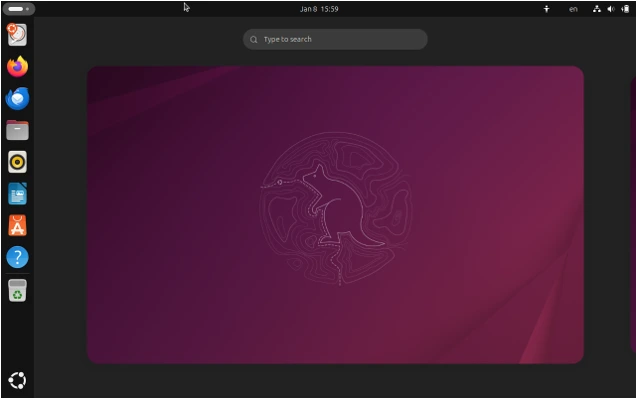
The biggest change? GNOME 49 drops X11 session support by default. After years of Wayland development, the team decided the legacy display server held back progress. While distributions can re-enable X11 support at build time, the official release runs Wayland-only. Applications requiring X11 run through XWayland translation, but the desktop itself commits fully to modern display server technology.
This decision wasn’t made lightly. The removal ensures developers focus on Wayland’s security model, better performance, and modern features like VRR support without maintaining parallel X11 code paths. For users, it means smoother operation, better fractional scaling, and improved multi-monitor handling.
GNOME 49 replaces Totem with Showtime, a new video player built on GTK 4 and Libadwaita. Showtime offers chromeless playback with controls that fade during viewing, adjustable playback speed, multiple audio and subtitle tracks, video rotation, and screenshot capture. Everything users need without bloat.
Papers replaces Evince as the default document viewer. Built with GTK 4 and Libadwaita, Papers brings improved performance and a refreshed interface. The streamlined PDF annotation feature stands out, making document markup faster and more intuitive. Papers supports PDF, DjVu, TIFF, and comic book archives with digital signature integration.
The lock screen gained media controls showing only when content plays via MPRIS. At the login screen, an accessibility menu appears in the lower-right corner, putting assistive tools where users need them. Virtual keyboard access helps when Bluetooth keyboards fail to connect.
Calendar received significant accessibility enhancements for keyboard navigation and screen reader support. The interface reorganization adapts to different window sizes and allows manually hiding the sidebar for smaller screens or tiled windows. Users can now export events as .ics files for sharing and backup.
GNOME Web improved with enhanced security features including better smartcard support, a dedicated password management dialog, and redesigned security dialogs. Web apps can be quit or uninstalled directly from their menu. OpenSearch integration adds a button in the address entry when visiting supported sites, enabling custom search engine additions with live suggestions. In-page search supports case-sensitive and whole-word matches.
Maps displays localized icons for metro and railway stations in some regions, making transit stops easier to recognize. Highway shields appear when viewing road information for supported countries.
KDE Plasma 6.5: Customization Without Chaos
KDE Plasma has always offered unmatched customization. Released October 21, 2025, Plasma 6.5 proves customization doesn’t require sacrificing stability or performance.
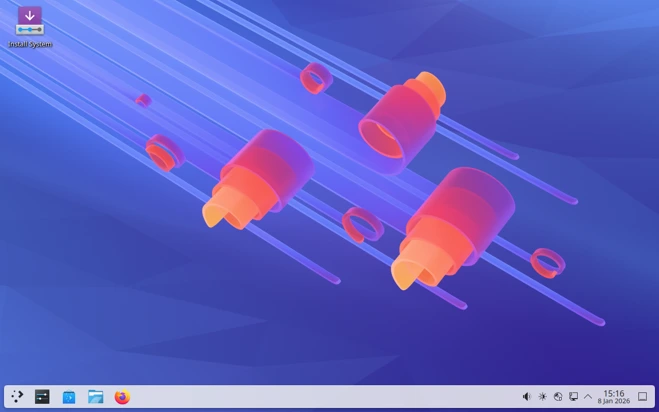
The most visible change? Breeze-themed windows now feature rounded bottom corners matching the top corners. The rounding is subtle compared to GNOME but creates visual consistency. Users preferring sharp corners can disable the feature in Settings.
Automatic light-to-dark theme switching based on time of day arrived in Plasma 6.5. Configure which global themes switch between and whether wallpapers transition with color schemes, by time of day, or remain static. This long-requested feature works smoothly without configuration headaches.
Pinned clipboard items let users save frequently-used text snippets to the clipboard, eliminating repeated copying. For artists, drawing tablet configuration now supports rotary dials and touch rings through System Settings. The tablet page shows warnings when custom drivers manage devices and hides when no tablets connect.
The Flatpak Permissions page transformed into a general Application Permissions page where users configure apps’ screenshot capture and remote control request abilities. Plasma’s built-in Remote Desktop Protocol server now shares the clipboard. Manual remote desktop account creation is no longer required—existing system user accounts work with supplied credentials.
KRunner implements fuzzy matching to locate applications even when names are misspelled. The search algorithm delivers results after typing the first character with improved result ordering. Sticky note widgets resize to smaller dimensions and background colors change directly from the context menu. A “Transparent” option removes colored backgrounds for minimalist appearance.
Sound-related improvements include warnings when “Raise maximum volume” remains active for extended periods, alerting users to potential speaker damage. Microphone muting behavior unified across the system—using a dedicated mute key or Super + Mute mutes all microphones simultaneously. Changing volume while muted automatically unmutes all playback devices.
Wayland support matured further. Picture-in-picture protocol support promises proper PiP windows staying above others automatically. Overlay plane support reduces CPU usage and power draw when displaying full-screen content on compatible GPUs. Variable refresh rate improvements move cursors at maximum refresh rates.
Plasma 6.5 continues the stability journey started with Plasma 6.0’s February 2024 release. Built on Qt 6, the desktop environment delivers customization power without the reliability concerns that plagued earlier versions.
COSMIC Desktop: The Rust Revolution Arrives
System76’s COSMIC desktop environment launched December 11, 2025 as the first stable release. Built entirely in Rust, COSMIC represents the boldest bet on intentional design across the Linux desktop ecosystem.
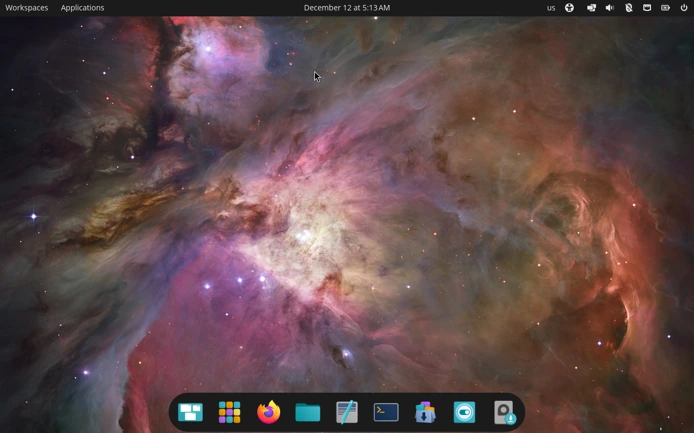
Three years in development, COSMIC breaks from GNOME while maintaining familiar workflows. The top panel, dock, and workspace overview feel immediately comfortable to GNOME users, but everything underneath runs on new foundations.
Rust’s memory safety guarantees eliminate vulnerability categories including buffer overflows and use-after-free bugs. As a Wayland-native environment, COSMIC prevents keylogging and input spoofing attacks possible under X11. Security through correct-by-construction design rather than constant patching.
Performance shows the benefits of starting fresh. COSMIC apps launch faster and use fewer resources than equivalents from other environments. The file manager, terminal, text editor, and media player ship with the desktop, providing cohesive experiences without depending on applications designed for other environments.
Customization works differently from KDE’s everything-exposed approach. COSMIC provides extensive theming through a unified design system. Change colors for window backgrounds, interface text, buttons, and input fields, with changes automatically carrying across all COSMIC apps. The system ensures customizations maintain readability through proper contrast checking.
Tiling window management integrates natively. Toggle an option in the menu bar, and COSMIC automatically arranges applications into tiles as you open them. No configuration files, no complex keybindings to memorize. Power users can dig deeper, but beginners get productive immediately.
Pop!_OS 24.04 ships COSMIC by default, replacing the customized GNOME desktop previous releases used. System76 built the environment to serve the entire open source community. Arch Linux, Fedora, openSUSE Tumbleweed, NixOS, and others already package COSMIC for their users.
Cinnamon 6.6: Traditional Desktop Done Right
While GNOME pushes forward and KDE offers endless customization, Cinnamon proves that traditional desktop design still matters. Released December 10, 2025, Cinnamon 6.6 arrives just in time for Linux Mint 22.3 “Zena,” demonstrating how intentional design doesn’t require reinventing the wheel.
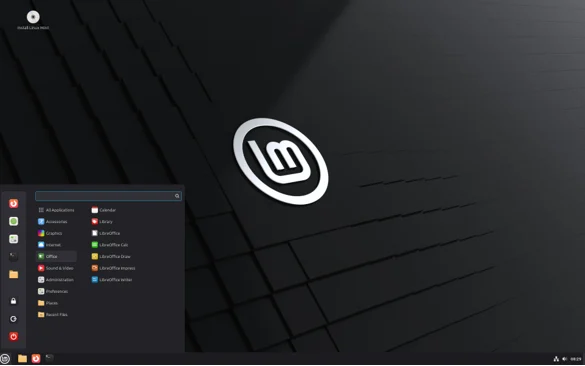
Cinnamon targets users who want familiarity. Windows refugees find the taskbar, system tray, and start menu immediately recognizable. Mac users appreciate the clean aesthetics. The desktop doesn’t fight your muscle memory—it works with it.
The most significant change in Cinnamon 6.6 centers on the application menu redesign. System buttons now appear at the top right of the search bar instead of mixing with regular items. Special categories moved to the bottom, creating cleaner visual hierarchy. Users can toggle between symbolic or full-color icons for categories, customize which places and bookmarks appear, and adjust the sidebar to show only favorites, places, or bookmarks.
Keyboard handling received a complete modernization. The virtual keyboard gained a new layout switching button, context menu shortcut for keyboard accessibility settings, improved theme support, better suggestion visibility, and fade effects when showing or hiding. Users can now create shortcuts to switch directly to specific keyboard layouts without cycling through all options.
The Settings app expanded with a new Thunderbolt module for managing Thunderbolt device connections and a dedicated tab for tiling preferences in the Windows module. Battery management options now include suspend controls, and fractional scaling direction becomes user-configurable.
Night Light functionality improved with an “Always” schedule mode option, letting users enable blue light filtering permanently rather than just at scheduled times. Hot corners work in fullscreen mode when enabled. The notification applet gained options for showing newest notifications first. Alt+Tab can display windows only from the current monitor, reducing confusion in multi-monitor setups.
Cinnamon 6.6 ditched the Tweener animation library in favor of easing functions, resulting in smoother transitions and lower resource consumption. The Expo workspace overview now activates on whichever monitor contains the mouse cursor, making the feature more intuitive with multiple displays.
Performance improvements run throughout the release. Linux Mint 22 with Cinnamon 6.x reduced memory usage significantly compared to 5.x versions through code refactoring and smarter resource allocation. Desktop sessions load 15-20% faster on identical hardware compared to previous releases. Multi-monitor setups benefit from reduced latency when dragging windows between displays.
Cinnamon’s intentional design philosophy shows in what it doesn’t include. No radical interface changes. No forced migration to new technologies before they mature. No removal of features users depend on. The team adds improvements when they’re ready, tested, and genuinely beneficial.
This conservative approach builds trust. Users know Cinnamon updates won’t break their workflows or force relearning basic operations. Distributions like Linux Mint rely on this stability, making Cinnamon the foundation for one of the most popular desktop Linux experiences.
Emerging Contenders Worth Watching
Beyond the big three, several desktop environments demonstrate intentional design principles worth noting.
Xfce continues serving users who need lightweight efficiency. The desktop uses minimal resources while providing complete functionality. Where GNOME and KDE prioritize modern features, Xfce prioritizes compatibility with older hardware. This intentional positioning keeps ancient computers running instead of headed for landfills.
LXQt combines lightweight operation with contemporary appearance. It matches Xfce’s efficiency while looking less dated. For users migrating from Windows on low-spec machines, LXQt provides familiar workflows without overwhelming limited resources.
Pantheon, Elementary OS’s desktop environment, borrows macOS design language deliberately. Mac users switching to Linux find Pantheon immediately comfortable. The dock, window decorations, and application menu mirror macOS conventions while running on Linux foundations.
Each environment succeeds because it knows its purpose and executes accordingly. No environment tries being everything to everyone.
Comparison: Key Desktop Environments in 2026
| Desktop Environment | Primary Focus | Memory Usage | Customization Level | Wayland Support | Best For |
|---|---|---|---|---|---|
| GNOME 49 | Modern workflows, simplicity | Moderate (750MB+) | Limited but growing | Excellent (Wayland-only) | Daily drivers, professionals |
| KDE Plasma 6.5 | Ultimate customization | Moderate (700MB+) | Extremely high | Excellent | Power users, tinkerers |
| COSMIC 1.0 | Security, performance | Light (600MB+) | Moderate | Native-only | Developers, forward-thinkers |
| Cinnamon 6.6 | Traditional familiarity | Moderate (650MB+) | Moderate | Partial | Windows refugees, stability seekers |
| Xfce | Lightweight efficiency | Very light (300MB+) | Moderate | Limited | Old hardware, servers |
| LXQt | Modern + lightweight | Very light (350MB+) | Low | Partial | Low-spec systems |
| Pantheonmac | OS familiarity | Moderate (650MB+) | Limited | Partial | Mac migrants |
Why Intentional Design Matters Now
The timing of this shift isn’t accidental. Several converging factors make 2026 the year intentional design became mandatory rather than aspirational.
Windows 10 reached end-of-life October 2024, forcing millions onto Windows 11 or alternatives. Windows 11’s strict hardware requirements and aggressive AI integration pushed users toward Linux. These migrants don’t want to learn command lines or edit configuration files. They need desktops that work immediately and intuitively.
Gaming on Linux matured through Steam Proton and native ports. Gamers demand reliable performance without constant troubleshooting. Desktop environments responded by treating gaming as first-class use case. Game controller support, VR headset compatibility, and HDR handling all improved dramatically.
Hardware vendors noticed. Framework laptops ship with excellent Linux support. System76 builds machines specifically engineered for Linux, guaranteeing compatibility. When hardware companies invest in Linux desktop success, desktop environment teams feel pressure to deliver polished experiences worthy of that investment.
Developer tools increasingly run Linux-first. Containers, Kubernetes, modern programming languages—all assume Unix-like environments. As developer adoption grows, consumer adoption often follows. Developers share their positive experiences, reducing Linux’s reputation as difficult or niche.
Wayland Reaches Critical Mass
The display server wars ended. Wayland won. Every major desktop environment prioritizes Wayland development, with GNOME 49 dropping X11 support entirely.
Wayland provides security X11 cannot match. Applications run isolated from each other, preventing keylogging and screen capture without explicit permission. This matters increasingly as remote work and privacy concerns grow.
Fractional scaling works properly under Wayland, making high-DPI displays usable. VRR support improves gaming and video smoothness. Screen recording and streaming applications work reliably across all desktop environments.
The transition took years longer than anticipated, but intentional design requires completing transitions fully rather than shipping half-implemented features. Desktop environment teams learned this lesson painfully through the 2010s. Now they ship features when ready, not when hype cycles demand it.
Performance and Resource Management
Modern desktop environments run faster despite adding features. This seems contradictory until you examine intentional optimization efforts.
Asynchronous processing prevents slow operations from blocking the entire interface. GNOME’s dynamic triple buffering in version 48 demonstrates this approach—smooth animations and fewer dropped frames through better concurrency handling.
Hardware acceleration offloads work from CPUs to GPUs. Video playback, screen recording, and desktop composition all leverage dedicated graphics hardware. Laptops gain battery life. Desktops respond faster.
Memory safety through Rust eliminates overhead from defensive programming. Traditional C programs include bounds checking and error handling that consume CPU cycles. Rust’s compiler guarantees safety at compile time, producing faster binaries. COSMIC’s performance benefits directly from this architectural decision.
The Developer and Power User Perspective
Developers drove early Linux desktop adoption. In 2026, desktop environments acknowledge and serve this constituency while broadening appeal.
Tiling window managers integrated into GNOME (through extensions) and COSMIC (natively) serve programmers managing many terminal windows simultaneously. KDE’s extreme customization lets developers build workflows matching their preferred tools.
COSMIC particularly appeals to developers. Rust’s popularity among programmers creates familiarity. The modular architecture invites contribution. The integrated tiling satisfies productivity demands without sacrificing approachability for less technical users.
Pop!_OS’s hardware-accelerated graphics switching helps developers using GPU acceleration for machine learning. Applications automatically run on discrete GPUs when needed, extending battery life by using integrated graphics otherwise.
Accessibility Advances Show True Intentionality
Nothing demonstrates intentional design better than accessibility improvements. These features help relatively small user populations while requiring significant engineering effort. Projects that prioritize accessibility show they’re building for everyone, not just the biggest market segments.
GNOME 49’s Calendar accessibility enhancements make the application fully usable with keyboard navigation and assistive technologies. The lock screen’s accessibility menu puts tools where users need them immediately.
KDE Plasma 6.5’s unified microphone muting and volume controls help users with motor impairments. Grayscale filters expand visual accessibility. Drawing tablet configuration for users with specific input needs demonstrates attention to diverse workflows.
These features won’t appear in marketing materials alongside flashy new themes. They won’t drive social media buzz. But they make Linux desktop environments usable for people previously excluded. That’s intentionality.
Flatpak and Universal Packaging
Software distribution historically fragmented Linux. Each distribution used different package formats, making application developers choose between supporting many targets or abandoning Linux entirely.
Flatpak changed everything. Applications packaged as Flatpaks run across distributions without modification. Developers build once, users install anywhere. This reduces friction dramatically for both parties.
Desktop environments integrate Flatpak deeply. GNOME Software, KDE Discover, and COSMIC Store all handle Flatpak installations seamlessly. Users don’t need to understand packaging systems—they just install applications.
Sandboxing makes Flatpak installations safer than traditional packages. Applications get only the permissions they need, limiting damage from malicious software. This intentional security model protects users without requiring expertise.
KDE Plasma 6.5’s transformation of the Flatpak Permissions page into a general Application Permissions page demonstrates this integration. Users see clear controls for what apps can do, regardless of how they were packaged.
Challenges Remaining
Despite tremendous progress, challenges persist. Application availability still favors Windows and macOS for certain professional software. Adobe Creative Cloud, Microsoft Office, and specialized industry applications lack Linux versions.
Wine, Proton, and emulation layers help but don’t solve everything. Professional users need native applications running at full performance. Until major software vendors prioritize Linux, desktop environments face adoption headwinds regardless of quality.
Nvidia graphics driver support remains problematic compared to AMD and Intel. The proprietary driver works reasonably on X11 but lags on Wayland. Nvidia’s recent open-source driver improvements help, but years of closed development created compatibility gaps taking time to close. GNOME 49’s Wayland-only approach may pressure Nvidia to improve faster.
Hardware diversity creates testing challenges. Desktop environment developers cannot test every possible configuration. Bugs appear on specific hardware combinations that work fine elsewhere. This improves as more vendors officially support Linux, but comprehensive compatibility requires more market share than Linux currently commands.
Looking Ahead: Beyond 2026
Linux Desktop Environments in 2026 Feel More Intentional because the ecosystem matured. Teams learned what works, what doesn’t, and how to prioritize limited resources. The resulting environments serve users better than ever before.
Expect continued refinement rather than revolutionary changes. GNOME will keep adding requested features thoughtfully, having proven the Wayland-only approach in version 49. KDE will stabilize while maintaining customization, with Plasma 6.5 showing how power and polish coexist. COSMIC will expand its ecosystem and refine its Rust-based foundation as more distributions adopt it.
The convergence of external pressures—Windows changes, privacy concerns, developer needs—and internal maturity positions Linux desktops for sustained growth. Mass market dominance remains unlikely, but becoming the obvious choice for developers, creatives, and technically-minded users grows more realistic annually.
Intentional design doesn’t mean perfection. It means purposeful choices that prioritize users over ego, functionality over feature counts, and polish over rushing releases. That’s the Linux desktop in 2026, and it’s been a long time coming.
Frequently Asked Questions
Which Linux desktop environment is best for beginners in 2026?
GNOME 49 offers the smoothest beginner experience with minimal configuration required. Ubuntu 25.10’s default GNOME implementation works excellently out of the box. COSMIC 1.0 is also beginner-friendly if you want something newer with a focus on security.
Can I run games on Linux desktop environments in 2026?
Yes, gaming works excellently on all major desktop environments through Steam Proton. KDE Plasma 6.5 and COSMIC provide particularly good gaming experiences with proper controller support, VRR, and performance optimizations. GNOME 49’s Wayland-only approach also delivers smooth gaming performance.
How much RAM do modern Linux desktop environments need?
GNOME 49 needs around 750MB of RAM at idle, KDE Plasma 6.5 uses approximately 700MB, and Cinnamon 6.6 uses about 650MB. COSMIC runs lighter at approximately 600MB. For very old hardware, Xfce or LXQt use only 300-350MB.
Is Wayland stable enough for daily use in 2026?
Yes, Wayland became the reliable default across all major desktop environments. GNOME 49 runs Wayland-only, demonstrating the maturity of the technology. KDE Plasma 6.5 and COSMIC are also Wayland-native. Cinnamon 6.6 continues improving Wayland support while maintaining X11 compatibility. Most users should run Wayland sessions for better security, fractional scaling, and modern feature support.
Will COSMIC replace GNOME and KDE?
No. COSMIC offers a modern alternative, particularly for security-focused users and developers who appreciate Rust’s memory safety. GNOME, KDE, and Cinnamon remain stable, mature options with larger ecosystems and decades of development. All four will coexist, giving users meaningful choices based on their priorities—whether that’s cutting-edge features, customization depth, traditional familiarity, or security-first architecture.
Disclaimer
This article reflects the state of Linux desktop environments as of early 2026 based on officially released versions and announced features. Software development moves rapidly, and specific features or release dates mentioned may change. Always verify compatibility with your specific hardware and use case before committing to any desktop environment.
Performance metrics and memory usage figures represent typical installations and may vary based on configuration, installed applications, and hardware specifications. The author has no financial relationships with any desktop environment projects or Linux distributions mentioned.
Also Read
Nitrux 5.1 Brings Hardware Validation and New System Utilities
About the Author