

Linux for Data Science: Tools and Distros You Need to Know
In the ever-evolving world of data science, choosing the right operating system can significantly impact your productivity, efficiency, and overall workflow. For many data scientists, Linux for Data Science has become the go-to choice due to its flexibility, open-source ecosystem, and robust performance. Whether you’re a seasoned professional or just starting out, Linux offers a powerful environment for data analysis, machine learning, and visualization.
In this comprehensive guide, we’ll explore why Linux is ideal for data science, highlight the best Linux distributions tailored for this field, and dive into the essential tools that make Linux a powerhouse for data science tasks. Let’s get started!
Why Choose Linux for Data Science?
Linux is a favorite among data scientists for several compelling reasons. Its open-source nature, stability, and compatibility with a wide range of data science tools make it an excellent choice. Here’s why Linux stands out:
- Open-Source Ecosystem: Linux distributions are free and open-source, meaning you can customize your environment to suit your specific needs. This is particularly valuable for data scientists who often require specific libraries, frameworks, or tools like TensorFlow, PyTorch, or Pandas.
- Performance and Stability: Linux is known for its ability to handle resource-intensive tasks, such as processing large datasets or training machine learning models. Its stability ensures that your system won’t crash during critical computations.
- Command-Line Power: The Linux terminal provides unparalleled control, allowing data scientists to automate tasks, manage dependencies, and integrate tools seamlessly. Tools like grep, awk, and sed are invaluable for data preprocessing.
- Community Support: With a vast and active community, Linux offers extensive documentation and support. Whether you’re troubleshooting a package installation or seeking advice on optimizing your workflow, the Linux community has you covered.
- Production Compatibility: Many data science models are deployed on Linux-based servers. Developing in a Linux environment ensures compatibility and reduces issues when transitioning from development to production. As one ex-data scientist noted, the Windows-to-Linux pipeline often leads to problems, making Linux the preferred choice for production-ready workflows.
With these advantages in mind, let’s explore the top Linux distributions for data science and the tools that make them shine.
Top Linux Distributions for Data Science
Choosing the right Linux distribution (distro) is crucial for setting up an efficient data science environment. Below, we’ll discuss five of the best Linux distros for data science, based on recent insights and official data from 2024 and 2025. These distros are tailored to meet the needs of data scientists, offering pre-installed tools, user-friendly interfaces, and robust community support.
1. Ubuntu: The Beginner-Friendly Powerhouse
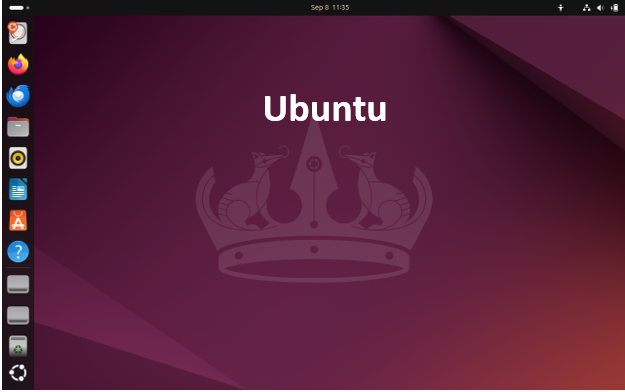
Ubuntu is the most popular Linux distribution for data science, and for good reason. Its user-friendly interface, extensive documentation, and large community make it an excellent choice for both beginners and experienced data scientists. Ubuntu’s repositories are packed with data science tools like Python, R, Jupyter Notebook, and TensorFlow, making setup a breeze.
Why Ubuntu for Data Science?
- Ease of Use: Ubuntu’s intuitive interface is ideal for those transitioning from Windows or macOS.
- Long-Term Support (LTS): Ubuntu’s LTS versions, such as Ubuntu 24.04 LTS, are supported for five years, ensuring stability for long-term projects.
- Hardware Compatibility: Ubuntu works well with a wide range of hardware, including NVIDIA GPUs, which are essential for deep learning tasks.
- Pre-Installed Tools: Most Ubuntu distributions come with Python pre-installed, and tools like pip and conda simplify package management.
Getting Started with Ubuntu:
To install the latest version of Python and essential data science tools on Ubuntu, run:
sudo apt update && sudo apt install python3 python3-pip
pip3 install notebook pandas numpy scikit-learn matplotlib seaborn
Who Should Use Ubuntu?
Ubuntu is perfect for beginners and professionals who want a reliable, well-supported platform with minimal setup hassle.
2. Fedora: Cutting-Edge Innovation
Fedora, backed by Red Hat, is known for its cutting-edge features and frequent updates, making it a great choice for data scientists who want access to the latest tools and libraries. Fedora’s DNF package manager simplifies the installation of data science frameworks like PyTorch and TensorFlow.

Why Fedora for Data Science?
- Latest Packages: Fedora’s rolling release model ensures you have the most up-to-date versions of Python, R, and other tools.
- Developer-Friendly: Fedora is optimized for developers, with excellent integration for AI and machine learning workflows.
- Performance: Fedora leverages hardware capabilities for fast data processing and model training.
Getting Started with Fedora:
To install Python and Jupyter Notebook on Fedora, use:
sudo dnf install python3 python3-pip
pip3 install notebook pandas numpy scikit-learn
Who Should Use Fedora?
Fedora is ideal for data scientists who prioritize access to the latest technologies and are comfortable with frequent updates.
3. CentOS: Enterprise-Grade Stability
CentOS is a favorite in enterprise environments due to its stability and long-term support. It’s a free derivative of Red Hat Enterprise Linux (RHEL), making it a reliable choice for data scientists working on critical projects.

Why CentOS for Data Science?
Stability: CentOS is rock-solid, with long-term support for consistent workflows.
- Minimalistic Installation: CentOS offers a minimal installation option, allowing you to customize your environment for data science tasks.
- Compatibility: It supports popular frameworks like TensorFlow and PyTorch, ensuring compatibility with production environments.
Getting Started with CentOS:
To set up a data science environment on CentOS, install Python and key libraries:
sudo yum install python3 python3-pip
pip3 install notebook pandas numpy scikit-learn
Who Should Use CentOS?
CentOS is best for data scientists working in enterprise settings or those who prioritize stability over frequent updates.
4. Arch Linux: The Customizable Choice
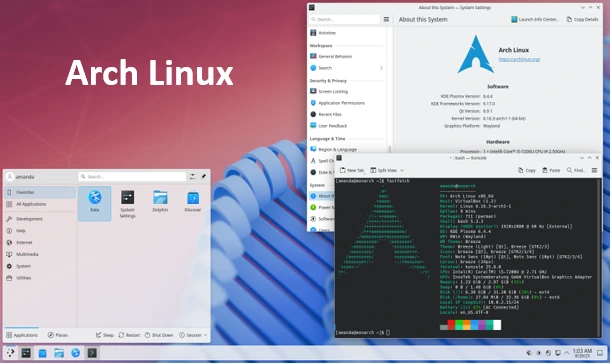
Arch Linux is a lightweight, highly customizable distribution that appeals to advanced users. Its rolling release model ensures access to the latest software, but it requires more technical expertise to set up.
Why Arch Linux for Data Science?
- Flexibility: Arch Linux allows you to build a tailored data science environment from scratch.
- Vast Repository: The Arch User Repository (AUR) provides access to a wide range of data science tools and libraries.
- Performance: Its lightweight nature ensures optimal performance for resource-intensive tasks.
Getting Started with Arch Linux:
To install Python and data science tools on Arch Linux:
sudo pacman -S python python-pip
pip install notebook pandas numpy scikit-learn
Who Should Use Arch Linux?
Arch Linux is suited for experienced users who want complete control over their system and are comfortable with manual configuration.
5. DAT Linux: The Data Science Specialist
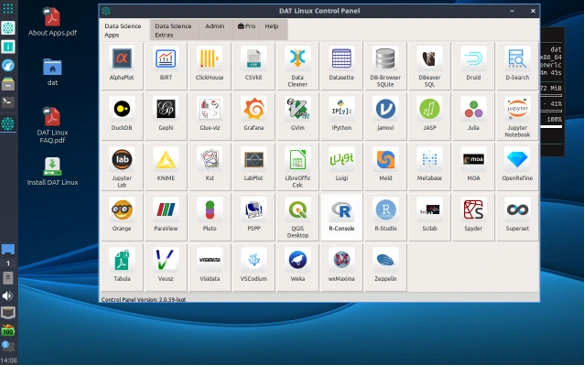
DAT Linux is a specialized Linux distribution designed specifically for data science. Based on Ubuntu 24.04 LTS, it comes pre-loaded with dozens of open-source data science tools, including AlphaPlot, ClickHouse, DuckDB, Gephi, and Grafana. Its custom DAT Linux Control Panel simplifies the management of these tools, making it a ready-to-run solution for data scientists.
Why DAT Linux for Data Science?
- Pre-Configured Tools: DAT Linux includes a curated selection of data science apps, saving you hours of setup time.
- User-Friendly: The LXQt desktop environment and DAT Linux Control Panel make it accessible to beginners and professionals alike.
- Community Support: The DAT Linux GitHub community provides announcements, feedback, and support.
Key Tools in DAT Linux:
- AlphaPlot: For interactive scientific graphing and data analysis.
- ClickHouse: A column-oriented DBMS for online analytical processing.
- DuckDB: An in-process SQL OLAP database management system.
- Gephi: For graph and network visualization.
- Grafana: A popular platform for data visualization and monitoring.
Getting Started with DAT Linux:
Download DAT Linux from the official website (datlinux.com) and follow the installation instructions. The included Control Panel simplifies tool management, so you can start analyzing data immediately.
Who Should Use DAT Linux?
DAT Linux is perfect for students, academics, and professionals who want a pre-configured, data science-focused environment without the hassle of manual setup.
Essential Linux Tools for Data Science
In addition to choosing the right distro, leveraging the best tools is critical for success in data science. Below, we highlight five must-have Linux tools for data science in 2025, based on recent insights.
1. Python: The Data Scientist’s Swiss Army Knife
Python is the backbone of data science, and Linux enhances its capabilities with seamless integration and performance. Most Linux distros come with Python pre-installed, and package managers like pip and conda make it easy to install libraries like Pandas, NumPy, Scikit-learn, Matplotlib, and Seaborn.
Why Use Python on Linux?
- Pre-installed on most distros, reducing setup time.
- Excellent integration with Linux command-line tools for automation.
- Vast ecosystem of data science libraries.
Installation:
sudo apt update && sudo apt install python3 python3-pip # Ubuntu/Debian
sudo dnf install python3 python3-pip # Fedora
sudo pacman -S python python-pip # Arch Linux
pip3 install pandas numpy scikit-learn matplotlib seaborn
2. Jupyter Notebook: The Interactive Playground
Jupyter Notebook is an open-source tool that combines code, visualizations, and narrative text in a single document. It’s perfect for experimenting with data and sharing results.
Why Use Jupyter Notebook on Linux?
- Easy installation via pip.
- Supports interactive visualizations with libraries like Plotly and Bokeh.
- Browser-based interface for seamless coding.
Installation:
pip3 install notebook
jupyter notebook
3. R: Statistical Powerhouse
R is a powerful language for statistical analysis and visualization, widely used in academia and industry. Linux supports R through package managers, and tools like RStudio enhance its usability.
Why Use R on Linux?
- Access to CRAN packages for advanced statistical modeling.
- Integration with tools like D-Search for dataset exploration.
- Robust community support for troubleshooting.
Installation:
sudo apt install r-base # Ubuntu/Debian
sudo dnf install R # Fedora
sudo pacman -S r # Arch Linux
4. Apache Spark: Big Data Processing
Apache Spark is a scalable platform for big data processing and machine learning. Its Linux compatibility makes it ideal for handling large datasets.
Why Use Apache Spark on Linux?
- Optimized for distributed computing on Linux clusters.
- Supports Python (PySpark) and R for data science workflows.
- Handles large-scale data processing with ease.
Installation:
Download Spark from the official website (spark.apache.org) and follow the setup guide for your distro.
5. Grafana: Data Visualization and Monitoring
Grafana is a popular open-source platform for creating interactive dashboards and visualizations. It’s included in DAT Linux and works well with other distros.
Why Use Grafana on Linux?
- Creates stunning visualizations for data insights.
- Integrates with databases like ClickHouse and DuckDB.
- Easy to install and configure on Linux.
Installation:
sudo apt install grafana # Ubuntu/Debian
sudo dnf install grafana # Fedora
sudo pacman -S grafana # Arch Linux
Tips for Optimizing Your Linux Data Science Workflow
To make the most of Linux for Data Science, consider these practical tips:
- Use Virtual Environments: Tools like venv or conda help manage dependencies and avoid conflicts between projects.
python3 -m venv myenv
source myenv/bin/activate
- Automate with Shell Scripts: Write Bash scripts to automate repetitive tasks like data preprocessing or model training.
- Leverage Containers: Use Docker or Podman to create reproducible environments for your data science projects.
- Stay Updated: Regularly update your distro and packages to access the latest features and security patches.
sudo apt update && sudo apt upgrade # Ubuntu/Debian
sudo dnf upgrade # Fedora
sudo pacman -Syu # Arch Linux
- Join the Community: Engage with Linux and data science communities on platforms like GitHub, Stack Overflow, or Reddit for support and inspiration.
Conclusion
Linux for Data Science is a match made in heaven, offering unmatched flexibility, performance, and access to a rich ecosystem of tools. Whether you choose the beginner-friendly Ubuntu, the cutting-edge Fedora, the stable CentOS, the customizable Arch Linux, or the specialized DAT Linux, you’ll find a distro that suits your needs. Pair these distros with powerful tools like Python, Jupyter Notebook, R, Apache Spark, and Grafana, and you’ll have everything you need to tackle complex data science projects.
By embracing Linux, you’re not just choosing an operating system—you’re joining a global community of innovators and problem-solvers. So, download your preferred distro, install your favorite tools, and start exploring the endless possibilities of data science on Linux. Happy analyzing!
Disclaimer
The information provided in this blog post is for general informational purposes only and is based on the latest available data as of September 2025. While we strive to ensure the accuracy and relevance of the content, the field of data science and Linux distributions evolves rapidly, and tools, features, or system requirements may change. The author and publisher are not responsible for any errors, omissions, or outdated information.
Readers are encouraged to verify details, consult official documentation, and seek professional advice before making decisions based on this content. The use of any software, tools, or distributions mentioned is at the user’s own risk. Links to external websites are provided for convenience and do not constitute an endorsement. Always ensure compatibility with your specific hardware and software requirements before proceeding with installations or configurations.
Also Read
Debian 13.1 Review: Stability, Security, and Performance Improvements
About the Author





