
MakuluLinux WebOS The Ultimate Web-Centric Linux Experience for 2025
In the ever-evolving world of Linux distributions, MakuluLinux has carved out a unique niche with its innovative approach to integrating artificial intelligence and user-centric design. The latest offering, MakuluLinux WebOS, is poised to redefine how we interact with Linux in 2025. Built on the robust foundation of Debian and powered by a heavily customized desktop environment, MakuluLinux WebOS combines the power of AI, seamless web integration, and unparalleled customization to deliver what could be the ultimate web-centric Linux experience. Whether you’re a seasoned Linux enthusiast or a newcomer transitioning from Windows or macOS, this distro promises to elevate your computing experience with its blend of accessibility, performance, and cutting-edge features.
In this comprehensive blog post, we’ll dive deep into what makes MakuluLinux WebOS stand out, exploring its features, performance, AI capabilities, and why it’s a game-changer for 2025. Buckle up as we unpack this exciting Linux distro guide that’s as informative as it is engaging!
What is MakuluLinux WebOS?
MakuluLinux, developed by Jacque Montague Raymer, has been a trailblazer in the Linux community since its debut in 2013. The name “Makulu,” meaning “big chief” in Zulu, reflects its bold ambition to push the boundaries of what a Linux distribution can do. While earlier releases like LinDoz and Shift focused on customizable desktops and AI integration, MakuluLinux WebOS takes things to the next level by prioritizing a web-centric experience. Built on a Debian base and featuring a modified Cinnamon or GNOME framework (depending on the edition), WebOS is designed to seamlessly blend desktop computing with web-based functionality, making it ideal for users who live in the cloud or rely heavily on web applications.
Unlike traditional Linux distributions that focus solely on local applications, MakuluLinux WebOS is tailored for the modern user who needs a fast, secure, and intuitive platform for web browsing, cloud computing, and AI-driven tasks. With its AI assistant, Electra, and a suite of web-optimized tools, this distro is not just another operating system—it’s a forward-thinking solution for 2025’s digital landscape.
Key Features of MakuluLinux WebOS
MakuluLinux WebOS is packed with features that make it a standout choice for 2025. Let’s break down the highlights that set it apart from the competition.
1. Web-Centric Design for Seamless Online Integration
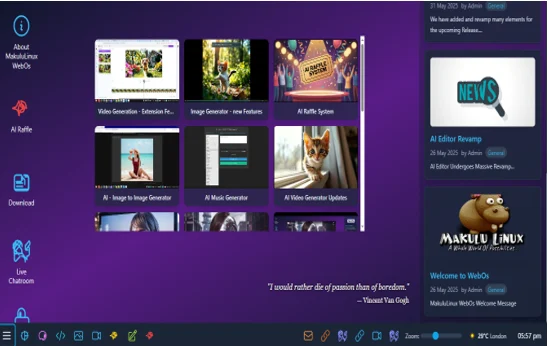
MakuluLinux WebOS is built with the internet at its core. Whether you’re managing cloud-based projects, streaming media, or running web apps, WebOS delivers a fluid experience. The distro includes a custom web interface that allows users to interact with Electra, the AI assistant, via a browser-like environment. This interface supports quick access to web-based tools, cloud storage, and online services, reducing the need for third-party applications.
The desktop widget, which is resizable and draggable, acts as a mini-browser for interacting with Electra or accessing web content directly from the desktop. This eliminates the clutter of multiple browser tabs and provides a streamlined way to manage online tasks. Additionally, WebOS supports Snap and Flatpak, ensuring compatibility with a wide range of modern web applications.
2. Electra: The AI-Powered Assistant
At the heart of MakuluLinux WebOS is Electra, a multimodal AI assistant that rivals the likes of Siri, Google Assistant, and even ChatGPT. Electra is integrated into the operating system, offering text, voice, and widget-based interactions in over 40 languages. Whether you need help with coding, document summarization, or automating workflows, Electra is there to assist in real-time.
What makes Electra unique is its ability to handle multiple inputs and tasks simultaneously. For example, you can ask Electra to generate text, analyze data, or even create images, all within the same session. The AI runs on a hybrid model, with some processes handled locally to prioritize privacy and others on servers for more complex tasks. According to developer Jacque Montague Raymer, Electra is built from a custom combination of models like Llama, Palm2, and Google’s AI, capable of processing up to 400 queries per minute with a response time of 3-10 seconds, depending on hardware.
For users who opt for the Pro Upgrade (available for a one-time $33 donation), Electra unlocks additional features, such as advanced content generation and enhanced automation. However, even the free version offers robust AI capabilities, making it accessible to all users.
3. Debian-Based Stability with Cinnamon or GNOME
MakuluLinux WebOS is built on the latest Debian testing repository, ensuring rock-solid stability and compatibility with a vast library of software. Unlike earlier Ubuntu-based releases, the shift to Debian enhances performance and flexibility, making WebOS suitable for both modern and older hardware. The distro runs on the Linux 6.10 kernel and features a heavily modified Cinnamon 6.2.0 desktop environment, with a GNOME-based option available in the Max edition.
The Cinnamon desktop is known for its Windows-like look and feel, making it an excellent choice for users transitioning from Microsoft’s ecosystem. However, WebOS goes beyond aesthetics, offering extensive personalization options to tweak themes, icons, and layouts. For those who prefer a more modern interface, the GNOME-based Max edition provides a sleek, minimalist experience with multiple desktop layout options ported from MakuluLinux Shift.
4. AI Toolkit for Productivity
WebOS includes a comprehensive AI toolkit that enhances productivity across various tasks. Some standout tools include:
- Therapist AI: A unique feature that provides conversational support for mental health and well-being, offering a judgment-free space for users to discuss their thoughts.
- ChatAI: A conversational AI tool for quick answers, brainstorming, or casual chats, competing directly with platforms like ChatGPT.
- Stock Market Plugins: Real-time market analysis and insights powered by AI, perfect for finance enthusiasts or professionals.
- Code Assistance: Electra can assist with coding tasks, offering suggestions, debugging tips, and even generating code snippets in multiple programming languages.
These tools are accessible via the toolbox interface menu, which integrates seamlessly with the desktop environment. Whether you’re a developer, content creator, or casual user, the AI toolkit streamlines complex tasks and boosts efficiency.
5. Android Integration for Versatility
One of the most exciting features of MakuluLinux WebOS is its GameR edition, which includes full Android integration. This allows users to run Android apps within a Linux container, bridging the gap between mobile and desktop ecosystems. Whether you want to play mobile games, use productivity apps, or access Android-exclusive services, WebOS makes it possible without the need for a separate emulator.
6. Privacy and Security First
In an era where data privacy is paramount, MakuluLinux WebOS prioritizes user security. The distro keeps AI processing local whenever possible, minimizing reliance on cloud-based solutions that could compromise data. It also adheres to open-source principles, allowing the community to inspect and modify AI integrations. Built-in malware protection, AI-assisted monitoring, and enhanced encryption ensure a secure computing environment, while frequent updates keep the system protected against emerging threats.
7. Customization and Theming
MakuluLinux WebOS offers unparalleled customization options, allowing users to tailor the desktop to their preferences. With redesigned light and dark themes, 330 wallpapers, 92 icon sets, 20 cursors, and 14 GTK themes, you can create a workspace that’s uniquely yours. The distro also includes a Conky dock for system monitoring and quick access to tools, adding both functionality and visual appeal.
For users who want to switch between desktop environments, the Shift edition (available as an alternative to WebOS) supports eight unique layouts, including LinDoz, Core, Flash, Simple, Dash, Unity, Plasma, and GNOME. These layouts can be changed with a single click, no reinstallation required.
Performance and Hardware Compatibility
MakuluLinux WebOS is optimized for speed and efficiency, with significant improvements in boot times and resource management. The distro performs well on a wide range of hardware, from high-end workstations to older machines with modest specs. The Debian base ensures compatibility with a vast library of software, while built-in compatibility layers like Wine allow users to run Windows applications seamlessly.
The Cinnamon desktop, while visually rich, is lightweight enough to run smoothly on systems with 4GB of RAM or more. For users with lower-powered hardware, the GNOME-based Max edition offers a more minimalist experience without sacrificing functionality. The Linux 6.10 kernel provides excellent hardware support, including the latest drivers for GPUs, Wi-Fi, and peripherals.
Why MakuluLinux WebOS Stands Out in 2025
In a crowded Linux landscape, MakuluLinux WebOS distinguishes itself through its focus on web-centric computing and AI integration. Here’s why it’s a top choice for 2025:
1. Accessibility for All Users
MakuluLinux WebOS is designed to be approachable for both beginners and advanced users. The Windows-inspired Cinnamon desktop makes it easy for newcomers to transition, while the extensive customization options and AI toolkit cater to power users. The distro’s intuitive interface and comprehensive documentation (including video tutorials) ensure that users of all skill levels can get up and running quickly.
2. AI as a Core Component
While other Linux distributions dabble in AI, MakuluLinux WebOS makes it a central feature. Electra’s ability to handle text, voice, and widget-based interactions sets a new standard for Linux desktops. Whether you’re automating tasks, generating content, or seeking real-time assistance, WebOS delivers an AI-driven experience that rivals proprietary platforms.
3. Web-Centric Workflow
As more users rely on cloud-based tools and web applications, MakuluLinux WebOS is perfectly positioned to meet their needs. The distro’s web interface, desktop widget, and Android integration create a seamless workflow for online tasks, making it ideal for remote workers, students, and digital nomads.
4. Open-Source Philosophy
Despite its advanced features, MakuluLinux WebOS remains true to its open-source roots. The community can inspect and modify the code, ensuring transparency and trust. The free version offers robust functionality, while the optional Pro Upgrade provides additional features for those who want to support the project.
5. Future-Proof Design
With ongoing development and plans for KDE-based editions, MakuluLinux WebOS is built to evolve. The distro’s partial rolling update model ensures that users receive the latest features and security patches without the need for a full reinstall. This forward-thinking approach makes WebOS a future-proof choice for 2025 and beyond.
How to Get Started with MakuluLinux WebOS
Ready to experience MakuluLinux WebOS for yourself? Here’s how to get started:
- Download the ISO: Visit the official MakuluLinux website (webos.makululinux.com) to download the latest WebOS ISO. Choose between the Cinnamon-based LinDoz edition or the GNOME-based Max edition, depending on your preference.
- Create a Bootable Drive: Use tools like Rufus or Etcher to create a bootable USB drive with the WebOS ISO.
- Test in Live Mode: MakuluLinux WebOS supports live mode, allowing you to try the distro without installing it. This is a great way to explore its features and ensure compatibility with your hardware.
- Install the OS: Follow the straightforward installation wizard to set up WebOS on your system. The process is user-friendly and supports both UEFI and legacy BIOS.
- Explore Electra and Web Features: Once installed, dive into Electra’s AI capabilities and the web-centric interface. Customize the desktop to your liking and start exploring the AI toolkit.
For those who want enhanced AI features, consider the Pro Upgrade for a one-time $33 donation. This unlocks additional Electra functionalities and supports the ongoing development of MakuluLinux.
Potential Drawbacks
While MakuluLinux WebOS is a powerhouse, it’s not without its quirks. The heavy reliance on AI may feel overwhelming for users who prefer a traditional Linux experience. Additionally, the shift to a Debian base, while improving stability, may require some adjustment for users accustomed to Ubuntu-based distros. Finally, the Pro Upgrade, while affordable, may be a barrier for some users who want access to all AI features without additional cost.
Conclusion: The Future of Linux is Here
MakuluLinux WebOS is more than just a Linux distribution—it’s a bold vision for the future of desktop computing. By combining a web-centric design, powerful AI integration, and a user-friendly interface, it delivers an experience that’s both innovative and accessible. Whether you’re a tech enthusiast, a developer, or someone looking to transition from Windows, WebOS offers a compelling alternative that’s ready for 2025’s digital demands.
With its Debian-based stability, customizable desktop, and Electra AI assistant, MakuluLinux WebOS sets a new benchmark for what a Linux distro can achieve. If you’re ready to explore the ultimate web-centric Linux experience, download MakuluLinux WebOS today and see why it’s making waves in the open-source community.
Disclaimer
The information provided in this blog post about MakuluLinux WebOS is based on the latest available data from official sources and reputable publications as of July 12, 2025. While every effort has been made to ensure accuracy, the features, specifications, and performance of MakuluLinux WebOS may change with future updates or releases.
The author and publisher are not affiliated with MakuluLinux or its developers and do not guarantee the performance, compatibility, or suitability of the operating system for any specific purpose or hardware. Users are encouraged to verify details on the official MakuluLinux website (webos.makululinux.com) and test the distribution in live mode before installation.
Any reliance on the information in this post is at the user’s own risk. Additionally, opinions expressed are those of the author and do not necessarily reflect the views of MakuluLinux or its affiliates. Always back up important data before installing or using any new operating system.
Also Read
What Makes Parrot OS 6.4 the Ultimate Choice for Ethical Hackers?
About the Author





