

Marathon OS Explained
Remember the days when smartphones weren’t just about endless scrolling and app overload? When a mobile OS actually felt intentional, with gestures that made sense and features designed for productivity rather than addiction? If you’re nodding your head, you probably remember BlackBerry 10. And if you’ve been mourning its loss since 2022, you’re in for a treat.
Enter Marathon OS—a revolutionary Linux-based mobile operating system that’s breathing new life into the brilliant design philosophy that made BlackBerry 10 legendary. But here’s the twist: it’s not running on BlackBerry devices. It’s bringing that magic to modern Android hardware, and it’s doing so in a way that could fundamentally change how we think about mobile computing.
What Exactly is Marathon OS?
Marathon OS explained in simple terms: it’s a gesture-first mobile operating system built entirely on Linux, inspired by BlackBerry 10’s interaction model, and reimagined for contemporary hardware. But calling it just “BB10 for Android phones” would be doing it a serious disservice.
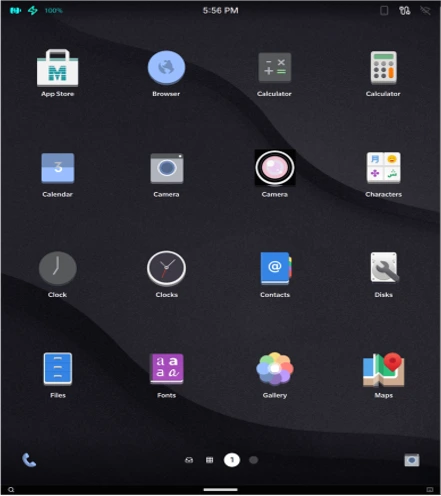
Developed as a gesture-first mobile operating system on a Linux foundation, Marathon OS draws inspiration from BlackBerry 10’s interaction approach while incorporating PostmarketOS and Qt6 for modern device compatibility. Think of it as a love letter to what made BB10 special—The Hub, Active Frames, and that impossibly smooth gesture navigation—but written with the benefit of hindsight and modern technology.
Developer Patrick Quinn is the mastermind behind this ambitious project, and unlike many nostalgic revivals, this isn’t a simple clone but represents Quinn’s personal interpretation of what made the platform special. He’s not trying to resurrect a ghost; he’s evolving an idea whose time has finally come again.
The Technical Foundation: Why Linux Changes Everything
Let’s talk about what sets Marathon OS apart from your typical Android ROM or iOS alternative. The project builds upon a Qt6-based Wayland compositor combined with a QML interface that directly models BlackBerry 10’s gesture navigation, with its core userspace inherited from postmarketOS, itself constructed on Alpine Linux.
If that sounds like tech jargon, here’s what it means in practice: Marathon OS isn’t a modified version of Android. It’s a pure Linux system that happens to run on devices originally designed for Android. This distinction is crucial for several reasons:
True Device Control
Unlike Android, which sits on top of proprietary vendor code and Google services, Marathon OS runs mainline Linux kernels wherever possible. The system operates with a mainline Linux kernel free of vendor blobs, enabling complete device control. This means you own your device in a way that’s become increasingly rare in the mobile world.
The PostmarketOS Advantage
PostmarketOS, which serves as Marathon’s foundation, represents a specialized smartphone operating system derived from Alpine Linux, actively maintained since its 2017 launch and designed to extend device lifecycles to a decade. Alpine Linux is incredibly lightweight—the base system minus the kernel occupies just 6MB of storage, making it perfect for breathing new life into older devices.
The PostmarketOS philosophy aligns perfectly with Marathon’s goals: sustainable computing, user freedom, and long-term device support. In a world where phones become obsolete after two years of updates, this approach feels revolutionary.
Modern Architecture with Classic Soul
Marathon OS employs standard Linux service layers including NetworkManager for connectivity, ModemManager for telephony functions, UPower for power monitoring, and BlueZ for Bluetooth capabilities. Every component is modular, maintainable, and upgradeable independently. The system delivers atomic updates to an encrypted partition, ensuring your data stays protected while the OS evolves beneath it.
The BB10 Magic: What Made It Special and How Marathon Brings It Back
To understand why Marathon OS matters, we need to understand why BlackBerry 10 still has such passionate fans years after its demise.
The Hub: Your Life in One Place
BlackBerry 10’s Hub aggregated emails, text messages, calls, and notifications into a unified chronological list, allowing users to filter by application or inbox and interact with content directly from this central location. It wasn’t just a notification center—it was a command center for your digital life.
Marathon OS recreates this experience with modern sensibilities. Imagine opening your phone and immediately seeing everything that matters—emails from multiple accounts, text messages, missed calls, app notifications—all in one flowing, chronologically organized stream. No jumping between apps, no notification badges scattered across home screens. Just you and your information, exactly where you need it.
Active Frames: Multitasking That Actually Works
Active Frames displayed applications as miniaturized windows that continued running in the background, allowing users to monitor and return to them with a tap or close them with an X icon, with widget-like functionality showing live information.
This wasn’t just alt-tabbing for phones. Active Frames turned your home screen into a living dashboard. Your music player showed the current track. Your calendar displayed upcoming events. Your messaging app showed the last message received. All at a glance, all still running, all instantly accessible.
Marathon OS brings this concept back with modern polish and performance optimizations that weren’t possible in 2013.
Gesture Navigation Done Right
Before iOS and Android adopted gesture controls, BB10 mastered them. Users could unlock devices or return home by swiping upward from the bottom, while modified versions of the same gesture—swiping to the middle-right—revealed notifications without lifting a finger.
The beauty of BB10’s gestures was their fluidity and logic. Every swipe felt natural, purposeful. Marathon OS captures this essence while adapting it for modern screen sizes and user expectations.
Performance: How Does It Actually Run?
Here’s where Marathon OS gets really impressive. Testing on the OnePlus 6 demonstrates a 20-25 second boot time, 10-15 millisecond touch latency, 200-250 millisecond app launch times, and consistent 60 FPS display performance.
For context, that’s faster than many modern Android installations on similar hardware. The secret lies in the efficient Qt6/QML rendering pipeline and the lean Alpine Linux foundation. There’s no bloat, no unnecessary services—just the essentials running incredibly well.
The platform currently achieves 60fps performance on the OnePlus 6, a 2018 device equipped with the Snapdragon 845 processor. Quinn’s goal is even more ambitious: fluid performance on decade-old chips and exceptional performance on modern silicon.
Device Support: Can You Run It?
Currently, Marathon OS has validated support for the OnePlus 6, with development underway for the OnePlus 6T and Xiaomi POCO F1. Devices utilizing Snapdragon 845 and Snapdragon 855 processors are identified as optimal targets due to their established upstream kernel support.
Why these specific devices? The Snapdragon 845 and 855 families have mature mainline Linux kernel support, unlockable bootloaders, and were produced in massive quantities—meaning there are millions of these phones available on the secondary market for under $100.
Quinn intends to facilitate community ports, enabling users to adapt Marathon OS to additional devices of their choice. This community-driven approach means that as the project matures, more devices will join the supported list.
There’s even a particularly exciting collaboration in the works: Quinn is collaborating with the Zinwa team to explore porting the platform to the revived BlackBerry Classic. Imagine BB10-inspired software running on actual BlackBerry hardware—nostalgia meeting innovation in the most perfect way.
The App Ecosystem: What Can You Actually Run?
This is the million-dollar question for any alternative mobile OS, and Marathon OS has a pragmatic answer.
Native Linux Apps
As a full Linux distribution, Marathon OS runs standard Linux desktop applications through the Wayland protocol. That means apps built with Qt, GTK, and other Linux frameworks work out of the box. For productivity-focused users, this is huge—real Firefox, actual LibreOffice, professional development tools.
Marathon-Native Apps
Developers can create apps specifically optimized for Marathon OS using the Marathon UI design system and QML. These apps are built from the ground up for touch interfaces and gesture navigation.
Android App Support (Coming Soon)
The developer has committed to delivering Android application support through a customized version of Waydroid, the containerized Android runtime utility. Waydroid runs Android apps in a container on Linux systems, providing compatibility without sacrificing the purity of the Linux foundation.
This isn’t perfect—apps dependent on Google Play Services might need workarounds like microG—but for many essential apps, it provides a bridge to practicality.
Electron Apps
Modern web-based applications built with Electron work seamlessly on Marathon OS, giving you access to apps like Slack, Discord, Visual Studio Code, and countless others.
Who Is Marathon OS For?
Marathon OS isn’t trying to be everything to everyone. The project targets former BB10 users longing for that workflow, mobile Linux enthusiasts, the PostmarketOS community, and privacy advocates seeking complete device control.
Let me break down these audiences:
Former BB10 Users: If you’ve been using Android or iOS while secretly missing the efficiency of BB10, Marathon OS might be your ticket home. The muscle memory, the workflow, the focus on getting things done—it’s all there.
Mobile Linux Enthusiasts: For those who’ve been following projects like postmarketOS, Phosh, Plasma Mobile, or Ubuntu Touch, Marathon OS represents an exciting evolution. It proves that Linux on mobile can be both functional and beautiful.
Privacy Advocates: Running a pure Linux system with no proprietary blobs, no Google services, and complete control over your data is increasingly valuable. Marathon OS delivers this without the usual compromises in usability.
Productivity Focused Users: If you treat your phone as a tool rather than an entertainment device, the Hub-centric workflow and gesture efficiency will feel like coming home.
Sustainable Tech Supporters: Want to keep your phone useful for 10 years instead of two? Marathon OS is building toward that future.
The Current State and Roadmap
Let’s be honest about where Marathon OS stands today: it’s in active development. Installation images aren’t yet publicly available, and the project is still refining core functionality.
However, the progress is remarkably fast. The compositor is stable, the shell is functional, system services integrate smoothly, and the performance metrics are impressive. The GitHub repositories show consistent commits, and the developer is openly engaging with potential users.
The immediate roadmap includes:
- Public release of installation images for supported devices
- Waydroid integration for Android app support
- Expansion to additional Snapdragon 845/855 devices
- Community porting tools and documentation
- Refinement of the Marathon UI design system
- Development of native Marathon applications
Installing Marathon OS: What to Expect
While official installation images aren’t yet available, the process will be familiar to anyone who’s installed alternative ROMs or Linux distributions on phones. Installation requires a OnePlus 6 device with an unlocked bootloader, fastboot tools, a Linux development machine with pmbootstrap, and involves flashing boot and userdata images through fastboot commands.
The beauty of the pmbootstrap tooling inherited from postmarketOS is that it’s battle-tested across hundreds of devices. Once Marathon OS releases public images, the installation process should be straightforward for anyone comfortable with basic command-line operations.
The Bigger Picture: Why This Matters
Marathon OS represents something bigger than just another mobile Linux distribution. It’s a statement about what mobile computing could be—should be.
In 2025, the mobile OS market is essentially a duopoly. iOS and Android control 99% of the market, and while both are technically excellent, they serve the interests of their corporate parents first and users second. Targeted advertising, data collection, and planned obsolescence are baked into the business model.
Marathon OS, like its spiritual predecessor BlackBerry 10, prioritizes user needs: efficiency, privacy, productivity, and sustainability. It proves that we can have beautiful, functional mobile operating systems that respect users and don’t require multi-billion-dollar corporations to maintain.
The fact that it’s built on solid open-source foundations—Alpine Linux, postmarketOS, Qt6, Wayland—means it stands on the shoulders of giants. The mobile Linux ecosystem has matured enormously since BB10’s demise. Projects like Plasma Mobile, Phosh, and postmarketOS have solved many of the hard problems. Marathon OS leverages this work while adding its own distinctive vision.
Challenges and Realistic Expectations
Let’s address the elephant in the room: alternative mobile operating systems face serious challenges.
The App Gap: Despite Waydroid support, you won’t have the full Android or iOS app ecosystem. Banking apps, mobile games with DRM, proprietary corporate apps—many won’t work or will require workarounds.
Hardware Support: The list of supported devices will always be smaller than mainstream OSes. Bleeding-edge hardware features might take time to implement.
Daily Driver Viability: For most people, Marathon OS isn’t ready to be a daily driver today. Critical features like reliable calls, SMS, and mobile data need to work flawlessly, and while progress is strong, it’s still maturing.
Community Size: Marathon OS is new. The community is small. Finding help, apps, or troubleshooting advice won’t be as easy as with mainstream platforms.
But here’s the thing: every successful platform started small. Linux desktop was “not ready” for decades before suddenly becoming viable. The same patience and iteration that made desktop Linux excellent is happening in mobile Linux right now.
The Future of Mobile Computing
BlackBerry 10 failed commercially not because the ideas were wrong, but because the ecosystem and timing weren’t right. The app ecosystem wasn’t mature enough, corporate IT was already shifting to iOS and Android, and BlackBerry was locked into proprietary hardware.
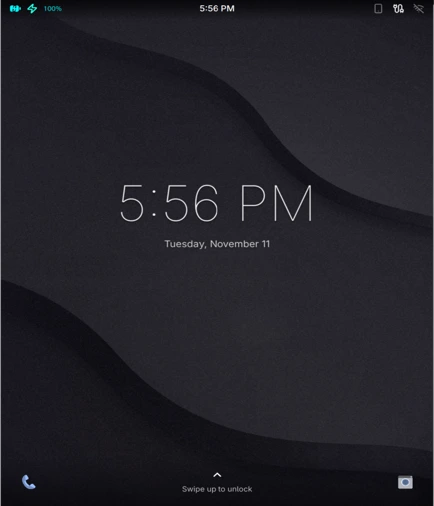
Marathon OS doesn’t have these constraints. It’s open source, runs on cheap and plentiful hardware, can leverage existing Linux applications, and exists in an ecosystem that’s finally ready for alternative mobile platforms.
Will it replace iOS or Android for the masses? Almost certainly not. But that’s not the goal. The goal is to provide a genuine alternative for people who want something different—something that respects their time, their privacy, and their intelligence.
How to Get Involved
Interested in Marathon OS? Here’s how you can participate:
Follow Development: Check out the official website at marathonos.xyz and the GitHub repositories at MarathonOS/Marathon-Image and patrickjquinn/Marathon-Shell.
Join the Community: Connect with other enthusiasts through the postmarketOS community channels and keep an eye on Marathon OS announcements.
Prepare Hardware: If you’re serious about trying it, grab a OnePlus 6 from the used market. They’re incredibly affordable and will be the primary supported device.
Contribute: If you’re a developer, contributions are welcome. The project needs help with everything from kernel drivers to app development to documentation.
Spread the Word: The biggest challenge for alternative platforms is awareness. If you find Marathon OS interesting, tell other people who might care.
Final Thoughts: The Marathon, Not the Sprint
The name “Marathon OS” is fitting. This isn’t a sprint to market dominance; it’s a long-term commitment to building something sustainable, elegant, and user-focused.
Marathon OS represents a gesture-first mobile OS on Linux featuring The Hub, Active Frames, and contemporary user experience design. It’s BlackBerry 10’s best ideas, freed from corporate constraints and proprietary platforms, reimagined for an era when mobile Linux is finally viable.
For those of us who remember the joy of using BB10—the efficiency, the elegance, the feeling that our phone was a tool that worked for us rather than against us—Marathon OS offers hope. Hope that mobile computing doesn’t have to be a choice between two corporate walled gardens. Hope that we can have devices that last a decade instead of two years. Hope that productivity, privacy, and user respect can coexist with modern functionality.
The project is young, the challenges are real, and the road ahead is long. But marathon runners don’t give up at the first hill. They pace themselves, stay focused on the goal, and keep moving forward.
Marathon OS explained? It’s the mobile operating system that believes your phone should be yours, your data should be private, and good ideas never truly die—they just wait for the right moment to return, better than before.
The marathon has begun. Are you ready to run?
Disclaimer
The information presented in this article about Marathon OS is based on publicly available sources, developer documentation, and community discussions as of December 2024. Marathon OS is an independent, community-driven open-source project currently in active development, and is not affiliated with BlackBerry Limited or any of its subsidiaries. Features, specifications, device compatibility, and performance metrics described herein are subject to change as the project evolves.
Installing alternative operating systems like Marathon OS requires technical knowledge, involves unlocking your device’s bootloader (which typically voids manufacturer warranties), and may result in data loss or device malfunction if not performed correctly. Users should thoroughly research and understand the risks before attempting installation.
This article is intended for informational and educational purposes only and should not be construed as an endorsement or guarantee of the software’s functionality, security, or suitability for any particular purpose. Always backup your data, use supported devices, and proceed at your own risk. The author and publisher assume no liability for any damages, losses, or issues arising from the use of Marathon OS or information contained in this article. For the most current and accurate information, please visit the official Marathon OS website and GitHub repositories directly.
Also Read
Mobian 13 Review: The Ultimate Debian Experience for Your Smartphone!
About the Author





