
MX-25 “Infinity” RC1 Released What’s New in This Powerful MX Linux Update
Hey there, fellow Linux enthusiasts! If you’re anything like me, you’ve probably spent more hours than you’d care to admit tweaking your distro of choice, chasing that perfect balance of stability, speed, and simplicity. And if MX Linux has been your go-to for any of those late-night sessions, you’re in for a treat. That’s right—MX-25 “Infinity” RC1 Released is official, and it’s not just another incremental update. This release candidate is a bold step forward, built on the fresh foundations of Debian 13 “Trixie” and packed with refinements that make it feel like MX Linux is finally embracing the future without forgetting its roots.
As someone who’s been riding the MX wave since the early days—back when it was still finding its footing as a MEPIS and antiX lovechild—I’m genuinely excited about this one. The RC1 stage means it’s close to prime time, but it’s still begging for your eagle-eyed testing. In this deep dive, we’ll unpack everything from the kernel upgrades to the shiny new tools, why this matters for your daily grind, and how it stacks up against the competition. Whether you’re a seasoned sysadmin or a newbie dipping your toes into open-source waters, stick around. By the end, you’ll know if it’s time to fire up a USB stick and give MX-25 “Infinity” RC1 a spin. Let’s jump in.
A Quick Refresher: What Makes MX Linux Tick?
Before we geek out over the new stuff, let’s set the stage. MX Linux isn’t your average Debian spin—it’s a collaborative powerhouse born from the antiX and former MEPIS communities back in 2014. Think of it as Debian’s stable branch on steroids: rock-solid reliability meets user-friendly tools that make customization a breeze. No bloat, no drama—just elegant desktops (Xfce, KDE Plasma, Fluxbox) that run like a dream on everything from ancient netbooks to beastly workstations.
What sets MX apart? Its “MX Tools” suite, for one—a collection of graphical goodies for everything from package management to live USB remastering. Inherited from antiX, these tools let you snapshot your system, rollback changes, or even tweak the bootloader without diving into the terminal (though power users love that option too). And historically, MX has stuck to sysVinit for that lightweight vibe, but times are changing. If you’re searching for a distro that’s “just works” with minimal fuss, MX Linux has topped DistroWatch charts for years. Now, with MX-25 “Infinity” RC1 Released, it’s evolving in ways that could solidify its throne even further.
The Big Leap: From Debian 12 to 13 “Trixie”
At the heart of MX-25 “Infinity” RC1 is its base: Debian 13 “Trixie.” If you’ve been on MX-23 (still a champ on Debian 12 “Bookworm”), this upgrade feels like swapping out a reliable sedan for a turbocharged hybrid. Debian 13 brings a slew of under-the-hood improvements—better hardware support, enhanced security features, and a more modular package ecosystem. But MX doesn’t just port it over; they polish it with their signature MX repositories and antiX live system magic.
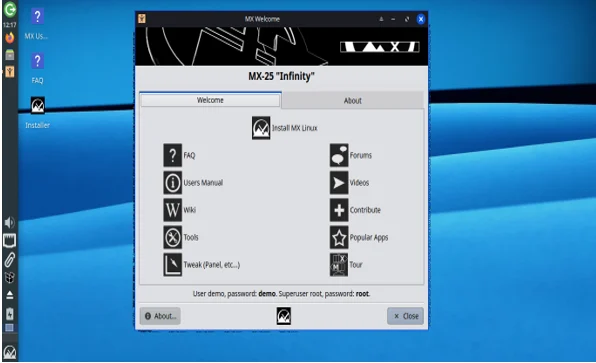
Why does this matter? Trixie introduces PipeWire 1.0 as the default audio server (goodbye, PulseAudio quirks), improved Wayland integration for smoother graphics, and a refreshed toolchain that’s kinder to developers. For everyday users, it translates to fewer driver headaches on modern laptops and desktops. MX-25 RC1 ships with the Linux 6.12 LTS kernel on standard editions—long-term support means security patches for years—and ramps it up to a Liquorix-flavored 6.15 on AHS (Advanced Hardware Support) variants for bleeding-edge gaming rigs or creative workflows. Liquorix? It’s an optimized kernel tuned for low latency and high throughput, perfect if you’re editing videos or crunching code.
From the official release notes, this isn’t a rushed port. The team has synced MX repos meticulously, ensuring that your favorite tweaks from MX-23 carry over seamlessly. Upgrading from beta installs? You’ll get all the package bumps, but version strings stay beta-tagged for tracking—smart move to keep beta bugs isolated.
Desktop Delights: Xfce, KDE, and Fluxbox Get a Glow-Up
MX Linux has always been a multi-flavor feast, and MX-25 “Infinity” RC1 serves up three delectable editions: Xfce 4.20, KDE Plasma 6.3.6, and Fluxbox 1.3.7. Each one’s been refined for Trixie, but let’s break ’em down because, honestly, choosing one feels like picking a favorite child.
Xfce 4.20: The Efficiency King Stays Supreme
Xfce has been MX’s flagship for good reason—lightweight, customizable, and buttery smooth. In RC1, it’s bumped to 4.20, which packs fractional scaling for HiDPI screens (finally, crisp text on 4K monitors without pixelation woes) and better Flatpak/Snap integration out of the box. MX’s AHS edition throws in that Liquorix kernel for extra oomph on newer AMD/Intel chips.
But the real stars? MX Tools now ported to Qt6. More on that later, but it means snappier performance across the board. Thunar (Xfce’s file manager) gets a Samba shares plugin—right-click a folder, tweak properties, and you’re sharing files over the network like a pro. No more CLI fumbling. And for theme lovers, “mx-comfort” variants now include “thick” window borders for easier grabbing on touchscreens.
If you’re on an older machine, the sysVinit variant keeps things lean—RC1 labels these ISOs clearly, so no surprises.
KDE Plasma 6.3.6: Modern Polish Meets MX Simplicity
KDE fans, rejoice: Plasma 6 is here, and it’s a revelation. Version 6.3.6 brings implicit touchpad scrolling (no more config hunts), a revamped Discover app store with better Flatpak support, and ARGB visual effects for glassier widgets. MX has dialed in defaults—no more Dolphin crashes on desktop saves, and MX Tools integrate seamlessly for that hybrid MX/KDE vibe.
One caveat from beta days: Root actions in Dolphin aren’t fully baked yet, but RC1 squashes that. If you crave a full-featured desktop without the resource hog stereotype, this is KDE at its most approachable. Pair it with the 6.12 kernel, and multitasking feels effortless.
Fluxbox 1.3.7: Minimalism with MX Flair
For the purists, Fluxbox returns with mx-fluxbox configs updated to 25.10.3. It’s still the RAM-sipper of the bunch (under 500MB idle), but RC1 adds rofi-based app finders, revised root menus, and Audacious as the default music player—complete with themed configs. New panel options let you tweak layouts on the fly, and conky integrations (more below) make it a monitoring beast.
SysVinit here is a boon for legacy hardware, keeping boot times under 10 seconds. If minimalism is your jam, Fluxbox in MX-25 RC1 is like a Swiss Army knife—compact but endlessly useful.
Across all editions, Secure Boot support is now baked in via the installer. Boot from UEFI? No more BIOS dives or shim hassles. It’s a small change, but it opens doors for enterprise deploys.
MX Tools Unleashed: Qt6 Migration and Smarter Workflows
Ah, MX Tools—the secret sauce that turns Debian into a user-friendly powerhouse. In MX-25 “Infinity” RC1 Released, they’ve undergone a massive glow-up with a full Qt6 migration. Why Qt6? It’s future-proof: better Wayland compatibility, hardware acceleration, and scalability for high-res displays. Tools like MX Package Installer and MX Tweak now load faster and look sharper, without sacrificing that familiar interface.
Key highlights:
- MX Updater: Replaces the old apt-notifier with a centralized dashboard for updates, snapshots, and repo management. It scans for Trixie-specific conflicts and suggests fixes—genius for seamless upgrades.
- Gazelle Installer: This bad boy got love in RC1. Fixes for LUKS encryption (closes devices properly to avoid repartition fails), replacer workflows (swap partitions play nice now), and no more formatting non-Linux partitions from fstab. Traditional ext4/Btrfs installs are rock-solid, and zram swap is an option for SSD longevity. The team’s calling for tester feedback here—your installs could shape the final.
- MX Cleanup: Now multi-user aware, with per-account cleaning scripts. Loads thumbnail status and atime info dynamically, making disk scrubs smarter and less intrusive.
- Service Manager: Bug fixes galore, including systemd-networkd timeouts that won’t brick your boot.
Other gems: MX System adds masks for network services, and MX Conky (25.10.5) introduces ‘auto’ time formats—detects your locale’s 12h/24h preference for clocks. Backups refresh lists on the fly, and preview creation nags you if ImageMagick compat is missing. It’s these little touches that make MX feel alive.
Under the Hood: Init Systems, Sources, and Live System Tweaks
MX-25 RC1 flips the script on init systems. Systemd is now default across all ISOs—faster boots, better container support, and Trixie alignment. But fear not, sysVinit variants persist for Xfce/AHS/Fluxbox, labeled loud and clear. The rationale? Systemd’s maturity edges out sysVinit for most, but choice reigns supreme. The antiX live system got systemd-friendly updates, so persistence and remastering work flawlessly either way.
Sources lists? Hello, deb822 format—those .sources files in /etc/apt/sources.list.d/ for cleaner repo handling. Legacy .list files stick around for compatibility, but Qt6-powered tools embrace the new standard.
Live system changes include rollback menus in the bootloader (fix a bad remaster mid-boot) and Mesa Vulkan drivers by default for GPU acceleration. MX-25 RC1 also slips in systemd-cryptsetup for encrypted /home partitions—beta testers, this fixes your unlock woes.
Performance and Package Perks: What’s Fresh in the Repos?
Kernels aside, RC1’s repos brim with updates. Audacious 4.5.1 for audio (themed for MX), FreeCAD 1.0.2 for CAD wizards, PeaZip 10.7.0 for archives, and Pale Moon 33.9.1 browser. Cairo-Dock plugins hit 3.6.0 for eye-candy fans. MX-Modulus themes join the conky party, with ARGB visuals and memcpu formatting tweaks.
Conky gets a default config overhaul: auto-detect time formats, fresh themes like MX-Audacious, and modulus-clock renames for sanity. Fluxbox swaps to Audacious with help files—seamless.
These aren’t fluff; they boost real workflows. Gamers get Vulkan-ready Mesa, creators snag FreeCAD’s parametric modeling, and everyone enjoys snappier tools.
How to Get Your Hands on MX-25 “Infinity” RC1
Ready to test? Head to the official MX Linux site. Grab ISOs like MX-25_Xfce_RC1_x64.iso (or sysVinit/AHS variants)—SHA256 checksums and signatures are there for verification. KDE: MX-25_KDE_RC1_x64.iso. Fluxbox: MX-25_fluxbox_RC1_x64.iso.
Burn to USB with Etcher or dd, boot, and explore. Feedback? Hit the MX Forum’s RC1 thread—installer tests are priority. Upgrading from beta? Apt update/upgrade pulls most changes, but fresh install for init switches.
Pro tip: Test in a VM first (VirtualBox loves the 6.12 kernel). And remember, RC1’s for testing—backup production rigs.
Why Upgrade to MX-25 “Infinity” RC1? The User Angle
Look, I’ve beta-tested my share of distros, and MX-25 RC1 stands out. From a tinkerer’s view, Qt6 Tools feel modern without alienating. Power users dig the deb822 shift and cryptsetup fixes. Newbies? The installer’s hand-holding (zram, Secure Boot) lowers barriers.
Compared to Ubuntu 25.10 or Fedora 42, MX-25 is lighter, more customizable, and Debian-stable reliable—no six-month churn. If you’re fleeing Windows 11’s ads, this is sanctuary.
Potential snags? Fluxbox icon glitches linger from beta, and KDE root actions need polish. But RC1’s iterative—final’s imminent.
Wrapping Up: Infinity Awaits
MX-25 “Infinity” RC1 Released isn’t hype—it’s a testament to community-driven evolution. Debian 13 base, Qt6 Tools, systemd harmony, and desktop finesse make it MX at its peak. Whether you’re scripting in Fluxbox or Plasma-dashing, it delivers.
The “Infinity” codename? Apt—endless tweaks, boundless stability. Download, test, report. The final’s around the corner, and your input shapes it. What’s your first move—Xfce spin or KDE plunge? Drop a comment; let’s chat Linux.
FAQ: Quick Hits on MX-25 “Infinity” RC1
Is MX-25 RC1 stable for daily use?

It’s release candidate—great for testing, but hold off on production until final.
SysVinit or systemd—which to pick?
Systemd for modern hardware; sysVinit for legacy lightness.
How’s hardware support?
Stellar with 6.12 LTS and AHS 6.15—WiFi, GPUs, touchpads shine.
Upgrade path from MX-23?
Point release repos first, then full upgrade post-final.
Best for beginners?
Absolutely—MX Tools and installer make it welcoming.
Also Read
Mobian 13 Review: The Ultimate Debian Experience for Your Smartphone!
About the Author





