
NetBSD The Lightweight OS for Every Device
Hey there, fellow tech enthusiasts! If you’ve ever found yourself tinkering with old hardware in the attic, dreaming up IoT projects on a shoestring budget, or just craving a Unix-like system that’s as lean and mean as they come, let me introduce you to NetBSD. Yeah, that’s right—NetBSD, the unsung hero of open-source operating systems. In a world dominated by bloated behemoths and resource-hogging giants, NetBSD stands out like a minimalist’s dream: lightweight, portable, and ready to conquer any device you throw at it. Whether you’re reviving a dusty Amiga, powering a Raspberry Pi smart home gadget, or securing a high-end server, NetBSD whispers, “Of course it runs NetBSD.”
As of October 2025, NetBSD isn’t just surviving—it’s thriving in the shadows of flashier siblings like Linux and FreeBSD. With its latest release, NetBSD 10.1 (dropped back in December 2024), this bad boy continues to punch above its weight in portability and efficiency. If you’re tired of OSes that demand gigabytes just to boot a desktop, stick around. In this deep dive, we’ll unpack what makes NetBSD tick, trace its roots, explore why it’s the ultimate lightweight warrior for embedded systems and beyond, and even compare it to the competition. By the end, you’ll be itching to fire up a VM and give it a spin. Let’s boot into it!
A Quick History: From 386BSD Patches to Portable Powerhouse
To appreciate NetBSD today, you’ve got to rewind to the early ’90s—a time when the internet was dial-up slow, and open-source Unix was a rebellious spark in academia’s eye. NetBSD was born in 1993 out of frustration with 386BSD, a free Unix port for Intel PCs that had devolved into a messy patchwork of user-submitted fixes. Developers like Chris Demetriou, Theo de Raadt (who’d later fork OpenBSD), Adam Glass, and Charles Hannum wanted more: a clean, portable codebase that prioritized quality over quick hacks.
The project’s name? A nod to the burgeoning “Net” (hello, early internet) and its BSD heritage. The first release, NetBSD 0.8, hit the scene on April 19, 1993, built from 386BSD 0.1 plus a hefty unofficial patchkit and re-integrated bits from the Net/2 BSD release. It was legally clean—no AT&T encumbrances—and laser-focused on architecture independence. By October 1994, NetBSD 1.0 became the first multi-platform release, updated with 4.4BSD-Lite sources.
Milestones piled up like floppy disks. NetBSD 1.3 in 1998 introduced pkgsrc, the portable package system that’s now a beast with over 29,000 packages as of September 2025. Annual 1.x releases kept the momentum, evolving into the modern scheme: major versions every 2-3 years, with point releases every 6-12 months for stability. Fast-forward to 2018: ZFS got a major upgrade, rebased on FreeBSD’s implementation and marked production-ready in NetBSD 9.0. And in 2020, the default window manager shifted from twm to the more versatile CTWM.
Today, in 2025, NetBSD 10.1 is the crown jewel: a maintenance update to the 10.0 branch, packed with security fixes, hardware tweaks, and that signature clean design. It’s not flashy—no penguin memes here—but its evolution from a patch-fest to a 50+ platform juggernaut screams reliability. As the official site puts it: “A free, fast, secure, and highly portable Unix-like Open Source operating system.” That’s not hype; that’s history in action.
What Makes NetBSD the Lightweight Champ?
Let’s cut to the chase: NetBSD is lightweight without being puny. Its kernel boots in milliseconds on capable hardware, idles at under 50MB of RAM for a basic setup, and scales effortlessly from a 1GHz ARM board to a multi-core x86 beast. Why? It’s all about philosophy. NetBSD devs live by “It doesn’t work unless it’s right”—no half-baked features, no bloat for bloat’s sake.
At its core, NetBSD emphasizes modularity. The kernel splits into machine-independent (MI) and machine-dependent (MD) layers, letting a single Ethernet driver handle ISA, PCI, or Cardbus buses without rewriting code. This isn’t just elegant; it’s efficient. Add hardware abstraction for low-level I/O and DMA, and you’ve got an OS that sips resources while delivering full Unix compliance—POSIX, TCP/IP, virtual memory, the works.
Security? Baked in from the ground up. Features like ASLR (userland and kernel), W^X memory protection, and GCC’s Stack Smashing Protection (enabled since NetBSD 6.0) make it a fortress. Veriexec for file integrity, securelevels to lock down root ops, and NPF firewall round out the arsenal. It’s no wonder NetBSD powers security-critical networking gear.
Then there’s pkgsrc: NetBSD’s package manager extraordinaire. With 29,000+ apps—from KDE to Apache—it’s cross-platform magic. Build on NetBSD, deploy to Linux or macOS. Quarterly stable branches keep things tidy, and pkgin adds binary ease for noobs. Storage shines too: ZFS for snapshots and RAID-like resilience, RAIDframe for software arrays, cgd for encryption.
But the real lightweight secret? No sacred cows. NetBSD requires an MMU for its kernel (bye, μClinux vibes), ensuring robust memory management without excess overhead. It’s Unix distilled: simple, documented, and infinitely tweakable. In a 2025 landscape of AI-bloated desktops, NetBSD feels refreshingly retro-futuristic.
Portability: Why NetBSD Runs on Every Device
If NetBSD’s tagline were a bumper sticker, it’d read: “Of course it runs NetBSD.” Seriously—formal support for 53 architectures, experimental ports pushing 60+. From behemoth servers to pocket-sized IoT nodes, NetBSD’s portability is legendary.
Ports are tiered: “Focus” for modern staples like amd64 (x86-64), arm (Raspberry Pi, ODROID), evbmips (routers), evbppc (Wii? Yes!), and sparc64 (Sun relics). “Organic” tiers cover exotics: Amiga, Atari, Dreamcast, even VAX minicomputers from the ’70s. Within mac68k alone, 89 of 93 machines are supported.
| Architecture | Example Devices | Install Notes |
|---|---|---|
| amd64 | Modern PCs, servers | USB/CD images; full desktop support |
| evbarm | Raspberry Pi, Pine64, ODROID | Board-specific images; IoT heaven |
| i386 | Legacy x86 boxes | USB/CD; revives old netbooks |
| evbmips | EdgeRouter, Loongson | gzimg binaries; router favorite |
| evbppc | Nintendo Wii, RouterBOARD | Custom images; game console hacks |
| sparc64 | Sun UltraSPARC | CD ISO; enterprise nostalgia |
| Others (Organic)Others (Organic) | Amiga, Alpha, Dreamcast, VAX | Varies; hobbyist playground |
This breadth stems from cross-compiling wizardry: build.sh lets you craft images from any POSIX host, even non-BSD. Rump kernels—stripped subsystems runnable in userland—supercharge embedded tweaks. In 2025, with ARM dominating IoT, NetBSD’s evbarm port shines on low-cost boards, proving lightweight doesn’t mean limited.
NetBSD in Action: Use Cases for the Modern World
NetBSD isn’t just academic catnip; it’s a workhorse. Let’s spotlight where it flexes its lightweight muscles.
Embedded Systems and IoT: Small Footprint, Big Impact
In the embedded realm, NetBSD is king of the hill. Its 1MB firmware footprint fits toasters (yes, Technologic Systems demoed a NetBSD toaster in 2005). Fast-forward to 2025: Moritz Systems builds EU-compliant IoT and edge devices on NetBSD, leveraging its modularity for custom sensors and actuators.
Take routers: Internet Initiative Japan (IIJ)’s SEIL series embeds modified NetBSD for CPE gear, hitting 2Gbps throughput with VPNs. Wireless access points, print engines, cameras—NetBSD’s TCP/IP stack (the gold standard) and low overhead make it ideal. BMF’s EZF-1500E dev kit for fingerprint systems? Pure NetBSD 1.6 roots.
For IoT, rump kernels let you run filesystems or networking sans full kernel—perfect for microcontrollers. In a world of Zigbee and MQTT, NetBSD’s stability means fewer bricked prototypes. As one dev noted on Reddit: “NetBSD is lightweight: CWM uses lower memory than GNU/Linux.”
Servers and Networking: Secure, Scalable Backbone
Don’t sleep on NetBSD for servers. NPF firewall and IPsec (full since late ’90s) secure perimeters without fanfare. Wasabi Systems’ “Certified BSD” adds enterprise polish for storage and servers. Seclarity’s SiNic wireless cards? Standalone Unix firewalls on NetBSD.
In high-perf computing, pkgsrc’s adoption at NASA screams credibility. ZFS handles petabyte-scale data with ease, while RAIDframe mirrors drives on a dime.
Desktops and Research: Tinkerer’s Delight
For daily driving, NetBSD pairs X11R7 with lightweight WMs like CWM or CTWM. Run it on a ThinkPad for that “boring but reliable” vibe—one user calls it the antidote to Linux’s “Rube Goldberg stacks.” Academics love it: clean code for OS research, ports for teaching portability.
Recent buzz? A Qiita post on NetBSD/arm in October 2025 highlights ongoing tweaks for mobile SoCs. And on X, devs geek out over Wii ports and NeoGeo dreams.
NetBSD vs. the World: Lightweight Linux Alternatives and BSD Kin
NetBSD vs. Linux? Apples to embedded oranges. Linux (e.g., Ubuntu) guzzles 500MB+ idle; NetBSD sips 50MB. Linux ports galore, but NetBSD’s unified tree and MI/MD split make cross-compiling saner. GPL headaches? NetBSD’s 2-clause BSD license is royalty-free bliss.
Among BSDs: FreeBSD excels in ZFS and binary Linux compat, but it’s heavier for IoT. OpenBSD’s security paranoia is unmatched, but NetBSD edges in portability (50+ vs. 15 platforms). DragonFlyBSD scales SMP better, yet NetBSD’s pkgsrc portability wins for multi-OS devs.
| Feature | NetBSD | Linux (Ubuntu) | FreeBSD | OpenBSD |
|---|---|---|---|---|
| Idle RAM | ~50MB | 500MB+ | 200MB+ | 100MB |
| Platforms | 53+ | 20+ | 5-10 | 15 |
| Package Count | 29k (pkgsrc) | 60k+ (apt) | 20k (ports) | 10k (ports) |
| License | BSD-2 | GPL | BSD-2 | BSD |
| Best For | Embedded/Portability | Desktops/Servers | Storage | Security |
Bottom line: For lightweight every-device duty, NetBSD laps the field.
Getting Started with NetBSD: Your 2025 Guide
To install NetBSD 10.1, follow these concise steps:
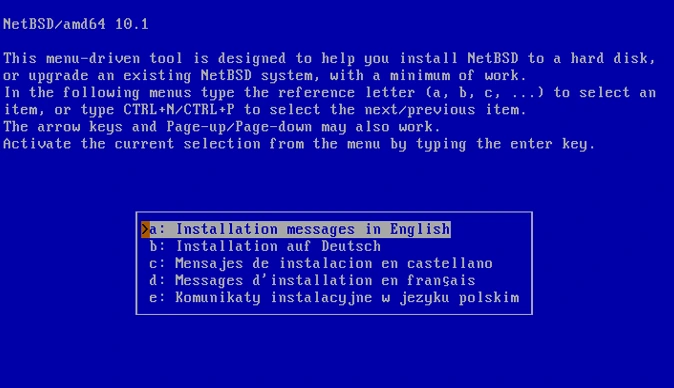
1. Download the ISO: Get the NetBSD 10.1 ISO image for your architecture (e.g., amd64, i386) from the official NetBSD website.
2. Create Bootable Media: Burn the ISO to a CD/DVD or write it to a USB drive using tools like dd (e.g., dd if=NetBSD-10.1-amd64.iso of=/dev/sdX bs=4M status=progress) or a GUI tool like Etcher.
3. Boot from Media: Insert the CD/USB, restart your system, and boot from the media. Adjust BIOS/UEFI settings if needed to prioritize the boot device.
4. Start Installer: At the boot menu, select “Install NetBSD” and press Enter.
5. Follow Installer Prompts:
- Language and Keyboard: Choose your language and keyboard layout.
- Disk Partitioning: Select the target disk, choose to use the entire disk or set custom partitions (e.g., root, swap). Use defaults if unsure.
- Install Type: Select “Full installation” or customize sets (base, etc, games, etc.).
- Bootloader: Install the bootloader (usually GRUB or NetBSD’s default).
- Network: Configure network settings (DHCP or static IP) if needed.
- Root Password: Set a root password.
6. Install System: Confirm settings and let the installer copy files to the disk.
7. Post-Install:
- Remove the installation media and reboot.
- Log in as root and configure additional settings (e.g., users, packages via pkgin or pkgsrc).
8. Optional: Update the system with pkgin update and pkgin upgrade for the latest packages.
For detailed guidance, refer to the official NetBSD Installation Guide: https://www.netbsd.org/docs/guide/en/chap-install.html.
Wrapping Up: Why NetBSD Deserves Your Next Project
In 2025, as devices shrink and demands explode, NetBSD remains the lightweight OS for every device—portable, secure, and unapologetically efficient. From IoT brains to server spines, it’s the quiet powerhouse proving elegance trumps excess. Sure, it won’t win popularity contests, but for devs who value “right” over “right now,” it’s irreplaceable.
Dust off that old Pi, spin up a router, or just uname -a on a VM. NetBSD awaits. What’s your first port of call? Drop a comment—I’d love to hear your NetBSD tales. Until next time, keep it lean, keep it portable.
Disclaimer
This blog post is for informational purposes only and reflects data and opinions current as of October 2025. While we strive for accuracy, NetBSD features, performance, and availability may vary. Always verify details from official sources like netbsd.org before making decisions based on this content. The author is not liable for any errors or outcomes from using NetBSD.
Frequently Asked Questions About NetBSD
What exactly is NetBSD, and why should I care?
NetBSD is a free, open-source, Unix-like operating system that’s all about being lightweight, secure, and insanely portable. It can run on almost anything—from modern PCs to retro Amigas or even your Raspberry Pi. You should care if you love tinkering with hardware, need a lean OS for IoT projects, or want a stable, no-nonsense system for servers or research. Think of it as the Swiss Army knife of operating systems: it’s not flashy, but it gets the job done, anywhere.
How is NetBSD different from Linux or other BSDs like FreeBSD?
Great question! Compared to Linux, NetBSD is way lighter (think 50MB RAM vs. 500MB+ for Ubuntu) and focuses on portability across 50+ architectures, not just mainstream ones. Unlike FreeBSD, which leans toward servers and storage, NetBSD shines in embedded systems and exotic hardware. And while OpenBSD is security-obsessed, NetBSD balances security with flexibility, plus its pkgsrc package system works across platforms. It’s the minimalist’s choice for maximum device coverage.
Can I use NetBSD as my daily desktop OS?
Totally! NetBSD can run a full desktop with lightweight window managers like CWM or CTWM, and you’ve got access to 29,000+ packages via pkgsrc for browsers, editors, and more. It’s not as plug-and-play as Ubuntu, so expect some setup elbow grease—especially for modern GPUs or Wi-Fi. But if you’re after a clean, customizable Unix experience on a netbook or old PC, users on forums like Reddit swear by its reliability for daily tasks.
Is NetBSD good for beginners, or is it just for tech wizards?
It’s not gonna lie—it’s a bit geeky. NetBSD’s setup and configuration (like using sysinst or tweaking pkgsrc) assume some Unix know-how, so beginners might feel a tad overwhelmed. That said, the community is super helpful, and the wiki is a goldmine. If you’re comfy with command lines or eager to learn, start with a VM or Raspberry Pi. For total newbies, something like Linux Mint might be easier, but NetBSD rewards those who dive in.
How do I get started with NetBSD in 2025?
Piece of cake! Head to netbsd.org, grab the NetBSD 10.1 image for your device (USB for PCs, gzimg for ARM boards), and boot it up. The sysinst installer is straightforward, and you can have a basic system running in under 30 minutes. Post-install, run pkgin update for pre-built apps or bootstrap pkgsrc for custom builds. Check the wiki for guides, and join mailing lists or X discussions for tips. Pro tip: Test it on QEMU first to avoid hiccups!
Also Read
Beyond Linux: The 5 Best BSD-Based Distributions for 2025
About the Author





