
ObsidianOS Review 2026: The Anti-Brick Linux Distribution
If you’ve ever experienced the sinking feeling of a broken system update that leaves your Linux machine unbootable at 2 AM, you’re not alone. System updates have long been one of the most anxiety-inducing aspects of maintaining a Linux installation. Enter ObsidianOS, a distribution that’s taking a radically different approach to system reliability. In this comprehensive ObsidianOS Review 2026, we’ll explore how this innovative Arch-based distribution is changing the game with its unique A/B partitioning system that promises to make bricked systems a thing of the past.
What Makes ObsidianOS Different?
ObsidianOS isn’t just another Arch Linux derivative with a fresh coat of paint. While the Linux ecosystem is saturated with distributions that merely repackage existing tools with different themes, ObsidianOS tackles a fundamental problem that has plagued Linux users for years: the risk of system-breaking updates.
The distribution implements A/B partitioning on traditional Linux filesystems, specifically EXT4 and f2fs, without relying on complex snapshot systems or specialized filesystems like Btrfs. This approach, borrowed from mobile operating systems like Android and ChromeOS, ensures that users always have a working system to fall back on.
Understanding A/B Partitioning: The Core Innovation
At the heart of ObsidianOS lies its A/B partitioning scheme, which fundamentally changes how system updates work. Here’s how it operates:
Your system maintains two complete root partitions, designated as Slot A and Slot B. When you’re running on Slot A, any system updates are written to Slot B in the background. Once the update completes, you simply reboot and switch to Slot B. If anything goes wrong with the new update, you can instantly reboot back to Slot A, which remains untouched and fully functional.
This isn’t just theoretical safety—it’s a guarantee. Unlike traditional snapshot-based rollback systems that can sometimes fail or require technical knowledge to navigate, ObsidianOS makes recovery as simple as selecting a different boot option. No complex commands, no emergency recovery procedures, just a straightforward reboot into your previous working system.
Latest Features in February 2026
The most recent build of ObsidianOS, released on February 8, 2026, showcases the distribution’s commitment to staying current while maintaining stability:
- Linux Kernel 6.18.7: The latest stable kernel providing cutting-edge hardware support and performance improvements
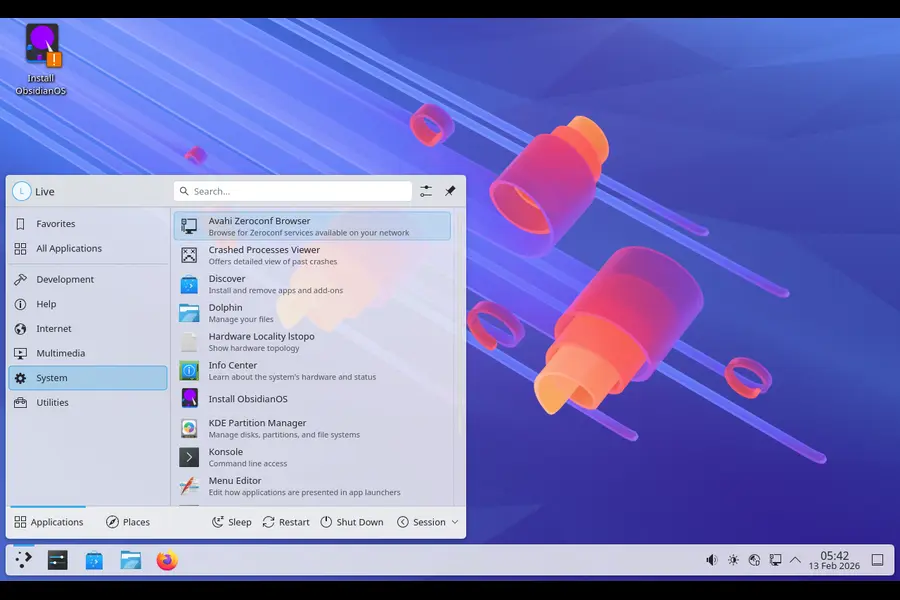
- KDE Plasma 6.5.5: A polished, modern desktop environment that remains lightweight and responsive
- Mesa 25.3.4: Essential for gamers and graphics enthusiasts, offering the latest GPU driver support
- Dual Package Management: Both Pacman and Flatpak support for maximum software availability
Available Editions
ObsidianOS recognizes that different users have different needs. The distribution comes in several flavors:
Base Edition
A minimalist installation with a text-based installer, perfect for experienced Linux users who want complete control over their system. Installation can be completed in as little as 4-5 minutes on capable hardware.
KDE Plasma Edition
Features a custom Qt6 + Python GUI installer, making the installation process more accessible while maintaining the full power of Plasma’s feature-rich desktop environment.
COSMIC Edition
For users interested in System76’s new COSMIC desktop environment, this edition offers a glimpse into the future of Linux desktop design.
VOID Edition
Based on VOID Linux rather than Arch, this variant ships without a graphical interface, targeting server deployments and advanced users.
Technical Specifications and Requirements
ObsidianOS is designed as a UEFI-only, systemd-based operating system for x86_64 systems. Here’s what you need to know:
| Component | Specification |
|---|---|
| Architecture | x86_64 only |
| Boot System | UEFI (Legacy BIOS not supported) |
| Init System | systemd |
| File Systems | EXT4 (primary), f2fs (alternative) |
| Desktop Options | KDE Plasma, COSMIC, or Base (no GUI) |
| Package Managers | Pacman, Flatpak, opm (experimental) |
| Minimum RAM | 2GB (4GB+ recommended for desktop editions) |
| Storage | 40GB minimum (more recommended for A/B partitions) |
| Base | Arch Linux (with Gentoo and VOID influences) |
Beyond Basic A/B Partitioning: User-Mode Overlays
ObsidianOS doesn’t stop at A/B partitioning. The distribution introduces an experimental feature called user-mode overlays, implemented in Rust, which intercepts system calls to create layered filesystem behavior entirely in user space. This innovation allows for package isolation without requiring kernel modules or special filesystems.
The experimental ObsidianOS Package Manager (opm) leverages this overlay system. When you install a package through opm, it downloads from Pacman repositories, creates an overlay image, and applies it on top of the system. This approach dramatically reduces the risk of package conflicts or system corruption.
Installation Experience
The installation process varies depending on which edition you choose, but the team has made significant improvements throughout 2025 and into 2026:
GUI Installer (KDE/COSMIC Editions)
The custom Qt6-based installer walks users through the process with clear visual prompts. While it’s still maturing compared to established installers like Calamares, it handles the complex A/B partition setup seamlessly. The installer automatically configures both partitions, sets up the bootloader, and ensures everything is ready for your first boot.
TUI Installer (Base Edition)
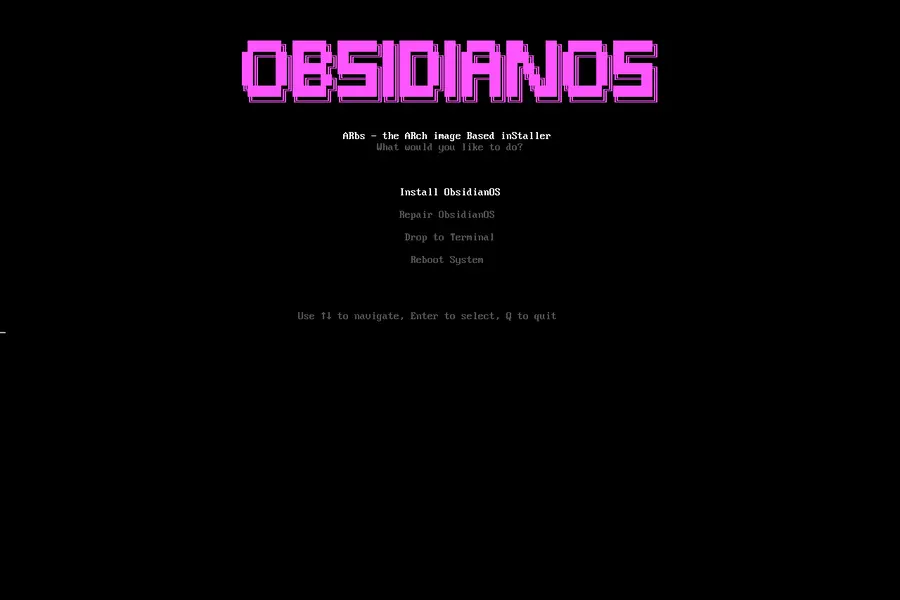
For terminal enthusiasts, the text-based installer provides a familiar, Arch-like experience. While more challenging for newcomers, it offers complete transparency and control over the installation process.
Quick Installation Option
For existing Arch Linux users, ObsidianOS can be installed directly using a single command:
sudo bash -c "$(curl -fsSL https://arbs.obsidianos.xyz)"
Desktop Experience and Control Center
Upon first boot, ObsidianOS presents a clean, vanilla KDE Plasma experience without unnecessary customizations or bloat. The real magic reveals itself when you open the ObsidianOS Control Center, a Qt6 GUI frontend for the obsidianctl command-line tool.
This control center provides:
- Easy switching between A and B partitions
- System update management with safety checks
- Overlay configuration and management
- System health monitoring
- Rollback capabilities with clear visual indicators
The interface maintains the distribution’s philosophy of transparency—users always know which partition they’re running, the status of updates, and available fallback options.
Performance and Stability
Being based on Arch Linux, ObsidianOS benefits from rolling release updates that keep software current. However, the A/B partitioning system adds a safety net that traditional Arch installations lack. Users can enjoy bleeding-edge software without the typical anxiety of update-induced system breaks.
The distribution runs efficiently on modern hardware. While it’s more resource-intensive than minimal distributions due to dual partition overhead, the trade-off in reliability is well worth it for most users. Desktop editions perform smoothly with 4GB+ RAM, while the base edition can run comfortably on systems with 2GB.
Who Should Use ObsidianOS?
Ideal For:
- Arch Linux enthusiasts who want additional safety guarantees
- Developers and power users who need reliable rollback capabilities
- System administrators managing critical workstations
- Tinkerers interested in innovative Linux technologies
- Users transitioning from immutable distributions like Fedora Silverblue or NixOS who want more traditional package management
Not Recommended For:
- Complete Linux beginners (the distribution assumes intermediate knowledge)
- Systems without UEFI (legacy BIOS is not supported)
- Users with limited storage (A/B partitioning requires roughly double the space)
- Production environments (the project is still in active development and experimental phases)
Performance and Daily Use
On hardware (Intel i7-13th gen laptop with 32GB RAM, NVMe SSD), boot times hover around 12–15 seconds to desktop—respectable for Arch underpinnings without heavy customizations. KDE Plasma feels snappy, and COSMIC (which hit stable in late 2025) brings a modern, gesture-friendly experience that’s lighter on resources than GNOME.
Package management depends on your base:
- Arch edition uses pacman — rolling release, latest software.
- Debian edition offers stability with apt.
- Gentoo brings source-based compilation for ultimate optimization.
- Void uses XBPS, appealing to minimalism fans.
The A/B system adds negligible overhead. Updates apply to the inactive slot in the background, and the switch happens at reboot. I’ve deliberately broken things—installing incompatible kernels, messing with systemd units—and recovery was trivial: reboot, select old slot, fix or purge the bad packages.
Battery life and thermals match or slightly beat plain Arch installs, likely due to cleaner default configs.
Comparing ObsidianOS to Alternatives
vs. Vanilla Arch Linux
ObsidianOS adds significant safety mechanisms while maintaining Arch’s rolling release philosophy and package availability. The trade-off is additional disk space and slightly more complex partition management.
vs. Fedora Silverblue
While Silverblue offers immutability through OSTree, ObsidianOS provides a more traditional Linux experience with A/B safety. Silverblue users may find ObsidianOS less restrictive while still benefiting from atomic updates.
vs. NixOS
NixOS offers declarative configuration and rollbacks but requires learning a new paradigm. ObsidianOS maintains familiar Linux patterns while adding safety features, making it more accessible to traditional Linux users.
vs. EndeavourOS
Both aim to make Arch more accessible, but ObsidianOS focuses on update safety through A/B partitioning, while EndeavourOS emphasizes user-friendliness with traditional single-partition setups.
Potential Drawbacks and Considerations
Storage Overhead
The A/B partition system requires approximately double the storage space compared to traditional installations. For a comfortable experience, allocate at least 60-80GB for the root partition pair.
Early Development Stage
ObsidianOS is still maturing. While the core A/B partitioning system is solid, some tools like opm remain experimental. Users should expect occasional rough edges and be prepared to provide feedback to developers.
Installation Complexity
Despite GUI installer improvements, setting up ObsidianOS still requires more technical knowledge than distributions like Ubuntu or Linux Mint. The process isn’t difficult for experienced users but may overwhelm newcomers.
Limited Community Resources
As a newer distribution, ObsidianOS doesn’t yet have the extensive documentation, tutorials, and community support that established distributions offer. Users may need to rely on general Arch Linux resources for troubleshooting.
Community Recognition and Development
ObsidianOS has been gaining recognition in the Linux community. It’s FOSS named it “Linux Distribution of the Month,” praising its innovative approach to system reliability. The project is actively maintained on GitHub with regular updates and an engaged developer community.
The development team has shown commitment to long-term support and feature development. Regular builds appear every few weeks, incorporating the latest upstream improvements while refining the distribution’s unique features.
Real-World Use Cases
Software Development
Developers appreciate the ability to test system updates without risking their primary development environment. If an update breaks a critical tool, switching back to the previous partition takes seconds.
Content Creation
Creators using Linux for video editing, audio production, or graphic design benefit from the stability guarantees. The risk of losing work due to system failures is significantly reduced.
Learning and Experimentation
Students and hobbyists can experiment with system-level changes knowing they have an instant fallback. This makes ObsidianOS an excellent platform for learning Linux internals without fear of breaking the system.
System Administration
IT professionals managing multiple workstations can deploy updates with confidence, knowing that any problems can be quickly resolved by reverting to the previous partition.
Future Outlook
The ObsidianOS project shows strong potential for continued growth. The developers are actively working on:
- Refining the opm package manager and overlay system
- Improving installation tools and documentation
- Expanding hardware support and performance optimizations
- Building additional community resources and guides
- Developing editions based on other distributions (Debian, Gentoo variants)
As the project matures, it could influence how other distributions approach update management. The success of A/B partitioning on standard Linux filesystems may inspire similar implementations elsewhere in the ecosystem.
Getting Started with ObsidianOS
If you’re interested in trying ObsidianOS, here are recommended first steps:
- Start with a Virtual Machine: Test ObsidianOS in VirtualBox or QEMU before committing to bare metal installation
- Choose the Right Edition: Select KDE Plasma for the most polished experience, or Base for maximum control
- Allocate Sufficient Storage: Provide at least 60GB for comfortable operation with room for both partitions
- Join the Community: Connect with other users through GitHub discussions, IRC, or Matrix channels
- Contribute Feedback: Report bugs, suggest features, and help improve the distribution for everyone
Final Verdict: Is ObsidianOS Worth It?
ObsidianOS represents one of the most innovative approaches to Linux system reliability in recent years. While it’s not ready to replace mainstream distributions for everyday users, it offers compelling advantages for intermediate to advanced Linux users who value system stability and rollback capabilities.
Strengths:
- Genuinely innovative A/B partitioning on standard filesystems
- Strong safety guarantees for system updates
- Active development and community engagement
- Rolling release benefits without typical risks
- Experimental features that push Linux forward
Weaknesses:
- Still in early development stages
- Requires technical knowledge and troubleshooting skills
- Limited documentation and community resources
- Storage overhead from dual partitions
- UEFI-only requirement may limit hardware compatibility
For users who manually install Arch Linux for fun, system administrators who need reliable workstations, or anyone tired of traditional Linux update anxiety, ObsidianOS deserves serious consideration. It’s not perfect, and it’s not for everyone, but it’s tackling a real problem in a genuinely novel way.
As we move through 2026, ObsidianOS stands as a testament to the Linux community’s capacity for innovation. Whether it becomes a mainstream choice or remains a niche solution for power users, it’s already succeeded in demonstrating that there are still new, better ways to approach fundamental Linux challenges.
If you’re looking for an Arch-based distribution that genuinely tries to solve problems rather than just repackaging existing solutions, ObsidianOS is worth your attention. Just remember to test it thoroughly in a virtual machine first, keep backups, and be prepared to engage with an actively developing project.
The anti-brick promise isn’t just marketing—it’s a fundamental architectural decision that makes ObsidianOS stand out in the crowded Linux distribution landscape. For the right user, it might just be the most reliable way to run Arch Linux in 2026.
Disclaimer
This review is based on publicly available information and community feedback as of February 2026. ObsidianOS is an actively developed project, and features, stability, and specifications may change. Always back up your data before installing any operating system, and test in a virtual machine before deploying on production hardware. We are not affiliated with the ObsidianOS project.
Frequently Asked Questions
Can I dual boot ObsidianOS with Windows or another Linux distribution?

Yes, ObsidianOS supports dual booting with other operating systems. However, because it uses A/B partitioning, you’ll need to allocate enough disk space for both partitions plus your other OS. Make sure to install ObsidianOS after Windows to avoid bootloader issues, and always back up important data before modifying partitions.
How much extra storage does the A/B partition system actually use?
The A/B system requires roughly double the space of a traditional installation. For a base KDE Plasma system, each partition needs about 20-25GB, so you should allocate at least 60-80GB total to allow room for growth. The inactive partition mirrors your system, ensuring you always have a complete fallback.
Will my Arch Linux packages and AUR software work on ObsidianOS?
Yes, ObsidianOS is fully compatible with Arch repositories and the AUR (Arch User Repository). You can use pacman, yay, paru, or any other AUR helper just as you would on vanilla Arch. The A/B partitioning happens at the system level and doesn’t affect package management compatibility.
What happens if both A and B partitions get corrupted?
While extremely unlikely, if both partitions become corrupted, you’d need to reinstall the system, similar to any other distribution. However, ObsidianOS’s design makes this scenario very rare—typically, only one partition receives updates at a time, and you can always boot from the other. For critical systems, maintain external backups as an additional safety layer.
Is ObsidianOS stable enough for daily use in 2026?
For experienced Linux users comfortable with troubleshooting, yes. The core A/B partitioning system is solid and reliable. However, some features like the opm package manager remain experimental. If you need absolute stability for mission-critical work, test thoroughly in a VM first or wait for future releases as the project matures.
Also Read
pearOS 26.2 Brings Arch Linux Power with macOS Polish
About the Author





