

Opera GX for Gamers: Everything You Need to Know (2026 Edition)
If you’ve spent any time in gaming communities online, you’ve probably heard about Opera GX. People either swear by it or shrug it off as a gimmick. But after spending real time with it — and now that Opera GX for gamers is officially making its long-awaited leap to Linux — there’s genuinely more to talk about than ever before.
Whether you’re running Ubuntu, Fedora, Arch, or gaming on a Steam Deck, this is the complete breakdown you’ve been waiting for. We’ll cover what Opera GX actually is, every feature worth knowing about, how it stacks up against Chrome and Firefox, and — most importantly for this community — what the Linux arrival means for you.
What Is Opera GX?
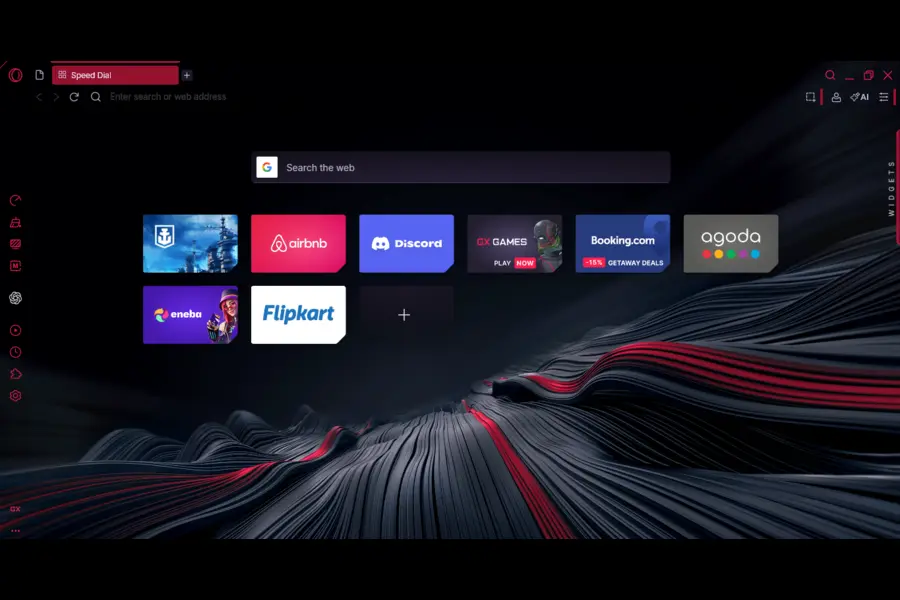
Opera GX is a gaming-focused spin-off of the regular Opera browser, built on Chromium (the same open-source engine that powers Google Chrome). It launched in 2019, initially as a Windows-only product, with macOS support arriving a few months later.
From the start, it wasn’t trying to be another Chrome clone. The whole concept was to give gamers a browser that actually respects what’s running on your system. If you’ve ever tabbed out of a game to check a build guide and noticed your framerate tank — that’s exactly the problem Opera GX set out to fix.
The browser is free to download and use, and it’s built around a visual identity clearly designed to appeal to the gaming crowd: neon accent colors, customizable soundscapes, angular UI elements, and deep integration with platforms like Twitch and Discord. It’s a lot. But underneath the aesthetic, there are real, useful tools.
GX Control: The Feature That Actually Matters
Ask any Opera GX power user what they use it for and they’ll say two words: GX Control.
This is Opera GX’s resource management panel, and it genuinely sets the browser apart from every other option on the market. Here’s what it gives you:
RAM Limiter
GX Control lets you set a hard cap on how much memory the browser is allowed to use. There are two modes:
- Default mode: The browser tries to stay at or below your chosen limit, but will slightly exceed it if it means keeping a stream or cloud file running smoothly.
- Hard Limit mode: The browser will not exceed your set memory cap under any circumstances, even if it degrades the browsing experience slightly.
This is genuinely useful if you’re running a game that’s already eating 12 GB of RAM and you still need a browser open for a guide or Discord web.
CPU Limiter
Similar concept for your processor. You can cap how much CPU Opera GX is allowed to consume, reserving the rest for whatever game or application you have running in the background. It’s not magic, but it works.
Network Limiter
You can set maximum upload and download bandwidth limits for the browser. So if you’re gaming and don’t want your browser’s background activity eating into your connection — you can put an exact ceiling on it. Your game gets the bandwidth it needs, the browser gets whatever’s left over (up to your limit).
No other major browser offers anything close to this natively. Chrome’s built-in Task Manager shows you what’s using resources, but gives you no way to cap it. Opera GX’s Hot Tabs Killer feature takes it a step further — it shows you which specific tabs are the biggest resource hogs, letting you kill them without closing the whole browser.
Built-in Integrations That Actually Save You Time
Twitch in the Sidebar
Twitch lives directly in the sidebar. You can see who you follow, who’s currently live, and set up notifications — all without opening a new tab. If you stream or watch a lot of live content, this alone is worth trying.
Discord in the Sidebar
Same deal with Discord. Your servers, DMs, and notifications are accessible from the sidebar while you browse, game, or do anything else. No alt-tabbing, no second monitor required.
Music Services
Opera GX connects to Spotify, Apple Music, YouTube Music, and Tidal — all from inside the browser. You can switch between services without digging through tabs.
Messenger, WhatsApp, Telegram, and More
Facebook Messenger, WhatsApp, Telegram, TikTok, VKontakte, Slack, and Bluesky are all integrated into the sidebar. It sounds like a lot, but in practice it means you’re switching between fewer apps during a session.
Flow: Cross-Device Syncing
Flow lets you send links, files, and notes between your mobile and desktop browsers by scanning a QR code. It’s encrypted and doesn’t require a login or account. Handy for sending yourself a video or article without emailing it to yourself like it’s 2009.
GX Corner: Your Gaming Hub
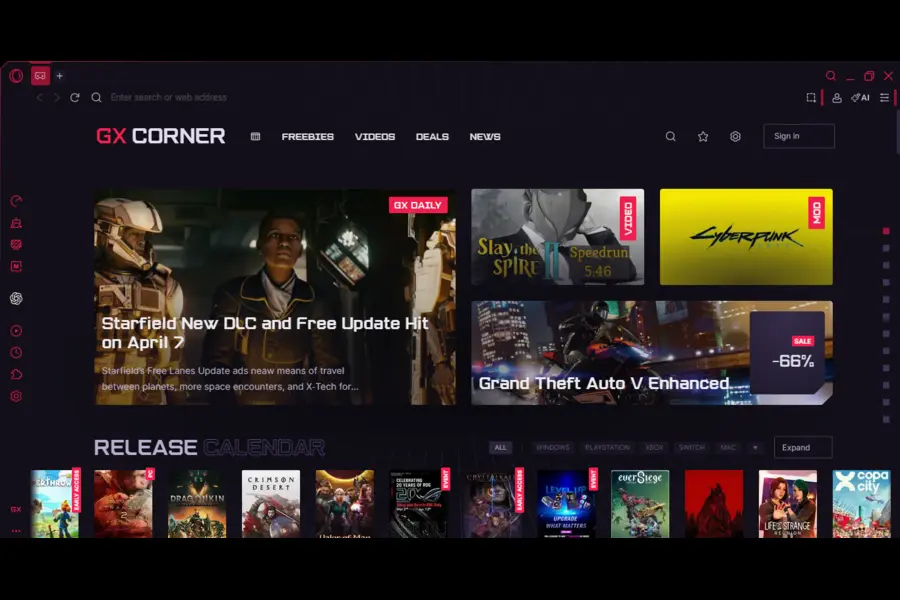
GX Corner is Opera GX’s built-in section for gaming content. It pulls together:
- A game release calendar so you know what’s dropping and when
- Free game deals from platforms like Epic Games
- Gaming news curated for active players
- Exclusive loot and giveaways — Opera GX has partnered with game publishers (most recently Wargaming for World of Warships) to offer in-game bundles to GX users
It’s not going to replace your usual gaming news sources, but having a release calendar baked into your browser is actually a small quality-of-life win.
Customization: More Than Just Aesthetics
Opera GX’s customization options are deep enough to be worth mentioning separately. You can:
- Completely redesign the color scheme to match your gaming setup, desk lighting, or personal taste
- Choose from themed wallpapers and GX mods (including official mods like the Cyberpunk 2077 theme)
- Apply visual shaders across all websites — basically a filter layer over every page you visit
- Enable keyboard sounds — custom audio plays on every keypress, which is either charming or annoying depending on who you ask
- Set dynamic background music that adapts to what you’re doing
- Force dark mode across every website, even ones that don’t natively support it
The GX Store houses community and official mods, giving the browser an actual ecosystem for visual customization.
The browser’s design has won real recognition, too — it’s received both the Red Dot and IF Design awards, which are legitimate industry honors for product design.
Privacy and Security Features
Opera GX includes a built-in ad blocker and cookie dialog blocker, which speeds up page loads and reduces visual noise. There’s also:
- Cryptojacking protection: Prevents websites from using your hardware to mine cryptocurrency without your knowledge
- Free VPN (available on Windows and macOS currently): Routes browser traffic through a VPN server — note this is a browser-level VPN, not a system-wide one
- Panic Button: Pressing F12 instantly hides your current browsing session. Useful if you’re on a work computer and need to quickly cover your tracks. A recent Opera GX survey found that 36% of respondents admitted to accessing non-work content at school or work — so clearly this feature has an audience.
Opera GX vs. Chrome vs. Firefox: A Practical Comparison
| Feature | Opera GX | Chrome | Firefox |
|---|---|---|---|
| RAM/CPU Limiter | ✅ Yes | ❌ No | ❌ No |
| Network Limiter | ✅ Yes | ❌ No | ❌ No |
| Built-in Twitch | ✅ Sidebar | ❌ No | ❌ No |
| Built-in Discord | ✅ Sidebar | ❌ No | ❌ No |
| Built-in Ad Blocker | ✅ Yes | ❌ No | ❌ No |
| Gaming Themes | ✅ Extensive | ❌ Minimal | ❌ Minimal |
| Linux Support | 🔄 Coming in 2026 | ✅ Yes | ✅ Yes |
| Open Source Engine | Chromium | Chromium | Gecko |
| Free VPN (Built-in) | ✅ Browser-level | ❌ No | ❌ No |
Chrome is faster in raw benchmarks at times, and Firefox has a stronger privacy pedigree (and is fully open source). But for someone who games heavily, has a lot of tabs open simultaneously, and wants those integrations without installing five separate apps, Opera GX fills a genuine gap.
Opera GX Has Officially Landed on Linux
No more “coming soon.” Opera GX is now available natively on Linux, with the official launch confirmed on March 19, 2026.
The road here started back in January 2026, when Opera cheekily announced the port via a post on X (formerly Twitter) — timed to coincide with news about Microsoft adding Copilot to Windows 11’s File Explorer — writing: “Is this a good time to announce that we are working on the Linux version of Opera GX?” That got the community talking. Now, less than two months later, it’s actually here.
What’s Supported Right Now
Opera GX on Linux officially supports the following distributions:
- Debian-based (Ubuntu, Linux Mint, Pop!_OS, etc.)
- Fedora-based distributions
- openSUSE-based distributions
Installation is available via .deb and .rpm packages. If you prefer Flatpak — good news: Flatpak support is actively in development and coming soon. That’s important for anyone on an immutable distro or who just prefers the sandboxed installation approach.
Full Feature Parity — Not a Stripped-Down Port
This isn’t a minimal proof-of-concept. According to Opera’s official announcement, Linux users get the same core feature set as Windows and macOS users — including GX Control (RAM, CPU, and network limiters), the Hot Tabs Killer, Twitch and Discord sidebar integrations, GX Mods and customization, built-in ad and tracker blockers, cryptojacking protection, and the optional zero-log VPN audited by Deloitte.
Opera’s Product Director Maciej Kocemba put it plainly: “PC gaming has long been associated with a single dominant platform, but that’s changing. Bringing GX to Linux users — who are renowned for the control they like to exert over their tools — means gamers and developers can manage browser resources, customize their setup, and keep their system performing exactly the way they want.”
Privacy: A Direct Answer to the Linux Community’s Concerns
When the January announcement dropped, the Linux community’s reaction was mixed. Plenty of people were skeptical about Opera’s data practices. Opera has addressed this head-on in the official Linux launch materials.
According to the official press release, Opera GX on Linux does not collect location data, browsing history, page content, search queries, or information typed into forms. The browser is developed in Europe (with teams in Norway and Poland), is fully GDPR compliant, and infrastructure is hosted in European data centers — including facilities in Iceland. The VPN operates under a zero-log policy and has been independently audited by Deloitte.
That said, Opera GX remains closed-source software. If open-source is a non-negotiable for you, that’s a fair line to hold. But for users who want a gaming-focused browser and are satisfied with the privacy commitments above, the Linux version appears to be a full, well-considered release rather than a rushed port.
The Bigger Picture for Linux Gaming
This launch didn’t happen in a vacuum. Linux gaming has genuinely changed. Valve’s Proton compatibility layer, SteamOS, and the Steam Deck have made Linux a real platform for PC gamers — not just a hobbyist’s side project. Opera GX has grown to over 34 million users worldwide since its 2019 launch, and demand for a Linux version had been building consistently across Reddit, Discord, and Linux forums.
Opera has committed to this being a long-term effort — not a one-and-done release. The company says it has a dedicated team that will fix bugs, deploy quality-of-life improvements, push regular updates, and stay active in Linux community forums. Weekly updates are planned, with feedback channels through Discord and a public bug reporting system.
For Linux gamers, this is the kind of commitment that matters more than the launch itself.
Opera GX on Mobile

Opera GX has mobile versions on both iOS and Android. The mobile app includes:
- GX Corner with free mobile games and game deals
- A Fast Action Button (FAB) for one-handed navigation with haptic feedback
- The same Flow cross-device syncing
- Custom themes (GX Classic, Ultra Violet, Purple Haze, White Wolf)
- Built-in ad blocker and cookie dialog blocker
- Cryptojacking protection
The mobile version is solid for what it is, though some users have noted it’s somewhat bare-bones compared to the desktop version in terms of the deeper integrations.
Who Should Actually Use Opera GX?
Let’s be direct. Opera GX is not the right browser for everyone, and it’s not trying to be.
You’ll probably like it if:
- You game heavily and leave browser tabs open at the same time
- You watch Twitch streams or participate in Discord servers while browsing
- You want everything centralized — music, chat, social — in one place
- You like a highly customized, visually distinctive browser that matches your setup
- You’re on Linux and have been waiting for a gaming-focused browser — it’s finally here, and it’s a full-featured release
You might want to stick with Firefox or another browser if:
- Open-source software is a firm requirement (Opera GX is closed source)
- You have deep privacy concerns and prefer a browser with a more transparent data policy
- You find the visual density and extra features overwhelming
- You just need a clean, minimal browsing experience
Final Thoughts
Opera GX for gamers has always had a clear identity: it’s the browser that treats your PC like a gaming machine, not just a web terminal. The GX Control suite is genuinely useful, the integrations are thoughtfully placed, and the customization depth is unmatched in the browser space.
The Linux arrival — which happened on March 19, 2026 — is arguably the most significant moment in the browser’s history since launch. For the millions of people gaming on Linux — whether on a full desktop rig, a laptop running Fedora, or a Steam Deck — having native access to GX’s resource controls and gaming integrations fills a real gap. And it’s not a watered-down port either: Opera has confirmed full feature parity, a dedicated update team, and a long-term commitment to the platform.
If you’re on a Debian, Ubuntu, Fedora, or openSUSE-based system, you can download Opera GX today from the official Opera GX website in .deb or .rpm format. Flatpak support is on the way for those who need it.
Disclaimer
This blog post is written for informational purposes only. All feature details, release timelines, and product information are based on publicly available and officially announced data from Opera at the time of writing (March 2026). We are not affiliated with, sponsored by, or officially connected to Opera in any way. Product features, availability, and release dates may change — always check the official Opera GX website for the most up-to-date information. The Linux release timeline mentioned in this article is based on Opera’s official public announcement and may be subject to change.
Also Read
Exploring the Power of LinuxHub Prime v3.1.5: Everything You Need to Know
About the Author





