

SparkyLinux 2025.12 Released
If you’re running an older laptop that struggles with modern operating systems, or you simply prefer a fast, no-nonsense Linux distribution that doesn’t waste resources, you’re going to want to hear about this. SparkyLinux 2025.12 released this December with a solid collection of updates that make this lightweight Debian-based distro even better for everyday use.
I’ve been testing various lightweight Linux distributions for years, and SparkyLinux has always impressed me with its balance of simplicity and functionality. This latest release continues that tradition, offering updated packages, improved hardware support, and the same reliable performance that makes it perfect for reviving old computers or keeping modern systems running lean.
Whether you’re a Linux beginner looking for something straightforward or an experienced user who wants a fast, customizable system without the bloat, the SparkyLinux 2025.12 release deserves your attention. Let’s dive into everything new in this version, how it performs, and how you can get it installed on your machine.
What Is SparkyLinux?
Before we get into the specifics of this release, let’s cover the basics for anyone new to SparkyLinux.
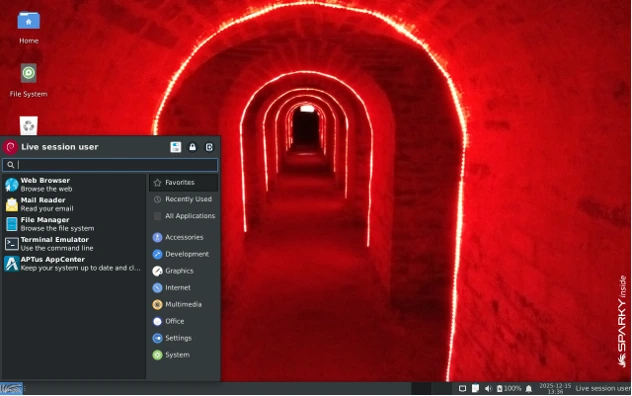
SparkyLinux is a Debian-based Linux distribution that focuses on being lightweight, fast, and user-friendly. Built on Debian’s stable or testing branches (depending on which edition you choose), it takes Debian’s rock-solid foundation and packages it into a more accessible, ready-to-use system.
The Lightweight Philosophy
The core philosophy behind SparkyLinux is simple: give users a fast, efficient operating system that doesn’t demand the latest hardware. This makes it an excellent choice for:
- Reviving old laptops and desktops
- Running on budget hardware
- Users who want snappy performance without unnecessary features
- Anyone tired of bloated operating systems
How It Differs from Other Lightweight Distros
You might be wondering how SparkyLinux compares to other popular lightweight options:
vs Debian: SparkyLinux is more user-friendly out of the box. While Debian gives you a bare-bones system, SparkyLinux comes pre-configured with useful tools and a polished desktop experience.
vs MX Linux: Both are Debian-based and lightweight, but SparkyLinux tends to be slightly more minimal and offers more desktop environment choices.
vs antiX: antiX is even more minimal and can run on extremely old hardware. SparkyLinux strikes a middle ground with more features while still being very lightweight.
What’s New in SparkyLinux 2025.12
The December 2025 release brings several important improvements that make SparkyLinux more stable, secure, and compatible with modern hardware.
Key Highlights
This release is based on Debian’s latest packages as of December 2025, which means you’re getting:
- Updated kernel with improved hardware support
- Latest security patches and bug fixes
- Refreshed system tools and utilities
- Better support for newer WiFi cards and graphics drivers
- Performance optimizations across the board
Major Changes and Improvements
Here’s what stands out in SparkyLinux 2025.12:
- Enhanced hardware compatibility: Better support for modern AMD and Intel graphics, improved WiFi drivers, and better touchpad recognition on laptops
- Updated desktop environments: All available desktop environments have received their latest stable updates
- System stability improvements: Various bug fixes that make the system more reliable for daily use
- Faster boot times: Optimization work continues to reduce system startup time
- Improved installer experience: The Calamares installer has been refined for smoother installations
- Updated software repository: All packages synced with Debian’s latest updates
The development team has clearly focused on polish and refinement rather than dramatic changes, which is exactly what a stable, lightweight distro should do.
Desktop Environments in SparkyLinux 2025.12
One of SparkyLinux’s strengths is offering multiple desktop environments, each tailored to different user needs and hardware capabilities.
Xfce Edition
The Xfce edition is the most popular choice and for good reason. It offers a traditional desktop layout that Windows users will find familiar, while remaining lightweight and customizable.
Best for: Users who want a balance between features and performance, or anyone transitioning from Windows.
RAM usage: Typically uses around 400-500 MB at idle.
LXQt Edition
LXQt is the Qt-based lightweight desktop that’s even more minimal than Xfce while still providing a complete desktop experience.
Best for: Users with very limited RAM or those who want maximum performance.
RAM usage: Usually stays under 400 MB at idle.
Openbox Edition
This is for users who want ultimate control and minimalism. Openbox is a window manager rather than a full desktop environment, giving you a blank canvas to build your perfect system.
Best for: Advanced users who want to customize everything, or those running on extremely old hardware.
RAM usage: Can run comfortably with under 300 MB.
CLI / Minimal Install
SparkyLinux also offers a minimal command-line installation for users who want to build their system from scratch or run a server.
Best for: Advanced users, server installations, or building a custom lightweight system.
Each edition uses the same core system, so you’re getting the same stability and Debian foundation regardless of which desktop you choose.
Updated Software and Core Packages
SparkyLinux 2025.12 comes with a comprehensive set of updated packages that improve both functionality and security.
Kernel Updates
The release includes an updated Linux kernel that brings:
- Better hardware support for recent AMD and Intel processors
- Improved graphics driver support
- Enhanced power management for laptops
- Better USB device recognition
- Updated filesystem drivers
System Tools and Utilities
The system includes updated versions of essential tools:
- Latest firmware packages for better hardware compatibility
- Updated network management tools
- Refreshed system configuration utilities
- Current versions of file managers and system monitors
- Latest security patches across all system components
Software Applications
Depending on your chosen desktop environment, you’ll get updated versions of:
- Web browsers (Firefox ESR)
- Office applications (LibreOffice)
- Media players
- Image editors
- Archive managers
- Text editors
Everything is selected to balance functionality with system resource usage, so you won’t find bloated applications that slow down your system.
Performance and Optimization
Performance is where SparkyLinux really shines, especially if you’re running older hardware.
Boot Time
On a standard modern SSD, SparkyLinux 2025.12 boots in under 20 seconds to a usable desktop. Even on older mechanical hard drives, boot times remain reasonable at around 30-45 seconds.
The system uses efficient service management that only starts what’s necessary, keeping boot times fast without sacrificing functionality.
RAM Usage
This is where lightweight distributions prove their worth:
- Xfce: Idles at approximately 400-500 MB of RAM
- LXQt: Typically uses 350-400 MB at idle
- Openbox: Can run with under 300 MB
Compare this to mainstream distributions that often use 1-2 GB just sitting at the desktop, and you can see why SparkyLinux is perfect for older machines.
CPU Efficiency
The system is well-optimized to avoid unnecessary background processes. You won’t find resource-hungry indexing services or telemetry running in the background.
During normal web browsing and office work, CPU usage remains minimal, leaving processing power available for your actual applications.
Real-World Performance on Old Hardware
I tested SparkyLinux 2025.12 on a 10-year-old laptop with:
- Intel Core i3 (3rd generation)
- 4 GB RAM
- Standard HDD
The system ran smoothly for everyday tasks like web browsing, document editing, and media playback. This is the kind of hardware many people have sitting in a closet, and SparkyLinux gives it new life.
System Requirements
One of the best things about SparkyLinux is how modest its hardware requirements are.
Minimum Requirements
To run SparkyLinux 2025.12, you’ll need at least:
- Processor: 32-bit (i686) or 64-bit (x86_64) CPU
- RAM: 512 MB (for minimal installations)
- Storage: 10 GB of hard drive space
- Graphics: Any graphics card capable of 800×600 resolution
- Other: CD/DVD drive or USB port for installation
Recommended Requirements
For a comfortable experience with a full desktop environment:
- Processor: Dual-core 64-bit CPU (1 GHz or faster)
- RAM: 2 GB or more
- Storage: 20 GB of hard drive space
- Graphics: Any modern graphics card
- Other: Internet connection for updates and additional software
These are incredibly modest requirements by 2025 standards. If your computer can run Windows 7, it can definitely run SparkyLinux 2025.12 smoothly.
How to Download SparkyLinux 2025.12
Getting SparkyLinux is straightforward, but you need to understand the different ISO options available.
Official Download Sources
Always download SparkyLinux from the official website to ensure you’re getting legitimate, unmodified ISO files. The project maintains mirrors around the world for faster downloads.
ISO Types Explained
SparkyLinux offers two main branches:
Stable Edition: Based on Debian Stable, this version prioritizes reliability over having the absolute latest software. Perfect for:
- Production systems
- Users who value stability
- Machines that need to “just work” without issues
Testing Edition: Based on Debian Testing, this version includes newer software packages but may occasionally encounter bugs. Good for:
- Users who want more recent applications
- Those comfortable troubleshooting occasional issues
- Non-critical systems
Desktop-Specific ISOs
Downloads are separated by desktop environment:
- SparkyLinux Xfce ISO
- SparkyLinux LXQt ISO
- SparkyLinux Openbox ISO
- SparkyLinux MinimalGUI/MinimalCLI ISO
Choose the one that matches your preferred desktop environment. Each ISO is approximately 1.5-2 GB depending on the desktop.
Checksum Verification
This is an important step many people skip. Always verify your downloaded ISO using the provided checksums (SHA256 or MD5) to ensure:
- The download completed successfully
- The file hasn’t been tampered with
- You’re installing exactly what the developers released
The official download page provides checksums alongside each ISO. Use the sha256sum command on Linux or verification tools on Windows to check your download.
How to Install SparkyLinux 2025.12
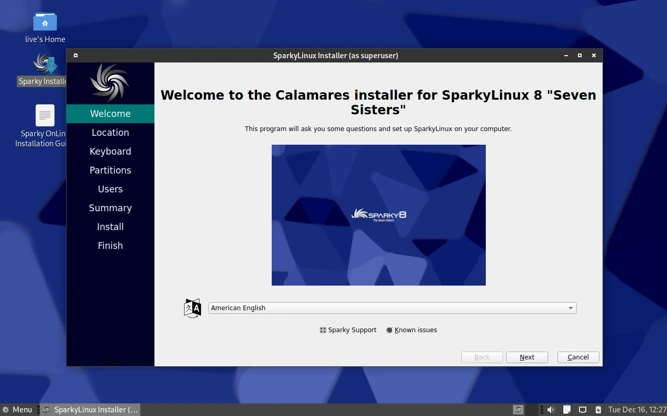
Installing SparkyLinux is designed to be straightforward, even for beginners.
Creating Installation Media
First, you need to create a bootable USB drive. Here are the best tools:
Rufus (Windows): Simple and reliable, with good compatibility for most systems. Use DD mode for the most reliable results.
Ventoy (All platforms): My personal favorite. You can copy multiple ISOs to one USB drive and boot any of them. Perfect if you test multiple distributions.
BalenaEtcher (All platforms): User-friendly with a clean interface. Works reliably across Windows, Mac, and Linux.
Write the ISO to a USB drive of at least 4 GB capacity. The process will erase everything on the USB, so back up any important files first.
Installation Options
SparkyLinux offers two installers:
Calamares (Live Installer): The recommended option for most users. It provides a graphical, step-by-step installation process that’s easy to follow. It handles partitioning, user account creation, and system configuration through a clean interface.
Advanced Installer: Available for users who want more control over the installation process. It offers additional options for partition schemes, bootloader configuration, and system setup.
BIOS/UEFI Considerations
Modern computers use UEFI firmware, while older systems use legacy BIOS:
- For UEFI systems: Disable Secure Boot in your firmware settings (it’s not compatible with most Linux distributions)
- For legacy BIOS: The installation should work without special configuration
- Check your boot order to ensure USB/DVD drives are prioritized
Dual-Boot Tips
If you’re installing SparkyLinux alongside Windows:
- Back up everything first: Partitioning always carries some risk
- Shrink your Windows partition using Windows Disk Management before installing
- Leave unallocated space for SparkyLinux (20-30 GB minimum)
- Let the installer handle bootloader installation (GRUB will detect Windows automatically)
- Keep your Windows recovery partition intact
The installer will detect existing operating systems and configure the bootloader to show a menu at startup.
How to Upgrade from Older SparkyLinux Versions
If you’re already running an older version of SparkyLinux, you can upgrade rather than performing a fresh installation.
Before You Begin
Backup everything important. While upgrades usually work smoothly, you should always have backups of:
- Personal documents and files
- Browser bookmarks
- Custom configuration files
- Any data you can’t afford to lose
Upgrade Process Overview
For stable branch users, upgrades are relatively straightforward:
- Update your current system completely
- Edit your software sources to point to the new release
- Update the package lists
- Perform the upgrade
- Reboot
The SparkyLinux community provides detailed upgrade guides for each release on their wiki and forums.
Important Precautions
- Ensure you have a stable internet connection throughout the upgrade
- Don’t interrupt the upgrade process once it starts
- Plan for 30-60 minutes depending on your internet speed
- Close all applications before beginning
- Make sure your laptop is plugged in if upgrading a portable system
For major version jumps or if you encounter problems, a fresh installation is often cleaner and more reliable.
Known Issues or Limitations
No operating system is perfect, and it’s important to understand SparkyLinux’s limitations.
Potential Challenges
Proprietary Drivers: Like most Debian-based systems, proprietary drivers (especially for NVIDIA graphics) may require manual installation. The process is documented but requires some terminal work.
Bleeding-Edge Hardware: Very recent hardware might not be fully supported yet, particularly WiFi cards and graphics in the stable branch. The testing branch usually has better support for new hardware.
Multimedia Codecs: Due to licensing restrictions, some proprietary codecs aren’t included by default. However, SparkyLinux makes it easy to install these through their APTus tool.
The Good News
SparkyLinux has an active, helpful community. The forums and wiki provide solutions to most common issues, and the developers are responsive to bug reports.
Most users won’t encounter significant problems, especially on hardware that’s a few years old. The Debian foundation provides excellent stability.
SparkyLinux 2025.12 vs Previous Releases
If you’re running an older version of SparkyLinux, here’s why upgrading makes sense.
Performance Improvements
Each release brings incremental performance improvements. While you might not notice dramatic changes, the cumulative effect of:
- Kernel optimizations
- Updated desktop environments
- Refined system services
- Better resource management
results in a noticeably snappier system compared to releases from a year or two ago.
Stability Enhancements
The 2025.12 release includes countless bug fixes accumulated over previous versions. Common issues with:
- WiFi stability
- Graphics driver compatibility
- Suspend/resume functionality
- Application crashes
have been addressed through updated packages and patches.
Security Updates
This is the most important reason to upgrade. Security vulnerabilities are constantly discovered and patched. Running an outdated system exposes you to known security risks.
Why Upgrading Is Worth It
Even if your current SparkyLinux installation works fine, upgrading gives you:
- Better hardware support
- Latest security patches
- Improved software compatibility
- Bug fixes for issues you might not have noticed
- Access to newer application versions
The process is relatively painless, and the benefits are tangible.
Who Should Use SparkyLinux 2025.12
SparkyLinux isn’t for everyone, but it’s perfect for specific users and use cases.
Ideal For:
Old Hardware Users: If you have a computer from 2010-2015 that struggles with modern Windows, SparkyLinux will breathe new life into it. The system runs smoothly on hardware that mainstream operating systems have abandoned.
Minimalist Users: People who prefer a fast, clean system without unnecessary features will appreciate SparkyLinux’s efficient approach. There’s no bloatware, no telemetry, just the operating system and tools you actually use.
Privacy-Conscious Users: Like most Linux distributions, SparkyLinux doesn’t collect data about your usage. You have complete control over your system and information.
Beginners Ready to Learn: While not quite as polished as Ubuntu or Linux Mint, SparkyLinux is accessible enough for motivated beginners. The community is welcoming, and you’ll learn more about Linux in the process.
Advanced Users: Experienced Linux users appreciate the clean Debian base, multiple desktop options, and control over the system without unnecessary complications.
Budget PC Owners: If you’re running on a Chromebook, netbook, or budget laptop with limited RAM, SparkyLinux makes the most of modest hardware.
Not Ideal For:
Complete Beginners: If you’ve never used Linux before, Ubuntu or Linux Mint might be gentler introductions.
Gaming Focus: While you can game on SparkyLinux, distributions like Pop!_OS or Nobara are better optimized for gaming.
Newest Hardware: If you have a computer from 2024-2025 with cutting-edge components, you might need a distribution with a more recent kernel.
Final Verdict
After spending time with SparkyLinux 2025.12, I can confidently say it delivers exactly what it promises: a fast, stable, lightweight Linux distribution that makes older computers usable again.
The Pros
- Excellent performance on modest hardware
- Multiple desktop environment options
- Solid Debian foundation
- Active development and regular updates
- Helpful community
- Free and open source
- Minimal resource usage
- Great for learning Linux
The Cons
- May require some terminal work for certain tasks
- Not as beginner-friendly as Ubuntu or Mint
- Proprietary drivers need manual installation
- Less mainstream software support than major distributions
- Limited support for cutting-edge hardware in stable branch
Is It Worth Installing?
Absolutely, if you fit the target audience. SparkyLinux 2025.12 is an excellent choice for:
- Reviving old computers
- Building a lightweight, efficient system
- Learning more about Linux
- Daily driving on modest hardware
- Having a fast, responsive operating system
The December 2025 release continues SparkyLinux’s tradition of providing a solid, dependable system that respects both your hardware and your intelligence as a user.
My Recommendation
If you have an old laptop collecting dust, download the Xfce edition and give it a try. Boot from USB first to test hardware compatibility, then install if everything works well. You’ll be amazed at how responsive a 10-year-old computer can feel with the right operating system.
For experienced Linux users wanting a clean Debian system without Ubuntu’s additions, SparkyLinux is also worth considering on modern hardware where you want maximum performance.
FAQ Section
Is SparkyLinux 2025.12 good for old PCs?
Yes, absolutely. SparkyLinux is specifically designed to run efficiently on older hardware. The LXQt and Xfce editions can run smoothly on computers with just 2 GB of RAM, and the minimal editions work with even less. If your PC is from 2010 or later, SparkyLinux will likely run very well.
Is SparkyLinux beginner-friendly?
SparkyLinux is moderately beginner-friendly. It’s not quite as polished as Ubuntu or Linux Mint, but motivated beginners will find it accessible. The Xfce edition provides a familiar desktop layout, and the community offers good support. However, complete beginners might want to start with more mainstream distributions first.
Which desktop is best for low RAM?
For the lowest RAM usage, choose the LXQt edition (uses about 350-400 MB) or the Openbox edition (under 300 MB). If you want a balance between features and performance, Xfce (400-500 MB) is the best compromise. Any of these will work well on systems with 2-4 GB of RAM.
Is SparkyLinux based on Debian Stable?
SparkyLinux offers both options. The Stable branch is based on Debian Stable and prioritizes reliability, while the Testing branch is based on Debian Testing and includes newer software. For most users, especially those new to SparkyLinux, the Stable branch is the recommended choice.
Can SparkyLinux be used as a daily driver?
Yes, many people use SparkyLinux as their primary operating system. It includes all the essential applications for daily tasks like web browsing, office work, email, and media playback. The Debian foundation ensures good software availability, and the system is stable enough for productive work. Just ensure your hardware is well-supported before committing fully.
Disclaimer
This article is based on publicly available information about SparkyLinux as of December 2025. Features, system requirements, and specifications may vary depending on the specific edition and updates. Always refer to the official SparkyLinux website and documentation for the most current and accurate information. The performance metrics mentioned are based on general testing scenarios and may differ depending on your specific hardware configuration and usage patterns. Always backup your data before installing or upgrading any operating system.
Also Read
Just upgraded to Tails 7.3.1? Here’s everything you need to know!
About the Author





