
SUSE Enterprise Linux 16: What’s New in SUSE’s Next-Gen Enterprise OS
Enterprise Linux systems rarely change drastically. Most companies rely on stability, predictability, and long support cycles. That’s why major shifts — the kind that reshape how you install, manage, and secure systems — are rare. SUSE has now delivered one of those rare moments.
SUSE Enterprise Linux 16 (SLES 16) is not just another version. It is a foundational redesign of the SUSE operating system to meet the needs of the next decade — cloud-native workloads, AI-assisted operations, stricter security regulations, and massively distributed edge deployments.
This guide is written for everyone — whether you’re new to SUSE, new to Linux system administration, or just exploring enterprise operating systems. You’ll understand what changed, why it matters, and how SLES 16 sets itself apart in the enterprise Linux world.
✅ What Is SUSE Enterprise Linux 16?
SUSE Enterprise Linux 16 is the newest major release of SUSE’s commercial operating system designed for enterprises, data centers, cloud deployments, and edge environments.
This release replaces the older SUSE Linux Enterprise 15 series, which has been around since 2018.
Unlike smaller SP (service pack) updates, SLE 16 introduces massive platform-wide changes:
- A new installer
- A new management UI
- A new security framework
- A new networking stack
- Updated kernel and libraries
- Long-term lifecycle
- AI automation capabilities
If you have used previous SUSE versions, SLE 16 will look and feel very different — in a good way.
✅ Who Is SLE 16 Designed For?
SUSE Enterprise Linux 16 is ideal for:
- Enterprise servers and data centers
- Cloud (AWS/Azure/GCP) deployments
- Hybrid and multi-cloud setups
- Edge devices and IoT gateways
- High-security environments (banks, govt, defense)
- SAP HANA and SAP workloads
- AI and automation-heavy infrastructures
If your organization values stability, strong security defaults, automation-readiness, and long-term support, SLE 16 fits perfectly.
✅ Why This Release Is a Big Deal
Because SLE 16:
1️⃣ Modernizes the OS from the ground up
The installer, management tools, and runtime environment are rebuilt.
2️⃣ Prioritizes security more aggressively
SELinux, PQC, SSH restrictions, reproducible builds — all enabled by default.
3️⃣ Unifies the system architecture
NetworkManager only, cgroup v2 only, no 32-bit userland — everything is simplified.
4️⃣ Embraces cloud and automation
New APIs, Cockpit UI, better containers, new networking stack, KVM-focused virtualization.
5️⃣ Starts the path for AI-driven system operations
The “AI agentic” features (tech preview) set the foundation for automated infrastructure.
This is the biggest transformation since SUSE switched from SysV to systemd years ago.
🟩 Understanding the Biggest Changes in SUSE Enterprise Linux 16
Let’s break each major change down in a beginner-friendly way.
✅ 1. A Completely New Installer: Agama
SLE 16 introduces Agama, a modern installer that replaces the traditional YaST-based installer for new systems.
🔹 What Is Agama?
Agama is a web-based installer.
This means:
- When you boot the SLE 16 ISO,
- Instead of a local-only installer,
- The system starts a small web server,
- And you open the installer in your web browser.
You can install the OS using:
- Your laptop
- Another server
- Even a phone (not recommended but works)
🔹 Why did SUSE shift away from YaST for installation?
Because YaST, although powerful, was designed 20+ years ago.
Today:
- Most organizations automate installs
- Cloud images require scriptable workflows
- Remote deployment is critical
- Manual clicks are slow for large fleets
Agama solves all of this.
🔹 Benefits for Beginners
- Very clean and user-friendly UI
- Easier to understand partitioning
- Clearer explanations for each option
- Better error messages
- No confusing old-style menus
🔹 Benefits for Enterprises
- Remote installation
- REST API for automation
- Better CI/CD integration
- Rust-based core (memory safe)
- AutoYaST compatibility
Even someone new to Linux can install SLE 16 with minimal confusion — that’s how much cleaner Agama is.
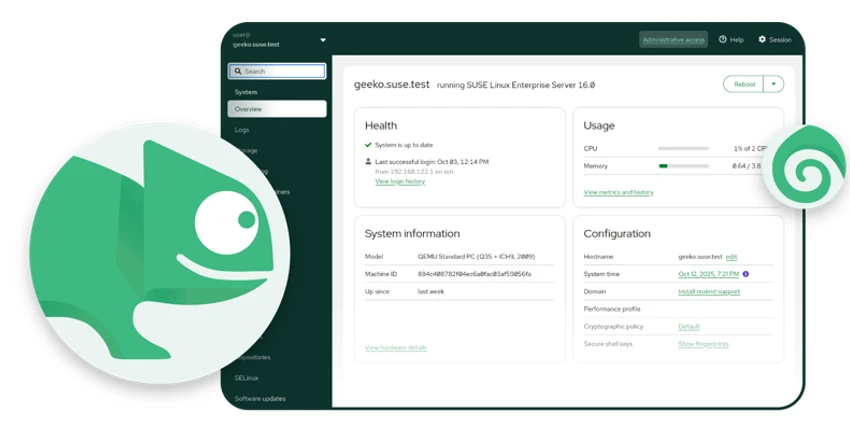
✅ 2. Cockpit Becomes the Main Administration Tool
If you’ve used SUSE before, you know YaST was the main system admin tool.
In SLE 16, Cockpit replaces YaST for server administration.
🔹 What Is Cockpit?
Cockpit is a web dashboard for server management.
Open a browser → Go to server IP:9090 → Manage your system.
🔹 What Can You Do with Cockpit?
- Monitor CPU, disk, memory
- View logs (journal)
- Manage users
- Manage updates
- Configure networking
- Manage storage
- Manage services
- Manage containers (Podman)
- Use terminal directly
- Check system health
🔹 Why Switch from YaST?
YaST is great for local GUI/NCurses configuration,
but Cockpit:
- Works remotely
- Works on cloud servers
- Is modern and lightweight
- Has extensions
- Matches the ecosystem (RHEL, Fedora also use Cockpit)
✅ Beginners benefit because:
- Everything is graphical
- No need to remember commands
- Easy to learn
- Visual explanations
✅ Enterprises benefit because:
- Web-based administration
- Remote management
- Easier onboarding for new admins
- Consistent with cloud workflows
SUSE didn’t remove YaST entirely, but Cockpit is the new recommended way.
✅ 3. SELinux Replaces AppArmor (Default Security Framework)
This is one of the most impactful changes.
🔥 SELinux is now default, and enforcing.
✔ Why does this matter?
Because SELinux:
- Provides stronger isolation
- Offers industry-standard security
- Has better compatibility with modern applications
- Is already widely used (RHEL, Fedora, Rocky, etc.)
✔ What about AppArmor?
It’s no longer the default.
Some users may still use it, but SELinux is recommended.
✔ Beginners: How SELinux protects you
Imagine apps are in separate rooms, and SELinux locks the doors.
Even if:
- A hacker breaks into an app
- They are stuck inside that isolated “room”
- They cannot access rest of system
This drastically reduces attack impact.
✔ Enterprises: Why SELinux is important
- Regulatory compliance (banking, govt)
- Better container security
- SAP HANA security guidelines
- Industry standardization
This change may require some policy learning, but the benefits are huge.
✅ 4. Stronger Default Security Across the OS
SLE 16 introduces several new security defaults:
✅ SSH passwords disabled
Only SSH keys allowed → reduces brute-force attacks.
✅ Reproducible builds
Guarantees binaries match the published source code.
✅ Post-Quantum Cryptography readiness
Future-proofing against quantum computing attacks.
✅ /tmp is temporary filesystem
Data inside disappears after reboot → better hygiene.
✅ More secure kernel defaults
Safer syscalls, memory protections, etc.
Overall, SLE 16 is one of the most secure enterprise Linux systems today.
✅ 5. A Predictable 16-Year Lifecycle
One of the longest support lifecycles in enterprise Linux.
🔹 Breakdown:
- 2 years General Support (per minor release)
- 3 years Long-Term Support (LTS)
- Major version supported for 16 years
🔹 Why is this important?
Large companies don’t upgrade OS frequently because:
- They run critical workloads
- They use certified software (SAP, Oracle)
- They have thousands of servers
- Upgrades cost time and money
A 16-year lifecycle means:
- Lower risk
- Longer stability
- Predictable maintenance cycles
- Easier planning for CIOs and sysadmins
This is one of the strongest selling points of SLE 16.
✅ 6. Major Platform Updates: Kernel, Toolchain, Networking
Let’s break down each area in a simple manner.
✅ 6.1 Linux Kernel 6.x Series
What this means:
- Faster performance
- Better hardware support
- New filesystems improvements
- Better multi-core CPU scheduling
- Energy optimization for servers
- Enhanced security
✅ 6.2 Updated Programming Tools
- GCC / LLVM updated
- glibc updated
- Python 3.13
- OpenSSL 3.x
- OpenSSH 9.9
- Ruby, Go, Rust updated versions
This ensures compatibility with modern software.
✅ 6.3 Networking Stack Simplified
✅ NetworkManager is the only supported network tool now.
This means:
- No more wicked
- No duplicates
- No confusion
NetworkManager is:
- More modern
- Cloud-friendly
- Better for WiFi + Ethernet + VLANs
- Supported across many distros
This unifies the networking experience.
✅ 6.4 nftables Default Firewall
iptables is legacy.
nftables:
- Faster
- Easier to script
- Cleaner rule structure
✅ 6.5 64-bit Only System
This removes legacy 32-bit userland.
Benefits:
- Better performance
- Better security
- Cleaner codebase
- Fewer compatibility headaches
Most modern enterprise software is already 64-bit.
✅ 7. Better Virtualization & Container Support
✅ 7.1 KVM is now the primary hypervisor
Xen is removed.
This aligns with cloud and data center trends.
✅ 7.2 Improved IBM Power & IBM Z support
Better CPU optimizations, virtualization performance, and system tools.
✅ 7.3 Containers: Podman + cgroup v2 only
- Podman replaces Docker daemon
- systemd integrates smoothly
- Kubernetes-friendly
- Better security
Containers run more predictably, especially on cgroup v2.
✅ 8. AI-Assisted Operations (Tech Preview)
This is an early-stage but exciting feature.
SLE 16 includes MCP host integration, enabling AI tools (like ChatGPT-compatible agents) to:
- Analyze system logs
- Suggest fixes
- Automate routine tasks
- Help with compliance checks
- Provide guided troubleshooting
- Perform controlled operations (with permissions)
This is the future of enterprise OS management: AI as an assistant to sysadmins.
✅ 9. Hardware Baseline (Very Important)
Minimum requirements:
✅ x86-64
Needs x86-64-v2 and newer (modern CPUs).
✅ IBM Power
POWER10 and up.
✅ IBM Z
z14 and up.
✅ Arm
Armv8-A or newer.
✅ UEFI recommended
Legacy BIOS still works, but with limited features.
This ensures SLE 16 only supports secure, modern hardware.
✅ 10. Upgrading From SLE 15 to SLE 16
Official upgrade path:
✅ SLE 15 SP7 → SLE 16
Older versions must upgrade to SP7 first.
✅ What you must check before upgrade:
- SELinux policies
- NetworkManager migration
- 32-bit packages removal
- SSH key setup
- Custom services with systemd
- Monitoring/backup agent compatibility
- cgroup v2 support for containers
A test environment is recommended.
✅ 11. SLE 15 vs SLE 16 — Easy Comparison Table
| Feature | SLE 15 | SLE 16 |
|---|---|---|
| Installer | YaST | Agama |
| Admin Tool | YaST | Cockpit |
| Security | AppArmor | SELinux |
| Networking | wicked/NM | NetworkManager only |
| Firewall | iptables | nftables |
| Kernel | 5.x | 6.x |
| 32-bit | Supported | Removed |
| Virtualization | KVM + Xen | KVM only |
| Lifecycle | ~10 years | 16 years |
| Cloud snapshots | Limited | Everywhere |
| AI Automation | No | Yes (tech preview) |
✅ Conclusion: SUSE Enterprise Linux 16 Is Built for the Future
SUSE Enterprise Linux 16 marks a major turning point for SUSE’s enterprise ecosystem. It modernizes almost every layer of the operating system — from installation and administration to security, automation, and lifecycle management. For newcomers, the platform is significantly easier to understand thanks to the intuitive Agama installer and the browser-based Cockpit interface. For enterprise teams, SLE 16 delivers the stability, predictability, and security needed to run mission-critical workloads across data centers, clouds, and distributed edge environments.
The switch to SELinux, the adoption of NetworkManager, the removal of 32-bit legacy components, and the deep integration of Btrfs snapshots all improve reliability and resilience. Meanwhile, the introduction of AI-assisted operational previews shows SUSE’s commitment to shaping the future of autonomous infrastructure.
If your organization values long-term lifecycle support, enterprise-grade security, and modern cloud readiness, SUSE Enterprise Linux 16 is one of the strongest platform upgrades available today. It is built to last, built to scale, and built to support the next decade of innovation — from traditional servers to AI-driven environments.
✅ Disclaimer
This article is intended for general informational and educational purposes only. While great care has been taken to ensure accuracy, features, specifications, and release details for SUSE Enterprise Linux 16 may evolve over time. Always refer to the official SUSE documentation, release notes, and support channels for the most current and authoritative information. This post does not represent SUSE or its affiliates, and any product names, trademarks, or logos mentioned remain the property of their respective owners. Readers should perform their own testing and validation before deploying SUSE Enterprise Linux 16 in production environments.
Also Read
UmbrelOS 1.5.0 Review – Complete Breakdown
About the Author





