Top 10 Apps That Use End-to-End Encryption in 2025: Secure Your Digital Life
In an era where data breaches and cyber surveillance are constant concerns, protecting your online privacy has never been more critical. Whether you’re sharing sensitive work documents, chatting with friends, or storing personal files, you want assurance that your data remains private. Enter end-to-end encryption (E2EE), the gold standard in secure communication. E2EE ensures that only the sender and recipient can access the content of a message or file—no one else, not even the app provider, can decrypt it. With privacy becoming a top priority for users worldwide, many apps now incorporate E2EE to safeguard your data.
In this blog post, we’ll dive into the top 10 apps that use end-to-end encryption in 2025, based on the latest official web data. We’ll explore what makes each app stand out, their features, and why they’re trusted for secure communication. From messaging apps to cloud storage and password managers, these tools are designed to keep your digital life private and secure. Let’s get started!
Why End-to-End Encryption Matters
Before we jump into the list, let’s quickly unpack why E2EE is so important. End-to-end encryption scrambles your data using advanced cryptographic algorithms, making it unreadable to anyone except the intended recipient. Unlike encryption in transit (which protects data only while it’s moving between servers) or encryption at rest (which secures data stored on a server), E2EE ensures your data is protected from the moment it leaves your device until it reaches its destination. This means hackers, governments, or even the app’s own developers can’t access your messages, files, or calls.
With rising concerns about data collection by tech giants and increasing cyber threats, E2EE offers peace of mind. Apps that prioritize E2EE often go beyond encryption, incorporating features like open-source code, minimal data collection, and decentralized networks to enhance privacy. Now, let’s explore the top 10 apps that excel in delivering E2EE in 2025.
1. Signal: The Gold Standard in Secure Messaging
Why It’s Great: Signal is widely regarded as the benchmark for secure messaging apps, thanks to its robust E2EE and open-source code. Its encryption protocol, the Signal Protocol, is so reliable that it’s used by other apps like WhatsApp.

Features:
- End-to-end encrypted text messages, voice calls, video calls, and group chats.
- Open-source code, audited by security experts for transparency.
- Minimal data collection—no ads, no tracking.
- Disappearing messages for added privacy.
- Cross-platform support (Android, iOS, Windows, macOS, Linux).
Why Choose Signal? Signal’s commitment to privacy is unmatched. It doesn’t store metadata like your contacts or call logs, and its nonprofit status ensures it isn’t driven by profit motives. However, it requires a phone number for registration, which may deter users seeking complete anonymity.
Best For: Anyone prioritizing privacy, from casual users to journalists and activists.
2. WhatsApp: The Popular Choice with Strong Encryption
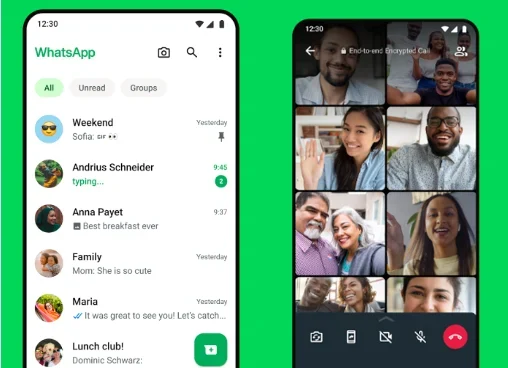
Why It’s Great: With over 2 billion monthly users, WhatsApp is the world’s most popular messaging app. It adopted the Signal Protocol in 2016, ensuring all chats and calls are end-to-end encrypted by default.
Features:
- E2EE for messages, voice/video calls, and group chats.
- Two-step verification for added security.
- Encrypted backups (optional).
- Cross-platform support (Android, iOS, Windows, macOS, web).
- Features like broadcasts, location sharing, and file transfers.
Why Choose WhatsApp? Its massive user base means you’re likely to find your contacts already using it. However, WhatsApp is owned by Meta, which raises concerns about metadata collection (e.g., phone numbers, IP addresses). While messages are secure, users wary of Meta’s data practices may hesitate.
Best For: Users who want a widely-used app with strong encryption but are less concerned about metadata.
3. Threema: Privacy-First Messaging from Switzerland
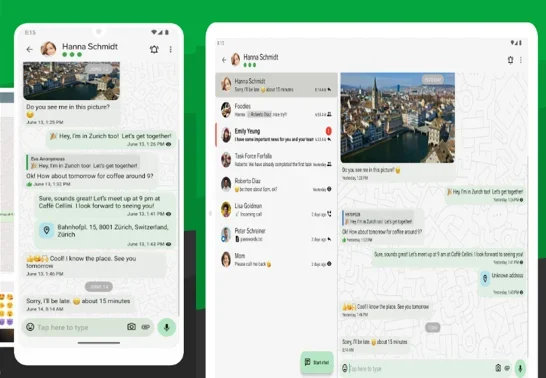
Why It’s Great: Threema, based in Switzerland, is a paid app that prioritizes privacy with E2EE and minimal data collection. Its “privacy by design” approach makes it a favorite for security-conscious users.
Features:
- E2EE for texts, voice calls, video calls, and group chats.
- No phone number or email required for signup—complete anonymity.
- Open-source code for transparency.
- Messages are deleted from servers once delivered.
- Available on Android, iOS, Linux, macOS, Windows, and web.
Why Choose Threema? Threema’s Swiss jurisdiction benefits from strong privacy laws, and its lack of PII (personally identifiable information) requirements ensures anonymity. The downside? It’s not free, requiring a one-time fee.
Best For: Users seeking anonymity and robust privacy without reliance on free apps.
4. Session: Decentralized and Anonymous Messaging
Why It’s Great: Session takes privacy to the next level with a decentralized network and no requirement for a phone number or email. It uses E2EE and onion routing to keep your communications anonymous.

Features:
- E2EE for messages, group chats (up to 100 participants), and calls.
- Decentralized network—no central server to hack.
- No personal information required for signup.
- Disappearing messages and screenshot disabling by default.
- Open-source and available on Android, iOS, and desktop.
Why Choose Session? Session’s decentralized structure eliminates single points of failure, making it ideal for users in high-risk environments. However, its calling features are still in beta, so it’s best for text-based communication.
Best For: Activists, journalists, or anyone needing anonymous, secure messaging.
5. Briar: Offline Privacy for High-Risk Users
Why It’s Great: Briar is designed for activists and journalists in authoritarian regimes. It uses E2EE and syncs messages directly between devices via peer-to-peer networks, bypassing central servers.

Features:
- E2EE for messages and group chats.
- Syncs via Bluetooth, Wi-Fi, or Tor if the internet is unavailable.
- No central server—messages are stored locally.
- Disables screenshots and screen recording by default.
- Open-source and Android-only (for now).
Why Choose Briar? Briar’s ability to function without internet access makes it unique. It’s ideal for users in unstable regions, but its Android-only availability and lack of video call support may limit its appeal.
Best For: Users in high-risk environments needing offline communication.
6. Wire: Secure Collaboration for Teams
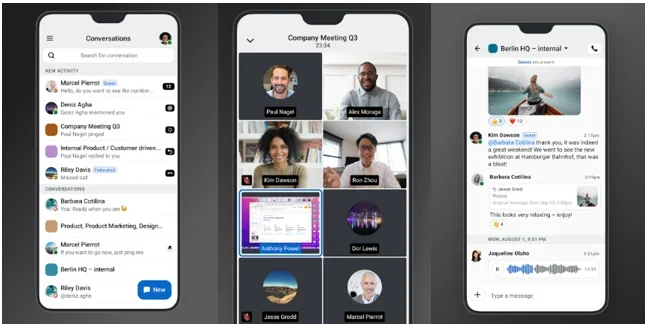
Why It’s Great: Wire, also based in Switzerland, is tailored for secure team collaboration but works well for personal use. It uses E2EE by default and is trusted by organizations like the German government.
Features:
- E2EE for messaging, voice/video calls, and file sharing.
- Open-source code, audited for security.
- No unnecessary data collection.
- Supports deployment on private servers for extra control.
- Available on Android, iOS, Linux, macOS, Windows, and web.
Why Choose Wire? Wire’s focus on corporate security makes it robust, and its open-source nature adds transparency. However, it may feel less intuitive for casual users compared to apps like Signal.
Best For: Teams and professionals needing secure group communication.
7. iMessage: Apple’s Built-In Secure Messaging
Why It’s Great: Apple’s iMessage offers E2EE for messages, FaceTime calls, and group chats, making it a convenient choice for iOS and macOS users. However, its privacy depends on your settings.

Features:
- E2EE for messages and FaceTime calls.
- Cross-platform support within Apple’s ecosystem (iOS, macOS).
- Seamless integration with SMS (though SMS isn’t encrypted).
- Optional encrypted iCloud backups.
Why Choose iMessage? iMessage is user-friendly and built into Apple devices, but iCloud backups are not E2EE by default, which could expose data if hacked. Disabling iCloud backups or enabling encryption is recommended.
Best For: Apple users who value convenience but are mindful of backup settings.
8. Google Messages: RCS with E2EE for Android
Why It’s Great: Google Messages supports E2EE for RCS (Rich Communication Services) chats, offering a secure alternative to traditional SMS for Android users.

Features:
- E2EE for RCS chats (one-to-one and group) when all participants use Google Messages.
- Verification codes to confirm encryption.
- Cross-device syncing via RCS.
- Available on Android and web.
Why Choose Google Messages? It’s a default app on many Android devices, making it accessible. However, E2EE only works for RCS chats, and both parties must have the latest version with RCS enabled. SMS messages remain unencrypted.
Best For: Android users seeking a secure alternative to SMS.
9. 1Password: Secure Password Management
Why It’s Great: 1Password is a password manager that uses E2EE to protect your login credentials, both locally and during cloud syncing. Your master password is known only to you.

Features:
- E2EE for passwords, notes, and sensitive data.
- Cross-platform support (Android, iOS, Windows, macOS, Linux, Chrome OS).
- Secure sharing and vault organization.
- Browser extensions for easy access.
- Subscription-based with a free trial.
Why Choose 1Password? Its robust E2EE and user-friendly interface make it ideal for managing passwords securely. However, it’s not free, with plans starting at $2.99/month.
Best For: Users needing a secure, cross-platform password manager.
10. Skiff: Encrypted Productivity Suite
Why It’s Great: Skiff is a privacy-focused alternative to Google Docs, offering E2EE for documents, file storage, and collaboration. Its decentralized storage option via IPFS adds an extra layer of security.
Features:
- E2EE for documents, notes, and file storage.
- Decentralized storage via IPFS (optional).
- Collaborative editing with real-time encryption.
- Free tier with 1GB storage; premium plans for more.
- Available on Android, iOS, and web.
Why Choose Skiff? Skiff combines productivity with privacy, making it perfect for secure document collaboration. Its free tier is generous, but advanced features require a subscription.
Best For: Professionals and teams needing secure document management.
What to Look for in an E2EE App
When choosing an app with end-to-end encryption, consider these factors:
- Default E2EE: Ensure encryption is enabled by default, not optional (e.g., Telegram’s Secret Chats are not default).
- Open-Source Code: Apps like Signal and Threema allow public audits, increasing trust.
- Minimal Data Collection: Check if the app collects metadata (e.g., IP addresses, contacts).
- Decentralized Networks: Apps like Session and Briar avoid central servers, reducing hacking risks.
- Cross-Platform Support: Ensure the app works on your devices (mobile, desktop, web).
- Additional Features: Look for disappearing messages, screenshot protection, or anonymous signup.
Apps to Avoid for Maximum Privacy
While many apps claim E2EE, some fall short in practice:
- Telegram: Only “Secret Chats” are E2EE; regular chats are not. It also collects metadata and uses closed-source server code.
- Facebook Messenger: E2EE is not enabled by default and requires manual activation.
- Viber: Offers E2EE but lacks a no-data-collection policy, risking data exposure in hacks.
Tips to Enhance Your Privacy
Using an E2EE app is a great start, but here are additional steps to stay secure:
- Use a VPN: Hide your IP address and location with a trusted VPN like NordVPN.
- Disable Cloud Backups: For apps like iMessage, turn off unencrypted backups or enable encryption.
- Enable Two-Factor Authentication: Add an extra layer of security where available.
- Avoid Public Wi-Fi: Use a VPN or mobile data to prevent interception on unsecured networks.
- Regularly Update Apps: Ensure you have the latest security patches.
Conclusion: Stay Secure in 2025
End-to-end encryption is a powerful tool to protect your digital communications, and the apps on this list—Signal, WhatsApp, Threema, Session, Briar, Wire, iMessage, Google Messages, 1Password, and Skiff—represent the best options in 2025. Whether you’re a casual user, a professional, or someone in a high-risk environment, there’s an E2EE app tailored to your needs.
For maximum privacy, prioritize apps with open-source code, minimal data collection, and decentralized networks. Signal and Threema are top choices for secure messaging, while Skiff and 1Password excel in productivity and password management. Always verify an app’s privacy policy and settings to ensure your data stays truly private.
Disclaimer
The information provided in this blog post about the “Top 10 Apps That Use End-to-End Encryption” is based on the latest official web data available as of June 25, 2025, and is intended for informational purposes only. While we strive to ensure the accuracy and reliability of the content, we cannot guarantee that all details remain current or complete, as app features, privacy policies, and security practices may change over time. Readers are encouraged to verify the encryption standards, privacy policies, and terms of service of any app before using it for sensitive communications or data storage.
The apps listed are not endorsed or sponsored by the author or publisher unless explicitly stated. The inclusion of an app does not constitute a recommendation for all use cases, and users should assess each app’s suitability based on their specific privacy and security needs. We are not responsible for any risks, data breaches, or damages that may arise from using these apps.
Additionally, this post may contain links to external websites for reference. We are not responsible for the content, accuracy, or security of these third-party sites. Always exercise caution when downloading apps or sharing personal information online. For professional advice on cybersecurity or data privacy, consult a qualified expert.
Also Read
Top 5 Phones for PostmarketOS 25.06 Linux Experience!
About the Author