Top 10 Beginner Linux Distros in 2025
Switching to Linux in 2025 can feel like stepping into a vibrant, open-source playground. With over a thousand distributions (distros) out there, the choices can be overwhelming, especially if you’re new to the game. But don’t worry! Linux has evolved to be incredibly beginner-friendly, offering intuitive interfaces, massive community support, and distros tailored for those just dipping their toes into this flexible operating system. Whether you’re escaping the Windows 10 end-of-support deadline in October 2025 or just curious about a free, customizable alternative to macOS or Windows, this blog post will guide you through the top 10 beginner Linux distros for 2025. I’ve scoured the latest official websites and community insights to bring you a detailed list that’s perfect for newcomers. Let’s dive in!
Why Choose Linux in 2025?
Before we jump into the list, let’s talk about why Linux is a fantastic choice for beginners. Linux is open-source, meaning it’s free, customizable, and community-driven. It’s also more secure than Windows, with fewer malware threats, and can breathe new life into older hardware. In 2025, Linux distros are more polished than ever, with sleek interfaces like GNOME, KDE Plasma, and Cinnamon that rival the look and feel of commercial operating systems. Plus, with Microsoft ending support for Windows 10, many users are looking for a reliable, long-term alternative. Linux distros, especially those with Long-Term Support (LTS) releases, offer stability and updates for years—perfect for beginners who want a hassle-free experience.
So, what makes a distro beginner-friendly? Look for a user-friendly interface, strong community support, easy software installation, and compatibility with a wide range of hardware. With that in mind, here are the top 10 Linux distros for beginners in 2025, curated to make your transition smooth and exciting.
1. Ubuntu: The Gold Standard for Beginners
Official Website: ubuntu.com
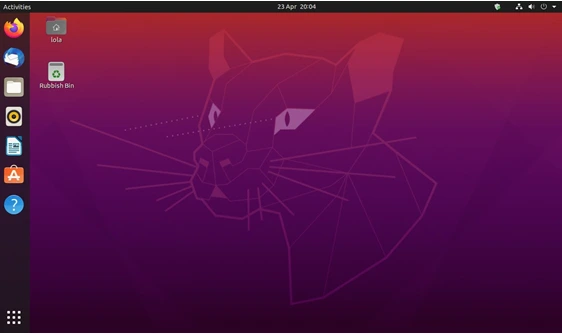
Ubuntu has been the poster child for beginner-friendly Linux distros for years, and in 2025, it’s still leading the pack. Developed by Canonical, Ubuntu boasts a massive community—over 40 million desktop users and 55% of OpenStack clouds run on it. Its user-friendly GNOME desktop environment is sleek, modern, and intuitive, making it a breeze for Windows or macOS users to adapt.
Why It’s Great for Beginners
- Ease of Use: Ubuntu’s GNOME interface is clean and straightforward, with a dock and app menu that feel familiar.
- Software Center: The Ubuntu Software Center makes installing apps (like Firefox, LibreOffice, and GIMP) as easy as clicking a button.
- Community Support: With a huge user base, you’ll find answers to any question on forums, Reddit, or Canonical’s official documentation.
- Long-Term Support: Ubuntu 24.04 LTS offers 12 years of updates, ensuring stability until 2036.
What’s New in 2025?
Ubuntu 25.04 (non-LTS) introduces GNOME 48 and Linux kernel 6.14, with an improved security center for better user control. For beginners, I recommend sticking with Ubuntu 24.04 LTS for its rock-solid stability.
Best For
Newcomers, Windows/macOS switchers, and anyone seeking a polished, all-purpose distro.
2. Linux Mint: The Windows-Like Wonder
Official Website: linuxmint.com

Linux Mint is a fan favorite for beginners, especially those transitioning from Windows. Built on Ubuntu, it offers a familiar interface with its Cinnamon desktop environment, which mimics the Windows taskbar and start menu. In 2025, Linux Mint 22.1 remains a top pick for its simplicity and out-of-the-box functionality.
Why It’s Great for Beginners
- Familiar Interface: Cinnamon feels like Windows, with a taskbar, system tray, and start menu, easing the learning curve.
- Pre-Installed Goodies: Comes with Firefox, LibreOffice, Thunderbird, and multimedia codecs for a seamless experience.
- Stability: Mint’s LTS releases are supported for 5 years, with Mint 22 supported until 2029.
- Lightweight Options: Offers Xfce and MATE flavors for older hardware.
What’s New in 2025?
Mint 22.1 refines the Cinnamon desktop with smoother animations and better memory management. Its Driver Manager simplifies installing proprietary drivers (like NVIDIA), making hardware setup a breeze.
Best For
Windows users, beginners with older PCs, and those who want a polished, stable system.
3. Zorin OS: Sleek and User-Friendly
Official Website: zorin.com

Zorin OS is designed to make Linux accessible to everyone, especially Windows users. Its polished interface and built-in compatibility for Windows apps (via Wine) make it a standout in 2025. Available in free and Pro versions, Zorin OS offers a visually appealing experience with robust performance.
Why It’s Great for Beginners
Windows-Like UI: Zorin’s desktop can be customized to mimic Windows or macOS layouts, reducing the learning curve.
App Compatibility: Pre-installed Wine and PlayOnLinux let you run Microsoft Office and other Windows apps.
Education Focus: Zorin OS Education edition is great for students and schools.
Community Support: Active forums and detailed guides help troubleshoot issues.
What’s New in 2025?
Zorin OS 17 (based on Ubuntu 22.04 LTS) continues to shine, with a planned update in April 2025 promising enhanced security and new desktop layouts. The Pro version includes pre-installed apps and games for a premium experience.
Best For
Windows switchers, students, and users who prioritize aesthetics and ease of use.
4. Pop!_OS: The Gamer and Creator’s Choice
Official Website: pop.system76.com
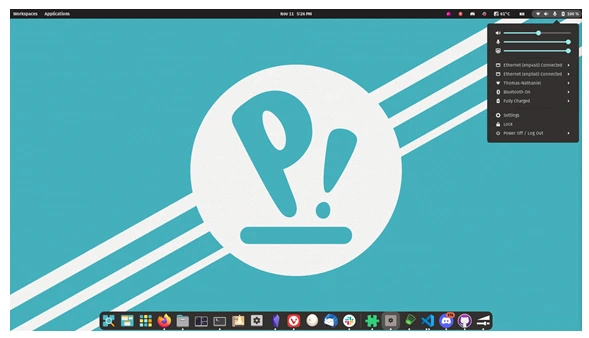
Developed by System76, Pop!_OS is an Ubuntu-based distro that’s perfect for gamers, developers, and creative professionals. Its custom COSMIC desktop (set to stabilize in Q1 2025) offers a tiled window manager for productivity, and its gaming features make it a hit in 2025.
Why It’s Great for Beginners
- Gaming Ready: Pre-installed Steam, Lutris, and NVIDIA driver support make gaming a breeze.
- Hybrid Graphics: Seamless switching between integrated and dedicated GPUs for laptops.
- User-Friendly: The COSMIC desktop is intuitive, with a focus on workflow efficiency.
- Tutorials Galore: System76 provides hundreds of videos and help articles for beginners.
What’s New in 2025?
Pop!_OS 24.04 LTS introduces the COSMIC desktop, built in Rust for speed and customization. It also supports full-disk encryption out of the box, enhancing security.
Best For
Gamers, developers, and users with modern hardware looking for a fast, customizable distro.
5. Elementary OS: The macOS Doppelgänger
Official Website: elementary.io
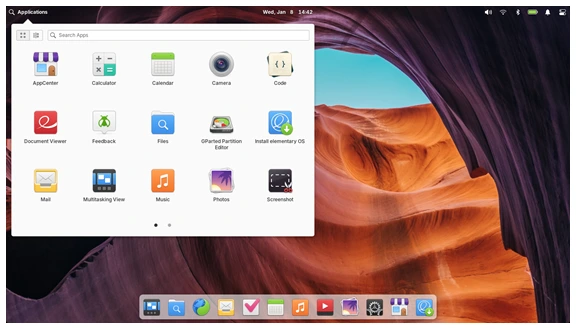
Elementary OS is known for its stunning, macOS-like Pantheon desktop environment. In 2025, it remains a top choice for beginners who want a beautiful, minimalistic system that’s easy to use. Based on Ubuntu, it offers stability and a curated app ecosystem.
Why It’s Great for Beginners
- Gorgeous Design: The Pantheon desktop is sleek, with a dock and animations that feel premium.
- Curated Apps: The AppCenter features polished, native apps like Photos and Music.
- Ubuntu Base: Inherits Ubuntu’s stability and software compatibility.
- Privacy Focus: Minimal bloatware ensures a clean, secure experience.
What’s New in 2025?
Elementary OS 8 (based on Ubuntu 24.04 LTS) is expected in mid-2025, with improved performance and new privacy features. Its consistent design continues to attract macOS users.
Best For
macOS switchers, design enthusiasts, and beginners who want a minimalistic OS.
6. MX Linux: Lightweight and Versatile
Official Website: mxlinux.org

MX Linux is a Debian-based distro that’s lightweight, fast, and beginner-friendly. In 2025, it’s a top choice for users with mid-range or older hardware, thanks to its Xfce desktop and custom tools that simplify system management.
Why It’s Great for Beginners
- Lightweight: Runs smoothly on older PCs with minimal resources.
- MX Tools: Custom tools like MX Snapshot and Package Installer make maintenance easy.
- Stability: Based on Debian Stable, with backported apps for freshness.
- Flatpak Support: Easily install modern apps from Flathub.
What’s New in 2025?
MX Linux 23.3 refines its Xfce desktop and adds new customization options. Its snapshot tool lets you create bootable ISOs of your setup, perfect for backups.
Best For
Users with older hardware, beginners seeking stability, and those who love customization.
7. Fedora: Cutting-Edge Yet Accessible
Official Website: fedoraproject.org
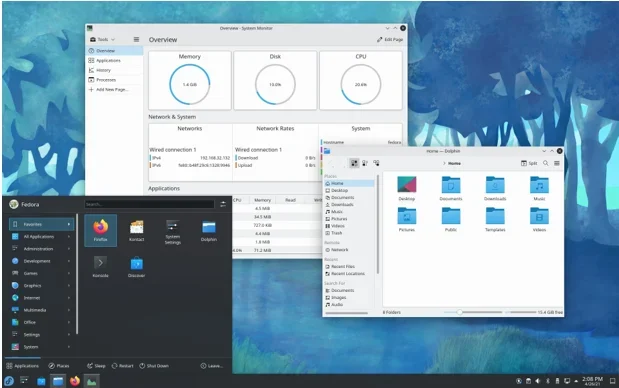
Fedora is known for its cutting-edge technology and ties to Red Hat Enterprise Linux. While it’s developer-friendly, Fedora Workstation’s GNOME desktop is polished and beginner-accessible in 2025, with frequent updates keeping it fresh.
Why It’s Great for Beginners
- Modern Interface: GNOME 48 is sleek and user-friendly, with a focus on productivity.
- Software Selection: Comes with LibreOffice, Firefox, and developer tools pre-installed.
- Community Support: Active forums and detailed documentation help new users.
- Security Focus: Regular updates and SELinux enhance security.
What’s New in 2025?
Fedora 41 introduces the latest open-source software and improved memory management, making it a great choice for modern hardware.
Best For
Beginners who want a modern, secure system and don’t mind frequent updates.
8. Manjaro: Arch Made Easy
Official Website: manjaro.org
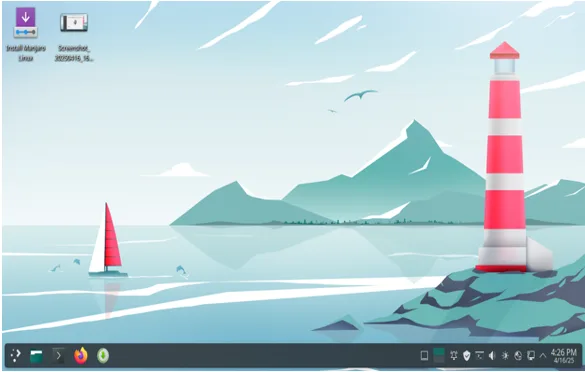
Manjaro takes the power of Arch Linux and makes it beginner-friendly. With its rolling-release model, you get the latest software without major upgrades. In 2025, Manjaro’s Xfce, KDE, and GNOME flavors cater to diverse preferences.
Why It’s Great for Beginners
- User-Friendly Setup: Simplifies Arch’s complex installation process.
- Package Manager: Pamac makes installing software a breeze.
- Hardware Detection: Automatically configures drivers for easy setup.
- Community Editions: Choose from Xfce, KDE, or GNOME desktops.
What’s New in 2025?
Manjaro 24.1 enhances its rolling-release model with better hardware support and a refined Pamac interface.
Best For
Beginners who want a taste of Arch’s power without the steep learning curve.
9. Linux Lite: The Lightweight Champion
Official Website: linuxliteos.com
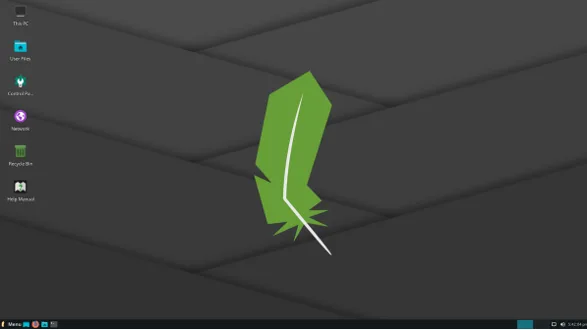
Linux Lite is designed for Windows users transitioning to Linux, especially on older hardware. Its Xfce desktop is lightweight yet feature-rich, making it a top pick for beginners in 2025.
Why It’s Great for Beginners
- Windows-Like UI: The Xfce desktop mimics Windows for familiarity.
- Low Resource Use: Runs smoothly on low-spec PCs.
- Lite Software: A curated app selection includes VLC, GIMP, and LibreOffice.
- Documentation: Extensive guides help new users get started.
What’s New in 2025?
Linux Lite 7.0 (based on Ubuntu 24.04 LTS) improves performance and adds new customization options for the Xfce desktop.
Best For
Windows switchers and users with older hardware looking for simplicity.
10. Nobara Linux: The Gamer’s Delight
Official Website: nobaraproject.org
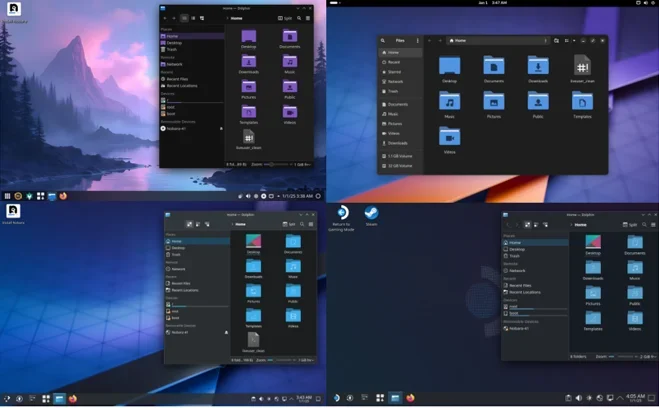
Nobara Linux, a Fedora-based distro by Glorious Eggroll (creator of Proton-GE), is tailored for gamers and content creators. In 2025, it’s a beginner-friendly option for those who want a gaming-ready Linux experience.
Why It’s Great for Beginners
- Gaming Optimized: Pre-installed Steam, Proton-QT, and MangoHUD for seamless gaming.
- Driver Support: Automatic NVIDIA and AMD driver installation.
- Creator Tools: Includes OnlyOffice and OBS Studio for content creation.
- Fedora Base: Inherits Fedora’s stability and modern features.
What’s New in 2025?
Nobara 41 updates its gaming patches and introduces a more streamlined setup process, making it easier for beginners to dive into Linux gaming.
Best For
Gamers, content creators, and beginners with modern hardware.
How to Choose the Right Linux Distro for You
With so many great options, how do you pick the perfect distro? Here are some tips to guide your decision:
- Consider Your Hardware: For older PCs, go for lightweight distros like MX Linux or Linux Lite. Modern systems can handle Ubuntu, Pop!_OS, or Fedora.
- Think About Your Use Case: Gamers should lean toward Pop!_OS or Nobara. Windows users might prefer Linux Mint or Zorin OS, while macOS fans will love Elementary OS.
- Desktop Environment: GNOME (Ubuntu, Fedora) is modern and sleek, Cinnamon (Linux Mint) is Windows-like, Xfce (MX Linux, Linux Lite) is lightweight, and Pantheon (Elementary OS) mimics macOS.
- Try Before You Commit: Most distros offer live USB modes, letting you test them without installing.
Getting Started with Linux in 2025
Ready to jump in? Here’s how to start your Linux journey:
- Download a Distro: Visit the official website of your chosen distro and download the ISO file.
- Create a Bootable USB: Use tools like Rufus or Balena Etcher to create a live USB.
- Test in Live Mode: Boot from the USB to try the distro without installing.
- Install: Follow the distro’s installer (most are beginner-friendly with guided steps).
- Join the Community: Engage with forums, Reddit, or official documentation for support.
Final Thoughts
In 2025, Linux is more accessible than ever, with distros like Ubuntu, Linux Mint, and Zorin OS leading the charge for beginners. Whether you’re after stability, gaming prowess, or a macOS-like experience, there’s a distro for you. My personal favorite for newcomers is Linux Mint for its Windows-like familiarity and rock-solid reliability. But don’t take my word for it—try a few in live mode and find your perfect fit!
Have you tried any of these distros? What’s your favorite Linux experience? Share your thoughts in the comments below, and let’s keep the Linux love alive in 2025!
Disclaimer
The information provided in this blog post, “Top 10 Beginner Linux Distros in 2025,” is for general informational purposes only. While we have made every effort to ensure the accuracy and relevance of the content by referencing official websites and reliable sources, the rapidly evolving nature of Linux distributions means that features, updates, or system requirements may change after publication.
We are not affiliated with any of the Linux distributions mentioned, including Ubuntu, Linux Mint, Zorin OS, Pop!_OS, Elementary OS, MX Linux, Fedora, Manjaro, Linux Lite, or Nobara Linux. The opinions expressed are based on research and personal evaluation and do not constitute an endorsement or guarantee of performance.
Before installing or using any Linux distribution, we recommend verifying system compatibility, backing up your data, and consulting official documentation or community forums for the most up-to-date guidance. Switching operating systems involves risks, including potential data loss or hardware compatibility issues. Proceed at your own discretion and ensure you understand the installation process.
For specific pricing or subscription details related to premium versions (e.g., Zorin OS Pro), please refer to the official websites, such as zorinos.com. We are not responsible for any inaccuracies in third-party information or changes to subscription plans.
If you have questions or need personalized advice, consult with a qualified IT professional. Happy exploring, and enjoy your Linux journey in 2025!
Also Read
Top 5 Phones for PostmarketOS 25.06 Linux Experience!
About the Author