Top 10 Gaming Operating Systems to Elevate Your Play in 2025
Gaming in 2025 is more immersive, accessible, and diverse than ever before. Whether you’re a casual player enjoying mobile games or a hardcore PC gamer chasing high frame rates, the operating system (OS) powering your device is the backbone of your gaming experience. A great gaming OS ensures smooth performance, broad game compatibility, and features tailored to enhance gameplay. With technology evolving rapidly, the options for gaming OSes have expanded, from Windows’ dominance to Linux’s rising star and mobile platforms pushing boundaries with cloud gaming and AI enhancements.
In this blog post, we’ll dive into the top 10 gaming operating systems for 2025, based on the latest data and trends. We’ll explore their strengths, weaknesses, and what makes them stand out for gamers, whether you’re on a PC, console, or mobile device. Let’s level up your gaming setup with the best OSes to dominate in 2025!
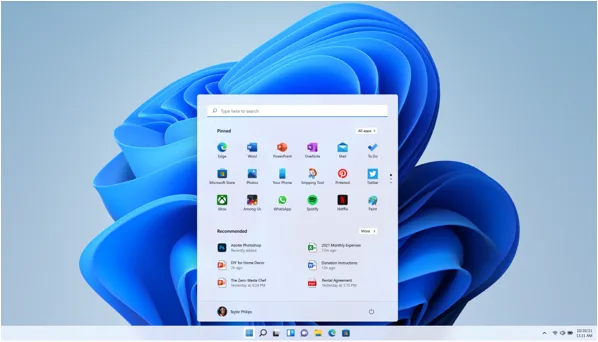
1. Windows 11: The Undisputed Champion for PC Gaming
Windows 11 has solidified its position as the go-to OS for PC gaming in 2025, overtaking Windows 10 in popularity among Steam users, with a 50.8% market share as of August 2024. Its gaming-focused features and widespread compatibility make it a powerhouse for gamers.
Why It’s Great for Gaming
- DirectX 12 Ultimate: Offers cutting-edge graphics capabilities, including ray tracing and variable rate shading, for stunning visuals and performance.
- Auto HDR: Automatically enhances older games with high dynamic range for vibrant colors.
- Game Mode: Prioritizes system resources for gaming, reducing lag and boosting frame rates.
- Broad Compatibility: Supports virtually every PC game, from AAA titles to indie gems, and integrates seamlessly with platforms like Steam, Epic Games Store, and Xbox Game Pass.
Drawbacks
- Hardware Requirements: Requires TPM 2.0 and modern CPUs, which may exclude older PCs.
- Bloatware: Some gamers find it less streamlined compared to lightweight alternatives.
- Updates: Occasional updates can disrupt gameplay or cause compatibility issues.
Why Choose Windows 11?
If you’re chasing the latest AAA titles or want a plug-and-play experience with minimal setup, Windows 11 is the gold standard. Its robust ecosystem and optimization for modern GPUs like Nvidia’s RTX 50-series and AMD’s Radeon RX 9000-series make it ideal for high-end gaming rigs.
2. Windows 10: The Reliable Veteran
Despite Windows 11’s rise, Windows 10 remains a favorite, powering 48.7% of Steam users’ PCs in August 2024. Its stability and familiarity keep it relevant, especially for gamers hesitant to upgrade due to hardware limitations.

Why It’s Great for Gaming
- Massive Game Library: Like Windows 11, it supports nearly all PC games and major platforms.
- DirectX 12 Support: Delivers excellent performance for modern games.
- Stability: Fewer compatibility issues compared to newer Windows versions.
- Lower Hardware Requirements: Runs on older systems, making it accessible for budget gamers.
Drawbacks
- End of Support Looming: Official support ends in October 2025, though extended security updates are available for a fee.
- Missing New Features: Lacks DirectX 12 Ultimate and Auto HDR, which are exclusive to Windows 11.
- Bloatware: Can feel heavy on low-end systems without optimization.
Why Choose Windows 10?
Windows 10 is perfect for gamers with older hardware or those who prefer a tried-and-true OS. It’s a safe bet for reliable performance, but consider upgrading to Windows 11 before support ends to stay future-proof.
3. SteamOS 3 (Holo): The Console-Like Linux Experience
SteamOS 3, developed by Valve, powers the Steam Deck and is available for desktop PCs via the HoloISO project. It’s a Linux-based OS tailored for gaming, gaining traction in 2025 for its console-like simplicity.

Why It’s Great for Gaming
- Proton Compatibility Layer: Enables thousands of Windows games to run on Linux with minimal performance loss.
- Optimized for Steam: Boots directly into Steam’s Big Picture mode for a seamless, console-like experience.
- Low Overhead: Lightweight design maximizes performance on modest hardware.
- Free and Open-Source: No licensing fees, and it’s highly customizable.
Drawbacks
- Limited Game Support: Some AAA titles with kernel-level anti-cheat (e.g., Valorant) may not work.
- Technical Knowledge Required: Customizing or troubleshooting can be daunting for beginners.
- Hardware Compatibility: Best suited for Steam Deck or specific PC setups.
Why Choose SteamOS?
SteamOS is ideal for Steam Deck users or PC gamers who want a streamlined, console-like experience. It’s a fantastic choice for portable gaming or budget PCs, but it’s not a full Windows replacement for AAA gaming.
4. Bazzite: The Linux Gaming Powerhouse
Bazzite, a Fedora-based Linux distribution, has emerged as a top choice for gaming in 2025, especially for handheld devices and PCs. It’s designed to replicate SteamOS’s gaming prowess while offering broader hardware compatibility.

Why It’s Great for Gaming
- Pre-Installed Steam: Supports Steam Gaming Mode and games from multiple platforms (Epic, GOG, etc.).
- Wide Hardware Support: Compatible with Steam Deck, ASUS ROG Ally, Lenovo Legion Go, and more.
- Performance Optimization: Includes tools like GameMode and AMD FSR for enhanced frame rates.
- Free and Open-Source: No cost and fully customizable.
Drawbacks
- Learning Curve: Requires some Linux knowledge for advanced tweaks.
- Game Compatibility: Proton works well but isn’t perfect for all Windows games.
- Not a SteamOS Clone: Differences from SteamOS may confuse users expecting identical functionality.
Why Choose Bazzite?
Bazzite is perfect for Linux enthusiasts or handheld gamers looking for a free, powerful OS that rivals SteamOS. It’s a great alternative for those who want flexibility without sacrificing performance.
5. Pop!_OS: The Linux All-Rounder
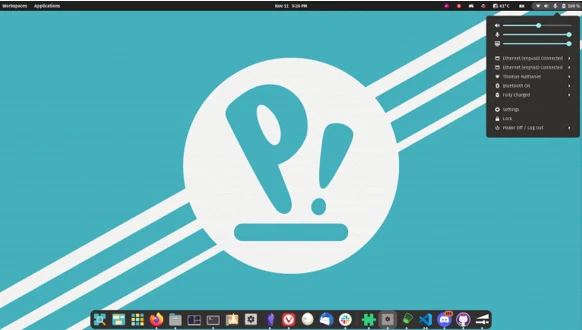
Pop!_OS, developed by System76, is a Ubuntu-based Linux distro with a gaming-optimized ISO for Nvidia GPUs. It’s gaining popularity in 2025 for its balance of performance and ease of use.
Why It’s Great for Gaming
- Nvidia Optimization: Pre-installed Nvidia drivers ensure smooth performance on Nvidia GPUs.
- Pop Shop: Easy access to gaming platforms like Steam and Lutris.
- Customizable Desktop: Uses a modified GNOME environment for a sleek, user-friendly interface.
- Free and Open-Source: No cost and highly customizable.
Drawbacks
- No Pre-Installed Gaming Platforms: Requires manual installation of Steam or other clients.
- Limited Anti-Cheat Support: Some multiplayer games may not work due to anti-cheat restrictions.
- System76 Hardware Bias: Best performance on System76 machines, though it works on most PCs.
Why Choose Pop!_OS?
Pop!_OS is a great pick for gamers who want a Linux distro that’s easy to set up and optimized for Nvidia hardware. It’s ideal for those dipping their toes into Linux gaming without needing extensive technical skills.
6. Android: The Mobile Gaming Giant
Android dominates mobile gaming in 2025, holding a 52% market share for tablets and a significant chunk of smartphones. Its flexibility and massive game library make it a top choice for mobile gamers.

Why It’s Great for Gaming
- Huge Game Library: Over 3 million apps on Google Play, including titles like Genshin Impact and Call of Duty Mobile.
- Cloud Gaming Support: Optimized for 5G and services like Xbox Cloud Gaming and Nvidia GeForce Now.
- AI Enhancements: Dynamically optimizes frame rates and battery life for gaming.
- Cross-Platform Play: Seamless integration across devices for multiplayer games.
Drawbacks
- Performance Variability: Dependent on device hardware, with budget devices lagging behind flagships.
- Fragmentation: Inconsistent updates across devices can affect compatibility.
- Security Concerns: More vulnerable to malware compared to iOS.
Why Choose Android?
Android is the go-to for casual and competitive mobile gamers, offering affordability and a vast game selection. Pair it with a flagship device for the best experience, especially for cloud and AR/VR gaming.
7. iOS: Premium Mobile Gaming
iOS remains a powerhouse for mobile gaming in 2025, thanks to Apple’s focus on performance and integration. Its App Store hosts over 2 million apps, with a strong emphasis on high-quality games.

Why It’s Great for Gaming
- Optimized Performance: Apple’s A-series chips deliver console-quality graphics and smooth gameplay.
- ARKit for AR/VR: Supports immersive augmented reality games.
- Game Center: Enhances multiplayer and social gaming experiences.
- Security and Stability: Robust security reduces malware risks, ensuring a safe gaming environment.
Drawbacks
- Expensive Hardware: Requires premium Apple devices for the best experience.
- Closed Ecosystem: Less customizable than Android.
- Limited Cloud Gaming: Fewer cloud gaming options compared to Android.
Why Choose iOS?
iOS is ideal for competitive gamers who want top-tier performance and a polished experience. It’s perfect for Apple ecosystem users who value security and seamless integration across devices.
8. Regata OS: The OpenSUSE Gaming Gem
Regata OS, a Brazilian Linux distro based on openSUSE, is designed for gaming and multimedia. It’s a lesser-known but powerful option for 2025 gamers.

Why It’s Great for Gaming
- GameMode and FSR: Built-in tools boost frame rates and performance.
- Multi-Platform Support: Integrates with Steam, Epic, Origin, and more via Regata OS Game Access.
- AMD and Nvidia Support: Optimized for both GPU brands and hybrid graphics setups.
- Free and Open-Source: No cost and highly customizable.
Drawbacks
- Niche Community: Smaller user base means less community support.
- Linux Limitations: Anti-cheat issues persist for some games.
- Learning Curve: Not as beginner-friendly as Ubuntu-based distros.
Why Choose Regata OS?
Regata OS is a solid choice for Linux gamers who want a pre-optimized OS with strong GPU support. It’s great for those comfortable with Linux and seeking high performance on a budget.
9. Zorin OS Gaming: The Beginner-Friendly Linux Option
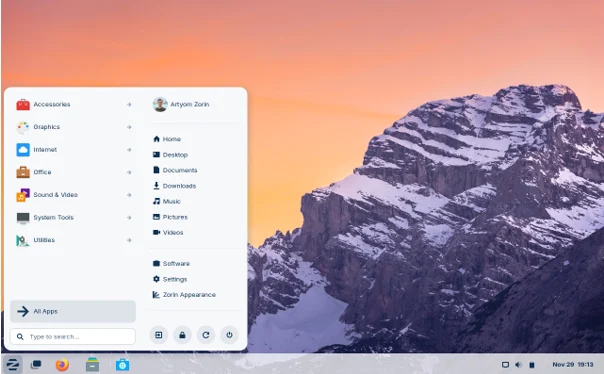
Zorin OS, built on Ubuntu, offers a gaming-focused version that’s perfect for Linux newcomers. Its Windows-like interface and ease of use make it a standout in 2025.
Why It’s Great for Gaming
- User-Friendly Interface: Mimics Windows for easy transition.
- Proton Support: Runs many Windows games via Steam’s compatibility layer.
- Customizable: Offers a polished desktop environment for gaming and productivity.
- Free and Open-Source: No licensing fees and community-driven updates.
Drawbacks
- Game Compatibility: Not all Windows games work flawlessly.
- Performance: Slightly heavier than other Linux distros due to its polished UI.
- Community Size: Smaller than Ubuntu or Pop!_OS, limiting support resources.
Why Choose Zorin OS?
Zorin OS is perfect for gamers new to Linux who want a familiar interface and decent gaming performance. It’s a great stepping stone before diving into more advanced Linux distros.
10. ChimeraOS: The Console Emulator
ChimeraOS is a Linux-based OS designed for console-like gaming on PCs. It runs in Steam Big Picture mode and excels at emulating retro games while supporting modern titles.

Why It’s Great for Gaming
- Console-Like Experience: Boots directly into Steam Big Picture for a seamless gaming setup.
- Retro Gaming: Optimized for emulating classic console games.
- Proton Support: Runs many Windows games via Steam.
- Free and Open-Source: No cost and customizable for enthusiasts.
Drawbacks
- Limited Scope: Primarily designed for Steam games and retro emulation.
- Anti-Cheat Issues: Some modern multiplayer games may not work.
- Technical Setup: Requires some know-how for non-standard hardware.
Why Choose ChimeraOS?
ChimeraOS is ideal for retro gaming fans or those who want a console-like PC experience. It’s perfect for living room setups or budget PCs dedicated to gaming.
How to Choose the Right Gaming OS for You
Selecting the best gaming OS depends on your hardware, gaming preferences, and technical comfort level. Here are some tips to guide your decision:
- For AAA Titles and Broad Compatibility: Choose Windows 11 or Windows 10 for the largest game library and plug-and-play experience.
- For Budget or Handheld Gaming: Linux distros like SteamOS, Bazzite, or ChimeraOS offer free, lightweight options with strong performance.
- For Mobile Gaming: Android suits casual gamers with diverse devices, while iOS is better for premium performance on Apple hardware.
- For Linux Enthusiasts: Pop!_OS, Regata OS, or Zorin OS balance gaming performance with user-friendly features.
- For Retro Gaming: ChimeraOS or Bazzite excel at emulation and console-like experiences.
Tips to Optimize Your Gaming OS
No matter which OS you choose, optimizing it can elevate your gaming experience. Here are some universal tips:
- Update Drivers: Ensure GPU, CPU, and peripheral drivers are up to date for maximum performance.
- Disable Background Apps: Close unnecessary programs to free up RAM and CPU resources.
- Enable Game Mode: Available on Windows and some Linux distros to prioritize gaming performance.
- Adjust Power Settings: Set your PC to high-performance mode to avoid throttling.
- Monitor Refresh Rates: Use high refresh rate monitors and enable variable refresh rate (VRR) for smoother visuals.
The Future of Gaming OSes in 2025
The gaming OS landscape in 2025 is vibrant and diverse. Windows 11 leads for PC gamers, but Linux distros are closing the gap with tools like Proton and GameMode. Mobile OSes like Android and iOS are pushing the boundaries of cloud gaming, AR/VR, and AI optimization, making high-end gaming accessible on smartphones and tablets. As 5G networks expand and hardware becomes more powerful, expect even more innovation in gaming OSes, from seamless cross-platform play to enhanced security and performance.
Conclusion
Choosing the right gaming OS in 2025 can make or break your gaming experience. Windows 11 and 10 dominate for their compatibility and performance, while Linux distros like SteamOS, Bazzite, and Pop!_OS offer free, customizable alternatives. Mobile gamers can rely on Android’s versatility or iOS’s premium power. Whether you’re building a high-end gaming rig, setting up a retro console, or gaming on the go, there’s an OS on this list to elevate your play.
Which OS will you choose to dominate in 2025? Let us know in the comments, and happy gaming!
Disclaimer
The information provided in this blog post is for general informational purposes only and is based on the latest available data as of July 2025. While we strive to ensure accuracy, the gaming operating systems, their features, and performance may vary depending on hardware, software updates, and individual use cases. We do not guarantee the compatibility, performance, or availability of any specific operating system or game mentioned.
Readers are encouraged to conduct their own research and verify compatibility with their devices before making decisions based on this content. The author and publisher are not responsible for any issues, damages, or losses arising from the use of the information provided. Always consult official documentation or support channels for the most up-to-date and accurate information.
Also Read
Why MorphOS is the Ultimate Lightweight OS for Retro Tech Lovers!
About the Author