Top Linux Distros Keeping 32-Bit Alive in 2025
Reviving Old Hardware with Modern Solutions
In an era dominated by 64-bit systems, the Top Linux Distros Keeping 32-Bit Alive in 2025 stand out as lifelines for users with vintage hardware. If you’ve got an old laptop or desktop with a 32-bit processor, you might think it’s destined for the scrap heap. But hold on—Linux, with its open-source ethos and knack for supporting legacy systems, has your back. Despite major distributions like Ubuntu and Fedora dropping 32-bit support, several projects continue to breathe new life into i686 architecture machines. Whether it’s a Pentium 4, an early Atom, or a dusty netbook, these distros ensure your hardware stays functional, fast, and secure in 2025.
Let’s dive into the best options, explore why 32-bit support matters, and uncover how these distros keep the spirit of open-source alive.
Why 32-Bit Support Still Matters in 2025
Before we get to the list, let’s talk about why 32-bit systems are still relevant. Many computers manufactured before 2007 rely on 32-bit CPUs (think i386, i586, or i686). These machines—often netbooks, old laptops, or embedded systems—can’t run 64-bit operating systems. While modern hardware has largely shifted to 64-bit, millions of users worldwide still rely on older systems for basic tasks like web browsing, document editing, or running lightweight apps. Throwing out perfectly functional hardware is wasteful, and Linux distros catering to 32-bit systems help reduce e-waste while keeping these machines productive.
The challenge? Maintaining 32-bit support requires extra effort from developers, as the user base shrinks and 64-bit dominates. Yet, the Linux community’s commitment to accessibility ensures that several distros remain active, offering lightweight, efficient, and up-to-date solutions for 32-bit hardware. Below, we’ll explore the Top Linux Distros Keeping 32-Bit Alive in 2025, based on the latest available data, community activity, and their suitability for older systems.
1. Debian GNU/Linux: The Rock-Solid Foundation
Debian is a cornerstone of the Linux world, and in 2025, it remains one of the Top Linux Distros Keeping 32-Bit Alive. Known for its stability and massive software repository, Debian continues to support 32-bit x86 (i686) architectures, making it a go-to choice for older hardware. The latest release, Debian 12 “Bookworm,” includes 32-bit installation images and packages, ensuring compatibility with vintage systems like Pentium 4 or early Celeron CPUs.

Why Choose Debian?
- Stability: Debian’s focus on rock-solid performance makes it ideal for both desktops and servers.
- Software Availability: With over 51,000 packages in its repositories, you’ll find everything from modern browsers like Firefox to development tools.
- Community Support: A massive community means plenty of documentation and forums for troubleshooting.
- Lightweight Options: Debian supports lightweight desktop environments like XFCE and LXQt, perfect for low-RAM systems (512MB minimum, 2GB recommended).
Best For
Users who want a stable, versatile system with access to a vast software ecosystem. It’s great for both beginners and advanced users, though the net installer can be slightly complex for newbies.
System Requirements
- RAM: 512MB (minimum), 2GB (recommended)
- CPU: 1GHz processor (i686 or better)
- Storage: ~10GB
Pro Tip: Pair Debian with XFCE for a lightweight desktop that runs smoothly on older hardware.
2. MX Linux: User-Friendly and Lightweight
MX Linux tops the charts on DistroWatch for good reason—it’s a systemd-free, Debian-based distro that balances ease of use with performance. In 2025, MX Linux continues to offer 32-bit support, making it one of the Top Linux Distros Keeping 32-Bit Alive. Built on Debian’s stable branch, it includes custom tools and native applications for a polished experience on older systems.

Why Choose MX Linux?
- Ease of Use: Its graphical installer and intuitive XFCE desktop make it accessible for Windows users transitioning to Linux.
- Performance: Carefully curated to run efficiently on low-end hardware, MX Linux supports systems with as little as 512MB of RAM.
- Desktop Options: Choose between XFCE, KDE Plasma, or Fluxbox for varying levels of resource usage.
- Tools: MX Linux’s unique tools, like MX Snapshot and MX Tweak, simplify system management.
Best For
Users seeking a beginner-friendly distro with modern features and excellent performance on older hardware. Its familiarity to Windows users makes it a top pick for those new to Linux.
System Requirements
- RAM: 512MB (minimum), 1GB (recommended)
- CPU: i686 processor
- Storage: 8GB
Pro Tip: MX Linux’s antiX components make it especially lightweight, ideal for netbooks or systems with 1GB of RAM or less.
3. Linux Mint Debian Edition (LMDE): Familiar and Polished
Linux Mint is a household name for its Windows-like interface, but its mainline version dropped 32-bit support with Ubuntu. Enter Linux Mint Debian Edition (LMDE), a Debian-based alternative that keeps 32-bit alive in 2025. LMDE combines Mint’s user-friendly Cinnamon desktop with Debian’s robust foundation, making it one of the Top Linux Distros Keeping 32-Bit Alive.

Why Choose LMDE?
- Familiar Interface: The Cinnamon desktop mimics Windows with a taskbar and start menu, easing the transition for new users.
- Software Manager: A user-friendly app store simplifies installing software.
- Debian Base: Access to Debian’s repositories ensures a wide range of 32-bit compatible packages.
- Stability: LMDE is built for reliability, with updates that maintain system integrity.
Best For
Beginners and Windows users looking for a polished, familiar experience on 32-bit hardware.
System Requirements
- RAM: 1GB (minimum), 2GB (recommended)
- CPU: i686 processor
- Storage: 15GB
Pro Tip: Always download the 32-bit ISO from the Linux Mint website to ensure compatibility.
4. AntiX: Feather-Light and Flexible
AntiX is a Debian-based, systemd-free distro designed for speed and efficiency on low-end hardware. In 2025, it remains a standout among the Top Linux Distros Keeping 32-Bit Alive, particularly for systems with minimal resources. With its IceWM window manager, AntiX is blazing fast, even on machines with 512MB of RAM.

Why Choose AntiX?
- Ultra-Lightweight: Runs smoothly on systems as old as 15 years with minimal RAM.
- Live USB/CD: Can be used as a rescue system or run entirely from removable media.
- Customization: Offers multiple flavors (Full, Base, Core, Net) to suit different needs.
- Community-Driven: Active development ensures ongoing support for 32-bit systems.
Best For
Experienced users or those with extremely old hardware (e.g., Pentium III or 512MB RAM systems) who need a fast, minimalistic OS.
System Requirements
- RAM: 256MB (minimum), 512MB (recommended)
- CPU: i686 processor
- Storage: 2.8GB (Full), 1GB (Core)
Pro Tip: Try the “Base” flavor for a balance of lightweight performance and essential apps.
5. Puppy Linux: Tiny but Mighty
Puppy Linux is a legend in the lightweight Linux world, and in 2025, it’s still one of the Top Linux Distros Keeping 32-Bit Alive. Unlike other distros, Puppy isn’t based on a single parent but builds from packages of Ubuntu or Slackware. Its 300MB footprint and ability to run entirely in RAM make it a top choice for ancient hardware.

Why Choose Puppy Linux?
- Tiny Footprint: Occupies just 300MB of storage, perfect for low-disk systems.
- RAM-Based: Boots into RAM for lightning-fast performance.
- Portable: Runs from USB or CD without installation.
- Grandpa-Friendly: Simple interface for basic tasks like browsing or document editing.
Best For
Users with very old systems (e.g., 256MB RAM) or those who want a portable, no-install OS.
System Requirements
- RAM: 256MB (minimum), 512MB (recommended)
- CPU: i686 processor
- Storage: 300MB
Pro Tip: Opt for the Ubuntu-based version for easier access to apt-get packages.
6. Q4OS: Windows-Like with Unique Features
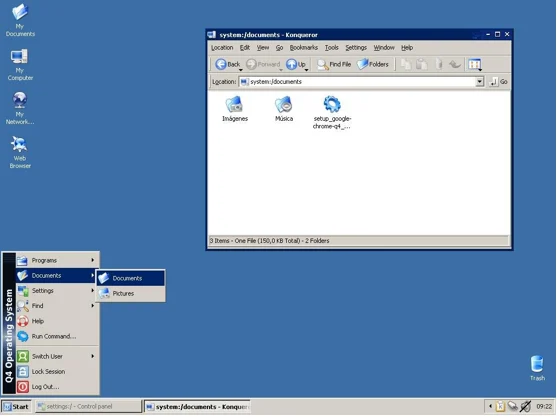
Q4OS is a Debian-based distro that stands out for its Windows-like Trinity Desktop and unique Windows installer, allowing you to run it alongside Windows. In 2025, it’s among the Top Linux Distros Keeping 32-Bit Alive, offering a fast and familiar experience for 32-bit systems.
Why Choose Q4OS?
- Windows Integration: Install Q4OS inside Windows without a virtual machine.
- Trinity Desktop: Lightweight and reminiscent of Windows XP, ideal for older systems.
- Speed: Optimized for low-resource hardware with minimal RAM usage.
- Software Center: Easy access to third-party apps and Debian repositories.
Best For
Users transitioning from Windows XP or those who want a dual-boot setup without complex partitioning.
System Requirements
- RAM: 128MB (Trinity), 1GB (Plasma)
- CPU: 300MHz (Trinity), 1GHz (Plasma)
- Storage: 3GB (Trinity), 5GB (Plasma)
Pro Tip: Use the Trinity Desktop for maximum performance on low-end hardware.
7. Void Linux: Independent and Rolling
Void Linux is an independent distro (not based on Debian or Fedora) that follows a rolling-release model, ensuring up-to-date packages. In 2025, it’s one of the Top Linux Distros Keeping 32-Bit Alive, supporting i686 architectures with its unique XBPS package manager and runit init system.

Why Choose Void Linux?
- Rolling Release: Get the latest software without waiting for major releases.
- Lightweight: Supports minimal setups with desktop environments like XFCE or LXQt.
- Independent: Offers a fresh approach, free from systemd or mainstream bases.
- Flexibility: Build your system from a barebones base to suit your needs.
Best For
Advanced users who want a modern, customizable system on 32-bit hardware.
System Requirements
- RAM: 256MB (minimum), 512MB (recommended)
- CPU: i686 processor
- Storage: 4GB
Pro Tip: Check Void’s documentation for tweaking build profiles to support older i686 variants.
8. Porteus: Slackware Speedster
Porteus, a Slackware-based distro, is designed for portability and speed, making it one of the Top Linux Distros Keeping 32-Bit Alive in 2025. Its modular design and ability to run from RAM or USB make it a versatile choice for older systems.

Why Choose Porteus?
- Portability: Runs from USB or CD, ideal for temporary setups.
- Modular: Add software via modules for a compact, customizable system.
- Desktop Options: Supports KDE, XFCE, LXQt, and more.
- Speed: Compressed file system ensures fast performance on low-end hardware.
Best For
Users who need a portable or kiosk-style OS for 32-bit systems.
System Requirements
- RAM: 256MB (minimum), 512MB (recommended)
- CPU: i686 processor
- Storage: 2GB
Pro Tip: Use the “kiosk” edition for public machines that boot directly into a browser.
9. Tiny Core Linux: The Minimalist Marvel
Tiny Core Linux lives up to its name as one of the smallest distros, with a core system under 50MB. In 2025, it’s a standout among the Top Linux Distros Keeping 32-Bit Alive, designed to run entirely in RAM for blazing speed on ancient hardware.

Why Choose Tiny Core Linux?
- Ultra-Small: Core system requires minimal resources, ideal for systems with 128MB RAM.
- Modular: Add only the apps you need via extensions.
- Fast: Runs in RAM for quick boot times and responsive performance.
- Customizable: Build a tailored system from a minimal base.
Best For
Tech enthusiasts with very old hardware who enjoy customizing their OS.
System Requirements
- RAM: 128MB (minimum), 256MB (recommended)
- CPU: i486 or better
- Storage: 50MB (Core), 200MB (with extensions)
Pro Tip: Use Tiny Core’s online repository to add lightweight apps like Firefox.
10. Bodhi Linux: Lightweight Elegance
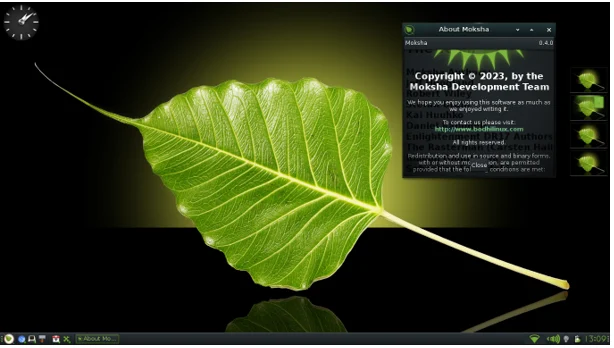
Bodhi Linux, based on Ubuntu LTS, offers a 32-bit “Legacy” edition for older hardware. With its Moksha Desktop (a fork of Enlightenment), it’s visually appealing yet resource-efficient, securing its spot among the Top Linux Distros Keeping 32-Bit Alive in 2025.
Why Choose Bodhi Linux?
- Moksha Desktop: Lightweight and modern, with minimal resource usage.
- Ubuntu Base: Access to Ubuntu’s vast software repositories.
- Legacy Edition: Tailored for 32-bit systems with older kernels.
- Community Support: Active forums for troubleshooting and customization.
Best For
Users who want a stylish, lightweight distro for 32-bit systems with at least 512MB RAM.
System Requirements
- RAM: 256MB (minimum), 512MB (recommended)
- CPU: i686 processor
- Storage: 4GB
Pro Tip: The Legacy edition is ideal for 15-year-old systems, but check for updates, as Bodhi 6.0’s 32-bit support is still in progress.
Challenges of Running 32-Bit Systems in 2025
While these distros keep 32-bit hardware alive, there are limitations. Many modern applications, like Google Chrome or Electron-based apps (e.g., VSCode), no longer support 32-bit architectures. Firefox remains a reliable browser option, but for other software, you may need to rely on web versions or older packages. Additionally, some distros require manual configuration for very old CPUs (e.g., pre-SSE2 i686), so check compatibility before installing.
How to Choose the Right Distro
Selecting from the Top Linux Distros Keeping 32-Bit Alive in 2025 depends on your needs:
- Beginners: Go for Linux Mint Debian Edition or MX Linux for user-friendly interfaces.
- Minimalists: AntiX, Puppy Linux, or Tiny Core Linux are perfect for low-RAM systems.
- Windows Users: Q4OS or LMDE offer familiar desktops.
- Advanced Users: Void Linux or Debian provide maximum control.
- Portable Needs: Porteus or Puppy Linux excel in live USB/CD setups.
Always test distros in “live” mode via USB before installing to ensure compatibility with your hardware.
Conclusion: Keeping 32-Bit Alive with Linux
The Top Linux Distros Keeping 32-Bit Alive in 2025 prove that old hardware still has a place in the modern world. From Debian’s stability to Puppy Linux’s tiny footprint, these distros cater to a wide range of users and systems. By choosing the right distro, you can revive that old laptop or desktop, reduce e-waste, and enjoy a fast, secure computing experience. Whether you’re a newbie or a Linux veteran, these options ensure your 32-bit hardware stays relevant in 2025 and beyond.
Ready to breathe new life into your old PC? Download one of these distros, boot it up, and let us know your experience in the comments!
Disclaimer
The information provided in this blog post, “Top Linux Distros Keeping 32-Bit Alive in 2025,” is based on the latest available data from official sources and community-driven projects as of June 30, 2025. While every effort has been made to ensure accuracy, software development, particularly for 32-bit systems, is subject to rapid changes, and support for specific architectures or packages may evolve.
Readers are encouraged to verify compatibility with their hardware and check official distribution websites for the most up-to-date information before installing any software. The author and publisher are not responsible for any issues, damages, or data loss resulting from the use of these Linux distributions. Always back up your data and test distributions in a live environment before making permanent changes to your system.
Also Read
Discover the Top 10 Beginner Linux Distros in 2025!
About the Author