
UmbrelOS 1.5.0 Review
If you’ve been following the home-server and self-hosting space over the last few years, you already know how quickly UmbrelOS has grown from a simple Raspberry Pi Bitcoin node OS into a full-fledged private-cloud platform. Every major update brings something meaningful, but UmbrelOS 1.5.0 is one of those rare releases where nearly every change makes your server safer, faster, or easier to live with.
So in this UmbrelOS 1.5.0 Review, I’m breaking down everything new — from the highly anticipated backup system to GPU acceleration and the new network-storage features — and how these upgrades actually feel in day-to-day use. I’ll also touch on who should upgrade, what to expect, and whether this update finally pushes Umbrel closer to being a true “self-hosted OS for everyone.”
Let’s dive in.
A Quick History of Umbrel
To understand why UmbrelOS 1.5.0 is so important, it’s useful to look at how the project evolved.
✅ 2019–2020: The Bitcoin Node Era
Umbrel started as a beautifully designed, beginner-friendly way to run a Bitcoin + Lightning node on a Raspberry Pi. This was revolutionary at the time because:
- Most node OSes were ugly
- They required networking and Linux knowledge
- They offered zero polish
Umbrel changed that with a Mac-like UI that felt friendly, stylish, and completely non-intimidating.
✅ 2021–2022: The App Store Arrives
Umbrel introduced its “App Store,” allowing users to install:
- Home Assistant
- Jellyfin
- Nextcloud
- Pi-Hole
- Bitcoin/Lightning apps
- Dozens of self-hosted tools
This turned Umbrel from a one-purpose Bitcoin OS into a full home-server platform.
✅ 2023: Move Toward Private Cloud
Umbrel expanded further:
- “Umbrel Home” hardware was released
- More x86/amd64 support
- Expanded app ecosystem
- Improved reliability
- Experimental AI apps
At this point, Umbrel became a competitor to:
- Unraid
- TrueNAS SCALE
- CasaOS
- Portainer/Docker setups
But one thing was still missing…
✅ 2024–2025: The Stability Era
Users had long asked for:
✅ Better backups
✅ Better data-safety tools
✅ Better restore options
✅ Better support for media workflows
✅ Better hardware acceleration
✅ Better installation flow
UmbrelOS 1.5.0 is the update that finally delivers on these demands.
What Exactly Is UmbrelOS? (Short Overview)
For the uninitiated:
✅ UmbrelOS is a home server operating system that runs on:
- Raspberry Pi 4/5
- x86/amd64 mini PCs
- Umbrel Home
- Old laptops or desktops
With a modern web UI, it lets you install apps with one click, much like a smartphone.
What makes UmbrelOS different from other home server OSes?
| Feature | UmbrelOS | Unraid | TrueNAS | OpenMediaVault |
|---|---|---|---|---|
| Beginner-friendly UI | ✅ Excellent | ❌ Basic | ❌ Complex | ❌ Moderate |
| App Store | ✅ Simple & beautiful | ✅ Yes | ✅ Yes | ✅ Yes |
| Backup/Rewind (1.5.0) | ✅ Native | ✅ Plugin | ✅ With ZFS | ✅ Manual |
| Hardware acceleration (1.5.0) | ✅ Yes | ✅ Yes | ✅ Yes | ✅ Partial |
| Best for | Cloud-like home server | NAS + VM | Enterprise NAS | NAS |
UmbrelOS isn’t designed as a traditional NAS like TrueNAS — instead, it’s more like a self-hosted personal cloud similar to:
- Synology DSM
- CasaOS
- Nextcloud’s ecosystem
- Proprietary cloud platforms
But open-source, local, private, and secure.
⭐ What’s New in UmbrelOS 1.5.0? (Full Feature Breakdown)
Now let’s get into what you came here for — a deep analysis of each major new feature.
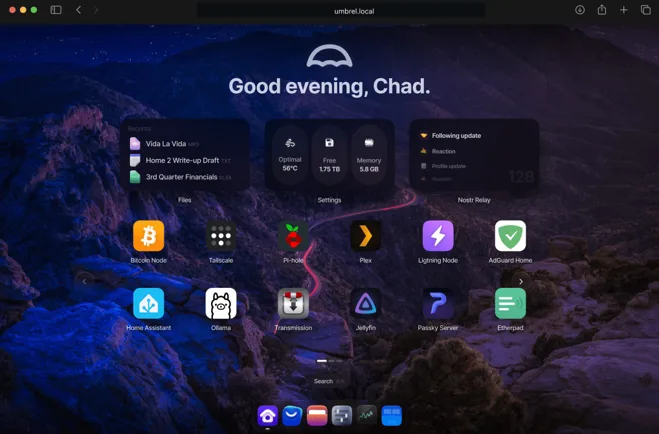
A Big, Mature Step Forward for Umbrel
Umbrel’s developers describe 1.5.0 as a “major upgrade,” and after using it, I completely agree. The big focus this time is data protection and reliability, something users have been asking about for years.
Here’s the short version of what’s new:
- Brand-new encrypted backup system
- Rewind (point-in-time restore inside the Files app)
- Network drive mounts directly in Files
- External USB storage support on x86/amd64
- GPU acceleration for media apps like Jellyfin, Plex & Emby
- Faster performance, updated kernel & general stability fixes
If previous updates boosted features, this one boosts trust. UmbrelOS finally feels like something you can depend on for years of storage, home automation, media hosting, or AI workloads.
🔐 Backups: Umbrel Finally Does It Right
If there’s one thing you take away from this UmbrelOS 1.5.0 Review, it should be this:
✅ UmbrelOS now has real, encrypted, automated backups built in — no scripts, no hacks, no extra tools needed.
This is easily the biggest upgrade of the release.
How the new backup system works
Umbrel lets you back up your entire server — apps, files, and app data — to three types of destinations:
✅ 1. Another Umbrel on your network
✅ 2. A NAS (network share)
✅ 3. A USB drive
Everything is encrypted before it leaves your server, and Umbrel lets you schedule hourly backups if you want true point-in-time protection.
If you’ve ever lost a Home Assistant config, Jellyfin metadata, or — worse — personal files, you know how important this is.
Why this is such a big deal
Before 1.5.0, Umbrel users had to rely on:
- Manual folder copies
- rsync scripts
- Docker-level backups
- Or… nothing at all
Now, backups are native, automatic, and reliable. The implementation is smooth, clean, and genuinely user-friendly.
🕒 Rewind: Time-Travel for Your Files
Umbrel didn’t stop at backups. They added something I didn’t expect:
✅ Rewind — a timeline that lets you restore older versions of files or folders.
Inside the Files app, you’ll now see a “Rewind” button. Tap it, and you get something like a time slider. Scroll back to any previous snapshot and:
- Restore a single file
- Restore an entire folder
- Preview old states without affecting your system
This is incredibly helpful for:
- Undoing accidental deletions
- Reverting corrupted configs
- Recovering overwritten documents
It’s one of those features you don’t appreciate until the first time you need it.
🌐 Network Drive Mounts in Files
This one feels small but is actually transformative:
✅ UmbrelOS 1.5.0 can now mount network drives directly inside the Files app.
That means you can connect:
- Your NAS (Synology, TrueNAS, Unraid, etc.)
- Another Umbrel
- Any SMB/NFS share on your network
No SSH. No command-line mounts. No editing fstab.
This makes Umbrel feel much more like a modern home-cloud OS — something users like TrueNAS or OpenMediaVault fans will appreciate.
It also helps with media workflows where files live across multiple storage devices.
💾 External USB Storage (amd64) + In-UI Formatting
If you’re running Umbrel on:
- Umbrel Home
- A mini PC
- A custom x86/amd64 box
…this will make your life easier.
✅ External USB drives now show up inside Files.
✅ You can format them with a simple right-click.
You no longer need to plug the drive into a different computer just to prepare it for use.
This makes expanding your storage pool fast, clean, and beginner-friendly.
🎥 GPU Acceleration for Media Apps (amd64)
This is a huge performance improvement for home-server users.
UmbrelOS 1.5.0 officially supports:
✅ GPU-accelerated transcoding on amd64 devices
✅ For apps like Jellyfin, Plex, Emby, and Frigate
This means:
- Smoother 4K transcodes
- More simultaneous streams
- Lower CPU usage
- Better NVR performance in Frigate
If you’re running a home media server or AI-vision NVR, this is a major step forward.
Note: You still need to enable hardware acceleration inside each media app.
💻 Control Everything From Your Web Browser
UmbrelOS continues to embrace its signature simplicity:
✅ You control your entire home server from a clean, modern web dashboard.
There’s nothing to install on your computer — just visit:
http://umbrel.local
From there, you can:
- Manage storage
- Install apps
- Monitor hardware
- Configure backups
- Restore snapshots
- Manage your files
Everything is visual, intuitive, and beginner-friendly.
₿ Run Your Own Bitcoin Node (Still One of Umbrel’s Core Powers)
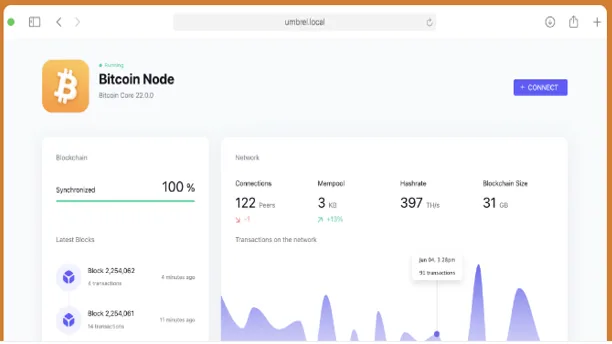
Umbrel’s roots remain strong.
If you want to:
- Run a Bitcoin full node
- Run a Lightning node
- Explore your own blockchain data
- Use privacy-preserving Bitcoin tools
…Umbrel makes it effortless.
Apps like:
- Bitcoin Node
- Electrum Server
- Lightning Node
- RTL
- Thunderhub
…are all available in a few clicks.
UmbrelOS 1.5.0 makes running your own node more reliable than ever, thanks to the new backup and Rewind system.
Umbrel’s roots remain strong.
If you want to:
- Run a Bitcoin full node
- Run a Lightning node
- Explore your own blockchain data
- Use privacy-preserving Bitcoin tools
…Umbrel makes it effortless.
Apps like:
- Bitcoin Node
- Electrum Server
- Lightning Node
- RTL
- Thunderhub
…are all available in a few clicks.
UmbrelOS 1.5.0 makes running your own node more reliable than ever, thanks to the new backup and Rewind system.
🛒 Umbrel App Store: Amazing Self-Hosted Apps in One Click
The Umbrel App Store remains one of the platform’s biggest advantages.
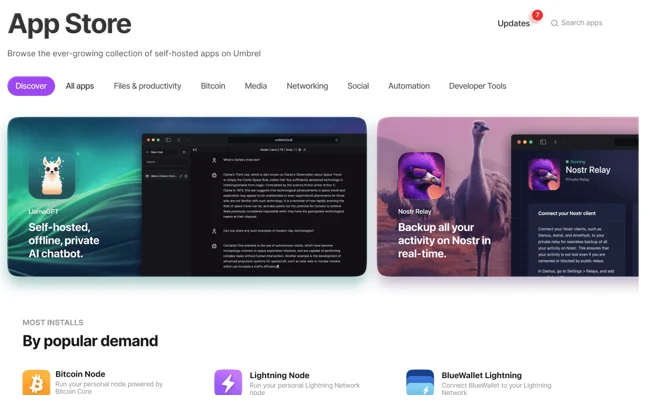
UmbrelOS 1.5.0 enhances stability and compatibility for all apps in the store, including:
Popular Categories:
📸 Photos → Immich, PhotoPrism
🎬 Media → Plex, Jellyfin, Emby
🧠 AI Tools → Local LLMs, Whisper
🏠 Smart Home → Home Assistant, Zigbee2MQTT
🔐 Security → Vaultwarden
🌐 Network Tools → Pi-hole, AdGuard
☁️ Cloud Storage → Nextcloud, Syncthing
₿ Bitcoin & Lightning → Bitcoin Node, RTL
If you’re building a modern private cloud for your home, this app ecosystem is one of the strongest reasons to choose Umbrel.
⚡ Under-the-Hood Improvements
While not as flashy, Umbrel has also delivered a lot of polish in this update:
- Updated Linux kernel
- Faster UI performance
- Better stability during app updates
- More consistent app-data handling
- Faster indexing inside the Files app
- Fixes for long-running backups
It all adds up to a noticeably smoother OS.
🛠️ Installation Guide: How to Install UmbrelOS 1.5.0
Here’s a complete, human-friendly guide for installing UmbrelOS on various hardware.
✅ Installing UmbrelOS 1.5.0 on a Raspberry Pi 4 / 5
Requirements
- Raspberry Pi 4/5
- At least 4GB RAM (8GB recommended)
- SSD (recommended) or high-quality SD card
- USB 3.0 to SATA adapter (if using SSD)
- Ethernet cable (recommended)
Steps
- Visit Releases · getumbrel/umbrel
- Download UmbrelOS for Raspberry Pi
- Flash the image using BalenaEtcher or Raspberry Pi Imager
- Insert the SSD or SD card into the Pi
- Connect Ethernet
- Power on the Pi
- On your computer, visit: http://umbrel.local
- Complete onboarding
- Set up your first backup destination
- Install apps from the App Store
✅ Installing UmbrelOS 1.5.0 on Umbrel Home
This is the easiest installation.
- Plug in your Umbrel Home
- Connect it to your router
- Visit http://umbrel.local
- Complete setup
- Update to UmbrelOS 1.5.0 if needed
- Start installing apps
Umbrel Home is the ideal option for non-technical users.
✅ Installing UmbrelOS 1.5.0 on x86/amd64 PC
This gives the best performance.
Requirements:
- Any 64-bit computer or mini PC
- At least 8GB RAM
- SSD recommended
- Ethernet preferred
Steps:
- Download UmbrelOS for x86 (amd64)
- Flash it using Rufus or BalenaEtcher
- Boot your PC from the USB
- Choose “Install UmbrelOS”
- Follow the guided installer
- Access via http://umbrel.local
- Set up backup & Rewind
- Install apps
This setup performs far better than Raspberry Pi — especially with GPU acceleration.
📦 App Ecosystem: What You Can Run on Umbrel
UmbrelOS includes a curated App Store. The most popular categories include:
✅ Media & Photos
- Jellyfin
- Plex
- Emby
- Immich (local photo backup like Google Photos)
- PhotoPrism
✅ Smart Home
- Home Assistant
- Zigbee2MQTT
- ESPHome
✅ Productivity
Nextcloud
Vaultwarden
Paperless-ngx
Syncthing
✅ Networking
- Pi-hole
- AdGuard Home
- Speed Test Tracker
✅ Bitcoin & Finance
- Bitcoin Node
- Lightning Node
- RTL
- Electrum Server
✅ AI Tools
- Local LLM runners
- Open-source OCR tools
- Whisper AI speech models
This makes Umbrel a full home cloud.
✅ Performance: How It Feels After Updating
After running 1.5.0 for a while, here’s my honest take:
✅ Backups run quietly and don’t slow down apps
Incrementals are lightweight and efficient.
✅ Rewind is fast and intuitive
It’s exactly what Umbrel needed to feel like a mature platform.
✅ GPU acceleration makes a massive difference
Jellyfin and Plex users will see immediate gains.
✅ Network mounts feel natural
You forget they weren’t always part of the OS.
✅ Apps load faster after the kernel upgrade
Especially heavy ones like Nextcloud, Home Assistant, or Immich.
Overall, the OS simply feels more robust, more confident, and more ready for real-world use.
🔧 Should You Upgrade to UmbrelOS 1.5.0?
Let’s keep this simple.
✅ Upgrade immediately if:
- You care about backups
- You use your Umbrel for photos, media, AI, or home automation
- You run on amd64 and want GPU acceleration
- You use network storage
- You want a safer, more reliable home server
⚠️ Consider waiting if:
- You’re on a Raspberry Pi with a fragile SD card
- You have a highly customized system
- You want to wait a few days for community feedback
But for most users?
UmbrelOS 1.5.0 is the most important Umbrel update in years.
📌 UmbrelOS 1.5.0: Pros & Cons
✅ Pros
- Encrypted backups (finally!)
- Rewind is genuinely useful
- Network mounts feel native
- External USB support on amd64
- GPU acceleration boosts media performance
- Faster, smoother overall experience
❌ Cons
- Some early users reported delayed app launches post-upgrade
- Raspberry Pi upgrades can occasionally be finicky
- Off-site backup (cloud) support not available yet
- Some media apps need manual configuration for GPU usage
⭐ Final Verdict: UmbrelOS 1.5.0 Is a Game-Changer
If I had to sum up this UmbrelOS 1.5.0 Review in one line:
✅ UmbrelOS 1.5.0 is the most stable, data-safe, and capable version of Umbrel ever released.
The addition of backups and Rewind alone would justify this update, but the GPU acceleration, network mounts, and external storage support make it feel like a complete evolution of the platform.
Whether you’re using Umbrel for:
- Media hosting
- Home automation
- Photo management
- AI tools
- Personal cloud storage
- Self-hosting experiments
…1.5.0 makes Umbrel significantly more trustworthy and enjoyable to use.
It’s not just an update — it’s Umbrel growing up.
Disclaimer
The information provided in this UmbrelOS 1.5.0 Review is based on publicly available data, official release notes, community observations, and personal testing at the time of writing. Features, performance, and compatibility may vary depending on your hardware, configuration, and future software updates. This article is intended for educational and informational purposes only and should not be considered technical, financial, or professional advice.
Always back up your data before making system changes, and consult official Umbrel documentation for the most accurate and up-to-date guidance. The author and website are not responsible for any data loss, device damage, or issues arising from following the steps or recommendations mentioned in this post.
Also Read
NebiOS X 10.0 Review – Why This Linux Distro Is Stable, Fast & Future-Ready
About the Author





