
What's New in Kali Linux 2026.1? Full Breakdown for Hackers & Developers
The Kali Linux team dropped something special this week — and if you’ve been waiting to see what’s new in Kali Linux 2026.1, the answer is: quite a lot. This first major release of the year landed on March 24, 2026, and it comes packed with a fresh visual identity, a deeply nostalgic nod to BackTrack Linux, eight brand-new security tools, a significant kernel bump to 6.18, and some genuinely exciting updates for mobile pentesters running Kali NetHunter.
Whether you’re a red teamer, a CTF enthusiast, a security researcher, or someone who just loves tinkering with Linux, this release has something worth your attention. Let’s break it all down — no fluff, just the details that actually matter.
The 2026 Theme Refresh: A New Look From Boot to Desktop
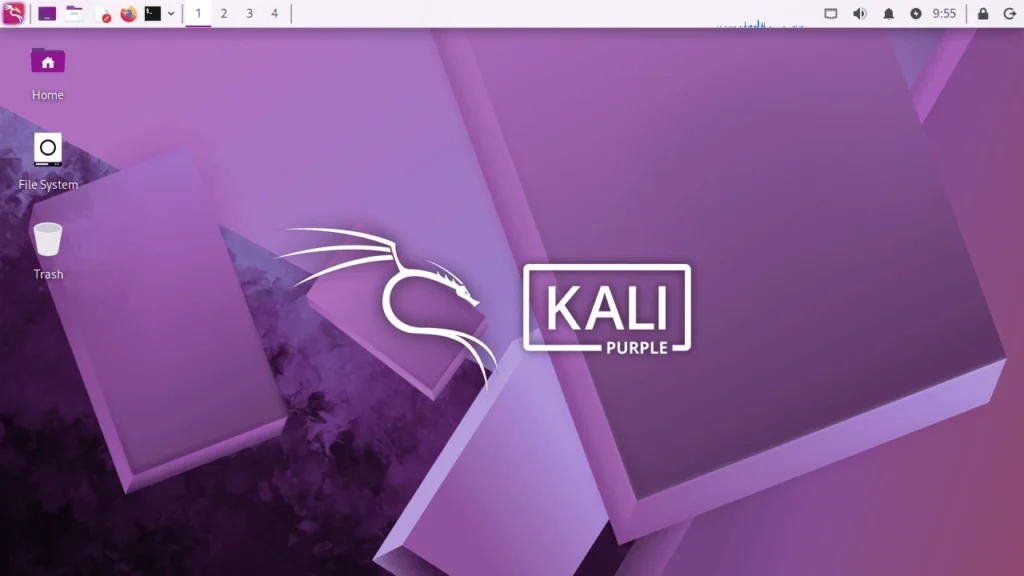
Every first release of the year brings a visual overhaul, and 2026.1 is no different. The Kali team has completely refreshed the look and feel of the distribution — and this year’s design feels noticeably polished.
The new theme rolls out across every touchpoint: the GRUB boot menu, the graphical installer, the login screen, the lock screen, and the full desktop environment. A brand-new set of wallpapers is also included for those who want something fresh without hunting for downloads.
The Kali Purple variant — aimed at defensive security and blue teamers — also receives updated artwork as part of this release, so both sides of the security spectrum get some visual love.
Boot Animation Fix: Finally Works the Way It Should
One small but satisfying fix is the boot animation on live images. Previously, the animation would freeze at the very beginning, showing only the end frame rather than playing through. That’s fixed. The animation now plays correctly and loops if the boot process runs long — making the live boot experience feel much smoother.
It’s the kind of thing most people would only notice once it’s broken. Now it just works.
BackTrack Mode in Kali-Undercover: A 20th Anniversary Tribute
This is arguably the most talked-about feature in the 2026.1 release — and rightfully so.
2026 marks the 20th anniversary of BackTrack Linux, the legendary penetration testing distribution that eventually evolved into Kali Linux. To honor that milestone, the Kali team added a dedicated BackTrack mode inside the kali-undercover utility.
Running the command:
kali-undercover --backtrack
Use this Kali Linux command to switch to BackTrack-style undercover mode, making your desktop resemble older penetration testing environments.
transforms your entire desktop into a recreation of BackTrack 5 — wallpaper, color scheme, window themes and all. It’s a genuinely faithful recreation, and for anyone who started their security journey on BackTrack, it’s a serious nostalgia trip. You can flip back to the standard Kali desktop by running the same command again.
This isn’t just a gimmick. It’s a thoughtful tribute from a team that clearly has a lot of affection for where all of this started. Kali-undercover was originally designed to make your Kali desktop look like a Windows machine (useful when you don’t want people looking over your shoulder). BackTrack mode extends that concept in a different direction — toward history rather than disguise.
8 New Tools Added to the Repositories
A Kali release without new tools would feel incomplete, and 2026.1 delivers eight new additions to the network repositories. Here’s the full list with context on what each one actually does:
1. AdaptixC2
An extensible post-exploitation and adversarial emulation framework. If you’re doing red team engagements or adversary simulation work, this one goes directly into your toolkit.
2. Atomic-Operator
Lets you execute Atomic Red Team tests across multiple operating system environments. This is a huge one for purple teamers and anyone building detection coverage based on MITRE ATT&CK techniques.
3. Fluxion
A well-known name in wireless security circles — Fluxion is a security auditing and social-engineering research tool focused on Wi-Fi networks. It’s now officially in the Kali repos, which makes installation and maintenance much cleaner.
4. GEF (GDB Enhanced Features)
GEF brings a modern, feature-rich experience to GDB (GNU Debugger) with advanced debugging capabilities. If you do binary exploitation, reverse engineering, or vulnerability research, GEF is something you’ve probably already installed manually. Now it’s officially part of Kali.
5. MetasploitMCP
This is particularly interesting for the current moment in security tooling. MetasploitMCP is an MCP (Model Context Protocol) server for Metasploit, enabling integration between Metasploit and AI-driven workflows. The intersection of LLMs and offensive security tooling is moving fast, and this tool sits right at that edge.
6. SSTImap
An automatic Server-Side Template Injection (SSTI) detection tool with an interactive interface. Web app pentesters working with template engines will appreciate having this readily available.
7. WPProbe
A fast WordPress plugin enumeration tool. WordPress still powers a massive percentage of the web, and plugin enumeration remains a critical step in any WordPress security assessment. WPProbe is built with speed in mind.
8. XSStrike
An advanced XSS (Cross-Site Scripting) scanner with a smart fuzzing engine. XSStrike has been around for a while as a community favorite — its inclusion in the official repos makes it significantly easier to use and keep updated.
Kernel Upgrade to 6.18 and Package Updates
Under the hood, Kali Linux 2026.1 ships with Linux kernel 6.18 — a meaningful bump from the 6.16 kernel that shipped in December’s 2025.4 release. Newer kernels bring improved hardware support, security patches, and performance improvements that matter in real-world usage.
The package landscape also got a solid refresh:
- 183 packages updated
- 25 new packages added
- 9 outdated packages removed
This kind of regular package hygiene keeps the distribution feeling current and reduces the technical debt that tends to accumulate in rolling releases over time.
Kali NetHunter Updates: Major Mobile Pentesting Improvements
The Kali NetHunter side of this release is where some of the most technically significant changes live — particularly if you do mobile penetration testing or wireless security work.
App Bug Fixes
The NetHunter app received several fixes that have been frustrating users for a while:
- WPS scan bug — fixed
- HID permission handling — corrected
- Back button behavior — resolved
These might sound minor, but if you’ve hit these bugs in the field, you know how disruptive they can be mid-engagement.
Redmi Note 8: Android 16 Kernel Support
The Redmi Note 8 now ships with a new kernel targeting Android 16, contributed by community member @ikteach. This keeps one of the more popular NetHunter target devices current with the latest Android release.
Samsung S10 Series: Wireless Firmware Fixed
This is a big one for the wardriving and wireless security community. A patch to libnexmonkali from contributor @Quazi Anwar fixes the use of internal wireless firmware in the Kali chroot on Samsung S10 series devices. The practical result? Reaver, Bully, and Kismet are now fully functional on S10 hardware — tools that had been broken or unreliable in this context for some time.
First Working Wireless Injection on QCACLD-3.0 (Qualcomm Chipsets)
This is probably the biggest mobile security news in the entire release. After years of effort, contributor @Loukious landed the first working wireless injection patch for QCACLD-3.0 — the driver used by most modern Qualcomm-based Android devices.
The implications here are significant. Qualcomm chipsets are found in a huge portion of the Android smartphone market. This patch potentially opens the door to packet injection capabilities on the vast majority of modern phones running Qualcomm hardware. It’s a milestone the NetHunter community has been waiting on for a long time.
NetHunter Goes Mobile Pentesting on Four Wheels
In one of the more creative uses of NetHunter in recent memory, security researcher Kristopher Wilson documented how he turned a Honda Civic Type-R into a rolling penetration testing platform using Kali NetHunter rootless. He even used AI to SSH into the car’s head unit from a virtual machine. It’s wild, creative, and exactly the kind of community experimentation that makes Kali’s ecosystem interesting.
Kali’s 13th Birthday Event
Kali Linux recently celebrated its 13th birthday, and the community marked the occasion with a cryptographic puzzle event on the official Kali Discord server. The event had prizes for the first solvers, and while the top three spots have been claimed, the puzzles remained accessible for the community to work through.
It’s a small thing in the context of a major release, but it reflects the community-driven culture that’s always been part of what makes Kali different from a plain enterprise Linux distribution.
Known Issues: SDR Tools Are Broken in This Release
Here’s something worth knowing before you upgrade: if you rely on the kali-tools-sdr metapackage for Software Defined Radio work, 2026.1 is not in great shape for you right now.
The GNU Radio ecosystem has significant issues in this cycle. Specific tools known to be broken include:
- gr-air-modes
- gqrx-sdr
The Kali team has acknowledged this publicly and says a fix is expected in the next release. If SDR tooling is central to your workflow, it may be worth waiting before upgrading, or keeping a working snapshot around. For everyone else, this shouldn’t be a blocker.
How to Get Kali Linux 2026.1
Fresh Install
Download the latest ISO directly from the official Kali Linux website. The release is available in all the usual flavors:
- 64-bit installer ISO
- Pre-built virtual machine images (VMware, VirtualBox)
- ARM builds
- Cloud images (AWS, Azure)
- WSL (Windows Subsystem for Linux)
- NetHunter packages for mobile
Upgrading from an Existing Kali Installation
If you’re already running a recent version of Kali, you don’t need to reinstall. A full system upgrade will get you to 2026.1:
sudo apt update && sudo apt full-upgrade# Verify Kali version
grep VERSION /etc/os-release# Check kernel version
uname -r
Use these Kali Linux commands to update your system to the latest version and verify the installed release (2026.1).
The grep VERSION command confirms your OS version, while uname -r checks the current Linux kernel version (e.g., 6.18.12+kali-amd64).
Final Thoughts
What’s new in Kali Linux 2026.1 is a release that balances nostalgia with forward momentum. The BackTrack anniversary mode is a genuinely thoughtful gesture that will resonate with the community’s long-time members. The eight new tools — especially MetasploitMCP and Atomic-Operator — reflect where offensive security tooling is headed as AI integration becomes more relevant to the day-to-day work of penetration testers.
The mobile side of things is where 2026.1 arguably shines brightest. The QCACLD-3.0 wireless injection breakthrough alone makes this release worth paying attention to if you work with Android-based NetHunter setups. The S10 wardriving fixes and Android 16 kernel support for the Redmi Note 8 round out a strong update for mobile security practitioners.
The SDR breakage is a real issue for a specific subset of users, but the team has been transparent about it and has flagged a fix for the next release cycle.
All things considered, 2026.1 is a solid start to the year — and if the tradition holds, the following three quarterly releases will build on this foundation meaningfully.
Disclaimer
This blog post is written for informational and educational purposes only. All information is sourced directly from the official Kali Linux blog. Kali Linux is a registered trademark of OffSec. We are not affiliated with, endorsed by, or officially connected to Kali Linux or OffSec in any way. Tool names and descriptions mentioned in this post belong to their respective developers and owners. Always use penetration testing tools legally and only on systems you have explicit permission to test.
Also Read
My All-Time Favorite Linux Feature That Got Even Better in 2026
About the Author