Why 1Password’s Passkey Is Your Key to a Passwordless World
In today’s fast-paced digital landscape, securing online accounts while maintaining convenience is a constant challenge. Passwords, once the cornerstone of digital security, are increasingly vulnerable to phishing attacks, data breaches, and human error. Enter passkeys, a revolutionary technology designed to usher in a passwordless future. As a leader in secure credential management, 1Password is at the forefront of this transformation, offering a seamless and secure passkey solution that promises to redefine how we protect our digital lives.
In this comprehensive guide, we’ll explore why 1Password’s passkey is your key to a passwordless world, diving into its benefits, functionality, and how it sets the stage for a safer, simpler online experience.
What Are Passkeys?
Before we delve into 1Password’s role, let’s clarify what passkeys are. Developed by the FIDO Alliance, passkeys are a passwordless authentication method that leverages public-key cryptography to secure online accounts. Unlike traditional passwords, which rely on a single, memorable string of characters, passkeys consist of two parts:
- Public Key: Shared with the website or app you’re signing into.
- Private Key: Securely stored on your device and never shared.
This cryptographic approach ensures that even if a website is breached, attackers cannot access your account without the private key, which remains safely on your device. Passkeys are authenticated using biometrics (like fingerprint or face recognition) or a device PIN, making them both user-friendly and highly secure.
Passkeys address the core weaknesses of passwords:
No memorization required: You don’t need to remember complex strings of characters.
Phishing resistance: Passkeys are tied to specific websites, preventing fake login pages from stealing credentials.
Breach-proof: Since the private key never leaves your device, data breaches can’t compromise it.
With major tech players like Apple, Google, and Microsoft backing passkeys, they’re quickly becoming the standard for secure authentication. And 1Password is leading the charge in integrating this technology into its platform.
The Password Problem: Why We Need a Change
Passwords have been the default for online security for decades, but they’re riddled with flaws:
- Complexity vs. usability: Strong passwords are hard to remember, leading many to reuse weak passwords across multiple sites.
- Phishing vulnerabilities: Hackers can trick users into entering passwords on fake websites.
- Data breaches: In 2022 alone, billions of login credentials were leaked, exposing accounts to risk.
- Time-consuming management: Creating, remembering, and resetting passwords eats up time and frustrates users.
These issues have fueled the need for a better solution. Password managers like 1Password have long helped by generating and storing strong passwords, but even they can’t fully eliminate the risks of phishing or breaches. Passkeys, however, tackle these problems head-on, and 1Password’s implementation makes the transition seamless.
1Password’s Passkey: A Game-Changer for Security and Convenience
1Password, a trusted name in password management, has embraced passkeys as the future of authentication. By integrating passkey support into its platform, 1Password is paving the way for a passwordless world where users can sign in faster, safer, and with less hassle. Here’s why 1Password’s passkey solution stands out:
1. Seamless Integration Across Devices
1Password’s passkey support is designed for cross-platform compatibility, ensuring you can use passkeys on all your devices—Mac, iOS, Windows, Android, and more. Unlike some solutions that limit passkey access to specific ecosystems, 1Password syncs your passkeys securely across devices, so you’re never locked out of your accounts.
For example, you can create a passkey on your iPhone and use it to sign in on your Windows PC or Android tablet. This flexibility is critical in a world where users switch between devices constantly. 1Password’s Watchtower feature even notifies you when a website you use adds passkey support, making it easy to upgrade your logins.
2. Unmatched Security
Passkeys are inherently more secure than passwords, and 1Password enhances this with its robust security framework:
- Phishing Resistance: Passkeys are tied to the specific website or app, so they can’t be used on fraudulent sites.
- End-to-End Encryption: 1Password stores your passkeys (and other sensitive data) in encrypted vaults, ensuring only you can access them.
- Biometric Authentication: Passkeys are protected by your device’s biometrics or PIN, adding an extra layer of security without the need to memorize anything.
Unlike passwords, which can be stolen in plaintext during a breach, passkeys rely on a private key that never leaves your device. Even if a hacker obtains the public key, it’s useless without the private key. This makes 1Password’s passkey solution a fortress for your digital credentials.
3. User-Friendly Experience
One of the biggest barriers to adopting new security measures is complexity. 1Password eliminates this hurdle by making passkeys easy to create, manage, and use:
- Creation: When you visit a passkey-supported website, 1Password prompts you to save the passkey, either as a new item or by updating an existing login.
- Sign-In: Signing in is as simple as selecting the passkey option and authenticating with biometrics or a PIN. Research from Google shows passkey logins are twice as fast as password-based logins.
- Organization: Passkeys are stored alongside passwords, credit cards, and other sensitive data in 1Password’s secure vaults, keeping everything in one place.
This streamlined experience ensures that even non-technical users—like your grandma—can embrace passkeys without confusion.
4. Sharing and Collaboration
1Password’s passkey solution goes beyond individual use. You can securely share passkeys with family members, coworkers, or temporary collaborators using shared vaults or item-sharing features. This is a game-changer for teams and families who need to manage shared accounts securely.
For businesses, 1Password offers administrative controls to enable or disable passkey support, ensuring organizations can roll out passkeys at their own pace.
5. Passage by 1Password: Empowering Developers
For developers and businesses looking to integrate passkeys into their own apps or websites, Passage by 1Password offers a simple solution. With just a few lines of code, developers can add passkey support, reducing login friction and boosting security. Passage offers two options:
- Passkey Complete: A full passwordless solution that replaces traditional login flows.
- Passkey Flex: A hybrid approach that supports both passkeys and traditional passwords for gradual adoption.
This makes it easier for businesses to offer a secure, frictionless login experience, which can reduce cart abandonment rates and improve customer satisfaction. According to a FIDO Alliance survey, 58% of consumers have abandoned purchases due to password-related frustrations.
How to Get Started with 1Password’s Passkeys
Ready to embrace the passwordless future? Here’s how to start using passkeys with 1Password:
Install 1Password: Download the 1Password app on your devices (Mac, Windows, iOS, Android) and install the browser extension for Chrome, Firefox, Edge, Brave, or Safari.
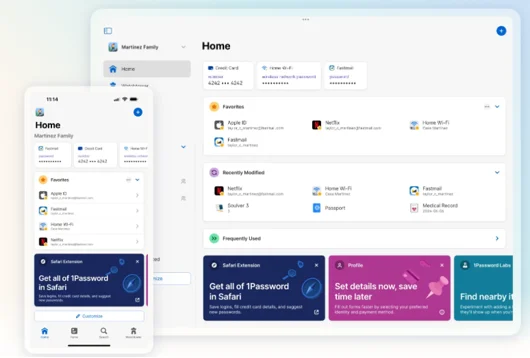
Check for Passkey Support: Use 1Password’s Watchtower feature or visit the passkey directory (passkeys.directory) to find websites and apps that support passkeys.
Create a Passkey:
- Visit a passkey-supported website or app.
- Follow the prompts to create a new account or update an existing one with a passkey.
- When prompted, choose to save the passkey in 1Password.
Sign In: The next time you log in, select the passkey option, and 1Password will handle the rest using biometrics or a PIN.
Manage and Share: Organize passkeys in vaults, share them securely, and use Watchtower to stay updated on new passkey-compatible services.
For new users, 1Password offers a 14-day free trial to explore passkey features and more.
The Future of Passkeys with 1Password
1Password’s commitment to passkeys goes beyond current functionality. The company is actively working to enhance its passkey offerings:
- Beta Features: 1Password has rolled out beta support for creating and unlocking accounts with passkeys, eliminating the need for a master password or Secret Key.
- Cross-Platform Expansion: Support for passkeys on Android 14 and native apps is in development, ensuring broader compatibility.
- Privacy-Preserving Telemetry: 1Password is introducing aggregated, de-identified usage data to improve passkey features while maintaining user privacy.
These advancements signal 1Password’s dedication to a fully passwordless future, where security and convenience go hand in hand.
Why Choose 1Password for Passkeys?
With so many platforms adopting passkeys, why should you choose 1Password? Here are the key reasons:
- Proven Security: Trusted by millions of users and over 150,000 businesses, 1Password has a track record of protecting sensitive data.
- Comprehensive Solution: Unlike device-specific passkey managers (e.g., iCloud Keychain), 1Password offers a unified experience across all platforms.
- User-Centric Design: From Watchtower alerts to seamless syncing, 1Password makes passkeys accessible to everyone.
- Business-Friendly: Tools like Passage and administrative controls make 1Password ideal for organizations transitioning to passwordless authentication.
Addressing Common Concerns
As with any new technology, users may have questions about passkeys. Here are answers to common concerns, based on 1Password’s approach:
- What if I lose my device? 1Password’s recovery codes and trusted device setup ensure you can regain access even if a device is lost.
- Are passkeys really more secure? Yes, passkeys use 256-bit entropy and are resistant to phishing and breaches, offering stronger protection than passwords.
- Can I use passkeys everywhere? While not all services support passkeys yet, 1Password’s directory and Watchtower help you identify compatible sites.
- What about non-technical users? 1Password’s intuitive interface and clear prompts make passkeys easy for anyone to use.
The Broader Impact of Passkeys
The shift to passkeys isn’t just about individual security—it’s about transforming the digital landscape. By adopting passkeys, 1Password is helping:
- Reduce Phishing Attacks: Passkeys eliminate the risk of sharing credentials with fake websites.
- Boost Business Efficiency: Passwordless logins reduce password reset requests and improve user satisfaction.
- Drive Industry Standards: As a FIDO Alliance member, 1Password is shaping the future of authentication alongside tech giants.
Conclusion: Embrace the Passwordless Future with 1Password
The era of passwords is fading, and 1Password’s passkey solution is your key to a safer, simpler digital world. By combining cutting-edge security with user-friendly design, 1Password makes it easy to create, manage, and use passkeys across all your devices. Whether you’re an individual looking to secure personal accounts or a business aiming to streamline authentication, 1Password’s passkey support offers unmatched convenience and protection. Ready to go passwordless? Sign up for a free 14-day trial at 1Password.com and explore the passkey directory to start using passkeys today. With 1Password, the future of authentication is here—and it’s password-free.
Disclaimer
The information in this blog post is based on details available on 1Password’s official website and related resources as of June 29, 2025. While every effort has been made to ensure accuracy, features, availability, and other details about 1Password’s passkey solution may change over time. Readers are encouraged to visit 1Password.com for the most up-to-date information. This content is for informational purposes only and does not constitute professional advice. Always verify details directly with 1Password before making decisions based on this information. The author and publisher are not responsible for any actions taken based on this content.
Frequently Asked Questions About 1Password’s Passkeys
What exactly is a passkey, and how does it work with 1Password?
A passkey is like a super-secure, modern replacement for passwords. It uses fancy public-key cryptography, so you don’t have to memorize anything. With 1Password, you can create and save passkeys for supported websites and apps right in your vault. When you sign in, 1Password prompts you to use your passkey, and you just authenticate with your fingerprint, face, or PIN. It’s quick, safe, and way less stressful than remembering passwords!
Can I use 1Password’s passkeys on all my devices?
Yep, absolutely! 1Password makes sure your passkeys sync securely across all your devices—whether you’re on a Mac, iPhone, Android, or Windows PC. No matter where you’re logging in from, your passkeys are ready to go, which is super handy if you’re always switching between devices.
What happens if I lose my phone or computer? Will I lose my passkeys?
No need to panic! 1Password has your back with recovery codes and trusted device setups. If you lose a device, you can still access your passkeys from another trusted device or recover your account using 1Password’s secure recovery process. Just make sure to keep those recovery codes in a safe place.
Are passkeys really safer than passwords?
Oh, definitely! Passkeys are designed to be phishing-proof since they’re tied to specific websites and apps, so fake login pages can’t trick you. Plus, they use strong encryption, and the private key never leaves your device. With 1Password’s end-to-end encryption, your passkeys are locked down tight, making them way safer than traditional passwords.
Do all websites support passkeys, and how do I know which ones do?
Not every website or app supports passkeys yet, but the list is growing fast! 1Password’s Watchtower feature is awesome—it alerts you when a site you use adds passkey support. You can also check out the passkey directory (passkeys.directory) to find compatible services. If a site doesn’t support passkeys yet, 1Password still has you covered with its password management tools.
Also Read
Doppl Unveiled: Transform Your Style with Google’s AI App!
About the Author