

Why GhostBSD is the Ultimate FreeBSD-Based Desktop for 2025
Hey folks, if you’re anything like me—always on the hunt for an operating system that’s stable, secure, and doesn’t bog you down with unnecessary fluff—then buckle up. In a tech landscape overflowing with Linux distributions and the ever-present Windows, BSD-based systems often get overlooked. But trust me, they’re gems waiting to be discovered. Today, we’re diving deep into why GhostBSD is the ultimate FreeBSD-based desktop for 2025. This isn’t just hype; it’s backed by the freshest data from its latest release, GhostBSD 25.02-R14.3p2, which dropped just days ago on August 25, 2025.
Whether you’re a seasoned developer, a privacy advocate, or someone dipping their toes into Unix-like systems, GhostBSD offers a polished, ready-to-use experience that stands head and shoulders above the competition. Let’s unpack this step by step, from its storied roots to the shiny new features making waves this year.
The Roots of GhostBSD: A Legacy of Stability and Simplicity
To grasp why GhostBSD is the ultimate FreeBSD-based desktop, we have to start with its foundation. GhostBSD is built on FreeBSD, one of the most reliable descendants of the original Berkeley Software Distribution (BSD) from the 1970s. FreeBSD itself powers massive infrastructures—like Netflix’s streaming servers and WhatsApp’s backend—thanks to its rock-solid kernel and emphasis on performance. But while vanilla FreeBSD excels in servers, it’s not always desktop-friendly out of the box, requiring tweaks for graphics, WiFi, and everyday apps.
Enter GhostBSD, launched in 2009 by Eric Turgeon as a Canadian project to bridge that gap. It started as a way to make FreeBSD accessible for desktops, pre-configuring elements like the MATE desktop environment for a familiar feel reminiscent of classic GNOME. Over the years, it briefly flirted with TrueOS (another FreeBSD fork) but returned to pure FreeBSD in 2021 for better compatibility and stability. Fast-forward to 2025, and GhostBSD has matured into a community-driven powerhouse under the BSD License, hosted on GitHub for global contributions.
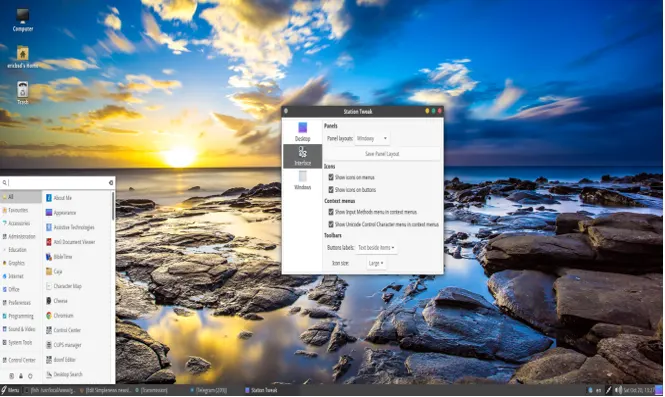
What sets it apart? Unlike some BSD variants that prioritize minimalism to a fault, GhostBSD focuses on usability without sacrificing BSD’s core strengths. The shift to building on FreeBSD RELEASE branches (starting with 25.01 in February 2025) ensures predictable updates and fewer surprises, making it ideal for daily drivers. In a year where AI workloads and remote work demand reliability, this heritage makes GhostBSD the ultimate FreeBSD-based desktop—blending decades of Unix wisdom with modern polish.
Standout Features: What Makes GhostBSD Shine in 2025
Diving into the meat of why GhostBSD is the ultimate FreeBSD-based desktop, let’s talk features. The 25.02-R14.3p2 release builds directly on FreeBSD 14.3-RELEASE, incorporating upstream improvements like enhanced kernel stability and better hardware drivers. At its core is ZFS as the default filesystem—a beast for data integrity with built-in snapshots, compression, and encryption. Accidentally mess up a config? Roll back in seconds. No more praying to the backup gods.
Preinstalled software is a huge plus. Boot up, and you’ve got Firefox for browsing, VLC with full codecs for media playback, LibreOffice for docs, and GIMP for image editing. The Software Station GUI simplifies installing from FreeBSD’s massive ports collection (over 30,000 packages), acting like an app store but without the corporate oversight. Hardware support got a serious upgrade in 2025: Auto-detection for AMD Radeon HD series GPUs, NVIDIA RTX 4000 and 5000 cards, improved WiFi firmware (especially Intel iwlwifi—install via sudo fwget before upgrading), and multi-channel audio switching. If you’re on a laptop or modern rig, this means fewer headaches than in vanilla FreeBSD.
Performance is another feather in its cap. FreeBSD’s kernel optimizes I/O operations better than many Linux counterparts, making GhostBSD snappy even on modest hardware. Reviews from 2025 note quick boots, low RAM usage with the MATE desktop, and smooth multitasking in virtual machines. The release also adds automatic /tmp clearing for cleaner runs and removes unnecessary ZFS tuning for broader compatibility. For developers, it’s a dream with built-in tools for compiling and debugging, minus the bloat of larger distros.
But wait, there’s more: Internationalization improvements include Simplified Chinese translations and fixes for Russian/Portuguese locales, making it accessible worldwide. In short, these features position GhostBSD as the ultimate FreeBSD-based desktop for anyone seeking efficiency without endless setup.
Gershwin: The Game-Changing Mac-Like Desktop Environment
If there’s one reason to crown GhostBSD the ultimate FreeBSD-based desktop for 2025, it’s the debut of Gershwin—a brand-new, community-preview desktop environment that’s turning heads. Inspired by macOS but built on open-source GNUstep (which echoes NeXTSTEP, macOS’s ancestor), Gershwin delivers a sleek interface with a top menu bar, dock, and intuitive window management. It’s a hybrid of GNUstep and Xfce components, ensuring compatibility with existing apps.
Led by developer Joe Maloney, Gershwin integrates seamlessly with GhostBSD’s tools like Software Station and Update Station. Out of the box, it includes GNUstep apps: GWorkspace for file browsing (handling the desktop and dock), Terminal, TextEdit, and Preferences. Non-GNUstep software runs without issues, and Xfce’s window manager provides that global menu bar for a cohesive feel. This isn’t just eye candy; it’s functional, lowering the barrier for macOS users switching to open-source.
Reviews are glowing: The Register calls it a “Mac-like twist” channeling classic NeXT vibes, perfect for creative workflows. Users on forums note its elegance reduces complexity, making BSD less intimidating. Compared to rivals like helloSystem (another Mac-inspired BSD), Gershwin feels more integrated and mature. As an early preview in 25.02, it hints at bigger things—perhaps becoming the default in future releases. For 2025, where hybrid work demands intuitive UIs, Gershwin makes GhostBSD the ultimate FreeBSD-based desktop for productivity and style.
Installation and Everyday Usability: No More BSD Barriers
One myth about BSD is that it’s hard to install—GhostBSD shatters that. The graphical installer is wizard-simple: Boot from the live USB (available in MATE, XFCE, or Gershwin flavors), select language, partition (ZFS auto-handles it), set users, and you’re done in under 10 minutes. It supports UEFI, encryption, and boot environments for safe testing.
Daily use is a breeze. Update Station GUI manages upgrades—create a boot environment first (sudo bectl create) to rollback if needed. Station Tweak customizes layouts: Go “Windowy” for Windows vibes or “Purity” for minimalism. Multimedia? Fusefs mounts various filesystems, and restored packages include VS Code and Signal. Non-tech users love it; one forum post compares it favorably to Linux Mint for simplicity and stability.
Hardware requirements are modest: 4GB RAM minimum (6GB recommended for Gershwin), 20GB disk, and a 64-bit CPU. The wiki offers guides on everything from networking to drivers, though some note it’s geared toward older versions—community forums fill the gaps. In 2025, with remote setups rising, this ease makes GhostBSD the ultimate FreeBSD-based desktop for hassle-free computing.
Performance, Stability, and Security: BSD’s Winning Edge
Performance-wise, GhostBSD leverages FreeBSD’s efficiency, outperforming Linux in I/O-heavy tasks like file servers or databases. It runs cool on laptops, with better battery life in some tests, and handles VMs flawlessly. Stability is legendary—no systemd drama, just simple rc.d scripts. The RELEASE branch means polished updates, fixing bugs like security package delays.
Security? Inherited from FreeBSD: Jails for containerization (pre-Docker tech), mandatory access controls, and ZFS encryption. No telemetry, no ads—pure privacy. Users praise it as a “safe haven” from Big Tech. In a cyber-threat-filled 2025, this fortification cements GhostBSD as the ultimate FreeBSD-based desktop.
Community and Support: A Welcoming BSD Family
GhostBSD thrives on its community. Forums on Flarum buzz with help, and GitHub invites contributions. Monthly donation reports fund features like Gershwin. GhostBSDCon 2025, announced in January, focuses on desktop BSD development. Unlike elitist circles, it’s newbie-friendly—X posts show users raving about smooth installs and hardware support.
GhostBSD vs. Competitors: Why It Reigns Supreme
Against other FreeBSD desktops: HelloSystem is Mac-like but experimental; MidnightBSD feels dated; NomadBSD is live-only. Vanilla FreeBSD lacks GUI polish. Vs. Linux like Mint: GhostBSD offers superior stability, fewer driver issues, though software variety is slightly less—but ports bridge that. 2025 reviews call it “the finest Unix-based system” for desktops.
Why GhostBSD in 2025? Future-Proof and Forward-Thinking
With AI, edge computing, and privacy concerns peaking, GhostBSD’s efficiency and security future-proof your setup. Gershwin’s innovation signals more to come, and community momentum—like X buzz around the release—keeps it evolving. Users share stories of ditching Linux for “blue screen-free” reliability.
Conclusion: Embrace the Future with GhostBSD in 2025
In a world overflowing with operating systems, GhostBSD stands out as the ultimate FreeBSD-based desktop for 2025, delivering a perfect blend of stability, innovation, and user-friendly design. With its rock-solid FreeBSD foundation, cutting-edge features like ZFS and the stunning Gershwin desktop environment, GhostBSD offers an experience that’s both powerful and approachable.
Whether you’re a developer needing a lean coding platform, a privacy advocate seeking a telemetry-free sanctuary, or just someone craving a reliable, bloat-free desktop, GhostBSD has it all. The 25.02-R14.3p2 release, fresh from August 2025, brings enhanced hardware support, seamless updates, and a community-driven spirit that keeps it evolving.
From its intuitive installer to its lightweight performance, GhostBSD makes BSD accessible without compromising its Unix roots. So why wait? Head to ghostbsd.org, download the ISO, and discover why GhostBSD is the ultimate FreeBSD-based desktop for 2025. Join the community, share your experience, and make your desktop truly yours. What’s stopping you from diving in? Let us know in the comments!
Disclaimer
The information provided in this blog post about “Why GhostBSD is the Ultimate FreeBSD-Based Desktop for 2025” is based on the latest official data available as of August 29, 2025, including the GhostBSD 25.02-R14.3p2 release and related sources. While we strive for accuracy, the content reflects opinions, reviews, and interpretations that may not represent the views of the GhostBSD development team or its affiliates.
Features, performance, and user experiences may vary depending on hardware, configurations, and individual use cases. We recommend verifying details on the official GhostBSD website (ghostbsd.org) before making decisions based on this post. The author is not responsible for any issues arising from the use of GhostBSD or related software. Always back up your data before installing or updating any operating system. For the most current information, consult official GhostBSD documentation, forums, or community resources.
Frequently Asked Questions About GhostBSD in 2025
What makes GhostBSD different from other FreeBSD-based desktops?
GhostBSD stands out because it’s designed for desktop users who want a polished, out-of-the-box experience without sacrificing FreeBSD’s stability. Unlike vanilla FreeBSD, which leans toward servers and needs manual tweaking for desktops, GhostBSD offers a graphical installer, pre-installed apps like Firefox and LibreOffice, and tools like Software Station for easy package management. Compared to competitors like helloSystem or MidnightBSD, GhostBSD’s new Gershwin desktop brings a Mac-like vibe with better integration, and its MATE option is lightweight and familiar. It’s the sweet spot for usability and BSD power in 2025.
Is GhostBSD beginner-friendly, or do I need to be a tech wizard?
No tech wizardry required! GhostBSD is built to be approachable, even if you’re new to BSD. The graphical installer in the 25.02 release walks you through setup—language, partitions, users—in under 10 minutes. Tools like Update Station and Station Tweak make managing updates and customizing layouts a breeze, no command line needed. That said, if you love diving into configs, GhostBSD supports that too. It’s like Linux Mint for BSD fans—simple for newbies, powerful for pros.
How does GhostBSD handle hardware support in 2025?
GhostBSD’s hardware support is stronger than ever in 2025. The 25.02-R14.3p2 release adds auto-detection for modern GPUs like AMD Radeon HD and NVIDIA RTX 4000/5000 series, plus improved WiFi with updated Intel iwlwifi firmware. It also handles multi-channel audio switching automatically, so your headphones or speakers just work. It runs smoothly on everything from old laptops to new workstations, with minimal RAM usage (around 500–600 MB at idle). Just grab the right firmware for WiFi before upgrading, and you’re golden.
Why should I choose GhostBSD over a Linux distro like Ubuntu or Mint?
GhostBSD offers a unique edge: FreeBSD’s rock-solid stability and security without Linux’s fragmentation or systemd debates. Its ZFS filesystem gives you snapshots and data protection that Linux distros often require extra setup for. GhostBSD’s lean design—especially with MATE or Gershwin—means less bloat, making it ideal for older hardware or performance hogs. While Linux might have more apps, GhostBSD’s 30,000+ ports cover most needs, and its privacy-first approach (no telemetry!) is a big win for 2025’s security-conscious users.
How can I get involved with the GhostBSD community?
The GhostBSD community is super welcoming! Jump into the Flarum forums, IRC, or GitHub to ask questions, share tips, or report bugs. You can contribute by coding, translating (new languages like Simplified Chinese were added in 25.02!), or donating via Patreon to fund projects like Gershwin. Keep an eye out for GhostBSDCon 2025, where you can connect with devs and enthusiasts. Whether you’re a newbie or a seasoned coder, there’s a spot for you in this growing community.
Want more answers? Head to ghostbsd.org or drop a comment below!
Also Read
iDeal OS Review: The Ultimate Privacy-Focused Linux Distro for 2025?
About the Author






1 thought on “Why GhostBSD is the Ultimate FreeBSD-Based Desktop for 2025”