Windows 11 vs. Windows Server 2025: Which OS Suits Your Needs?
Choosing the right operating system (OS) is a critical decision for individuals, businesses, and IT professionals. Microsoft’s Windows 11 and Windows Server 2025 are two of the latest offerings, each designed for distinct purposes but sharing some common ground. Released in October 2021, Windows 11 is tailored for personal and professional desktop use, while Windows Server 2025, launched on November 1, 2024, is optimized for enterprise-grade server environments.
This blog post dives deep into a detailed comparison of Windows 11 vs. Windows Server 2025, exploring their features, performance, security, and use cases to help you decide which OS best suits your needs. Let’s break it down in a friendly yet professional way, using the latest official data to guide you through this decision-making process.
Understanding the Core Purpose of Each OS
Before we dive into the nitty-gritty, let’s clarify what each OS is designed for. Windows 11 is Microsoft’s flagship client operating system, built for end-users like professionals, gamers, and casual PC users. It’s all about delivering a sleek, user-friendly experience with a modern interface, enhanced productivity tools, and gaming optimizations. On the other hand, Windows Server 2025 is a server-grade OS meant for managing enterprise infrastructure, hosting applications, and supporting large-scale virtualization and cloud integration. It’s the backbone for businesses running servers, databases, or complex IT environments.
Think of Windows 11 as your personal assistant, making your daily tasks smoother and more enjoyable. Windows Server 2025, however, is like the IT manager of a large organization, keeping everything running behind the scenes. But how do they stack up in terms of features, performance, and practical applications? Let’s explore.
Key Features Comparison
Windows 11: A Modern Desktop Experience
Windows 11 is designed with a consumer-focused approach, emphasizing aesthetics, usability, and versatility. Here are some standout features:
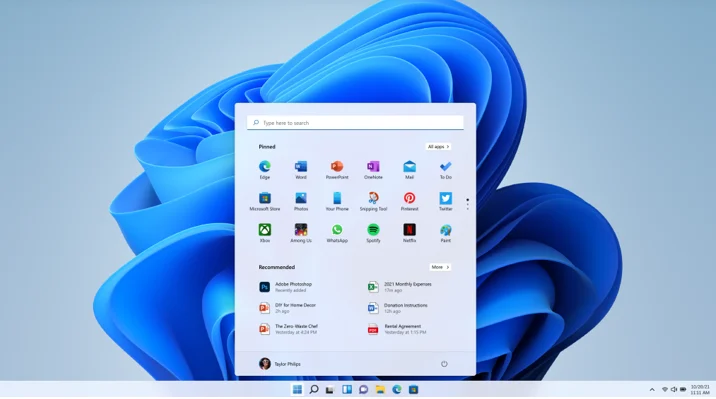
- Redesigned User Interface: Windows 11 introduces a centered Start menu, a streamlined taskbar, and a modernized Windows shell inspired by the canceled Windows 10X project. The interface uses rounded corners, a Mica design, and a clean aesthetic that aligns with Microsoft’s Fluent Design System.
- Productivity Enhancements: Features like Snap Layouts, virtual desktops, and improved multitasking make it easier to organize and switch between tasks. The Widgets panel offers quick access to news, weather, and personalized content.
- Gaming Optimizations: Windows 11 supports Auto HDR, DirectStorage, and Xbox Game Pass integration, making it a favorite among gamers. DirectStorage, for instance, reduces game load times by leveraging NVMe drives.
- AI Integration: With features like Copilot and Copilot Vision (introduced in July 2025), Windows 11 enhances productivity by analyzing screen content and assisting with tasks. The Recall feature, exclusive to Copilot+ PCs, allows users to search past activities using AI-driven snapshots.
- Microsoft Store and App Support: Windows 11 supports a wide range of applications, including legacy Win32 apps, Universal Windows Platform (UWP) apps, and Android apps via the Amazon Appstore. The Microsoft Store is more robust than ever, offering extensive software options.
- System Requirements: Windows 11 has stricter hardware requirements, including a 64-bit CPU, 4 GB of RAM, 64 GB of storage, and TPM 2.0. This ensures better security but may limit compatibility with older hardware.
Windows Server 2025: Powering Enterprise Infrastructure
Windows Server 2025 is built for scalability, security, and hybrid cloud environments. It adopts many elements of Windows 11’s design but tailors them for server use. Here’s what it brings to the table:
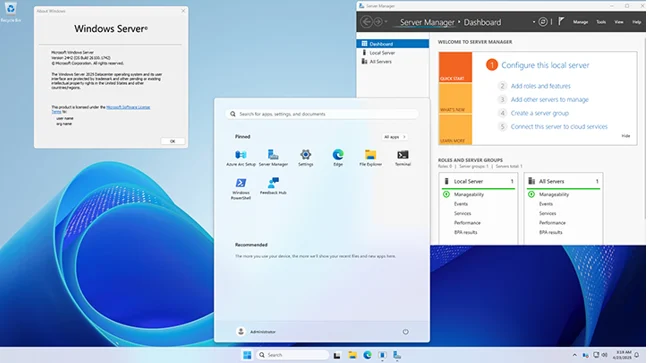
- Windows 11-Based Interface: For the first time, Windows Server 2025 adopts the Windows 11 desktop shell, complete with Bluetooth support for peripherals like mice, keyboards, and headsets. This makes it feel more familiar to users accustomed to Windows 11.
- Hotpatching: A game-changer for businesses, hotpatching allows security updates to be applied without requiring a system reboot, minimizing downtime for critical workloads. This feature is particularly prominent in the Datacenter: Azure Edition.
- Advanced Virtualization with Hyper-V: Windows Server 2025 enhances Hyper-V with features like Accelerated Networking (AccelNet) for reduced latency and CPU usage, and support for confidential VMs using AMD SEV-SNP and Intel TDX for hardware-encrypted isolation.
- AI and Machine Learning Support: Native support for AI/ML frameworks, including DirectML for GPU inference, makes Windows Server 2025 ideal for edge computing and real-time data analysis. It’s optimized for GPU partitioning and high-performance computing workloads.
- Storage and Performance Optimizations: Features like NVMe performance enhancements (up to 60% more IOPS than Windows Server 2022), block cloning on ReFS, and Storage Replica compression boost efficiency. Dev Drive, shared with Windows 11 24H2, optimizes developer workloads.
- Security Enhancements: Credential Guard is enabled by default, protecting against credential theft. SMB over QUIC ensures secure file sharing over the internet, and AI-driven threat detection adds proactive security.
- Azure Integration: Windows Server 2025 is designed for hybrid cloud environments, with seamless Azure Arc integration for unified management across on-premises and cloud setups.
- DTrace: A native command-line tool for real-time system monitoring and troubleshooting, DTrace helps administrators diagnose performance issues without modifying code.
Performance: Desktop vs. Server Workloads
Performance is where Windows 11 and Windows Server 2025 diverge significantly due to their intended use cases. Windows 11 is optimized for single-user or small-team environments, excelling in tasks like web browsing, gaming, and office productivity. Its lightweight design and lower resource footprint make it ideal for devices with modest hardware, though it requires at least 4 GB of RAM and a 64-bit CPU. In benchmarks, Windows 11 runs smoothly on modern hardware, with features like DirectStorage providing faster load times for games and applications.
Windows Server 2025, however, is built for high-performance, multi-user environments. It supports up to 256 CPU cores and 64 TB of RAM in its Datacenter edition, making it suitable for massive workloads like SQL Server databases, AI processing, and virtual machine hosting. Official data shows Windows Server 2025 delivers up to 60% more storage IOPS and 70% lower latency compared to Windows Server 2022, thanks to optimizations like DirectStorage and NVMe enhancements. Additionally, Active Directory in Windows Server 2025 leverages all CPU groups in NUMA hardware, improving efficiency on high-core-count servers.
Interestingly, some users on platforms like Reddit have reported that Windows Server 2025 feels snappier than Windows 11 in virtualized environments, even with minimal resources (e.g., 2 GB RAM and 2 CPUs). This is likely due to fewer background services and less bloat, as servers prioritize efficiency over consumer features. However, Windows Server 2025’s performance comes at the cost of higher hardware demands and complexity, making it overkill for typical desktop use.
Security: Protecting Data in Different Contexts
Both operating systems prioritize security, but their approaches cater to different needs. Windows 11 emphasizes user-level security with features like:
- TPM 2.0 and Secure Boot: Mandatory for installation, these ensure a secure boot process and protect against firmware attacks.
- Windows Defender: Integrated antivirus and threat protection, enhanced with cloud-based features like Defender for Endpoint in enterprise settings.
- BitLocker: Available in Pro editions, BitLocker provides disk encryption for data protection.
Windows Server 2025 takes security to an enterprise level with:
- Secured-Core Server: Builds on Windows 11’s security foundation, integrating TPM 2.0, Secure Boot, and Hypervisor-based Code Integrity (HVCI) for firmware and kernel protection.
- Credential Guard: Enabled by default, it protects NTLM hashes and Kerberos tickets from theft.
- SMB over QUIC: Allows secure file sharing over the internet without a VPN, using TLS 1.3 for encryption.
- AI-Driven Threat Detection: Uses machine learning to identify and mitigate threats proactively.
- Windows Local Administrator Password Solution (LAPS): Automatically generates and rotates unique passwords for local administrator accounts, reducing the risk of compromised credentials.
For businesses in regulated industries like finance or healthcare, Windows Server 2025’s advanced security features and compliance capabilities make it a stronger choice. Windows 11, while secure for personal and small business use, lacks the enterprise-grade protections needed for sensitive server environments.
Use Cases: When to Choose Which OS
When to Choose Windows 11
Windows 11 is the go-to choice for:
- Personal Use: If you’re a student, gamer, or casual user, Windows 11’s intuitive interface, gaming features, and app support make it ideal. Features like Snap Layouts and Widgets enhance daily productivity.
- Small Businesses: For small teams needing a reliable OS for office tasks, video conferencing, and light virtualization, Windows 11 Pro offers features like BitLocker and domain joining.
- Creative Professionals: Designers and video editors benefit from Windows 11’s high-resolution graphical interface and support for tools like Adobe Creative Cloud.
- Hybrid Work: With Microsoft Teams integration and cloud-based features like OneDrive, Windows 11 suits remote and hybrid workers.
When to Choose Windows Server 2025
Windows Server 2025 shines in:
- Enterprise Environments: Large organizations running databases, email servers, or ERP systems need Windows Server 2025’s scalability and virtualization capabilities. The Datacenter edition supports unlimited VMs, making it perfect for data centers.
- Hybrid Cloud Deployments: Businesses using Azure or other cloud platforms benefit from Azure Arc integration and pay-as-you-go licensing.
- High-Availability Workloads: Hotpatching and Storage Replica ensure minimal downtime, ideal for mission-critical systems like financial platforms or healthcare databases.
- AI and ML Workloads: Organizations deploying machine learning models or real-time analytics leverage Windows Server 2025’s GPU partitioning and DirectML support.
- IT Infrastructure Management: Features like DTrace, Windows Admin Center, and enhanced PowerShell scripting simplify server management for IT admins.
Can Windows Server 2025 Be Used as a Desktop OS?
Some tech enthusiasts have explored using Windows Server 2025 as a desktop OS, citing its lower resource usage and lack of bloatware. For example, a Reddit user reported running Windows Server 2025 in a Hyper-V VM with just 2 GB of RAM and 2 CPUs, finding it faster than Windows 11 in similar conditions. Another user on XDA Forums praised its speed and ability to install the Microsoft Store, making it viable for general use.
However, Windows Server 2025 isn’t designed for consumer use. It lacks features like gaming optimizations, and some drivers or applications may not install due to compatibility flags. For instance, certain network drivers refused to install in a Reddit user’s setup. Unless you have a specific need for server features or want to experiment, Windows 11 is the better choice for desktop use.
Licensing and Cost Considerations
Windows 11 is available as a free upgrade for eligible Windows 10 devices or comes pre-installed on new PCs. Pricing for standalone licenses varies, with the Home edition being more affordable and the Pro edition offering advanced features like BitLocker. Exact pricing isn’t publicly disclosed by Microsoft, requiring users to contact vendors for quotes.
Windows Server 2025 comes in multiple editions—Essentials, Standard, Datacenter, and Datacenter: Azure Edition—each with different pricing and licensing models. The Essentials edition is cost-effective for small businesses (up to 25 users and 50 devices), while Standard and Datacenter editions cater to larger organizations with virtualization needs. The Datacenter edition is pricier due to unlimited VM support and exclusive features like Storage Spaces Direct. Microsoft introduced pay-as-you-go licensing for flexibility, and pricing for Standard has reportedly decreased, while Datacenter costs have risen. For accurate pricing, check with Microsoft or authorized resellers like Trusted Tech Team.
System Requirements and Compatibility
Windows 11’s stricter requirements (TPM 2.0, 4 GB RAM, 64 GB storage, and specific CPUs) can pose challenges for older hardware. Windows Server 2025 maintains similar CPU requirements to Windows Server 2022 (1.4 GHz 64-bit CPU with NX, DEP, and SSE4.2 support) but supports massive configurations (256 cores, 64 TB RAM). It’s optimized for modern hardware, with optional TPM 2.0 and Secure Boot for enhanced security.
Both OSes share some features, like block cloning on ReFS and NVMe optimizations, but Windows Server 2025’s focus on enterprise hardware makes it less practical for consumer PCs.
Deprecated Features and Migration Considerations
Windows Server 2025 removes legacy features like TLS 1.0/1.1, NTLMv1, SMTP Server, and WordPad to enhance security and reduce maintenance. Organizations relying on these must plan migrations to avoid issues. Windows 11 also drops support for 32-bit CPUs and older hardware, which may require upgrades.
Which OS Should You Choose?
Choose Windows 11 if you’re an individual, small business, or creative professional needing a versatile, user-friendly OS for daily tasks, gaming, or hybrid work. It’s cost-effective and widely compatible with consumer software.
Choose Windows Server 2025 if you manage enterprise infrastructure, require advanced virtualization, or need hybrid cloud integration. It’s ideal for businesses prioritizing security, scalability, and uptime.
Conclusion
Windows 11 and Windows Server 2025 are powerful operating systems, each excelling in its domain. Windows 11 offers a polished, consumer-friendly experience with robust productivity and gaming features, while Windows Server 2025 is a powerhouse for enterprise workloads, virtualization, and AI-driven tasks. By understanding your needs—whether it’s personal productivity or enterprise scalability—you can choose the OS that aligns with your goals. For the latest details, check Microsoft’s official resources or contact a trusted vendor.
What’s your use case? Let us know in the comments, and we’ll help you decide which OS is right for you!
Disclaimer
The information provided in this blog post is based on the latest official data from Microsoft and other reliable sources as of August 6, 2025. While we strive to ensure accuracy, features, pricing, and specifications for Windows 11 and Windows Server 2025 may vary depending on region, licensing agreements, or future updates. This content is for informational purposes only and should not be considered professional advice.
Always consult Microsoft’s official documentation or authorized vendors for the most up-to-date and specific details before making purchasing or deployment decisions. The author and publisher are not responsible for any errors, omissions, or consequences arising from the use of this information.
Also Read
Uncover the Top 5 Hidden Gem Linux Distros to Try in 2025!
About the Author