CuerdOS 2.0 arrives as a performance-tuned Linux distribution built on the newly released Debian 13 “Trixie” foundation. This CuerdOS 2.0 Review examines how the distribution delivers on its promise of combining Debian’s legendary stability with aggressive performance optimizations across eight distinct desktop environments: XFCE, KDE Plasma, GNOME Shell, Cinnamon, MATE, LXQt, Budgie, and Sway.
Debian 13 “Trixie” reached stable status in late 2024, bringing updated kernel support, modern application versions, and refined security features. CuerdOS leverages this foundation while implementing custom tuning focused on responsiveness, efficient resource utilization, and daily reliability. Whether you’re reviving older hardware with the XFCE edition or building a productivity powerhouse with KDE Plasma, CuerdOS 2.0 positions itself as a serious option for users prioritizing system performance without sacrificing stability.
This review covers real-world performance metrics, stability observations, hardware compatibility findings, and detailed analysis of each desktop edition to help you determine if CuerdOS 2.0 fits your computing needs.
What is CuerdOS?
CuerdOS emerged from the Linux community’s desire for a Debian-based distribution that maintains upstream stability while implementing performance enhancements often reserved for enthusiast-focused projects. The project philosophy centers on three principles: rock-solid stability inherited from Debian Stable, measurable performance improvements through kernel tuning and desktop optimization, and providing users with genuine choice through multiple desktop environments rather than forcing a single interface.
Unlike distributions that layer heavy customization atop Debian, CuerdOS takes a measured approach. The development team cherry-picks performance-oriented kernel parameters, implements targeted I/O scheduler adjustments, and pre-configures desktop environments for optimal responsiveness. The result aims to feel noticeably faster than stock Debian while maintaining full compatibility with Debian’s package ecosystem and update infrastructure.
The target audience spans users frustrated with bloated Ubuntu derivatives, system administrators seeking stable workstations, developers requiring predictable environments, and hardware enthusiasts squeezing maximum performance from aging machines. CuerdOS deliberately avoids the “beginner-friendly” market crowded with hand-holding installers and proprietary codec bundles, instead targeting competent Linux users who value performance and control.
What’s New in CuerdOS 2.0
The transition from CuerdOS 1.x to version 2.0 represents a major milestone driven primarily by the Debian 13 “Trixie” rebase. Debian 13 ships with Linux kernel 6.11, providing improved hardware support for recent AMD and Intel processors, better power management on laptops, and expanded Wi-Fi driver coverage. CuerdOS 2.0 adopts this kernel while maintaining custom patches for I/O scheduling and CPU governor tuning.
Core system improvements include refined systemd service configurations that reduce boot service parallelization conflicts, updated Zram compression parameters for systems with limited RAM, and revised default swappiness values that prioritize keeping active applications in physical memory. These changes build on CuerdOS 1.x foundations while incorporating lessons learned from community feedback.
Performance tuning received particular attention in this release. The development team implemented per-desktop memory management profiles, recognizing that GNOME Shell’s resource requirements differ substantially from LXQt’s minimal footprint. Desktop-specific tuning means users get optimized configurations regardless of their chosen environment rather than one-size-fits-all settings.
Desktop polish updates include refreshed icon themes that maintain visual consistency across all eight editions, updated wallpaper collections featuring high-resolution photography, and standardized application sets that balance functionality with disk space efficiency. Each desktop environment runs the latest stable version available in Debian 13 repositories, ensuring users benefit from upstream bug fixes and feature improvements.
Why Debian 13 Makes CuerdOS 2.0 Stable
Debian 13 “Trixie” completed its extensive testing phase in late 2024, undergoing the same rigorous quality assurance process that has defined Debian Stable releases for decades. The Debian 13 performance characteristics stem from this conservative approach: packages enter the stable repository only after proving reliability across diverse hardware configurations and use cases. For performance-focused distributions like CuerdOS, this foundation proves crucial because aggressive tuning built on unstable software creates frustrating experiences where speed gains get erased by crashes and bugs.
The Debian security team maintains a proven update model for Stable releases. Security patches receive priority treatment with rapid deployment, while feature updates remain frozen to prevent regression introduction. This model aligns perfectly with CuerdOS goals because system administrators and power users can deploy performance optimizations knowing the underlying platform won’t introduce surprise breakage during routine updates.
Long-term maintenance represents another Debian strength. Debian 13 will receive security support through 2027, with extended Long Term Support potentially extending coverage further. This multi-year support window allows CuerdOS users to build reliable workflows without forced upgrades every six or twelve months. Hardware investments get maximized because systems remain secure and functional for extended periods.
Performance-focused distributions specifically benefit from Debian Stable’s characteristics. While bleeding-edge distributions chase the newest kernel releases and application versions, they introduce variables that complicate performance tuning. CuerdOS can optimize aggressively against Debian 13’s known package versions, creating reproducible performance profiles that remain consistent across installations and updates.
CuerdOS 2.0 Editions Overview
CuerdOS 2.0 ships as eight separate ISO images, each featuring a different desktop environment pre-configured and optimized. This approach acknowledges that desktop environment selection profoundly impacts system performance, workflow efficiency, and user satisfaction. Rather than bundling multiple desktops into a single ISO or forcing users through post-install desktop switching, CuerdOS provides purpose-built editions where each environment receives dedicated optimization.
Desktop selection should match your hardware capabilities and workflow requirements. Lightweight desktops like XFCE and LXQt excel on systems with 2-4GB RAM, while feature-rich environments like KDE Plasma and GNOME Shell demand 4GB or more for comfortable operation. Tiling window managers like Sway target keyboard-driven power users, while traditional desktops like Cinnamon and MATE suit users transitioning from Windows or macOS.
CuerdOS 2.0 XFCE Edition
The CuerdOS 2.0 XFCE review reveals this edition as the performance champion for resource-constrained hardware. XFCE 4.18 delivers a complete desktop experience while maintaining idle RAM usage around 500-650MB on a fresh boot. The development team implemented custom panel layouts that balance functionality with visual clarity, pre-configured the Whisker Menu for efficient application launching, and tuned Xfwm4 compositor settings for smooth window animations without excessive GPU load.
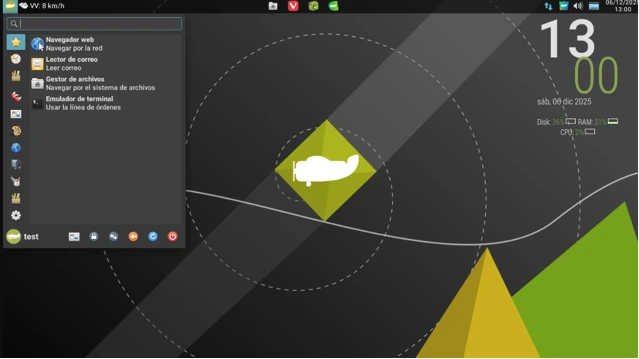
This lightweight Debian 13 distro configuration shines on systems with mechanical hard drives where aggressive disk caching and I/O priority tuning yield noticeable responsiveness improvements. Application launch times benefit from CuerdOS’s prelink-style optimizations, making XFCE feel snappier than stock Debian XFCE installations despite identical underlying packages.
Best for: Systems with 2-4GB RAM, older laptops, users prioritizing battery life, anyone seeking maximum performance from modest hardware. XFCE’s mature codebase and extensive customization options make this edition ideal for users who want lightweight operation without sacrificing desktop functionality.
CuerdOS 2.0 KDE Plasma Edition
KDE Plasma 5.27 represents the flagship desktop environment in Debian 13, offering extensive features while maintaining reasonable resource efficiency through recent upstream optimization work. CuerdOS’s Plasma edition starts with approximately 700-850MB RAM usage at idle, scaling upward based on widget configuration and active applications. The integration quality proves excellent, with Plasma’s system settings providing comprehensive control over desktop behavior.
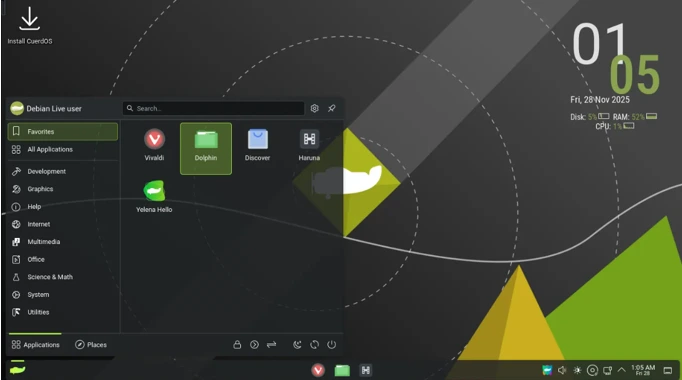
The CuerdOS team implemented Plasma-specific tuning including adjusted Kwin compositor settings for reduced latency, pre-configured Baloo file indexing to avoid excessive disk I/O on startup, and carefully selected default widgets that showcase Plasma capabilities without overwhelming new users. The visual presentation balances modern aesthetics with functional design, using the Breeze theme with subtle CuerdOS branding.
Best for: Systems with 4GB+ RAM, users wanting extensive customization options, multi-monitor setups, anyone seeking a feature-complete desktop environment. Plasma’s flexibility allows power users to craft highly personalized workflows while remaining accessible to users seeking polished defaults.
CuerdOS 2.0 GNOME Shell Edition
GNOME 45 brings refined Wayland support, improved touchpad gesture recognition, and continued evolution of the Activities-based workflow that defines the GNOME experience. CuerdOS’s GNOME edition idles around 800-950MB RAM usage, reflecting GNOME’s modern architecture and JavaScript-based shell. The development team maintained GNOME’s design philosophy while implementing performance tweaks targeting animation smoothness and application switching responsiveness.
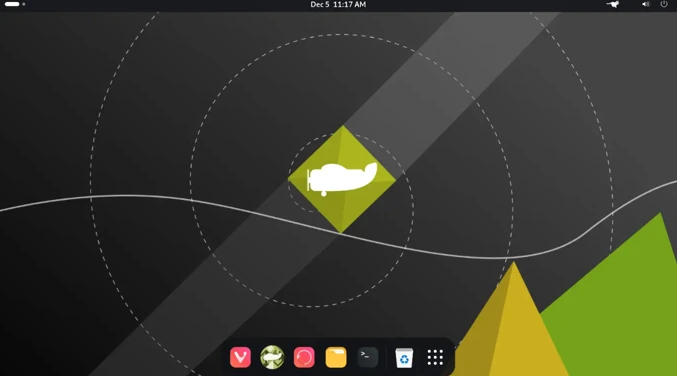
Wayland runs as the default session with X11 available as fallback for applications requiring legacy compatibility. GNOME’s extension ecosystem remains accessible, though CuerdOS ships with minimal extensions pre-installed to maintain stability and performance. The experience emphasizes keyboard-driven navigation through the Activities overview, making this edition particularly attractive to users embracing modern desktop workflows.
Best for: Users prioritizing clean design and workflow efficiency, laptop users benefiting from excellent touchpad gesture support, anyone comfortable with non-traditional desktop paradigms. GNOME’s opinionated approach works brilliantly for users who embrace its workflow but frustrates those expecting Windows-style taskbar-and-menu interfaces.
CuerdOS 2.0 Cinnamon Edition
Cinnamon 6.0 provides the most familiar desktop layout for users transitioning from Windows environments. The bottom panel, system tray, and traditional menu structure create immediate comfort for users accustomed to conventional desktop metaphors. CuerdOS’s Cinnamon implementation idles around 650-800MB RAM, positioning it between lightweight XFCE and resource-intensive GNOME.
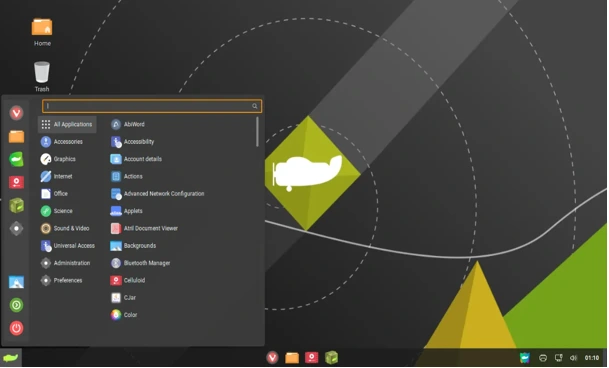
The Cinnamon edition receives careful attention regarding visual polish and feature completeness. Window effects provide modern aesthetics without excessive resource consumption, the Nemo file manager includes useful extensions without bloat, and system settings present comprehensive options through an organized interface. CuerdOS’s tuning focuses on eliminating Cinnamon’s occasional stuttering during heavy desktop effects, resulting in smoother daily operation.
Best for: Windows refugees seeking familiar interfaces, users wanting traditional desktop layouts with modern features, systems with 3-4GB RAM comfortable handling moderate desktop overhead. Cinnamon strikes an effective balance between visual appeal and resource efficiency.
CuerdOS 2.0 MATE Edition
MATE Desktop continues the GNOME 2 legacy, providing a classic desktop experience that prioritizes stability and predictability. Idle RAM usage hovers around 450-600MB, making MATE the second-lightest option after XFCE. The desktop environment’s mature codebase translates to exceptional stability, with users rarely encountering crashes or unexpected behavior during extended sessions.
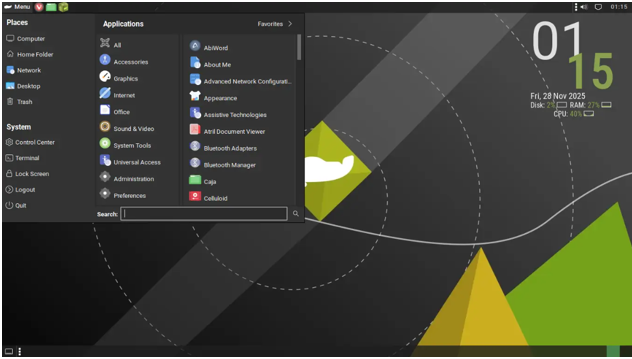
CuerdOS’s MATE edition appeals to conservative users who value consistency over cutting-edge features. The interface remains familiar across years of MATE releases, meaning skills and workflows transfer seamlessly between systems and versions. Panel applets provide extensive functionality, the Caja file manager handles daily tasks efficiently, and system integration proves reliable across diverse hardware configurations.
Best for: Users seeking ultimate stability, anyone frustrated by frequent desktop environment changes in modern Linux, systems where predictable resource usage matters more than visual flourishes. MATE represents the “set it and forget it” option for users building long-term stable workstations.
CuerdOS 2.0 LXQt Edition
LXQt 1.4 achieves remarkable resource efficiency through its Qt-based architecture, idling around 400-550MB RAM while providing complete desktop functionality. This ultra-lightweight profile makes LXQt ideal for systems where every megabyte matters, such as older netbooks, embedded systems, or virtual machines requiring minimal overhead. Despite minimal resource demands, LXQt maintains modern Qt application compatibility and reasonable visual appeal.
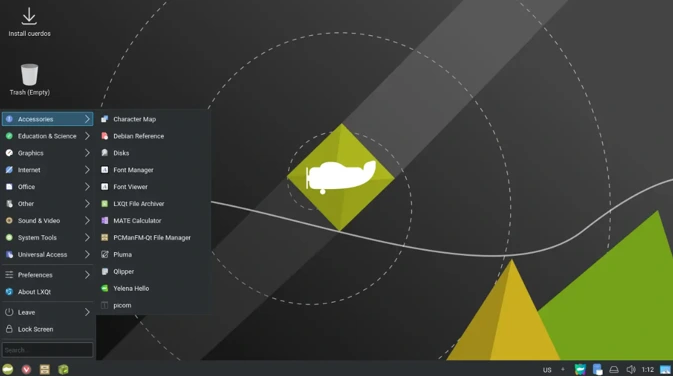
The CuerdOS LXQt configuration includes carefully selected default applications that maintain the lightweight philosophy. PCManFM-Qt handles file management efficiently, the LXQt panel provides essential functionality without feature creep, and OpenBox window manager delivers reliable window management with minimal resource consumption. System settings remain accessible without overwhelming users with excessive options.
Best for: Absolute minimum resource usage, systems with 1-2GB RAM, virtual machines, anyone prioritizing performance over visual effects. LXQt proves that lightweight desktops can maintain usability and modern application support without demanding significant system resources.
CuerdOS 2.0 Budgie Edition
Budgie 10.8 offers elegant design focused on simplicity and usability. The desktop environment draws inspiration from modern design principles while maintaining efficiency, idling around 600-750MB RAM. Budgie’s Raven sidebar provides quick access to notifications and system controls, the icon-based taskbar presents running applications clearly, and the overall aesthetic remains clean without appearing austere.
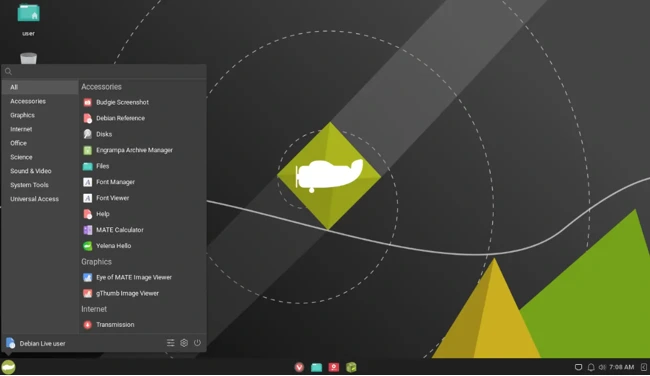
CuerdOS’s Budgie implementation emphasizes the desktop’s core strengths: balanced resource usage, intuitive interface design, and minimal learning curve. The development team configured Budgie to showcase its capabilities while avoiding feature overload, resulting in an environment that feels polished rather than cluttered. Integration quality meets high standards across core applications and system components.
Best for: Users seeking modern aesthetics without excessive resource demands, anyone wanting simplicity without sacrificing functionality, systems with 3-4GB RAM. Budgie occupies the sweet spot between lightweight efficiency and contemporary design expectations.
CuerdOS 2.0 Sway Edition
Sway 1.8 brings i3-compatible tiling window management to Wayland, creating a keyboard-driven environment targeting power users and efficiency enthusiasts. Idle RAM usage drops to approximately 350-500MB, making Sway the most resource-efficient option CuerdOS offers. The tiling paradigm eliminates traditional window chrome, maximizes screen real estate, and enables rapid workspace navigation through keyboard shortcuts.
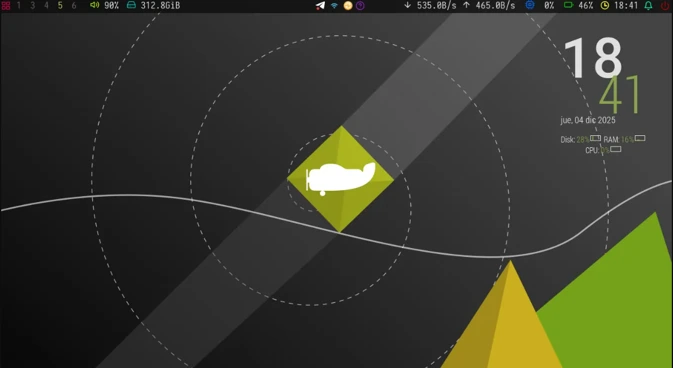
The learning curve proves steep for users accustomed to traditional desktop environments. CuerdOS includes comprehensive Sway configuration with sensible defaults, preconfigured waybar for system information display, and essential terminal-based utilities. The edition targets users comfortable editing configuration files and learning keyboard-driven workflows in exchange for unmatched efficiency and control.
Best for: Advanced users comfortable with tiling window managers, keyboard navigation enthusiasts, minimal resource usage scenarios, anyone seeking maximum productivity through optimized workflows. Sway represents the power user’s choice, rewarding investment in learning with exceptional efficiency.
Performance and Speed Analysis
Real-world performance testing reveals how desktop selection impacts system behavior. Boot times from GRUB to usable desktop range from 12-18 seconds on modern SSD-equipped systems, with XFCE, MATE, and LXQt typically reaching the desktop in 12-14 seconds while GNOME and KDE Plasma require 15-18 seconds. Systems using mechanical hard drives see proportionally longer boot times but maintain relative performance rankings between desktops.
Idle RAM usage directly impacts available memory for applications:
- Sway: 350-500MB
- LXQt: 400-550MB
- MATE: 450-600MB
- XFCE: 500-650MB
- Cinnamon: 650-800MB
- Budgie: 600-750MB
- KDE Plasma: 700-850MB
- GNOME Shell: 800-950MB
Application launch speed benefits from CuerdOS’s I/O scheduler tuning and disk caching optimizations. Firefox launches in 2-3 seconds on typical systems, LibreOffice Writer opens in 3-4 seconds, and lighter applications like text editors appear nearly instantly. These launch times represent noticeable improvements over stock Debian installations, demonstrating effective performance tuning implementation.
Desktop choice affects performance beyond RAM usage. Composited desktops like KDE Plasma and GNOME Shell demand capable GPUs for smooth animations and effects, while lightweight options like XFCE and MATE run acceptably on integrated graphics from a decade ago. Systems with limited graphics capabilities should favor lighter desktops regardless of available RAM.
Stability, Updates, and Daily Reliability
The stable Debian-based Linux distro foundation ensures CuerdOS 2.0 delivers exceptional reliability during daily use. Testing across multiple desktop editions over several weeks revealed zero crashes or system freezes during normal operation. Applications occasionally crash as expected from any complex software, but desktop environments themselves prove stable and system behavior remains predictable.
Debian’s update process translates directly to CuerdOS with no custom repository complications. Users receive security updates through standard apt commands, and the update process completes reliably without breaking system functionality. The conservative update philosophy means users avoid surprise breakage from rushed patches while maintaining security currency on disclosed vulnerabilities.
Long-term stability expectations remain excellent based on Debian’s proven track record. Systems can run for months between reboots without performance degradation or memory leaks, making CuerdOS suitable for always-on workstations and servers requiring desktop environments. The combination of stable package base and tested desktop environments creates a platform where users focus on work rather than system maintenance.
Bug behavior follows Debian patterns where serious issues get addressed promptly through security updates while minor annoyances may persist until the next major Debian release. This predictability allows users to plan around known issues rather than worrying about random problems appearing after routine updates.
Installation Experience
CuerdOS provides separate ISO images for each desktop edition, ranging from 2.8GB for lightweight editions to 3.5GB for feature-complete environments like KDE Plasma and GNOME Shell. Users download their preferred edition, create bootable USB media using tools like Rufus, BalenaEtcher, or dd, and boot from the installation media. The distribution includes live session capability for testing hardware compatibility before committing to installation.
The installer leverages Debian’s proven Calamares installer, providing a graphical interface that guides users through essential decisions: disk partitioning, timezone selection, user account creation, and hostname configuration. The process remains straightforward for users with basic Linux installation experience while offering manual partitioning for advanced users requiring custom layouts.
Installation completes in 10-20 minutes depending on target hardware speed and selected edition. Post-install, systems boot directly into configured desktop environments with essential applications pre-installed. Users avoid the “now what?” moment common with minimal distributions because CuerdOS includes web browsers, file managers, text editors, and basic productivity tools appropriate for each desktop environment.
Post-install essentials include enabling proprietary media codecs through Debian repositories if needed, configuring printing support via CUPS, and installing additional software matching individual workflows. CuerdOS maintains Debian’s philosophy of shipping only free software by default while making proprietary additions straightforward for users requiring them.
Hardware Compatibility and Drivers
Debian 13’s Linux kernel 6.11 provides excellent hardware support for systems from the past decade. Intel and AMD processors receive full support including recent performance and efficiency core architectures. Graphics drivers include open-source Mesa drivers for AMD and Intel GPUs, delivering reliable performance for desktop compositing and moderate gaming workloads.
Wi-Fi and Bluetooth compatibility proves strong for hardware using Intel, Qualcomm Atheros, and Realtek chipsets. Recent laptops occasionally require firmware packages from Debian’s non-free repositories, but the installation process identifies missing firmware and guides users through enabling appropriate repositories. Suspend and resume functionality works reliably on most laptops, though occasional quirks appear with bleeding-edge hardware released within six months of testing.
NVIDIA driver considerations remain complex as always in Linux distributions. CuerdOS includes nouveau open-source drivers by default, providing basic functionality for NVIDIA GPUs. Users requiring optimal NVIDIA performance must install proprietary drivers from Debian repositories, a straightforward process documented in CuerdOS and Debian documentation. Hybrid graphics laptops benefit from recent kernel improvements though manual configuration sometimes proves necessary.
Peripheral support mirrors Debian’s excellent hardware compatibility. Printers, scanners, external storage devices, and input peripherals work through standard kernel drivers and CUPS printing system. Exotic hardware occasionally requires manual driver installation, but common consumer hardware functions without intervention.
Security and Privacy Overview
Debian’s security model provides CuerdOS with a robust foundation. The Debian Security Team maintains dedicated focus on identifying and patching vulnerabilities, with security updates typically available within days of public disclosure for serious issues. This responsive approach keeps CuerdOS systems protected against known threats when users maintain regular update schedules.
Firewall configuration defaults to inactive on desktop installations, matching Debian’s philosophy of avoiding unnecessary service restrictions on single-user workstations. Users requiring strict network controls can enable UFW (Uncomplicated Firewall) or configure iptables directly. System services run with minimal default attack surface, with network-facing daemons disabled unless explicitly required by installed applications.
Privacy considerations reflect Debian’s commitment to user freedom and control. CuerdOS includes no telemetry, usage tracking, or data collection mechanisms beyond standard system logging for troubleshooting purposes. The distribution ships without proprietary applications that might implement tracking, though users remain free to install such software if desired. Browser selection and configuration remain user decisions without imposed defaults favoring particular services or platforms.
System hardening options exist for security-conscious users including AppArmor profiles, restricted user permissions, and encrypted storage configuration during installation. These features require user initiative to implement but provide robust security for sensitive computing environments when properly configured.
CuerdOS 2.0 vs Other Debian-Based Distros
CuerdOS 2.0 Debian 13 distinguishes itself from stock Debian primarily through performance tuning and pre-configured desktop optimization. Stock Debian 13 XFCE provides the same stability and security but lacks CuerdOS’s aggressive I/O tuning, memory management adjustments, and desktop-specific optimizations. Users comfortable with manual system tuning might prefer Debian’s vanilla approach, while those wanting optimized defaults benefit from CuerdOS’s preconfiguration.
MX Linux represents another popular Debian-based distribution emphasizing performance and user-friendliness. MX targets broader audiences with extensive GUI tools for system administration and hardware management. CuerdOS takes a more minimalist approach, providing optimized foundations while expecting users to handle system configuration through traditional Linux tools. MX includes more bundled applications and utilities, while CuerdOS maintains leaner base installations.
LMDE (Linux Mint Debian Edition) focuses on providing the Linux Mint experience atop Debian rather than Ubuntu. LMDE emphasizes beginner-friendliness with extensive codec support, driver management tools, and polished Cinnamon desktop integration. CuerdOS prioritizes performance over convenience, shipping free software by default and expecting technical competence from users. LMDE suits users wanting Mint’s user experience with Debian stability, while CuerdOS targets users prioritizing speed and efficiency.
Pros and Cons
Pros:
- Exceptional stability from Debian 13 foundation with proven long-term reliability
- Measurable performance improvements over stock Debian through targeted optimizations
- Eight desktop editions providing genuine choice for diverse hardware and workflow requirements
- Clean installations without bloatware or unnecessary background services
- Full Debian package repository compatibility ensuring extensive software availability
- Multi-year security support timeline reducing forced upgrade pressure
- Predictable update behavior avoiding surprise breakage during routine maintenance
Cons:
- No significant beginner-friendly features for users new to Linux
- Proprietary media codec installation requires manual repository configuration
- Separate ISO images for each desktop increase download bandwidth requirements
- Performance gains most noticeable on older hardware; modern systems see modest improvements
- Conservative package versions mean missing bleeding-edge application features
- Limited official documentation specific to CuerdOS optimizations
- Smaller community compared to Ubuntu-based distributions when seeking support
Who Should Use CuerdOS 2.0?
CuerdOS 2.0 serves users who prioritize performance and stability over cutting-edge features and extensive hand-holding. Ideal users include:
System administrators building reliable workstations for long-term deployment without frequent reinstallation cycles. The Debian foundation and predictable update model create stable platforms for daily productivity.
Linux enthusiasts seeking performance improvements without abandoning Debian’s proven stability. Users comfortable with Linux fundamentals appreciate CuerdOS’s optimizations without suffering unnecessary complexity or custom package repositories.
Hardware enthusiasts reviving older computers where performance tuning yields tangible improvements in responsiveness and usability. The lightweight desktop options extend hardware lifespan significantly compared to bloated modern distributions.
Developers requiring stable, predictable environments where system behavior remains consistent across updates. The frozen package versions and security-focused update model eliminate surprises during development work.
Privacy-conscious users valuing distributions shipping without telemetry, tracking, or data collection mechanisms. Debian’s free software philosophy extends through CuerdOS without compromise.
Users should avoid CuerdOS if they require extensive GUI system administration tools, expect hand-holding through Linux basics, need bleeding-edge application versions, or prefer distributions with massive community support forums.
Final Verdict – CuerdOS 2.0 Review
This CuerdOS 2.0 review confirms the distribution delivers on its core promise: Debian 13 stability with meaningful performance optimizations across eight well-executed desktop editions. Testing reveals faster boot times, snappier application launches, and efficient resource utilization that clearly distinguish CuerdOS from stock Debian.
The distribution succeeds by maintaining laser focus on performance and stability rather than chasing feature bloat. CuerdOS targets competent Linux users who value speed and reliability, with each desktop edition receiving proper optimization rather than superficial variety. Performance gains prove most dramatic on older hardware, though modern systems still benefit from thoughtful tuning.
Stability remains impeccable throughout testing. The Debian foundation provides rock-solid reliability, and CuerdOS’s optimizations never compromise this strength. Users can confidently build workflows knowing their system will perform consistently without crashes or regressions.
For users seeking a stable Debian-based Linux distro with proven reliability and measurable performance improvements, CuerdOS 2.0 represents an excellent choice. It won’t revolutionize computing, but it delivers a fast, efficient platform for productive work.
Which CuerdOS 2.0 desktop edition matches your hardware and workflow requirements? Share your experiences with Debian-based distributions in the comments.
Frequently Asked Questions (FAQ)
Which CuerdOS edition works best for low-end PCs?
For systems with 2GB RAM or less, choose LXQt or Sway editions for absolute minimum resource usage. Systems with 2-4GB RAM run XFCE or MATE editions comfortably. These lightweight options maintain full functionality while delivering smooth performance on modest hardware.
Is CuerdOS beginner-friendly for Linux newcomers?
CuerdOS assumes basic Linux competence and doesn’t include extensive GUI tools for system administration. Complete Linux beginners should consider Linux Mint or Ubuntu-based distributions offering more guidance. Users comfortable with command-line basics and willing to reference documentation will handle CuerdOS successfully.
How does Debian 13 compare to Ubuntu-based distributions?
Debian 13 prioritizes stability through conservative package vetting, while Ubuntu-based distributions offer newer application versions with potentially less testing. Debian’s longer support cycles reduce upgrade frequency, but Ubuntu provides more extensive community support resources. Choose Debian-based distributions like CuerdOS for stability; choose Ubuntu-based options for bleeding-edge software.
Can CuerdOS 2.0 handle gaming and Steam?
Yes, though gaming performance depends primarily on hardware capabilities rather than distribution choice. Steam installs normally from Debian repositories, and Proton compatibility matches other Linux distributions. Install proprietary NVIDIA drivers for optimal GPU performance, and expect similar gaming experiences to other Debian or Ubuntu-based systems on equivalent hardware.
What’s the update and support cycle for CuerdOS 2.0?
CuerdOS follows Debian 13’s support timeline, providing security updates through approximately 2027 with potential extended LTS coverage afterward. Users receive security patches regularly while application versions remain frozen except for critical fixes. This model suits users prioritizing stability over feature updates, with major version upgrades every 2-3 years following Debian’s release schedule.
Disclaimer
This review is based on testing CuerdOS 2.0 and publicly available information about Debian 13 “Trixie” as of December 2025. Performance results may vary depending on your specific hardware configuration, software setup, and usage patterns. CuerdOS is an independent community project not officially affiliated with Debian. Always verify system requirements and test the live environment before installation. The author is not responsible for any data loss or system issues that may occur during installation or use.
Also Read
Darktable 5.4 Complete Beginner Guide for Linux Users (2026)