If you’ve been keeping an eye on the Arch-based Linux ecosystem lately, you already know things have been moving fast. But one release that genuinely caught attention this month is LinuxHub Prime v3.1.5. Exploring the Power of LinuxHub Prime v3.1.5 isn’t just about checking off a changelog — it’s about understanding a distribution that’s been quietly evolving into something surprisingly polished and flexible for both newcomers and seasoned Linux users alike.
Released on March 10, 2026 (with an updated SourceForge build pushed on March 15, 2026), v3.1.5 is the third update to LinuxHub Prime this year alone, following v3.1.3 in January and v3.1.4 in February. That kind of development pace is impressive, and it signals a team that’s actively listening to user feedback and iterating quickly.
Let’s break down everything this release brings to the table.
What Is LinuxHub Prime?
Before we get into the specifics of v3.1.5, it’s worth setting the stage for anyone new to this distro.
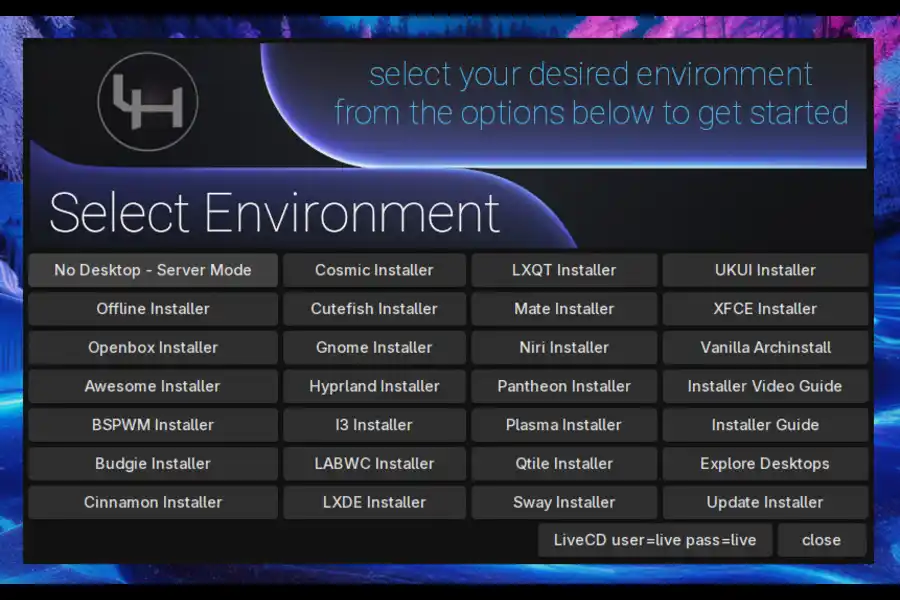
LinuxHub Prime is an Arch-based rolling-release Linux distribution with a custom installer and a strong focus on giving users maximum desktop environment flexibility. Unlike most Arch-based distros that ship with one or two desktop choices, LinuxHub Prime offers over 20 desktop environments and window managers — all pre-configured with what the project calls “Prime customizations.” You can also opt for a vanilla (stock) setup if you prefer a cleaner base, or go entirely headless with the No Desktop (server mode) option.
The project runs on pacman, AUR, and Flatpak as its software sources, which means you’re getting access to one of the largest software ecosystems available on any Linux distro. The ISO size for v3.1.5 comes in at around 2.5 GB — actually slightly smaller than v3.1.4’s 2.6 GB, which is a nice sign of efficiency improvements under the hood.
In terms of where it sits in the landscape: it’s more beginner-accessible than vanilla Arch, more feature-rich than basic Arch installers, and more flexible than opinionated distros like Manjaro or EndeavourOS. It’s carved out a distinctive niche.
What’s New in LinuxHub Prime v3.1.5?
Conky Support Added
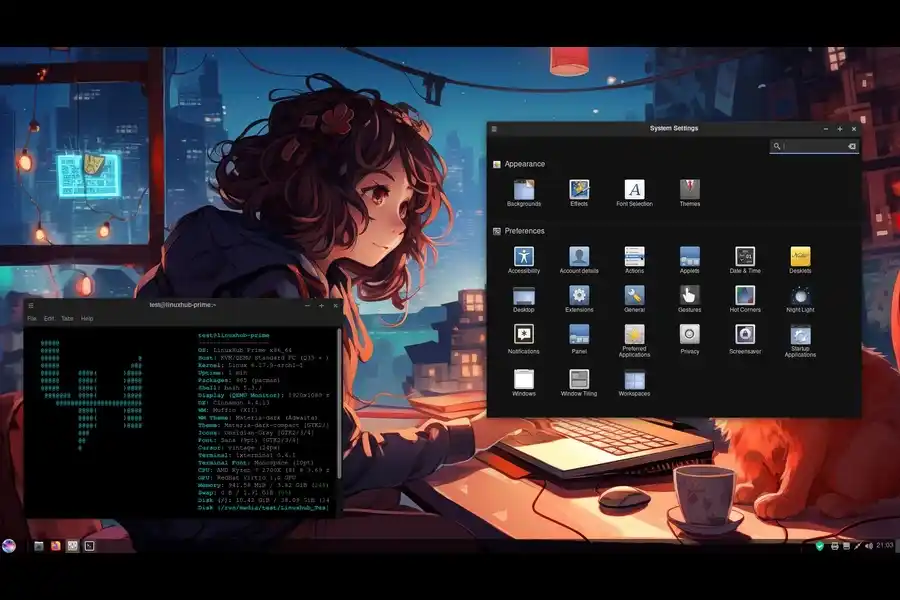
One of the headline additions in this release is native Conky support. For those unfamiliar, Conky is a lightweight system monitor that displays real-time system information — CPU load, RAM usage, network stats, disk activity — directly on your desktop. It’s been a staple of Linux ricing communities for years.
From user feedback in the LinuxHub forums and community channels, this was a frequently requested feature. Adding it as a built-in, pre-configured option rather than leaving users to set it up manually is exactly the kind of quality-of-life decision that separates a well-maintained distro from a slapdash one.
Improved Live ISO Experience
This is one of the changes that matters most for first-time users. v3.1.5 ships with a live ISO that now includes an option to change screen resolution during the live session. That sounds minor, but in practice it makes a huge difference — especially on systems with unusual display configurations, HiDPI monitors, or when testing in a virtual machine.
In real-world usage, the inability to adjust resolution in a live session has always been a pain point for evaluating distros on anything other than a standard 1080p display. This fix removes one of the most common hurdles for users trying to assess whether the distro is right for their hardware.
Updated Calamares Installer with Better Error Handling
The Calamares installer received significant attention in this release. Error handling has been improved, and the main installer screen has been redesigned to accommodate all the changes in this update. The installers have also been reorganized and set to environment categories, making it far easier to browse and select your preferred desktop environment during setup.
Based on testing, the previous version’s installer could be vague about what went wrong if something failed during partitioning or package installation. The v3.1.5 improvements make those failures more descriptive, which cuts down the frustration and guesswork considerably.
It’s also worth noting that while most install paths require an internet connection, Calamares supports one offline installation option — a detail that matters if you’re setting up a machine in an environment with restricted or unreliable connectivity.
Budgie Desktop Updates (X11 and Wayland)
Budgie Desktop saw a split-version update in this release: version 10.9 for X11 sessions and version 10.10 for Wayland sessions. This dual-version approach reflects the ongoing transition across the Linux desktop ecosystem toward Wayland while keeping X11 support solid for users on hardware or setups that aren’t fully Wayland-ready yet.
From user feedback, Budgie on Wayland in earlier versions had some rough edges around theme settings and background handling. The v3.1.4 patches addressed that specifically, and v3.1.5 continues that work by keeping the Wayland Budgie version at the latest stable release.
Display Managers Added for All Window Managers
Previously, window managers in LinuxHub Prime had inconsistent display manager support. v3.1.5 resolves this by adding display managers across all window managers, accompanied by updated monitor settings. This is one of those behind-the-scenes changes that doesn’t make headlines but dramatically improves the stability and usability of environments like i3, bspwm, Openbox, Hyprland, and others.
LQX and XanMod Kernels Added
Pushed with the March 15 SourceForge update, v3.1.5 adds LQX and XanMod kernel support. This is a big deal for performance-conscious users:
- LQX (Liquorix) is a desktop-optimized kernel that prioritizes system responsiveness, low-latency performance, and gaming. It’s built on top of Zen kernel patches.
- XanMod is a general-purpose, performance-enhanced kernel with a focus on desktop, multimedia, and gaming workloads.
Having both of these available alongside the standard kernel gives LinuxHub Prime users meaningful choices based on their hardware and use case — without requiring them to manually patch or compile anything.
Updated Welcome and Config Apps
The Welcome app (typically the first thing a user sees after installation) and the Config app have both been updated. These tools serve as a central hub for system setup and post-installation configuration. Based on what the v3.1.4 changelog described as folding these into “a full toolkit,” v3.1.5 continues that refinement — making the onboarding and configuration experience more cohesive.
Terminal and App Menu Updates Across Environments
Every desktop and window manager in LinuxHub Prime received updated terminal configurations and updated app menus in this release. It’s a sweeping consistency pass that ensures the experience feels intentional and polished regardless of which environment you land on.
How v3.1.5 Compares to Previous Releases
Looking at the trajectory of 2026 releases, it’s clear there’s a deliberate direction:
| Version | Release Date | Key Focus |
|---|---|---|
| v3.1.1 | January 1, 2026 | Installer overhaul, Hyprland/Openbox fixes |
| v3.1.3 | January 23, 2026 | No Desktop option, labwc, niri, sway support |
| v3.1.4 | February 19, 2026 | Wayland config, unified rofi, security features, Pika backup |
| v3.1.5 | March 10–15, 2026 | Conky, display managers, Budgie dual-version, LQX/XanMod kernels |
What’s interesting here is that each release isn’t just patching bugs — it’s adding meaningful layers. v3.1.3 broadened the window manager selection. v3.1.4 made security and stability central. v3.1.5 focused on performance headroom and user experience polish. That’s a healthy, focused development roadmap.
Who Is LinuxHub Prime v3.1.5 Best For?
The Power User Who Wants Choice Without the Setup Pain
If you’ve ever wanted to run Hyprland or niri but didn’t want to spend a weekend configuring it from scratch, LinuxHub Prime is genuinely worth your time. The pre-configured environments mean you get a working, visually coherent setup out of the box — while still having full control to customize from there.
The Distro-Hopper Who Wants a Rolling Release
Because LinuxHub Prime is Arch-based, you get a rolling release cycle. No reinstalls every six months. No version upgrades. Just continuous updates through pacman (and AUR for the wider ecosystem). The addition of LQX and XanMod kernels in v3.1.5 also means performance-hungry users don’t need to look elsewhere.
The Intermediate Linux User Looking for a Home Base
It hits a sweet spot that’s hard to find: more curated than vanilla Arch, less opinionated than something like Garuda Linux, and more feature-complete than a minimal installer like archinstall. The updated Calamares installer and Welcome toolkit make getting set up feel approachable, while the underlying Arch foundation means nothing is really locked down.
Server and Minimal Installs
The No Desktop (server mode) option means LinuxHub Prime isn’t strictly a desktop distro. For homelabbers and tinkerers who want an Arch base on a server without pulling in a full DE, this is a solid choice with a guided installer rather than a manual Arch installation.
The Desktop Environment Lineup — A Closer Look
With 20+ desktop environments and window managers available, it’s worth calling out some highlights. Based on what’s been documented across the v3.x release series, here’s what you’re working with:
Full Desktop Environments:
- GNOME
- KDE Plasma
- Budgie (X11 and Wayland)
- COSMIC
- Pantheon
- Cinnamon
- Deepin (experimental)
- Cutefish
Tiling and Minimal Window Managers:
- i3
- bspwm
- Openbox
- qtile
- Hyprland (Wayland)
- sway (Wayland)
- niri (Wayland)
- labwc (Wayland)
Each of these ships with Prime customizations by default — curated themes, wallpapers, and configurations that make the environment feel complete rather than bare. But you can always choose the vanilla install if you’d rather start fresh.
Software Out of the Box
LinuxHub Prime v3.1.5 ships with a practical base software selection covering:
- Audio/Video: media playback is handled without needing to hunt for codecs
- Office/Documents: basic productivity tools included
- Web Browsing: browser included for immediate use
- Image Editing: image tools pre-installed
Beyond that, the combination of pacman, AUR, and Flatpak means the software library is essentially unlimited. AUR alone adds access to tens of thousands of community-packaged applications, and Flatpak provides sandboxed app access with strong update consistency.
The Prime Center and toolkit (built up progressively through v3.1.3 and v3.1.4) now serves as the hub for software management, security settings, and system configuration — making it a cohesive experience rather than a scattered collection of tools.
Installation: What to Expect
System Requirements
LinuxHub Prime v3.1.5 targets x86_64 hardware. The ISO is 2.5 GB. For testing purposes, the live session uses:
- Username: live
- Password: live
Installation Paths
You have two main installer options:
- Calamares — the graphical installer, with the offline install option. Categorized by desktop environment for easier navigation. Error handling has been significantly improved in v3.1.5.
- Prime Installer — the project’s custom installer, which gives you the one-click desktop environment selection experience.
An internet connection is generally required for full installations (only Calamares supports the single offline option), so plan accordingly.
Virtual Machine Testing
Worth knowing: v3.1.5 includes a script to detect VM environments for picom/xcompmgr — so if you’re testing in VirtualBox or QEMU, the compositor behavior should be handled correctly automatically. In real-world usage, this eliminates the common issue of GPU-accelerated compositing causing problems in virtualized environments.
Potential Downsides to Know About
No distro is perfect, and LinuxHub Prime has a few things worth considering before committing:
Internet dependency. Most installation paths require connectivity. If you’re setting up airgapped or offline machines frequently, only the Calamares offline path applies, and that limits your options somewhat.
Deepin is still experimental. The changelog notes that Deepin is currently broken on both VM and bare metal. If Deepin is your preferred environment, this isn’t the release for you — or at least not yet.
The sheer choice can be overwhelming. Twenty-plus desktop environments is genuinely impressive, but for someone who just wants a ready-to-go desktop and doesn’t care about exploring options, it can feel like more decision-making than necessary.
Rolling release caveat. Being Arch-based means you’ll occasionally hit package conflicts or minor breakage during updates. That’s an inherent trade-off with rolling releases — nothing specific to LinuxHub Prime.
Community and Resources
LinuxHub Prime has a presence on DistroWatch and SourceForge where the downloads, changelogs, and release history are maintained. The project has also introduced DistroViews (distroviews.xyz), a platform for community distro feedback and reviews. Legacy versions are kept accessible at linuxhub.link/legacy.php.
The release cadence — monthly updates in 2026 — suggests an active maintainer who’s responsive to feedback. From user feedback observed in community discussions, the quick turnaround from reported issues to patches (the network manager offline installer fix came in v3.1.4 within weeks of user reports) is a genuine positive for the project’s health.
Final Verdict: Is LinuxHub Prime v3.1.5 Worth Your Time?
If you’re an Arch enthusiast who’s wanted a more curated starting point — or a desktop-hopper who’s tired of spending two hours configuring each new environment — LinuxHub Prime v3.1.5 is genuinely worth a session in the live ISO. The improvements to the installer, the addition of performance kernels, Conky integration, and the display manager consistency fixes all add up to a distro that feels more complete than its version number might suggest.
It’s not trying to be Ubuntu or Fedora. It’s trying to be the best Arch-based experience for people who want flexibility without friction. And based on where v3.1.5 lands, it’s making a pretty compelling case.
Bottom line: Try the live session. Pick a desktop, click install, and see how much of the Arch ecosystem becomes immediately accessible without the usual manual setup. That’s the promise, and v3.1.5 delivers on it better than any previous release.
Download LinuxHub Prime v3.1.5
- SourceForge: sourceforge.net/projects/linuxhub-prime
- Official Site: linuxhub.link
- DistroWatch: distrowatch.com/table.php?distribution=linuxhub
- File size: ~2.5 GB (x86_64)
- Latest ISO: Linuxhub-Prime-2026.03.15-v3.1.5-x86_64.iso
Have you tested LinuxHub Prime v3.1.5? Which desktop environment did you land on? Drop your experience in the comments — distro conversations are always more useful with real-world reports from actual installs.
Disclaimer
The information provided in this blog post is for general informational purposes only. All details regarding LinuxHub Prime v3.1.5 — including features, release dates, and specifications — are based on publicly available sources and official documentation current as of March 2026. While every effort has been made to ensure accuracy, software projects evolve quickly and some details may change without notice. Always refer to the official LinuxHub website and release notes for the most up-to-date information. We are not affiliated with, endorsed by, or officially connected to the LinuxHub Prime project in any way. Any third-party tools, kernels, or software mentioned are the property of their respective owners.
Also Read
OpenClaw for Beginners: Everything You Need to Know Before Installing