If you’ve been following the world of artificial intelligence lately, you’ve probably stumbled across the term “TPU” more than a few times. Maybe it was in a Google Cloud announcement, a news story about Anthropic training its Claude models, or a comparison between AI chips. Either way, the question comes up constantly: what is a TPU, and why does it matter so much right now?
The short answer is that a TPU — or Tensor Processing Unit — is Google’s custom-built chip designed from the ground up to accelerate machine learning workloads. But that single sentence barely scratches the surface of what makes these chips so remarkable, or why major companies like Meta, Anthropic, and Midjourney are racing to get their hands on them.
This guide walks you through everything you need to know about TPUs — what they are, how they work, how they compare to GPUs, and where the technology stands in March 2026.
The Basics: What Is a TPU?
A Tensor Processing Unit (TPU) is an application-specific integrated circuit (ASIC) that Google designed specifically for neural network computations. Unlike a general-purpose CPU (the kind in your laptop) or even a GPU (graphics card), a TPU does one thing extraordinarily well: it accelerates the mathematical operations that power deep learning.
The name “tensor” comes from the core data structure used in machine learning — a multi-dimensional array. Most of what happens inside a neural network, from image recognition to language generation, boils down to massive tensor multiplications. TPUs are built around hardware units called Matrix Multiply Units (MXUs) that handle these operations at breathtaking speed.
Google started using TPUs internally back in 2015, and by 2018 they made them available to third-party developers through Google Cloud. Since then, TPUs have powered virtually everything in Google’s AI stack — Search, Photos, Maps, and most famously, the Gemini family of language models.
Why Did Google Even Build TPUs?
This is a fair question. GPUs already existed and were doing a solid job running deep learning workloads. So why go through the enormous expense of building a custom chip from scratch?
The answer comes down to efficiency and specialization.
A GPU is a generalist. It was originally designed for rendering graphics — think video games and 3D modeling — and later adapted for parallel computing tasks including AI. It’s powerful and flexible, but that flexibility comes at a cost. A GPU carries a lot of hardware (rasterization units, texture mappers, etc.) that a neural network will never use. You’re paying for hardware you don’t need, and burning power to keep it running.
A TPU throws all of that out. It’s laser-focused on the type of low-precision arithmetic that neural networks rely on — operations like 8-bit matrix multiplications and the bfloat16 floating-point format (which Google Brain actually invented). The result is dramatically more AI computation per watt of energy used.
As one analyst put it plainly: “GPUs are the Swiss Army knife of computing; TPUs are a scalpel for AI.”
How Does a TPU Actually Work?
You don’t need an engineering degree to get the key idea here. Imagine you have to multiply two huge matrices together — this is essentially what a neural network does millions of times per second. A traditional CPU does this one operation at a time, which is slow. A GPU does it in parallel across thousands of cores, which is much faster. A TPU, however, has a dedicated systolic array of multipliers that flows data through a grid simultaneously, achieving throughput that’s orders of magnitude higher for these specific calculations.
Here are the main internal components of a modern TPU:
TensorCores: These handle the main matrix multiplication work. They’re optimized for dense linear algebra — the bread and butter of training and running transformer models.
Matrix Multiply Units (MXUs): The physical hardware inside each TensorCore that performs the actual multiplications. In the latest generation, these are 256×256 arrays, meaning they process 65,536 multiply-accumulate operations per clock cycle.
SparseCore: A specialized accelerator for embedding lookups, which are common in recommendation systems and large language models. This offloads random memory access from TensorCores so both can work simultaneously.
High Bandwidth Memory (HBM): Modern TPUs use stacked memory chips right next to the compute units, allowing data to move at extremely high bandwidth — essential when you’re feeding a 100-billion-parameter model.
Inter-Chip Interconnect (ICI): TPUs aren’t meant to work alone. They link together in pods of hundreds or thousands of chips using a proprietary high-speed network that lets the whole cluster behave like one giant processor.
The Seven Generations of Google TPU
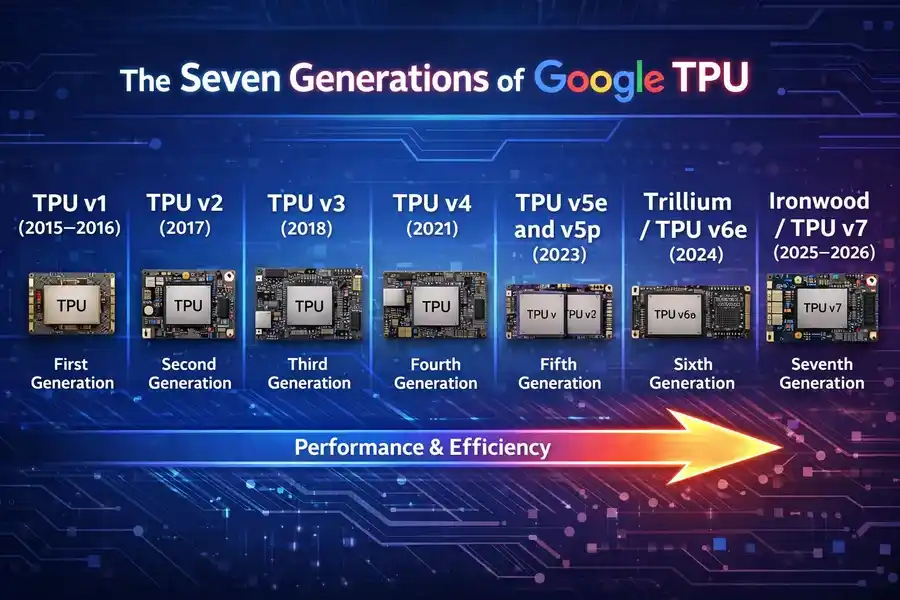
Google has iterated aggressively on TPU hardware. Here’s a quick tour of the lineage:
TPU v1 (2015–2016)
The original. An 8-bit integer chip focused purely on inference — running already-trained models, not training new ones. It lived in a hard drive-sized slot in Google’s data center racks and drew just 28–40 watts. Primitive by today’s standards, but at the time it was revolutionary.
TPU v2 (2017)
This version added the ability to train models from scratch, not just run them. Google introduced the bfloat16 number format here, a 16-bit floating-point standard that became an industry standard. Performance jumped to 45 teraFLOPS per chip, and 64-chip pods offered 11.5 petaFLOPS.
TPU v3 (2018)
Roughly doubled the performance of v2 and scaled pods up to 1,024 chips. Started using liquid cooling to manage the heat from more powerful chips.
TPU v4 (2021)
A major leap — more than 2x faster than v3, with 4,096 chips per pod and 10x the interconnect bandwidth. A landmark 2023 Google paper showed it was 5–87% faster than the Nvidia A100 on common ML benchmarks.
TPU v5e and v5p (2023)
The “e” variant was the cost-optimized version for inference and fine-tuning, while the “p” variant was the performance powerhouse. Google claimed v5p was competitive with the Nvidia H100 — a bold statement given Nvidia’s dominant market position.
Trillium / TPU v6e (2024)
Announced at Google I/O 2024, Trillium delivered a 4.7x jump in peak compute performance over v5e. HBM capacity and bandwidth doubled. The Inter-Chip Interconnect bandwidth also doubled. Perhaps most importantly, it became the most energy-efficient TPU to date — over 67% more energy-efficient than v5e. A single Trillium pod can scale up to 256 chips.
Ironwood / TPU v7 (2025–2026)
This is where things get genuinely jaw-dropping.
Meet Ironwood: Google’s Most Powerful TPU Yet
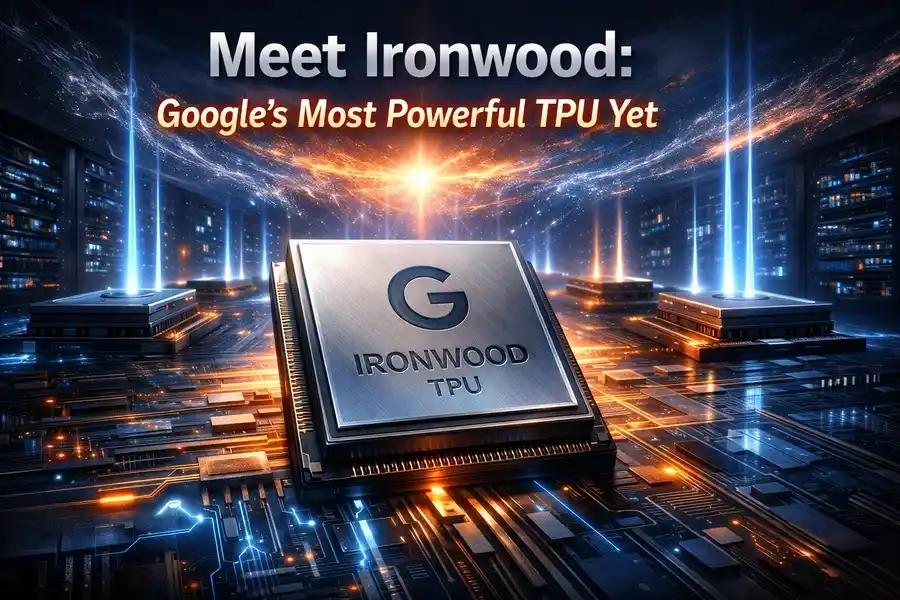
Unveiled at Google Cloud Next in April 2025, Ironwood is Google’s seventh-generation TPU — and it’s a fundamentally different kind of chip than anything before it. While earlier generations were designed primarily for model training, Ironwood is purpose-built for the age of inference.
The shift is significant. For years, the AI industry’s focus was on training massive models. Now the heavy lifting has moved to serving those models — running billions of user queries per day with low latency and high efficiency. That’s exactly what Ironwood is engineered for.
Ironwood’s Key Specs (March 2026)
| Specification | Detail |
|---|---|
| Generation | 7th (TPU v7) |
| Peak BF16 Performance | ~4,614 TFLOPS per chip |
| Peak FP8 Performance | 4.6 PFLOPS per chip |
| Scaling | Up to 9,216 chips per superpod |
| Total Superpod Compute | 42.5 Exaflops |
| ICI Network Speed | 9.6 Tb/s |
| Performance vs Prior Gen | 4x+ better per chip |
| Available Configurations | 256-chip or 9,216-chip clusters |
To put those numbers in perspective: a full 9,216-chip Ironwood superpod delivers 42.5 Exaflops of compute. The world’s most powerful supercomputer, El Capitan, offers 1.7 Exaflops. That means a single Ironwood superpod has more than 24 times the raw compute power of the world’s largest supercomputer.
Ironwood also introduces native FP8 (8-bit floating point) precision — a capability critical for running modern “thinking models” efficiently. The SparseCore component was enhanced specifically for the mixture-of-experts (MoE) architectures that dominate frontier AI today.
One interesting fact: Google used its own AlphaChip AI system — which applies reinforcement learning — to help design Ironwood’s chip layout. So yes, AI is now designing the hardware that trains AI.
TPU vs GPU: What’s the Real Difference?
People often ask whether TPUs are simply “better” than GPUs. The honest answer is: it depends entirely on your workload.
Where TPUs Win
For large-scale AI training and inference on standard transformer architectures (like LLMs and image generators), TPUs can be dramatically more cost-efficient. Midjourney, the popular image generation platform, migrated its inference workload from GPUs to TPUs and cut compute costs by 65%. Anthropic’s teams, after years of working with both GPUs and TPUs, described TPUs as having superior price-performance for their workloads.
TPU v6e starts at around $0.39–$1.375 per chip-hour on Google Cloud, compared to H100 GPUs at over $3 per hour. For massive inference workloads, that difference compounds quickly.
Where GPUs Still Win
NVIDIA’s CUDA ecosystem is unmatched in flexibility and maturity. If you’re running scientific computing, simulation, video processing, game development, or any workload outside of pure deep learning, a GPU is almost certainly the right tool. The library support for GPUs (cuDNN, TensorRT, etc.) is vastly more mature than the TPU ecosystem.
PyTorch has a TPU backend (PyTorch/XLA), but it’s less mature than CUDA. Some operations still fall back to CPU execution, and dynamic control flow in models can cause headaches. If your team is used to PyTorch and doesn’t have the engineering bandwidth to optimize for TPU, the transition has real friction.
The honest summary: TPUs are incredible for specific AI workloads at scale. GPUs are more versatile. Unless you’re running production AI at significant scale, the GPU ecosystem’s maturity often wins in practice.
Who Uses TPUs? Real-World Adoption in 2026
The TPU story in early 2026 isn’t just a technical one — it’s a business and infrastructure story.
Google itself uses TPUs to power every AI-driven product it has — Search, Photos, Maps, Translate, and its flagship Gemini models. Over a billion users interact with TPU-powered services every single day.
Anthropic made headlines in October 2025 when it committed to deploying over one million Ironwood chips starting in 2026 — one of the largest single-customer AI infrastructure deals ever announced, representing well over a gigawatt of compute capacity. Anthropic trains its Claude models (including Claude Opus 4.5) using TPUs for the majority of training and inference.
Meta entered negotiations in November 2025 to deploy TPUs in its AI data centers, a deal Google Cloud executives suggested could be worth roughly 10% of Nvidia’s annual data center revenue.
Midjourney completed a migration from GPUs to TPUs and achieved a 65% reduction in inference costs.
The pattern is clear: as AI workloads shift from training-heavy to inference-heavy — and as the scale of those workloads grows exponentially — TPUs’ cost and efficiency advantages are becoming harder to ignore.
How to Access TPUs Today
You don’t need to work at Google or Anthropic to use TPUs. There are several practical paths:
Google Cloud TPUs: The most direct route. You can provision TPU v5e, v5p, Trillium, or Ironwood instances through Google Cloud, either as on-demand resources or reserved capacity. Pricing varies by generation and region. Google also offers queued resource management so you can schedule large jobs even during periods of high demand.
Google Colab / Kaggle: Google offers free (limited) TPU access through its Colab and Kaggle platforms. These use older TPU generations, but they’re a great way to get hands-on experience with JAX or TensorFlow on actual TPU hardware without spending a dollar.
Vertex AI: Google’s managed ML platform integrates Cloud TPUs natively, with support for Kubernetes-based orchestration at scale.
Supported Frameworks: TPUs work with TensorFlow (native), JAX (native and preferred for research), and PyTorch (via PyTorch/XLA). If you’re starting fresh, JAX is generally the best choice for TPU development — it’s what Google DeepMind uses internally for most research.
TPUs and the Future of AI Infrastructure
The launch of Ironwood and the massive commercial deals around it signal something bigger than just a chip release. They represent a fundamental shift in how the AI industry thinks about infrastructure.
For most of the last decade, AI compute was synonymous with Nvidia GPUs. The CUDA ecosystem had such a strong moat that alternatives struggled to get serious traction. But the economics of inference at scale are different from the economics of training. When you’re running millions of queries per second, a 65% reduction in cost-per-query doesn’t just save money — it changes what products are commercially viable to build.
Google’s unique advantage here isn’t just the hardware. It’s the vertically integrated stack: custom chips, custom network fabrics (the Jupiter optical switch network), and co-designed software (XLA compiler, JAX, Pathways). No other company runs this combination end-to-end. And now, with Ironwood available to external customers and companies like Anthropic and potentially Meta deploying it at massive scale, that advantage is starting to extend outside Google’s walls.
The next few years will likely see TPUs move from “Google’s secret weapon” to a genuine, mainstream pillar of global AI infrastructure.
Summary: Key Things to Remember
If you take nothing else from this article, here are the most important points about TPUs:
- A TPU (Tensor Processing Unit) is Google’s custom ASIC designed specifically for neural network computations.
- They are purpose-built for matrix multiplications, making them dramatically more efficient than CPUs or GPUs for AI workloads.
- Google has released seven generations of TPUs since 2015, with the latest being Ironwood (TPU v7), which offers 42.5 Exaflops at full superpod scale.
- TPUs are accessible to everyone via Google Cloud, Google Colab, Kaggle, and Vertex AI.
- They support TensorFlow, JAX, and PyTorch (via PyTorch/XLA).
- TPUs are significantly more cost-efficient for large-scale AI inference, but have a steeper learning curve and less mature ecosystem than Nvidia’s CUDA-based GPUs.
- In 2026, adoption is accelerating fast — Anthropic, Meta, and Midjourney are among the major organizations shifting workloads to TPUs.
Frequently Asked Questions
Can beginners use TPUs?
Yes — Google Colab and Kaggle both offer free TPU access. If you’re comfortable with Python and TensorFlow or JAX, you can start experimenting today.
Are TPUs better than GPUs for everything?
No. TPUs excel at standard deep learning workloads (LLMs, vision models, recommendation systems) at scale. For general computing, research that needs flexible ops, or teams with strong CUDA expertise, GPUs often remain the better choice.
Do TPUs only work with TensorFlow?
No — this is a common misconception. Modern TPUs support TensorFlow, JAX, and PyTorch (via PyTorch/XLA integration).
What does “inference” mean in the context of TPUs?
Inference is the act of running a trained model to generate outputs — like asking an AI a question and getting an answer. Training is building the model in the first place. Ironwood was designed specifically to handle inference at massive scale and low latency.
Is it expensive to use TPUs on Google Cloud?
It depends on the generation and scale. TPU v6e (Trillium) starts at around $0.39 per chip-hour, which is significantly cheaper than Nvidia H100 GPUs at comparable scales. For large inference workloads, the economics heavily favor TPUs.
Understanding what a TPU is and how it fits into the AI hardware landscape is increasingly important — not just for engineers, but for anyone following the development of artificial intelligence. As the world’s demand for AI-powered services grows, the hardware that makes it possible will only become more central to the conversation.
Disclaimer
The information provided in this article is for general informational purposes only. While every effort has been made to ensure accuracy, technical specifications, pricing, and product details may change over time. Always refer to Google Cloud’s official documentation for the most current and authoritative information. This article is not affiliated with, endorsed by, or sponsored by Google LLC or any of its subsidiaries. Any third-party names, trademarks, or products mentioned are the property of their respective owners.
Also Read
Opera GX for Gamers: Everything You Need to Know (2026 Edition)