Quick summary: antiX 26.1 was released on 29 September 2026. It is a bug-fix update to antiX-26 that ships newer kernels (5.10.256 and 6.6.139), keeps five systemd-free init systems with runit as the default, and needs no reinstall if you already run antiX-26.
Most Linux distributions have settled on systemd, and for plenty of people that works fine. Others want a simpler, more transparent system, especially for older hardware. That is who antiX 26.1 “Stephen Kapos” is built for.
It landed on 29 September 2026 as a bug-fix release on top of antiX-26 (March 2026). It keeps the Debian 13 “Trixie” base and drops both systemd and elogind. The developer says antiX-26 users don’t need to reinstall.
Below you’ll find what changed, how it compares with MX Linux and Devuan, and who should download it. Everything comes from the official antiX release announcement and blog, plus the other projects’ public release notes. Where something is my judgement, I say so.
What Is antiX 26.1 “Stephen Kapos”?
antiX is a lightweight Linux distribution that has long targeted both old and new computers. The lead developer, anticapitalista, signs each announcement from Thessaloniki, and the project describes itself as anti-fascist.
The codename honours Stephen Kapos. The project links to an interview about his life through dictatorship, the Holocaust and protest.
A bug-fix release, not a rebuild
The announcement is clear: this is a bug-fix release. The team fixed issues that developers and forum members found after the March launch.
There is one honest caveat. A Bluetooth mouse may still not be detected on some machines. Projects rarely admit that up front, so it tells you a lot about how the team communicates.
Key Specifications at a Glance
- Release date: 29 September 2026
- Base: Debian 13 (Trixie), without systemd/libsystemd0 or elogind/libelogind0
- Init systems: runit (default), sysVinit, dinit, s6-rc, s6-66
- Device manager: eudev instead of udev
- Kernels (full): customised 5.10.256; customised 6.6.139 on 64-bit full only
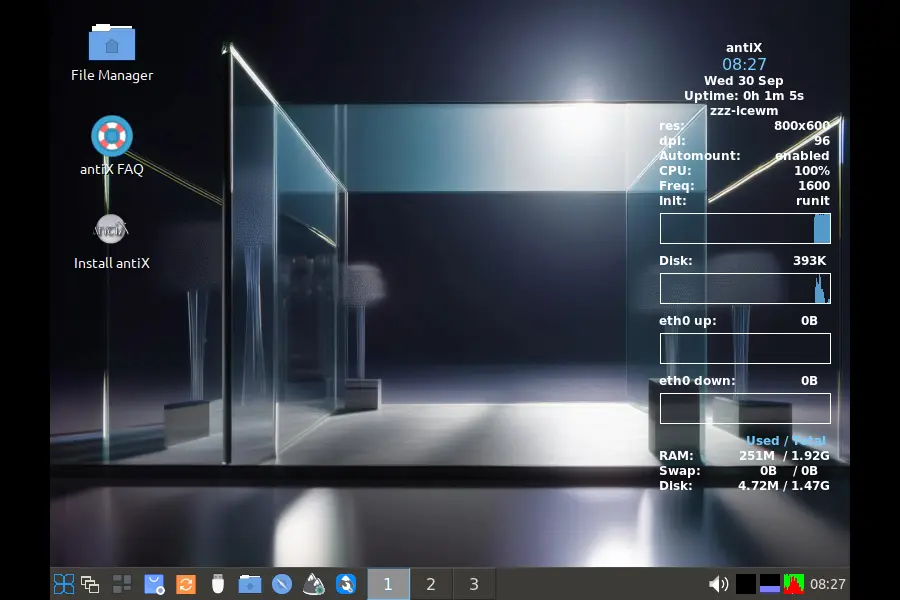
- Window managers: IceWM (default), fluxbox, JWM, herbstluftwm
- Editions: full (about 2 GB) and core (about 660 MB), in 64-bit and 32-bit
- Audio: PipeWire/WirePlumber on 64-bit full; ALSA on 32-bit full
- Packaging rules: no Snap (systemd) and no Flatpak (elogind)
The Init System Story: Five Choices, One Default
The init system is the main reason to look at antiX. Most distros give you one. antiX 26.1 gives you five.
Why runit is the default
runit is small and quick. Each service is a directory with a run script, and the supervisor restarts anything that dies. There’s no tangled dependency graph to decode, which suits a lightweight desktop.
The other four
- sysVinit is the classic script-based approach and feels familiar to long-time Linux users.
- dinit is a newer supervisor with dependency handling built in.
- s6-rc is a minimal, execline-based setup loved by people who like tiny components.
- s6-66 is a frontend that makes s6 easier to manage.
Who built this
The announcement gives ProwlerGR the credit for integrating the inits and for the experimental turnstile support. Eric of Obarun is thanked for his work on 66. This is a community effort, and the multi-init design would not exist without other distro developers’ cooperation.
A practical heads-up
During the antiX-25 beta, the developer warned that non-default inits need more manual work. For example, installing network-manager may also require a matching service package such as runit-service-network-manager. That was a beta-era note, so treat it as background rather than a current rule.
My advice: stay on runit unless you specifically want to learn another init.
antiX 26.1 vs antiX 26: What Changed?
| Feature | antiX 26 (March 2026) | antiX 26.1 (Sept 2026) |
|---|---|---|
| Release type | Major | Bug-fix |
| Base | Debian 13 | Debian 13 |
| Legacy kernel | 5.10.240 | 5.10.256 |
| Modern kernel (x64 full) | 6.6.119 | 6.6.139 |
| Default init | runit | runit |
| Init systems | 5 | 5 |
| Default WM | IceWM | IceWM |
| Reinstall for 26 users? | n/a | Not needed |
| Known issue | n/a | Bluetooth mouse may not be detected |
The kernel jump matters. In May 2026, antiX pushed updates for the vulnerabilities it labelled Copy Fail, Dirty Frag and Fragnesia. The 5.10.256 and 6.6.139 builds in 26.1 match the versions the project recommended in its Dirty Frag and Fragnesia notice, so a fresh install starts with those fixes.
Already on antiX-26? Update through the repositories and confirm you’re running a current antiX kernel.
antiX 26.1 vs MX Linux 25 vs Devuan 6
All three sit on Debian 13 and appeal to people who want alternatives to a stock systemd setup. They aim at different users.
| Area | antiX 26.1 | MX Linux 25 series | Devuan 6 “Excalibur” |
|---|---|---|---|
| Base | Debian 13 | Debian 13 | Debian 13 |
| systemd | Removed | Included by default; SysVinit also offered | Not used |
| Init choices | runit (default), sysVinit, dinit, s6-rc, s6-66 | systemd and SysVinit | SysVinit (default), OpenRC, runit |
| Desktop | Window managers (IceWM default) | Xfce, KDE Plasma, Fluxbox | Xfce default; Cinnamon, KDE, LXQt, LXDE, MATE optional |
| 32-bit ISO | Yes | No | No installer ISO |
| Kernel | 5.10.256 and 6.6.139 (custom) | 6.12 LTS (standard ISOs) | 6.12 LTS |
| Snap/Flatpak | Neither | Flatpak available | Flatpak available |
| Best for | Old hardware, init tinkering | Easy, polished daily use | Systemd-free Debian on modern machines |
Sources: antiX release notes; Linuxiac, The Register and Phoronix coverage of MX Linux 25 and Devuan 6.
What this table tells you
- antiX vs MX Linux: MX Linux is friendlier, with more desktop choice and a polished installer. It also went the other way on systemd: most MX 25 ISOs use systemd, with SysVinit as the alternative. antiX is the pick if you want to avoid systemd completely.
- antiX vs Devuan: Devuan tracks Debian closely and gives you a full desktop such as Xfce. antiX is lighter, more opinionated and comes with its own tool collection.
- The 32-bit factor: Debian 13 dropped 32-bit installers, and both MX and Devuan followed. antiX still ships 32-bit images, which is a strong reason to choose it for very old PCs.
My take: choose MX for comfort, Devuan for a mainstream systemd-free desktop, and antiX for old hardware and hands-on control.
Full vs Core: Which Should You Pick?
antiX 26.1 Full (about 2 GB)
This is the batteries-included edition, with a browser, office suite, email client and multimedia tools. Most people should start here.
antiX 26.1 Core (about 660 MB)
Core has no graphical interface, and you need a wired connection to reach the internet. It suits people who want to build their system piece by piece, or who need a tiny base for a custom setup.
What’s Included in the Full Edition
Everyday apps
- Firefox ESR, LibreOffice, Claws Mail, Evince (PDF), CUPS printing
Media
- mpv, Celluloid and Xine for video; XMMS for audio
- gtk-pipe-viewer for YouTube without a browser
- Winff and Asunder for converting audio and video
Files and networking
- zzzFM, ROX-Filer and Midnight Commander
- connman, ceni and gnome-ppp (yes, dial-up)
- connectshares-antix, the antiX SAMBA manager and droopy-antix
Productivity and utilities
- Geany, Leafpad and CherryTree
- LuckyBackup, Simple-scan, Xsane, Transmission-GTK and Meld
antiX’s own tools
- antiX Control Centre for most system configuration
- App Select, described as much more than a launcher
- User Language for app localisation
- iso-snapshot and the remaster tools for building your own installable image
- ddm-mx for Nvidia drivers
Desktop Experience: Window Managers, Not Full Desktops
antiX uses lightweight window managers instead of GNOME or KDE.
- IceWM (default): familiar taskbar-and-menu layout
- fluxbox: highly configurable
- JWM: very small and quick
- herbstluftwm: tiling for keyboard-driven workflows
The wingrid-antix tool turns the stacking window managers into tilers, a friendly middle ground if you like tiling but don’t want to switch fully.
The trade-off, in my view: you get speed and a small footprint but less built-in polish than a full desktop environment. Some conveniences come from separate tools rather than one integrated settings panel.
Audio: PipeWire on 64-bit, ALSA on 32-bit
64-bit full uses PipeWire with WirePlumber. 32-bit full uses ALSA. It’s a sensible split: modern features on newer machines, leaner audio on older ones.
antiX also adds an equaliser toggle for EasyEffects and an “acoustic colours” script to change how your audio output sounds.
No Snap, No Flatpak: What It Means
The project excludes Snap because of its systemd dependency and Flatpak because of its elogind dependency. If you depend on Flatpak apps, that is a real limitation. You’ll rely on the Debian-based and antiX repositories, which may lag behind the latest app versions.
For people who value a system where every package follows the same rules, that consistency is the point.
Hidden Gems
- antiX TV and antiX Radio streaming receivers
- 1-to-1-voice-antix for encrypted voice chat between two PCs via Mumble
- 1-to-1-assistance-antix for remote help
- ssh-conduit for remote resources over SSH
- Chroot Rescue Scan for repairs
How to Try antiX 26.1 Safely
- Download from the official download page or the SourceForge Final/antiX-26.1 folder.
- Verify the checksum before writing the ISO to a USB stick.
- Boot the live system first and check Wi-Fi, sound and touchpad.
- Pick full for a desktop, or core if you want to build from scratch.
- Keep runit as your init on the first install.
- Read the antiX-26 FAQ if something behaves oddly.
Test it yourself: a simple checklist
If you review antiX on your own hardware, record these so your results are comparable:
- Live boot time to desktop
- RAM use at idle (
free -h) - Wi-Fi and Bluetooth mouse detection
- Sound output under PipeWire (64-bit) or ALSA (32-bit)
- Time to install from the live session
Who Should Use antiX 26.1?
A good fit if you:
- Own an older PC or a 32-bit machine
- Want to avoid systemd
- Like learning how init systems and services work
- Want to build a custom ISO from your own setup
- Prefer speed over visual polish
Probably not ideal if you:
- Rely on Flatpak or Snap apps
- Want a fully integrated desktop out of the box
- Expect every Bluetooth peripheral to work with no tweaks
- Are brand new to Linux and want the easiest first experience
Pros and Cons
Pros
- Five init systems on Debian 13, with a fast runit default
- 32-bit and 64-bit ISOs, when many distros have dropped 32-bit
- Kernels 5.10.256 and 6.6.139 include the May 2026 vulnerability fixes
- Rich in-house tools, including the Control Centre and iso-snapshot
- Full and core editions cover casual users and builders
- Honest developer communication about known issues
Cons
- Bluetooth mouse detection may still fail
- Snap and Flatpak are excluded by design
- Non-default inits may need extra service packages
- Window managers feel less polished than full desktop environments
- Core requires a wired connection and manual setup
Should You Upgrade From antiX-26?
Not by reinstalling. The developer states that antiX-26 users do not need this edition. Keep updating through the repositories and run a current antiX kernel. New users get the cleanest, most current ISO by downloading 26.1.
Frequently Asked Questions
What is antiX 26.1 “Stephen Kapos”?
It’s a bug-fix release of antiX Linux based on Debian 13 “Trixie”, released on 29 September 2026, with no systemd and five init systems.
Does antiX 26.1 use systemd?
No. The full edition removes systemd, libsystemd0, elogind and libelogind0.
Which init systems does antiX 26.1 include?
It includes runit (default), sysVinit, dinit, s6-rc and s6-66.
What kernel does antiX 26.1 use?
The full edition ships a custom 5.10.256 kernel, and 64-bit full adds a custom 6.6.139 kernel.
Do I need to reinstall if I use antiX-26?
No, the developer says antiX-26 users do not need to install 26.1.
How big are the antiX 26.1 ISOs?
The full edition is about 2 GB and the core edition is about 660 MB.
Does antiX 26.1 support 32-bit computers?
Yes, both full and core come in 32-bit and 64-bit versions.
Can I use Flatpak or Snap on antiX 26.1?
No, the project excludes both because of their systemd and elogind dependencies.
Conclusion
antiX 26.1 “Stephen Kapos” doesn’t try to reinvent anything. It is a careful cleanup of a distinctive release: Debian 13, five systemd-free init systems, updated kernels and lightweight window managers.
If you already run antiX-26, keep updating and stay on a current kernel. If you’re new, this is the cleanest antiX-26 image to date, especially if you have older or 32-bit hardware. Few projects still put init choice and hands-on control front and centre.
Disclaimer: This article is based on the official antiX Linux release notes at antixlinux.com/blog as of 30 September 2026, plus public release information from MX Linux and Devuan. Versions, downloads and known issues can change, so check the official websites before installing. Back up your data before trying any new operating system.