Parrot OS 7.4 arrived on October 3, 2026. The kernel bump gets a line in the release notes, but the real story is a rebuilt Tor routing tool. AnonSurf 6.0 in Parrot OS 7.4 replaces most of the old stack and goes after the problems that made the tool annoying to trust.
If you’ve ever stopped AnonSurf and found yourself without working DNS, you’ll recognize the problem. Parrot community threads from the 4.x era are full of people hand-editing /etc/resolv.conf to recover.
This guide covers what changed, how it compares with the old design, and how to verify it on your own machine.
Quick Takeaways
- AnonSurf 6.0.1 ships with a Go backend and daemon and a Qt6/QML interface.
- DNS, firewall, IPv6 and Tor config changes are applied and rolled back transactionally.
- Interrupted sessions recover at boot, before Tor starts.
- The CLI now has JSON output, IP and Tor status checks, a DNS tool and Nyx monitoring.
- Upgrade with
sudo parrot-upgrade, then run your own leak tests.
What AnonSurf Does
AnonSurf is Parrot’s anonymous-mode wrapper. It pushes system traffic through the Tor network so you don’t configure proxies app by app. The Parrot documentation lists it as pre-installed on the Home and Security editions, under Applications, then Privacy.
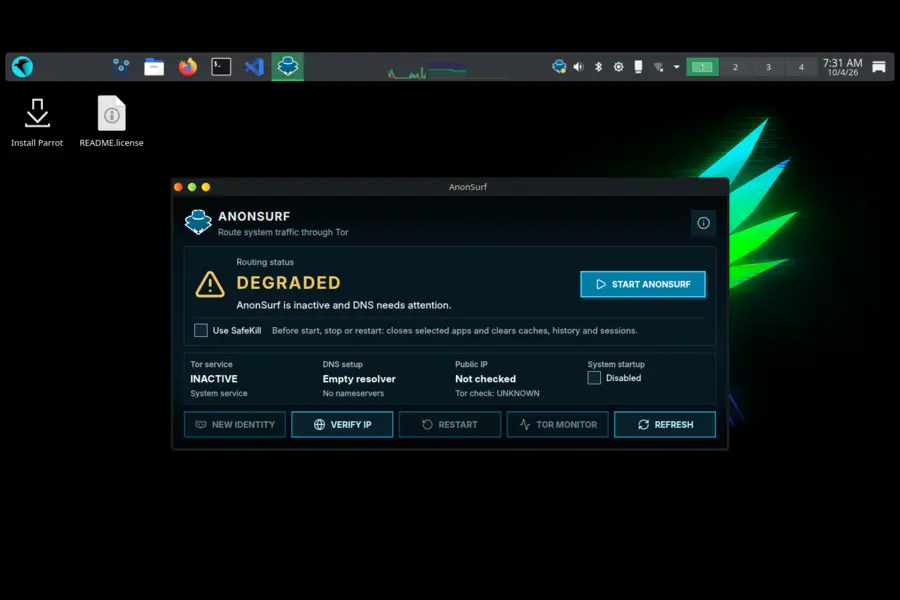
That’s different from Tor Browser, which protects only what happens inside the browser. AnonSurf aims at the whole machine: terminal tools, updaters and background services.
Parrot OS 7.4 at a Glance
According to the official release notes:
- Kernel: Linux 7.1
- Base: Debian 13.6 “Trixie” updates and security patches
- Desktop: KDE Plasma by default, with MATE, LXQt and Enlightenment spins
- Also new: Rocket 2.0 for containerized tools, Discovery as the first-run setup screen, parrot-core 7.4.1, and optimized images for newer CPUs (amd64v3, arm64v8.2)
- Downloads: Home and Security live editions, plus Docker, VM, WSL, Raspberry Pi, RISC-V and Hack The Box images
What Changed in AnonSurf 6.0
Parrot describes the release as the old stack replaced “behind a familiar surface.” Here’s what that means in practice.
A Go daemon and a Qt6/QML interface
The older design, as described in the AnonSurf man page on GitHub, used a bash script (anondaemon) to build the Tor transparent proxy, with a GTK interface on top.
AnonSurf 6.0 swaps that for a Go backend and daemon, paired with a Qt6 and QML interface designed for modern Plasma desktops. Shell scripts that rewrite network state are fragile, and a compiled daemon is easier to test and reason about.
During the upgrade, anonsurf-gtk transitions to anonsurf-gui.
Transactional changes for DNS, firewall, IPv6 and Tor
This is the headline improvement. Parrot says changes to DNS, firewall, IPv6 and Tor configuration are now applied and rolled back transactionally.
A transactional approach means a change either completes or gets undone. That directly targets the half-configured states that left people offline after stopping the tool.
Recovery at boot
Interrupted sessions now recover automatically at boot, before Tor starts. The ordering matters. Cleanup finishes before any traffic can flow, so a crash or sudden power loss doesn’t leave you in an unknown state.
DNS and IPv6 handling
The release notes spell out the details:
- TCP DNS uses the transparent proxy.
- UDP DNS uses a dedicated DNS port.
- IPv6 is restored per interface, now including complex interface names.
That last point sounds minor until you run bridges, VPN adapters or virtual NICs, which often have unusual names.
Tighter Tor control
Tor control authentication stays private, control requests are bounded, and bootstrap is allowed to finish undisturbed. These are small safeguards against self-inflicted breakage and sloppy handling of the control channel.
A CLI built for scripts
The command line was redesigned for both interactive and scripted use. It now offers structured JSON output, unified DNS feedback, public IP and Tor status checks, an integrated DNS tool and Nyx monitoring.
JSON output is the practical win. A script can read your exit status directly instead of scraping text.
Old vs New: Comparison Table
The “older design” column comes from the AnonSurf man page in the project’s GitHub repository, which predates this rewrite. The “6.0” column comes from Parrot’s 7.4 release notes.
| Area | Older design | AnonSurf 6.0 (6.0.1) |
|---|---|---|
| Daemon | Bash script (anondaemon) | Go backend and daemon |
| GUI | GTK (anonsurf-gtk) | Qt6 + QML (anonsurf-gui) |
| Config changes | Script-driven setup | Applied and rolled back transactionally |
| Boot behavior | Enable or disable at boot via systemctl | Interrupted sessions recover at boot, before Tor starts |
| DNS | All DNS through Tor, plus a separate dnstool | TCP DNS via transparent proxy, UDP DNS via dedicated port, integrated DNS tool |
| IPv6 | Disabled while active | Per-interface restoration, including complex names |
| CLI | start, stop, restart, changeid, status, myip, dns | Redesigned for scripts: JSON output, IP and Tor checks, unified DNS feedback, Nyx |
| Tor control | Not described | Private authentication, bounded requests |
Upgrade Steps
- Back up or snapshot. Use a VM snapshot if you can.
- Turn AnonSurf off first. Community users have long noted that updating over Tor is slow and can be rate-limited, and repository mirrors don’t always like exit nodes.
- Run the upgrade:
sudo parrot-upgrade- Confirm the package moved. Check that
anonsurf-guiis installed. - Read the new help. Run
man anonsurfandanonsurf --help, since the CLI was redesigned and flags may differ from your old habits.
Coming from a much older Parrot release? A fresh install from the Parrot download page has been the project’s long-standing advice for big jumps.
Test It Yourself
No release note replaces your own test. This takes about ten minutes and gives you evidence instead of faith.
- Baseline first. With AnonSurf off, note your real public IP.
- Start AnonSurf, then confirm with the built-in status and IP commands.
- Check Tor routing at check.torproject.org.
- Check DNS at dnsleaktest.com. Your ISP’s resolvers should not appear.
- Check IPv6 at test-ipv6.com, and run
ip -6 addr showin a terminal. - Stop AnonSurf and confirm normal browsing and DNS return without editing
/etc/resolv.conf. - Simulate a crash. In a VM, power off abruptly while AnonSurf is active, reboot, and check whether the recovery works as described.
If any step fails, report it through the official Parrot channels. Leak behavior is exactly the kind of bug maintainers want to hear about.
AnonSurf vs Other Privacy Tools
| Tool | Covers | Best for | Main trade-off |
|---|---|---|---|
| AnonSurf 6.0 | System traffic through Tor | Parrot users and pentesters | Runs on the host, so a compromised system defeats it |
| Tor Browser | Browser traffic | Casual anonymous browsing | Other apps aren’t covered |
| Whonix | Everything, via a separate gateway VM | Leak resistance through isolation | Needs virtualization and setup |
| Tails | Everything, amnesic live system | Short, high-risk sessions | Not built for daily work |
| VPN | Traffic from your ISP and local network | Public Wi-Fi | You trust the provider; not anonymity |
The deciding factor is isolation. Whonix keeps your apps and your Tor connection in separate machines, so malware in the workstation can’t easily learn your real IP. AnonSurf redirects traffic on the same machine. That’s far more convenient, and it’s also weaker against a compromised host.
The EFF’s Surveillance Self-Defense guides are a good way to match tools to your threat model.
Where It Helps in Practice
- Authorized testing: Route CLI tools through Tor and log your exit status in JSON beside your results.
- Shaky networks: Hotel and café Wi-Fi drops often, and boot recovery limits the mess.
- Learning: The documented DNS and IPv6 behavior makes it a good teaching example for Tor routing.
- Automation: Status and Nyx output can feed a shell script or dashboard.
Pros and Cons
Pros
- Compiled Go daemon in place of a bash-script daemon
- Transactional apply and rollback of network changes
- Recovery at boot before Tor starts
- Scriptable CLI with JSON
- Qt6 interface suited to Plasma
Cons
- Host-level redirection, so no VM-style isolation
- Brand-new code with little time in the field
- Tor’s speed limits and exit-node blocking by some sites
- Docs pages may still describe the older stack
- No protection from risky habits like logging into personal accounts
Limits That Still Apply
- Logging into an account tied to your identity ends anonymity for that session.
- A regular browser over Tor is easier to fingerprint than Tor Browser.
- Exit nodes can read unencrypted traffic, so prefer HTTPS.
- Keep the system updated, because point releases like 6.0.1 fix real bugs.
Who Should Upgrade
- Parrot Security users: Yes, the rollback and recovery behavior alone justifies it.
- Parrot Home users: Upgrade with your normal maintenance, then try the new interface.
- High-risk users: Treat AnonSurf as one layer and look at Whonix or Tails.
- Newcomers: The GUI is friendly, but read up on Tor’s limits first.
Conclusion
AnonSurf 6.0 in Parrot OS 7.4 is a rewrite aimed at reliability: a Go daemon, transactional network changes, and recovery that runs before Tor starts. Add a script-friendly CLI and a Qt6 interface, and it’s the most credible version of the tool so far.
It doesn’t turn Parrot into an isolation-based system, and it can’t fix risky behavior. Run the tests above, keep your system updated, and read the full Parrot 7.4 release notes before you depend on it.
Frequently Asked Questions
What is new in AnonSurf 6.0 in Parrot OS 7.4?
It adds a Go backend and daemon, a Qt6/QML interface, transactional DNS, firewall, IPv6 and Tor changes, and automatic recovery at boot.
How do I upgrade to Parrot OS 7.4?
Existing users can run sudo parrot-upgrade, or download a fresh image from the official Parrot website.
Does AnonSurf make me completely anonymous?
No, it routes system traffic through Tor, but logins, browser fingerprints and habits can still identify you.
Is AnonSurf the same as a VPN?
No, AnonSurf uses the Tor network, while a VPN sends traffic through one provider you have to trust.
Is AnonSurf better than Tor Browser?
They differ in scope: AnonSurf covers system traffic, while Tor Browser protects browsing with a hardened, fingerprint-resistant setup.
Which kernel does Parrot OS 7.4 use?
It ships with Linux kernel 7.1 on a Debian 13.6 “Trixie” base.
What happens to anonsurf-gtk after upgrading?
The package transitions to the new anonsurf-gui package.
Can I script AnonSurf 6.0?
Yes, the redesigned CLI offers structured JSON output, status checks and an integrated DNS tool.
Disclaimer: This article is for educational purposes only. Privacy tools can’t guarantee anonymity, and results depend on your setup and behavior. Use AnonSurf only on systems and networks you’re authorized to use, and follow the laws where you live. Features may change, so check the official Parrot documentation before relying on any tool for your safety.