

Most distro updates compete on shiny features. This one went after the boring, important stuff. PorteuX 2.9 arrives with a focus on reliability, and the release notes show a team that spent a development cycle auditing the code that gets a portable system from “power on” to “desktop.”
The release was published at the start of November 2026. Below you’ll find what’s new and how it compares with 2.7 and 2.8. You’ll also find who should try it and who should skip it.
Quick Summary (Key Takeaways)
- Release date: early November 2026
- Base: Slackware 64-bit current (rolling)
- Kernel: Linux 7.3.1, with faster zstd and page-cache reads and io_uring enabled by default
- Desktops: GNOME 51.1, KDE Plasma 6.8.2, COSMIC 1.11.0 (eight spins in total)
- Main theme: code review and bug fixes in the installer, initrd, rc scripts and PorteuX scripts
- ISO sizes: about 625 MB (Cinnamon) and 801 MB (COSMIC)
- Best for: people who want a fast, portable, run-anywhere Linux on a USB drive
What Is PorteuX?
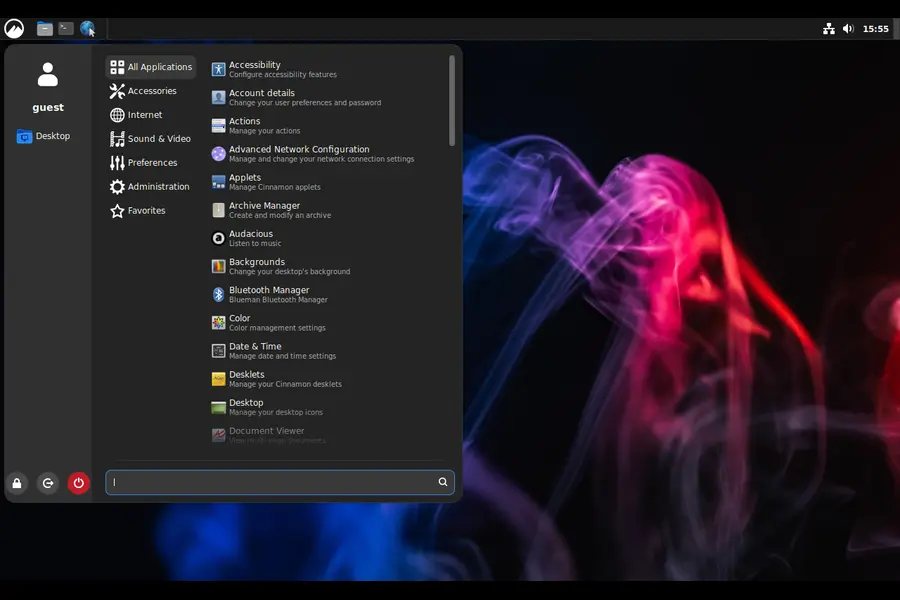
PorteuX is a modular, portable Linux distribution built on Slackware 64-bit current. It’s inspired by Slax and Porteus, and its stated goal is to be fast, small, portable and immutable.
According to the project’s GitHub page, there’s no traditional installer. You copy the ISO contents to a drive and run a bundled script for Linux or Windows. That script makes the drive bootable.
The core traits:
- Eight spins: Cinnamon, COSMIC, GNOME, KDE, LXDE, LXQt, MATE and Xfce
- Live boot in about three seconds, per the project
- Read-only system image with extra apps added as modules from the PorteuX App Store
- Update rollback, copy-to-RAM mode and network boot
- Hardware-accelerated media playback on Intel, AMD and NVIDIA GPUs
Think of it as a Linux toolbox you carry in your pocket rather than a system you install and maintain.
Why 2.9 Is a Reliability Release
The headline item in the changelog isn’t a new desktop. It’s a code review and bug-fixing pass across four layers:
- the installer
- the initrd
- the rc scripts
- PorteuX’s own scripts
These layers matter more on a portable distro than on a fixed install. If the initrd fails, nothing else runs. If a startup script misbehaves on one laptop but not another, a USB-based system loses the reason people use it. Fixes at this level don’t make screenshots, but they decide whether the thing works when you need it.
The Context: A Big Foundation Change in 2.8
The previous release, PorteuX 2.8, made a deeper structural move. It replaced the long-standing aufs union filesystem with aufs-ng, a new implementation the PorteuX team wrote from scratch. Coverage of that release says aufs-ng keeps the same on-disk format and mount syntax, and runs on roughly 5,000 lines of code instead of aufs’s 28,000. It also uses modern kernel I/O passthrough.
Replacing something that central is a significant change. It’s reasonable to read 2.9 as the follow-up where the team tightened the surrounding code. That reading is my interpretation, not a statement from the developers, but the timing and the changelog fit it well.
What’s New in PorteuX 2.9
Linux Kernel 7.3.1
PorteuX 2.9 ships Linux 7.3.1. Per OpenNet’s coverage, this build improves zstd performance and page-cache read operations. That matters for a distro that depends on compressed modules and often runs from RAM.
io_uring is now on by default. Some window managers, such as jay, need it, so those setups should work without extra configuration.
Linux 7.3 itself was released in mid-October 2026, so PorteuX shipped on the 7.3 series within roughly two weeks.
Desktop and Driver Updates
- GNOME 51.1
- KDE Plasma 6.8.2
- COSMIC 1.11.0
- NVIDIA driver 615.78.08
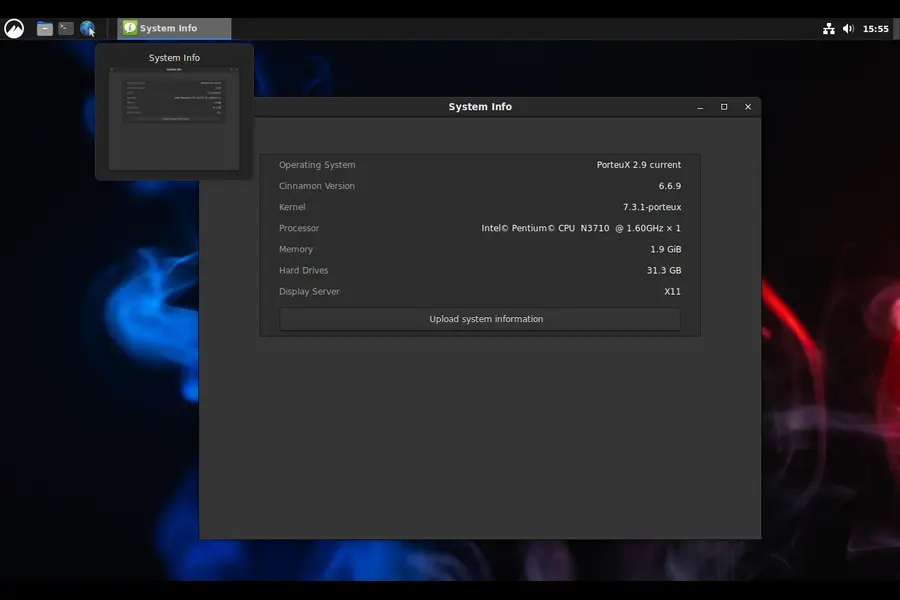
COSMIC’s jump from 1.0.16 in PorteuX 2.7 to 1.11.0 here is the biggest version leap of the three desktops, and it’s worth a look if you’ve been curious about System76’s Rust-based desktop.
Everyday Improvements
- Xfce: you can now drag files between windows without changing focus first
- COSMIC spin:
cosmic-viewerreplaces gpicview as the image viewer - Dolphin (KDE): PDF thumbnails are now generated
- wget2 replaces the classic
wget - mpv: missing dependencies were added so Vulkan support works
- Firmware: support added for Qualcomm Bluetooth chips and Cirrus sound cards
- 32-bit compatibility: a new
gcc15-compatpackage - Build options: tuned for better performance, though no benchmark numbers were published for this change
The firmware additions deserve a mention. A portable distro lands on unfamiliar hardware all the time, and missing Bluetooth or audio firmware is a classic way for a live session to disappoint.
What Was Removed From the KDE Spin
The KDE build dropped breeze-grub, gcc-gfortran, kapidox, kio-gdrive, kpeople, kpeoplevcard, kwayland-integration, kwin-x11, openblas and opencv. That keeps the image lean, and you can add what you need back as modules. If you rely on an X11 session in KDE, note that kwin-x11 is on that list.
PorteuX 2.9 vs 2.8 vs 2.7: Comparison Tables
Release Timeline
| PorteuX 2.7 | PorteuX 2.8 | PorteuX 2.9 | |
|---|---|---|---|
| Released | June 2026 | August 2026 | November 2026 |
| Linux kernel | 7.1 | 7.2 | 7.3.1 |
| Headline change | Big desktop refresh and a new native cursor theme | aufs-ng replaces aufs; new xfwm4-gl | Code audit of boot and startup scripts |
| Notable software | Xfce 4.20, LXQt 2.4, Cinnamon 6.6.8, MATE 1.28.2 | GCC 16.2.0, FFmpeg 9.0.1, Mesa 26.2.1 | wget2, NVIDIA 615.78.08, extra firmware |
| ISO sizes | Not covered here | 577 MB to 759 MB | 625 MB (Cinnamon), 801 MB (COSMIC) |
Desktop Versions: 2.7 vs 2.9
| Desktop | PorteuX 2.7 | PorteuX 2.9 |
|---|---|---|
| GNOME | 50.2 | 51.1 |
| KDE Plasma | 6.7 | 6.8.2 |
| COSMIC | 1.0.16 | 1.11.0 |
Three patterns stand out:
- The kernel moved one minor version per release. That’s a steady cadence, with a new PorteuX roughly every two to three months.
- Each release has a different personality. 2.7 was the visual update, 2.8 the structural one, and 2.9 the cleanup.
- ISOs are growing slowly. That’s normal as desktops and firmware expand, and the images are still small by mainstream standards.
How PorteuX Compares With Other Approaches
PorteuX shares a niche with Slax and Porteus, its two inspirations. Here’s how it differs from the usual alternatives:
- Versus a standard install (Ubuntu, Fedora): no partitioning or installer, and the whole system travels on a USB drive. The cost is that you manage modules yourself rather than leaning on a traditional package manager.
- Versus Slax and Porteus: PorteuX offers more modern desktop choices, including COSMIC and GNOME, and follows Slackware current rather than a slower-moving base.
- Versus a minimal rescue distro: you get a full desktop, GPU-accelerated media and an App Store. A rescue tool is smaller, but far more limited.
Who Should Try PorteuX 2.9?
It’s a good fit if you:
- keep a bootable USB for repairs, demos or private browsing
- like running a system entirely from RAM
- want to try COSMIC, GNOME 51 or Plasma 6.8 without touching your main OS
- have older hardware that needs a quick-booting distro
- enjoy modular, Slackware-style simplicity
It’s probably not for you if you:
- want a graphical installer and automatic dependency handling
- expect every app preinstalled on first boot
- depend on KDE’s X11 session
Pros and Cons
Pros
- Reliability-focused fixes in the installer, initrd and startup scripts
- Very fast live boot and flexible copy-to-RAM operation
- Fresh desktops across eight spins
- Update rollback acts as a safety net
- Wider firmware coverage for newer Bluetooth and audio chips
- Compact ISOs
Cons
- The modular, installer-free design takes time to learn
- Some apps, such as a web browser, may need to be fetched from the App Store after boot (one community commenter on OpenNet raised this about the Xfce spin)
- Slackware current is a rolling base, so occasional rough edges are possible
- The KDE trim could affect X11-dependent setups
- No independent benchmarks were published for the new build optimizations
How to Get Started
- Choose a spin from the eight available.
- Download the ISO from the official links on the PorteuX GitHub page.
- Copy the ISO contents to a USB drive or other storage.
- Run the installer script from the boot folder: the Linux
.runfile or the Windows.exe. - Boot from the drive and open the App Store for any extra software.
- Move modules into the modules folder so they load automatically at boot.
Other languages are available through the multilanguage package and the language switcher. For Windows apps, the Wine and Multilib Lite modules are in the App Store, and the project suggests keeping them in the optional folder and activating them only when needed.
Safety tip: test any new live image on a spare USB drive first, and back up important data before experimenting.
Our Read
PorteuX 2.9 is a quiet, confident release. A changelog that leads with code review won’t trend on social media, but it’s what a boot-from-anywhere system needs most. The new desktop versions are a pleasant extra, while the real value is a more trustworthy startup path.
If PorteuX looked interesting before but felt rough around the edges, this is a sensible version to revisit. If you’re new to it, budget some time to learn the module system. Once it clicks, the speed is hard to give up.
Frequently Asked Questions
What is PorteuX 2.9?
PorteuX 2.9 is the latest release of a portable, modular Linux distribution based on Slackware 64-bit current, published in early November 2026.
What kernel does PorteuX 2.9 use?
It uses Linux 7.3.1, with improved zstd performance, faster page-cache reads and io_uring enabled by default.
Which desktops does PorteuX 2.9 offer?
It offers eight spins: Cinnamon, COSMIC, GNOME, KDE, LXDE, LXQt, MATE and Xfce.
How big is the PorteuX 2.9 ISO?
The Cinnamon ISO is about 625 MB and the COSMIC ISO is about 801 MB.
Do I need to install PorteuX?
No, you copy the ISO contents to a drive and run the included script to make it bootable.
Can PorteuX run Windows apps?
Yes, through the Wine and Multilib Lite modules in the PorteuX App Store.
What changed in PorteuX 2.9 compared with 2.8?
It updates to Linux 7.3.1, GNOME 51.1, Plasma 6.8.2 and COSMIC 1.11.0, plus a code audit of the installer, initrd and scripts.
Is PorteuX 2.9 good for old computers?
Its small ISOs, fast boot and RAM mode make it a strong candidate, though results vary by hardware and spin.
Final Thoughts
PorteuX 2.9 may not win a feature-race, and that’s the point. Tightening the boot path while updating the kernel and major desktops makes a portable distro feel more dependable. To follow the project, start with the official PorteuX repository, read the OpenNet release summary, and learn about the upstream base at Slackware.com.
Disclaimer: This article is based on publicly available release information as of November 2026 and is for general informational purposes. Software versions, ISO sizes and features can change, so check the official PorteuX project pages before downloading. Back up your data and test any live system on a spare drive before relying on it.
Explore More Linux Guides
Interested in Linux distributions, new operating systems and security tools? Check out these related articles from TechRefreshing.