Hey there, tech enthusiasts! If you’re into Linux distributions and curious about how different countries are shaping their own tech landscapes, you’ve probably heard whispers about openKylin OS. This isn’t just another flavor of Linux—it’s China’s bold step toward technological independence. In this deep-dive blog post, we’ll unpack everything you need to know about openKylin OS, from its roots to its cutting-edge features, latest updates, and why it matters in today’s global tech scene. Whether you’re a developer, a privacy-conscious user, or just someone exploring alternatives to mainstream OS like Ubuntu or Windows, stick around. We’ll keep it informative, straightforward, and packed with the latest data straight from official sources as of August 2025.
By the end of this read, you’ll have a solid grasp on openKylin OS and maybe even feel inspired to give it a spin. Let’s jump in!
What is openKylin OS?
At its core, openKylin OS is an open-source Linux distribution developed primarily in China, aimed at providing a secure, efficient, and user-friendly operating system for desktops, laptops, and even specialized hardware. It’s often dubbed China’s homegrown Linux distro because it’s built with a focus on domestic needs, like supporting Chinese-made processors and fostering a self-reliant software ecosystem. Unlike many Western distros, openKylin OS emphasizes sovereignty, meaning it’s designed to reduce reliance on foreign tech, which is a big deal in the context of geopolitical tensions and data security.
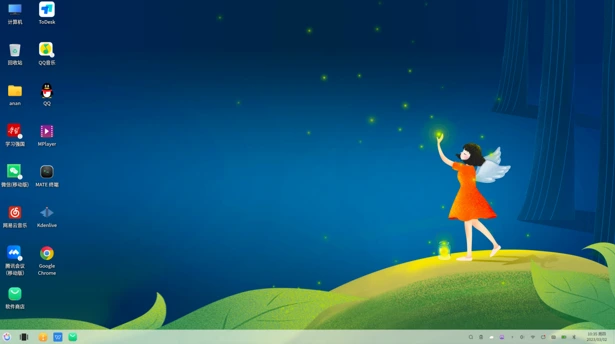
openKylin OS is based on the Linux kernel and draws from Debian’s stable foundations, making it reliable for everyday use. It comes with desktop environments like UKUI (a Qt-based interface that’s sleek and modern) and Kylin, offering both Wayland and X11 sessions right out of the box for better graphics performance and compatibility. What sets it apart? It’s optimized for a range of architectures beyond the usual x86, including ARM, RISC-V, and LoongArch—processors that are gaining traction in China and beyond.
Think of openKylin OS as China’s answer to Ubuntu, but with a twist: it’s deeply integrated with AI features in its recent versions, positioning it as an “AI PC Operating System.” This means built-in AI tools that can handle everything from smart assistants to local AI model processing, making it appealing for users in education, government, and emerging tech fields. As of 2025, it’s gaining momentum not just in China but globally, thanks to its open-source nature that invites contributions from anyone.
The History Behind openKylin OS
To truly appreciate openKylin OS, we need to rewind to its origins. The story starts back in 2001 with Kylin OS, developed by academics at the National University of Defense Technology in China as part of the national 863 Program—a government initiative to boost high-tech independence. Initially based on FreeBSD, Kylin was crafted for military and government use, prioritizing security and performance. It achieved notable milestones, like being the first 64-bit OS without a Linux kernel to get Linux standard certification in 2006.
By version 3.0, Kylin shifted to a Linux base, enhancing compatibility with global standards. In 2010, NeoKylin emerged through a partnership with China Standard Software, targeting enterprise and defense sectors. Meanwhile, Ubuntu Kylin (a separate but related project) launched in 2013, tailoring Ubuntu for Chinese users with localized features.
The big pivot came in July 2022 when openKylin was released as the fully open-source version of Kylin, opening the doors to community-driven development. This move was strategic, aligning with China’s push for open-source innovation amid U.S.-China tech rivalries. By 2020, Kylin OS v10 was compatible with over 10,000 hardware and software products, even supporting Android apps. openKylin built on this, evolving into a distro that’s not just secure but also innovative, with backing from state enterprises, universities, and a growing developer base.
Fast-forward to 2025: openKylin has matured, with events like the 2025 RISC-V China Summit showcasing its advancements in XR, AI, and hardware like RISC-V laptops. It’s a testament to how openKylin OS is evolving from a niche military tool to a global open-source contender.
Key Features of openKylin OS
What makes openKylin OS stand out in the crowded Linux world? Let’s break down its core features, drawn from the latest official insights.
- First off, multi-architecture support is a game-changer. openKylin OS runs smoothly on x86 (Intel/AMD), ARM (like Raspberry Pi), RISC-V (boards like VisionFive2 or Milk-V Pioneer), and LoongArch processors. This is huge for developers working on edge computing or IoT devices, where non-x86 hardware is common.
- The desktop environments are user-friendly: UKUI offers a modern, customizable interface with dual modes for PCs and tablets, while Kylin provides a more traditional feel. Both support Wayland for better security and performance, alongside X11 for legacy apps.
- Security is baked in, inheriting Kylin’s military-grade roots with features like enhanced encryption and compliance with Chinese standards. It uses APT for package management but includes a custom software center for easy app discovery, supporting over 4,000 applications.
- Multilingual support is robust, covering Chinese, English, Arabic, French, Spanish, and 52 others, making it accessible worldwide. For power users, it’s optimized for high-performance computing, as seen in its use with supercomputers like Tianhe-1 and Tianhe-2.
- One underrated feature is the Kaiming Package Format (also called Enlightened Package Format), a new standard presented at LAS 2025, which streamlines app distribution and integration. And let’s not forget the ecosystem compatibility— it even runs Android apps seamlessly in some setups.
Latest Versions and Releases of openKylin OS
Staying current is key with any OS, and openKylin OS doesn’t disappoint. As per the official download page (updated as of August 2025), the latest stable release is openKylin 2.0 SP1, rolled out on December 20, 2024, across multiple architectures.
- openKylin 2.0 SP1 X86: For Intel/AMD systems, ideal for standard desktops.
- openKylin 2.0 SP1 LoongArch: Tailored for China’s Loongson processors.
- openKylin 2.0 SP1 RISC-V: Supports boards like VisionFive2, SpacemiT K1, and RuyiBook.
- openKylin 2.0 SP1 ARM: Works on Raspberry Pi and Phytium Pi.
For those eager for bleeding-edge features, there’s openKylin 2.0 SP2 Beta1 X86, released on June 26, 2025. This beta emphasizes AI enhancements, dubbing it an “AI PC Operating System” with improved artificial intelligence integrations.
Older versions like openKylin 1.0 (July 2023) are still available for specific RISC-V hardware, but for most users, 2.0 SP1 is recommended. Downloads are accessible via mirrors on the official site, with ISO files for easy installation. Release notes highlight stability improvements, bug fixes, and expanded hardware support.
Installation Guide for openKylin OS
Getting started with openKylin OS is straightforward, similar to installing other Debian-based distros. Here’s a step-by-step guide based on official recommendations.
- Download the ISO: Head to https://www.openkylin.top/downloads/os-en.html and pick the version for your architecture. Verify the MD5 checksum for security.
- Create Bootable Media: Use tools like Rufus (on Windows) or dd (on Linux) to make a USB bootable drive.
- Boot and Install: Restart your PC, enter BIOS (usually F2 or Del), set USB as first boot device. The installer is graphical and user-friendly—select language (English available), partition disks, and set up users.
- Post-Installation: Update via terminal with sudo apt update && sudo apt upgrade. Install apps from the software center.
Pro tip: If you’re on RISC-V or ARM, ensure hardware compatibility. Dual-booting with Windows? Use tools like EasyBCD. The whole process takes about 30-60 minutes, and it’s free!
Community and Ecosystem Around openKylin OS
openKylin OS thrives on its community, operating under a merit-based model where contributors drive progress. The openKylin community includes developers from universities, enterprises, and independents, with forums, Git repositories, and events fostering collaboration.
The ecosystem is growing but still nascent compared to Ubuntu’s. It supports thousands of apps, but third-party options might require tweaks. Strengths include integration with Chinese hardware and software, like domestic browsers and office suites. Challenges? Less frequent updates and spotty multilingual support, but the community is addressing these.
Join via the official X account (@openkylin) for updates or the website’s forums. It’s a vibrant space for those interested in open-source with an Asian flair.
How openKylin OS Compares to Other Linux Distros
openKylin OS holds its own but has unique niches. Vs. Ubuntu: openKylin is more hardware-agnostic (e.g., LoongArch support) but lags in app variety and polish. Ubuntu wins on global community and ease, but openKylin excels in security and AI for Chinese contexts.
Compared to Fedora or Arch, openKylin is more stable (Debian-based) but less bleeding-edge. Its AI focus sets it apart from most distros, akin to emerging AI-integrated systems.
| Feature | openKylin OS | Ubuntu | Fedora |
|---|---|---|---|
| Base | Debian | Debian | Independent |
| Architectures | x86, ARM, RISC-V, LoongArch | x86, ARM, etc. | x86, ARM |
| Desktop | UKUI/Kylin | GNOME | GNOME |
| AI Integration | Built-in subsystem | Add-ons | Limited |
| Community Focus | Chinese independence | Global | Innovation |
If sovereignty matters, openKylin OS is a top pick.
The Role of AI in openKylin OS
Version 2.0 marks openKylin OS as an AI powerhouse. It includes a built-in AI subsystem for local and cloud-based models, enabling features like an AI Assistant for tasks like translation or code generation. This “AI PC OS” integrates AI into the core, from smart search to on-device LLMs (large language models).
For example, the Enlightened Package Format simplifies AI app deployment. At events like the RISC-V Summit, demos showed AI on RISC-V devices. This positions openKylin OS for future AI-driven computing, especially in education and research.
Future of openKylin OS
Looking ahead, openKylin OS is poised for growth. With ongoing AI enhancements and expanding architecture support, it could become a model for other nations seeking tech autonomy. Expect more stable releases, better international localization, and deeper ecosystem integrations. As China invests in open-source, openKylin might rival global giants, especially in emerging markets.
Challenges remain, like building a larger app base, but the momentum is strong—watch for SP2’s full release!
Conclusion
There you have it—a comprehensive look at openKylin OS, China’s innovative Linux distro that’s blending tradition with cutting-edge AI. From its secure roots to its multi-arch prowess and community-driven future, openKylin OS is more than an OS; it’s a statement on tech sovereignty. If you’re ready to explore, download from the official site and join the conversation.
What do you think? Have you tried openKylin OS? Share in the comments below. Stay tuned for more tech deep-dives!
Disclaimer
The information provided in this blog post about openKylin OS is based on the latest available data from official sources and other reliable references as of August 2025. While every effort has been made to ensure accuracy and completeness, the content is for informational purposes only and should not be considered professional advice.
The author and publisher are not responsible for any errors, omissions, or damages arising from the use of this information. Users are encouraged to verify details through official openKylin OS channels before making decisions based on this content. Opinions expressed are based on objective analysis and may not reflect the views of openKylin developers or affiliates. Always exercise caution when downloading or installing software, and ensure compatibility with your hardware and requirements.
Also Read
BOSS Linux in Education: Transforming Schools with Open-Source Power